

Updated June 16, 2023
Introduction to do while loop in Matlab
Matlab has no do-while loop like c programming, cpp programming, and other programming languages. But instead of using do while loop works powerfully in Matlab. In Matlab, mainly two loops are used to do operations. If we are sure how many times we need to perform a particular task, then for loop is used. And if we are unsure how often we want to perform a particular task, then a while loop is used. Inside the loop, we can write condition and repetition statements of particular programs and increment/decrement of variables.
The syntax used to write the while loop in the program is the while’ command; at the end, we must write the ‘end’ command to stop the loop.
How do while loop works in Matlab?
We must always consider three parameters to write a while loop in Matlab.
- The first condition limits the loop at the time of execution.
- Second parameter statements mean what the expected output is.
- The third parameter is the incrementing loop variable. If we miss the increment line, the loop will execute infinite times.
Syntax:
while(condition)

Statement1

Statement2

.

.

Statement n

Increment loop variable syntax
Examples of do while loop in Matlab
Given below are the examples of do while loop in Matlab:
Example #1
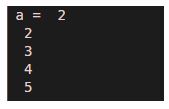
In this example, let us consider one variable a. The initial value assigned to a is 2. After applying condition ( a < = 5) along with the while loop, the loop will execute for values 2, 3, 4, 5. And here statement just displays the value of a. Therefore, it will display output as 2, 3, 4, 5.
Code:
a = 2

while(a <= 5)

disp(a)

a = a + 1;

end
Output:
Example #2
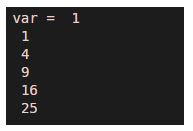
The second example is a square function. In this example, we will find the square of values till 5. Here var is the variable name. The value assigned to var is 1, varying from 1 to 5.
Code:
var = 1

while(var <=5)

op=var*var;

disp(op)

var = var + 1;

end
Output:
Example #3
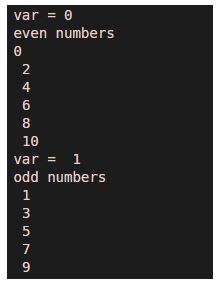
In this example, there are two different operations, one is even-numbered, and the second is odd numbers. We have used two different while loops to find out even and odd numbers.
Code:
var = 0

disp('even numbers')

while(var <= 10)

disp(var)

var = var + 2;

end

var = 1

disp('odd numbers')

while(var <= 10)

disp( var )

var = var + 2 ;

end
Output:
Example #4
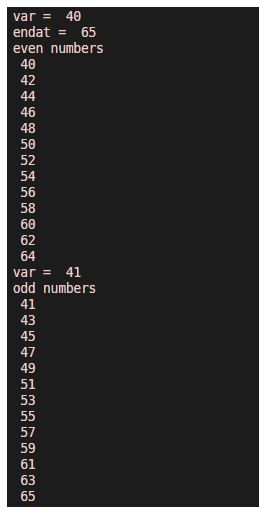
In previous examples, we start the problem from the origin, but we can change the range of problems by using a while loop. In this example, we consider numbers from 41 to 65. Here we have used two variables. Var is used for the start, and end at is used for the end of the range.
Code:
% even numbers between 41 to 65

var = 40

endat = 65

disp('even numbers')

while(var <= 65)

disp( var )

var = var + 2;

end

var = 41

disp('odd numbers')

while(var <= endat)

disp( var )

var = var + 2 ;

end
Output:
Example #5
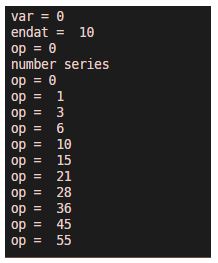
We can create various number series and applications using a while loop. In this example, we created a series of numbers by considering the output of previous iterations.
Code:
% addition of previous numbers

var = 0

endat= 10

op = 0

disp('number series ')

while(var <= endat)

%disp(var);

op = op + var

var = var + 1 ;

end
Output:
Conclusion
The ‘for’ loop and the ‘while’ loop are two main loops in any programming language. The’ while’ loop is used if the repetition statement’s range is unknown. The above examples show that while loop can be used in various ways with different parameters. It improves the program’s efficiency and reduces the problem’s complexity.
Recommended Articles
This has been a guide to do while loop in Matlab. Here we discuss the introduction; how does a while loop work in Matlab? Along with different examples and code implementation. You may also have a look at the following articles to learn more –

