


Developers in Russia can pay for DeepSeek API usage in rubles through Sozdai. Top up your Sozdai balance, create a Sozdai API key, and use it in a coding tool such as DeepSeek Harness or in your own application. Sozdai bills by token usage, with no monthly subscription required. From writing and programming to data analysis and complex reasoning, DeepSeek provides a range of capabilities that make it a useful alternative to other popular AI services. However, using the DeepSeek API in Russia is not always straightforward. While the models attract considerable interest, users may struggle to pay for official services or connect to the DeepSeek API. The official payment system does not accept Russian bank cards, and API requests from Russian IP addresses may return access errors.
These limitations can be particularly frustrating for developers who depend on AI tools in their daily work. Fortunately, alternative ways exist to access DeepSeek models without relying on the official payment infrastructure. This guide explains why Russian users face these difficulties, explores several payment options, and introduces a practical way to access DeepSeek through an alternative API provider.
Why is DeepSeek Difficult to Use in Russia?
Before looking at solutions, it helps to understand two problems affecting Russian users: payment restrictions and API connectivity.
Payment Restrictions for Russian Bank Cards
One of the most common problems is the inability to pay for international digital services using Russian bank cards. DeepSeek’s official payment infrastructure relies on international payment systems. Because of the restrictions affecting Russian financial institutions, cards issued by Russian banks generally cannot be used to complete payments through the official payment page.
This creates difficulties for people who want to purchase additional services or maintain access to paid AI resources. Some users attempt to solve this problem by obtaining a foreign bank card. While this can work in some cases, opening an account abroad may require additional documentation, meet eligibility requirements, and involve ongoing maintenance costs. Currency conversion fees can also make the process more expensive. For someone who simply wants to use an AI model for programming or everyday tasks, this may be an unnecessarily complicated solution.
Official API Access Problems
Payment is not the only obstacle. Developers who want to integrate DeepSeek into their own applications may discover that requests to the official API from Russian IP addresses return HTTP 403 errors. This means even users who have arranged an alternative payment method may still have trouble connecting their applications to the official service.
The distinction is important. Having a valid payment method does not automatically guarantee that the API will be accessible from a particular network. Consequently, Russian developers need to consider both how to pay for AI services and how to establish a reliable connection to the models they want to use.
Three Ways to Access DeepSeek from Russia
There are several approaches worth considering. Each has different advantages, costs, and potential disadvantages.
1. Using a Foreign Bank Card
The first option is to use a bank card issued outside Russia. For people who already have access to an international bank account, this may be a relatively familiar way to pay for online services. If the payment provider accepts the card, users can potentially complete transactions through the official payment system. However, this approach is less practical for people who do not already have a foreign account.
Opening an account in another country can require travel, identity verification, additional paperwork, and ongoing maintenance. Users may also need to consider exchange rates and international transfer fees. Another important limitation is that a foreign card only addresses payment. It does not necessarily resolve the API connectivity problems associated with Russian IP addresses. For this reason, this method may not be the most convenient choice for developers who need consistent API access.
2. Using Payment Intermediaries
Another possibility is to use third-party services that help Russian customers pay for international digital products. These intermediaries typically accept local payments and process transactions through their own payment infrastructure. The main advantage is convenience. Users do not necessarily need to open an international bank account or manage foreign currency themselves. Nevertheless, consider a few things.
First, intermediaries may charge additional service fees or include a markup in their exchange rates. Second, transaction processing may take longer than expected, particularly when manual assistance is required. Finally, users should carefully evaluate an intermediary’s reputation and security practices before sharing account information or making a payment. Most importantly, this approach still does not guarantee that the official DeepSeek API will work from a Russian network.
3. Using an Alternative API Provider
For people who primarily need access to DeepSeek models rather than the official DeepSeek account itself, an alternative API provider may be a more practical solution. Instead of purchasing credits directly from DeepSeek, users obtain an API key from another platform that provides access to compatible DeepSeek models. The provider handles the API connection, while users pay for their actual model usage through their account balance. This approach can address both major challenges at once: paying in rubles and accessing APIs from Russia.
Sozdai offers this option through its own OpenAI-compatible API. The service provides access to several AI models, including DeepSeek, Claude, GPT, Gemini, and Kimi. According to its published payment information, Russian users can recharge their accounts using supported local payment methods without relying on an international bank card. Another advantage is that users do not need to buy a fixed monthly subscription. Instead, the platform deducts request costs based on actual token consumption. For developers and people who use AI irregularly, this can provide greater flexibility.
How to Set Up the DeepSeek API in Russia Through Sozdai?
If you choose an alternative API provider, the setup process is relatively straightforward. It does not require opening a foreign bank account or purchasing an official DeepSeek subscription.
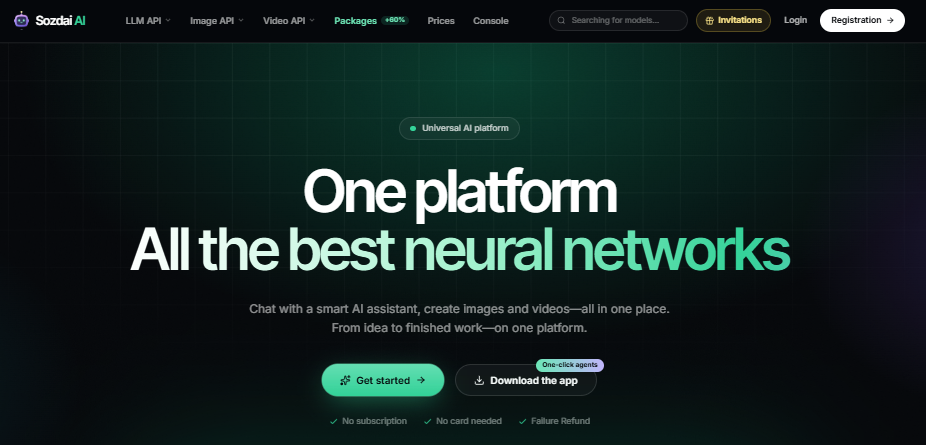
Image Source: Sozdai AI
Step 1: Register an Account
First, create an account on the Sozdai platform. Users can register using available authentication options, including email, Google, or GitHub. After completing registration, they can access the account dashboard and explore the available models.
There is no need to create an official DeepSeek account specifically for this access method. This is particularly useful for users who want to start working with AI models without going through several separate registration processes.
Step 2: Recharge Your Balance in Rubles
After registration, top up your Sozdai balance in rubles. The funds cover model requests made with your Sozdai API key. As of November 16, 2026, the minimum top-up amount was 425 ₽, according to information Sozdai published about DeepSeek API access in Russia.
Available payment methods include Russian bank cards, including supported Visa and Mastercard cards, as well as SBP, SberPay, T-Bank, and YooMoney. The ability to pay in rubles is one of the main advantages of this approach. Users do not need to arrange international transfers or worry about whether an overseas payment processor will accept their local bank card.
Adding funds to an account is also not the same as purchasing a monthly subscription. The balance is used to pay for model requests as they are processed. This means users with different activity levels can manage spending based on their actual needs.
Step 3: Create Your Personal API Key
Once you have added balance, the next step is to generate an API key. The API key acts as an authentication credential that lets compatible applications and development tools access the platform’s models. Users can create their key through the account dashboard.
It is important to keep this credential private. Sharing an API key publicly or storing it in an unsecured repository could allow others to use your account balance. For better account management, developers can also consider using separate credentials for different projects.
Step 4: Connect to the Available DeepSeek Models
After obtaining an API key, users can connect their preferred applications to the Sozdai API. The platform supports an OpenAI-compatible API format, which makes integration easier for many existing applications. Rather than creating an entirely new development workflow, users generally need to update the API provider address, authentication key, and selected model in their application’s settings.
Sozdai provides the API endpoint in its documentation, and the platform lists available model identifiers. This compatibility is especially useful for developers who already work with AI-powered tools. They can often keep their existing applications and change only the service that processes their requests. Still, check each application’s documentation, since different tools may support different configuration options.
How Much Does DeepSeek API Access Cost?
Pricing is another factor that Russian users should consider when choosing an API provider. DeepSeek API services generally use token-based billing. This means that costs depend on how much information a model processes rather than how many times a user opens the application.
Input tokens represent the information sent to the model, while output tokens represent the content generated in response. For example, a short question may consume relatively few tokens. A lengthy programming task involving multiple files, explanations, and extended responses can consume considerably more.
According to the pricing information published by Sozdai, the following DeepSeek models are available:
| Model | Input Per 1 Million Tokens | Output Per 1 Million Tokens |
| DeepSeek V4.1 Flash | 35.7 RUB | 142.8 RUB |
| DeepSeek V4 Pro | 110.93 RUB | 332.78 RUB |
Sozdai listed these rates on November 16, 2026. At these rates, 100,000 input tokens and 20,000 output tokens would cost about 6.43 ₽ on DeepSeek V4.1 Flash before any applicable cache pricing. A coding agent can make multiple model requests for a single task, so check your recorded usage on a small task first.
Which DeepSeek Model Should You Choose?
The best model depends on the work you are doing. DeepSeek V4.1 Flash is a good starting point for everyday questions, routine programming assistance, and tasks where response speed and cost efficiency matter. DeepSeek V4 Pro may suit users who regularly handle demanding reasoning tasks or more complex technical problems.
You do not need to select the most expensive model for every request. In many cases, a less expensive model can handle routine work effectively, while a more capable model can be reserved for tasks that require additional reasoning. This approach can help users manage API expenses without sacrificing too much flexibility.
Can DeepSeek Be Used in AI Coding Tools?
DeepSeek is not limited to browser-based conversations. Many developers want to use AI models directly inside their programming environments, where an assistant can help explore project files, understand existing code, identify problems, and support multi-step development tasks. DeepSeek Harness is one example of an agent-based coding environment. However, connecting such tools to an AI model requires a compatible API provider. This is where alternative API access becomes particularly useful. For additional setup details, Sozdai’s DeepSeek Harness setup (in Russian) includes screenshots and installation instructions.
The first option is to use the Sozdai desktop application. It can install the official DeepSeek Harness application and configure the account automatically. This is especially convenient for people who do not want to deal with manual installation or provider settings. The second option is manual configuration.
In Harness,
- Open Settings → Models → Add a custom provider.
- Enter https://api.sozdai.ai/v1 as the Base URL.
- Choose openai-completions, and enter your Sozdai API key.
- Select Fetch available models, choose deepseek-v4.1-flash, and send a short test prompt.
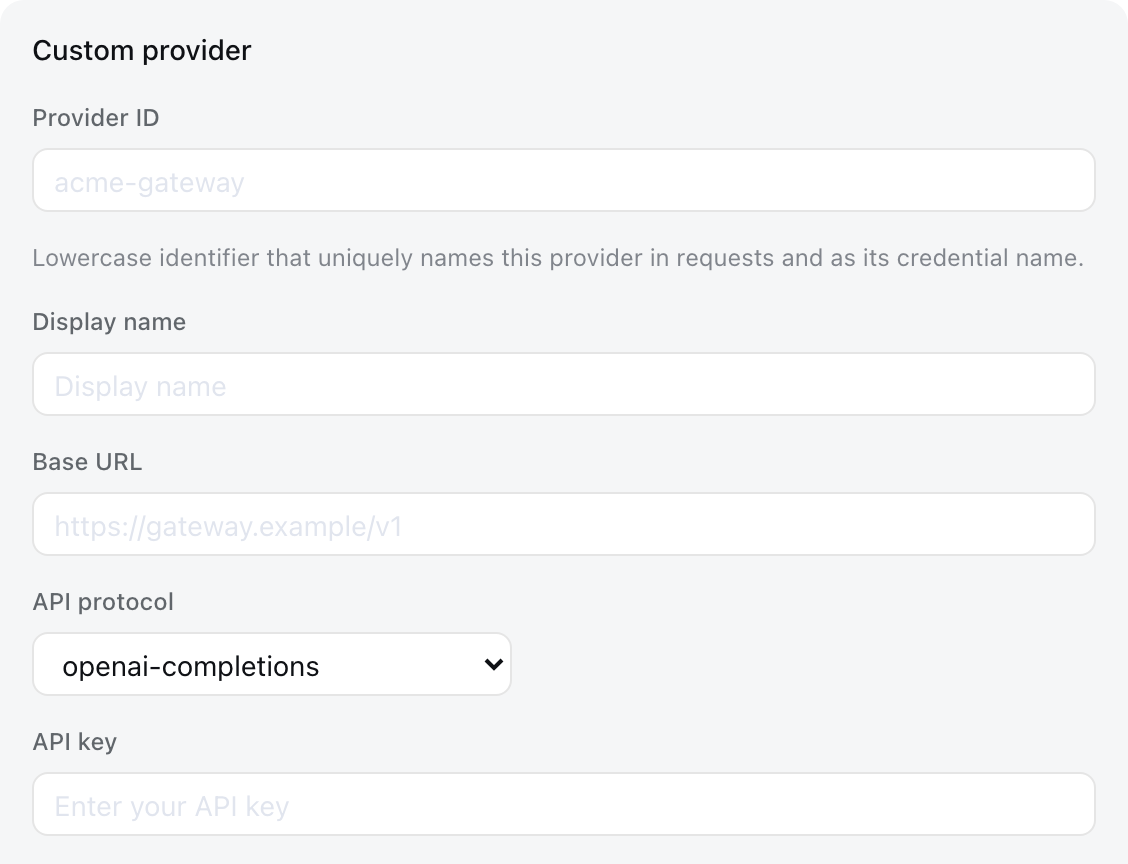
Image Source: DeepSeek Harness
Both methods allow users to access supported DeepSeek models through the alternative API infrastructure. For beginners, the automated installation process can reduce the technical learning curve. More experienced developers may prefer manual configuration because it gives them greater control over the provider and model settings.
Is an Alternative API Provider Worth Using?
Choosing an alternative API provider is not simply about finding a different payment method. It is also about finding a service that fits the user’s technical requirements and everyday workflow. Before choosing a provider, evaluate several factors.
- Model compatibility: Make sure the platform offers the specific DeepSeek models you intend to use. Different providers may support different model versions and capabilities.
- Payment convenience: Check whether it supports local payment methods and whether the minimum recharge amount fits your expected usage.
- Transparent pricing: Compare input and output token costs. A low initial deposit does not necessarily mean long-term usage will be inexpensive.
- API compatibility: If you intend to use third-party applications, confirm that the provider supports the API format required by those tools.
- Account security: Store API credentials securely, and monitor account usage regularly.
For professionals who depend on AI tools, these factors matter as much as the quality of the models they use.
Final Thoughts
DeepSeek offers useful AI capabilities for programming, research, writing, and everyday productivity. However, Russian users may face two separate challenges when accessing the official service: payment restrictions affecting local bank cards and connectivity problems involving the official API. Using a foreign bank card or a payment intermediary may help with transactions, but neither option necessarily resolves technical access problems.
For users looking for reliable ways to access the DeepSeek API in Russia, alternative API providers offer another approach. Sozdai provides access through its own API infrastructure, supports ruble-based balance top-ups, and uses token-based billing instead of requiring a fixed monthly subscription.
The platform also lets users connect DeepSeek to development tools such as Harness, giving them more flexibility in their workflows. By choosing a compatible provider and configuring the API connection correctly, developers in Russia can continue using DeepSeek models while managing payments and API usage more conveniently.
Recommended Articles
We hope this guide to the DeepSeek API in Russia helps you understand available access options, payment methods, and API integration. Check out these recommended articles for more insights into AI tools, API solutions, and emerging technologies.

