
Updated March 6, 2023

Introduction of DB2 TIMESTAMPDIFF
DB2 TIMESTAMPDIFF is a function provided by IBM that is used to find out the number of intervals in the unit of type mentioned by the first argument that is being passed to this function. TIMESTAMPDIFF function basically calculates the difference between the two timestamp values which is nothing but time or period interval. In this article, we will study how we can make the use of TIMESTAMPDIFF function to find out the interval or difference in any format or type that we want the result to be in, its syntax and implementation with the help of certain examples.
Syntax of DB2 TIMESTAMPDIFF
The syntax of TIMESTAMPDIFF function in DB2 is as shown below –
TIMESTAMPDIFF (first argument, second argument);
In the above syntax, we can observe that the TIMESTAMPDIFF () function accepts two parameter values to it. The first argument can be and expression that evaluates to numeric datatype or a constant numeric value. The numeric datatype expression that is expected in the first argument can be either the built-in integer or small int datatype.
The expression of value that is mentioned in the first argument should be valid and belong from any of the below mentioned values as each value individually represents the interval type that we want our result in. The following table shows how the value of first argument is considered internally.
| First argument’s expression value | Type of the interval considered for output |
| 256 | Years |
| 128 | Quarters |
| 64 | Months |
| 32 | Weeks |
| 16 | Days |
| 8 | Hours |
| 4 | Minutes |
| 2 | Seconds |
| 1 | Microseconds |
The above table shows all the interval types and the corresponding nature of which number should be mentioned as first argument if you want to get the output in the expected type.
The second argument will be a string expression that should return the value that is in the datatype of either a built-in CHAR type or VARCHAR datatype. It can even be a graphic string datatype provided that value should not be in LOB. In case of graphic string specified as the second argument, it is firstly converted implicitly into a character string value and the function is executed to evaluate the resultant value. The value of this expression is supposed to be the difference between the two TIMESTAMP values that are provided and that value is further converted into the character string which has a length of 22 characters. It is necessary that the string value that is specified should not have more than 6 digits to the right side of the decimal point.
In order to understand the elements and contents of specifying the string expression in the TIMESTAMPDIFF() function’s argument, refer to the below table –
| The element value to be mentioned in string | The valid value corresponding to the value to be specified | The position of the character with respect to decimal point. If this value is negative then it is treated to be on left side. |
| Microseconds | 000000 to 999999 | 1 to 6 |
| Decimal Separator | A point or period is at 0 | 0 |
| Seconds | 0 to 59 | -2 to -1 |
| Minutes | 0 to 59 or can even be blank | -4 to -3 |
| Hours | It can be blank or having 0-24 value | -6 to -5 |
| Days | It can be blank or having 0-30 value | -8 to -7 |
| Months | It can be blank or having 0-11 value | -10 to -9 |
| Years | It can be blank or having 0-9998 value | -14 to -11 |
The result of the TIMESTAMPDIFF() function gives the value which is an integer number which has the same sign as provided in the second argument’s string expression. In case, if we specify any of the argument’s value as NULL the function will result into the NULL value as well. The evaluation of the output value of the function for each of the possible interval type specified is done as shown in the below table –
| Interval type of result | evaluation of the duration value in terms of those elements |
| Microseconds | ((seconds+(minutes*60)) * 1000000) + microseconds |
| Seconds | 60 * (60 * (24 * ((days+(30*months)) + (365*years))) + minutes) + seconds and is an integer value |
| Minutes | 60 * (24 * ((days+(30*months)) + (365*years))) + minutes and is an integer value |
| Hours | 24 * ((days+(30*months)) + (365*years)) and is an integer value |
| Days | (days+(30*months)) + (365*years) and is an integer value |
| Weeks | ((days+(30*months))/7) + (52*years) and is an integer value |
| Months | ((12 * years)+ months) |
| Years | years |
| Quarters | Calculated as (months+(12 * years))/3 and is an integer value |
While evaluating the timestamp difference the following assumptions are made by the IBM in DB2 –
- There are 365 days in a single year.
- There are 52 weeks in a single year.
- There are 12 months in a single year.
- There are 24 hours in a single day.
- There are 60 minutes in a single hour.
- There are 60 seconds in a single minute.
Examples of DB2 TIMESTAMPDIFF
Now, let us have a look at how we can implement the TIMESTAMPDIFF() function to calculate the duration or internal that is the difference between two TIMESTAMP values. Consider two timestamp values ‘1997-03-01-00.00.00’ and ‘1997-02-01-00.00.00’ and we have to calculate the difference between the two mentioned values in terms of months. We can make the use of following statement to get the difference between the two timestamp values in months as shown below –
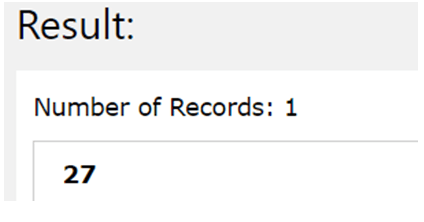
TIMESTAMPDIFF(16, CHAR(TIMESTAMP(‘2021-03-05-00.00.00’)- TIMESTAMP(‘2021-02-06-00.00.00’)))
The above statement returns the following output as shown in the image with the difference in the timestamp giving the duration of 27 days or 00000027000000.000000 because we mentioned 16 as the numeric character that stands for days interval calculation.
Let us consider one more example where we will be calculating the duration between two time stamps in terms of months. Consider two time stamp values ‘2021-08-06-00.00.00’ and ‘2021-07-07-00.00.00’ and the numeric argument for the first position of the function will be specified as 64 for months.
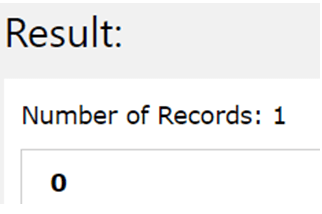
SELECT TIMESTAMPDIFF(64, CHAR(TIMESTAMP(‘2021-08-06-00.00.00’) – TIMESTAMP(‘2021-07-07-00.00.00’)))
The output of the above query is as shown below as the day difference is 30 and so the month difference will be 0 –
Recommended Articles
This is a guide to DB2 TIMESTAMPDIFF. Here we also discuss the introduction and syntax of TIMESTAMPDIFF function in DB2 along with examples. You may also have a look at the following articles to learn more –

