
What is CRM (Customer Relationship Management) Software?
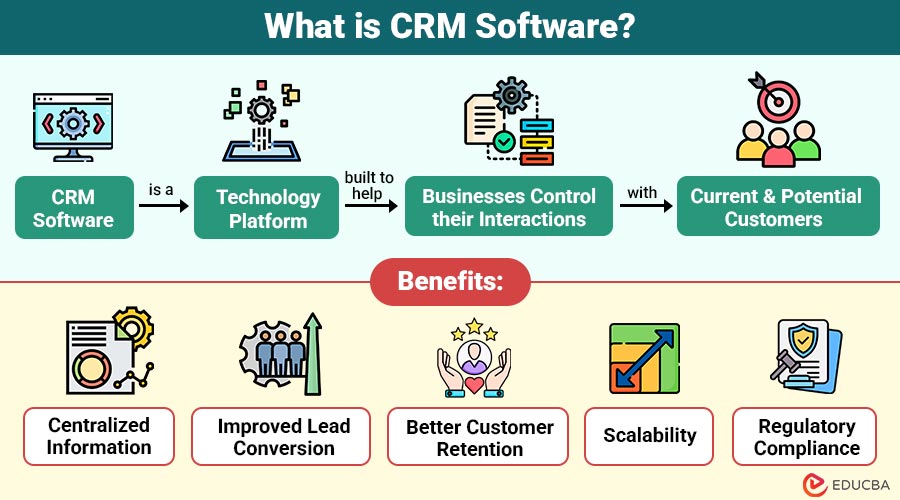
CRM software is a technology platform built to help businesses control their interactions with current and potential customers. It acts as a centralized hub that stores customer data, manages communication history, supports sales tracking, and facilitates customer service and marketing efforts.
Instead of manually keeping track of leads in spreadsheets or sticky notes, CRM software automates and organizes this process, ensuring better visibility, efficiency, and collaboration across teams.
Table of Contents:
- Meaning
- Why CRM Software Matters?
- Types of CRM Software
- Key Features
- Use Cases
- Benefits
- Popular CRM Software
- Real World Example
- Choosing the Right CRM for Your Business
Key Takeaways:
- CRM centralizes customer data, streamlines workflows, and enhances communication across sales, marketing, and support teams.
- It improves lead conversion, customer retention, and decision-making with real-time analytics and automation tools.
- CRM systems vary—choose from operational, analytical, collaborative, or strategic types based on your needs.
- Selecting the right CRM depends on business size, features required, team collaboration, and integration needs.
Why CRM Software Matters?
Here are the key reasons why CRM software has become essential for modern businesses:
1. Improves Sales Performance
CRM software enables tracking of every lead and deal, helping sales teams reduce cycle times, close more deals, and increase overall conversion rates efficiently.
2. Enhances Customer Experience
Personalized communication, prompt responses, and centralized history within CRM platforms result in better customer interactions, satisfaction, and long-term loyalty across all touchpoints.
3. Data-Driven Decisions
CRM tools offer real-time analytics, dashboards, and reporting features, empowering businesses to make smarter, faster, and more accurate decisions backed by concrete customer data.
4. Boosts Team Collaboration
CRM encourages cross-functional team alignment, transparency, and smooth cooperation between the support, marketing, and sales teams by providing common access to customer data and interactions.
5. Streamlines Marketing Campaigns
CRM software automates targeted email campaigns, lead nurturing, customer segmentation, and performance tracking, allowing marketers to run smarter and more personalized outreach initiatives.
Types of CRM Software
CRM systems come in several types, tailored to different business needs:
1. Operational CRM
Improves direct customer contacts, increases productivity, and streamlines workflows by automating sales, marketing, and customer service processes.
2. Analytical CRM
Analyzes customer data and behavior to uncover trends, optimize marketing strategies, and support better, data-driven business decisions and forecasting.
3. Collaborative CRM
Facilitates seamless communication across departments and with partners, ensuring all stakeholders have consistent, updated customer information for unified service delivery.
4. Strategic CRM
Focuses on building long-term relationships by integrating operational, analytical, and collaborative tools to enhance customer loyalty and lifetime value.
Key Features of CRM Software
Choosing the right CRM can be daunting. Prioritize these essential features:
1. Contact Management
Manage and organize customer details, communication history, and notes centrally to build a complete customer profile for personalized and informed interactions.
2. Sales Pipeline Management
Visually track sales deals, progress through stages, and identify bottlenecks to help your team focus efforts and improve opportunity conversion rates.
3. Marketing Automation
Automate email marketing, follow-up tasks, and customer engagement sequences to scale outreach and maintain consistent communication with minimal manual effort.
4. Customer Support Integration
Integrate support ticketing, SLAs, and communication tracking to streamline service operations and enhance customer satisfaction through faster, more coordinated responses.
5. Analytics and Reporting
Use real-time dashboards, KPIs, and custom reports to monitor sales and marketing performance, uncover trends, and support strategic, data-driven decisions.
6. Integration Capabilities
Connect your CRM with essential business systems—like email, ERP, or e-commerce tools—to ensure seamless data syncing and operational efficiency across platforms.
7. Mobile Access
Enable your team to access CRM features on the go with dedicated mobile apps, improving field productivity and real-time responsiveness anytime, anywhere.
8. Customizability
Adapt the CRM to your business by creating custom fields, workflows, and permissions that reflect your unique processes and operational needs.
Use Cases of CRM Software
CRM software benefits various industries and teams in different ways:
1. Sales Teams
- Assign leads to the right salespeople automatically to guarantee prompt follow-up, increased success, and higher conversion rates.
- Identify and focus on high-intent leads using scoring models to boost closure rates and improve pipeline efficiency.
- Use real-time sales dashboards to track progress, identify bottlenecks, and make strategic decisions based on accurate performance metrics.
2. Marketing Teams
- Group customers based on interactions, behavior, or demographics to deliver personalized, relevant marketing messages at the right time.
- Launch email, SMS, or social campaigns tailored to specific segments to increase conversions and build customer loyalty.
- Track open rates, clicks, and conversions to evaluate campaign effectiveness and calculate return on marketing investment accurately.
3. Customer Support
- Instantly access complete customer profiles, including past issues and purchases, for personalized and informed support interactions.
- Quickly resolve tickets using knowledge bases, automation tools, and AI chatbots to improve overall support efficiency.
- Shorten first response and resolution times with streamlined workflows and automated ticket routing based on urgency and category.
4. Management
- Use historical data and trends to accurately predict sales performance and guide future business planning and resource allocation.
- Monitor key performance indicators across departments in real-time to ensure objectives are being met efficiently and transparently.
- Align marketing, sales, and support by sharing centralized CRM insights and fostering interdepartmental collaboration toward business goals.
5. E-Commerce
- Automatically trigger emails to re-engage users who leave without purchasing, increasing conversion from abandoned shopping carts.
- Recommend personalized products based on browsing history, preferences, and past purchases to boost user engagement and satisfaction.
- Identify upsell and cross-sell opportunities using smart recommendations and behavioral analysis to increase average order value and revenue.
Benefits of CRM Software
Here is how CRM software adds measurable value:
1. Centralized Information
Store all customer data, interactions, and history in one unified platform—accessible to marketing, sales, support, and management teams.
2. Improved Lead Conversion
Automate follow-ups, monitor lead status, and prioritize opportunities to convert more prospects into loyal paying customers efficiently.
3. Better Customer Retention
Stay connected with personalized outreach, timely reminders, and proactive issue resolution to strengthen relationships and reduce churn rates.
4. Scalability
Easily scale your CRM to support growing contact lists, team sizes, and workflows without compromising performance or usability.
5. Regulatory Compliance
Maintain thorough, safe customer records and procedures that ensure adherence to industry-specific standards and privacy laws, such as GDPR and HIPAA.
Popular CRM Software
Streamline your firm’s operations with the top CRM software in India curated by Techimply. Here are some of the top CRM platforms on the market today:
1. Salesforce
Powerful and highly customizable CRM, ideal for enterprises needing robust tools for sales, marketing, service, and integration flexibility.
2. HubSpot CRM
CRM that is easy to use for startups and small businesses, providing free tools for customer support, sales, and marketing with simple scalability.
3. Zoho CRM
A budget-friendly all-in-one CRM suitable for small and medium businesses that includes automation, reporting, communication across multiple channels, and easy integration with other tools.
4. Pipedrive
Sales-centric CRM with intuitive pipeline views, goal tracking, and automation tools that help teams close deals more efficiently.
5. Freshsales
AI-powered CRM offering intelligent workflows, lead scoring, email tracking, and automation to streamline sales processes and boost productivity.
6. Microsoft Dynamics 365
Enterprise-level CRM with modular solutions for sales, customer service, and marketing, integrated with the Microsoft ecosystem and powerful analytics.
7. Nimble
Social CRM combines contact management with social media insights to nurture relationships and improve engagement across various communication channels.
8. Nutshell
User-friendly CRM with powerful sales, marketing, and customer engagement features, as well as AI-driven capabilities and free live support
Real World Example
Discover how CRM transformed a growing business into a streamlined success.
Company: GreenTech Solutions
GreenTech, a mid-sized B2B company in the renewable energy sector, faced issues with scattered customer information and missed follow-ups. After implementing HubSpot CRM:
- The sales team saw a 27% increase in conversion rates.
- Management improved quarterly forecasting accuracy by 40%.
- Marketing automation boosted email open rates by 22%.
Result: A more unified, efficient, and scalable business process.
Choosing the Right CRM for Your Business
Before selecting a CRM, consider the following:
1. Business Size & Budget
Evaluate your company’s size and financial capacity. Freelancers and small businesses often benefit from affordable or free CRMs like HubSpot or Zoho for basic needs.
2. Required Features
Identify must-have features such as lead scoring, automation, AI insights, or multichannel communication to ensure the CRM aligns with your specific sales and marketing workflows.
3. Team Collaboration Needs
If many departments will use the CRM, pick one that makes it easy for teams to work together, share dashboards, get real-time updates, and have role-based access to stay organized and coordinated.
4. Mobile Access
For remote or mobile teams, choose a CRM that has a strong mobile app with all the main features, so team members can work easily without needing a computer.
5. Integration with Existing Tools
Choose a CRM that integrates smoothly with tools you already use, like your email platform, ERP system, calendar, and marketing software, to maximize efficiency.
Final Thoughts
CRM software goes beyond storing contacts—it is essential for nurturing strong, scalable customer relationships. Whether you are growing a startup or modernizing an enterprise, CRM tools offer automation, insights, and customer-focused strategies. By evaluating your needs, comparing options, and prioritizing value-driven features, you can select a CRM that streamlines operations and drives business growth effectively.
Frequently Asked Questions (FAQs)
Q1. Is CRM only for sales?
Answer: No. CRM benefits sales, marketing, support, and management by centralizing customer data and automating workflows.
Q2. Can small businesses afford CRM software?
Answer: Yes. Many CRM platforms like HubSpot, Zoho, and Freshsales offer free or low-cost plans for small businesses.
Q3. What’s the best CRM for startups?
Answer: HubSpot CRM is often recommended for startups due to its free plan and ease of use.
Recommended Articles
We hope that this EDUCBA information on “CRM Software” was beneficial to you. You can view EDUCBA’s recommended articles for more information.

