
What is Content Decay?
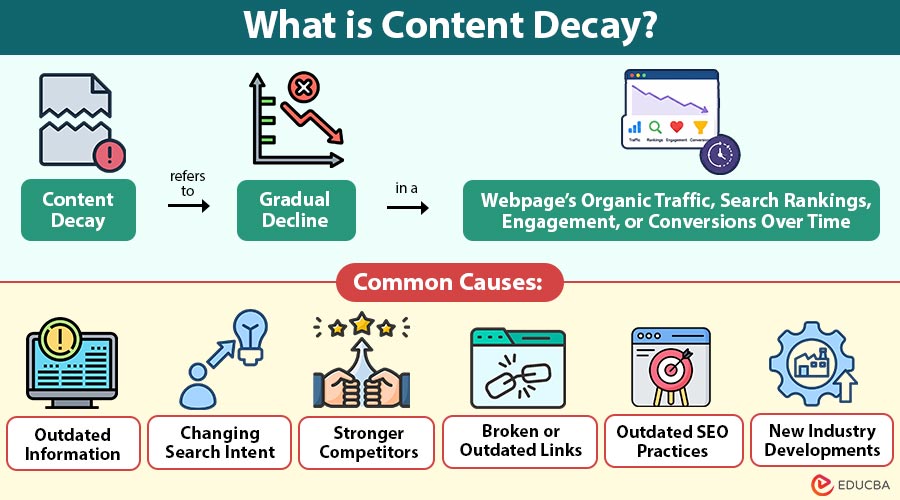
Content decay refers to gradual decline in a webpage’s organic traffic, search rankings, engagement, or conversions over time. It usually happens when content becomes outdated, less relevant, or less competitive in search results.
Content decay does not always mean that the original content was poor. A high-quality article can decay simply because the industry changes, statistics become outdated, competitors develop stronger resources, or users begin searching for different information.
For example, a blog explaining the best digital marketing tools in 2022 may have performed well when published. However, new tools, features, pricing models, and industry trends may make the article less useful today.
Table of Contents:
- Meaning
- Why Does Content Decay Matter?
- Common Causes
- How to Identify Content Decay?
- How to Fix Content Decay?
- Difference
- Benefits
- Tools
Key Takeaways:
- Content decay can reduce organic traffic, rankings, conversions, and overall website performance over time.
- Outdated information, changing search intent, stronger competitors, and broken links commonly cause content decay.
- Regular content updates can improve relevance, user experience, search visibility, conversions, and content ROI.
- Analytics and SEO tools help identify declining pages and guide effective content recovery strategies.
Why Does Content Decay Matter?
Content decay can affect both SEO performance and overall content marketing results. When important pages lose rankings, websites can experience lower organic traffic and fewer opportunities to generate leads or sales.
Key reasons content decay matters include the following:
1. Lower Organic Traffic
Declining search rankings can reduce website traffic from search engines, significantly limiting visibility, engagement, and potential business opportunities.
2. Reduced Conversions
Fewer website visitors can result in fewer leads, sign-ups, purchases, inquiries, and other valuable customer actions for businesses.
3. Poor User Experience
Outdated information may no longer address users’ current questions, needs, expectations, or search intent, leading to frustration and confusion.
4. Lost SEO Opportunities
Older content may miss emerging keywords, changing search trends, updated topics, and new opportunities to attract relevant audiences.
5. Reduced Content ROI
Previously successful content may gradually generate less traffic, engagement, leads, conversions, and revenue, reducing its overall business value.
Common Causes of Content Decay
Content decay can happen for several reasons. Identifying exact cause makes it easier to select the right recovery strategy.
1. Outdated Information
Information becomes outdated when statistics, prices, regulations, product features, software capabilities, and industry trends change over time.
2. Changing Search Intent
Search intent changes when users begin expecting different content formats, information, solutions, comparisons, tutorials, or product recommendations.
3. Stronger Competitors
Competitors can publish more comprehensive, accurate, useful content with updated statistics, original research, visuals, examples, and expert insights.
4. Broken or Outdated Links
Broken or outdated links can reduce user experience, lower credibility, and make older content appear poorly maintained or unreliable.
5. Outdated SEO Practices
Older content may use outdated SEO practices and lack proper headings, internal links, structured information, or valuable sections.
6. New Industry Developments
New technologies, products, regulations, and industry developments can quickly make existing content outdated, reducing its relevance and search visibility.
How to Identify Content Decay?
Content decay can be identified using website analytics and SEO data.
1. Review Organic Traffic
Compare the page’s current organic traffic with its historical performance. A steady decline over several months can indicate that the content is losing visibility.
2. Monitor Keyword Rankings
Check whether important keywords have moved down in search results. Losing rankings for several relevant keywords can indicate increasing competition or declining relevance.
3. Analyze Search Impressions
A decline in impressions can indicate reduced search visibility or changing demand. Comparing impressions with clicks helps determine whether the issue involves rankings, search demand, or click-through rates.
4. Check Competitor Content
Review pages currently ranking for the target keyword. Look for differences in content depth, freshness, structure, examples, media, and user experience.
5. Review Conversions
Traffic alone does not determine content performance. A page that receives fewer visitors but generates strong conversions may still be valuable.
How to Fix Content Decay?
Once declining content is identified, several strategies can help restore its performance.
1. Update Outdated Information
Replace outdated statistics, examples, screenshots, product details, and references with accurate, current information that remains useful for readers.
2. Match Current Search Intent
Review current search results and adjust your content to match what users now expect from their searches.
3. Improve Content Quality
Expand weak sections, remove unnecessary information, and add examples, data, expert insights, FAQs, and actionable recommendations.
4. Add New Keywords Naturally
Research relevant emerging keywords and incorporate them naturally into headings, paragraphs, FAQs, and supporting sections without excessive repetition.
5. Improve Internal Linking
Add relevant internal links between authoritative pages and declining content to improve navigation, discoverability, and connections between related topics.
6. Replace Broken Links
Check internal and external links regularly, replace broken URLs, and remove outdated references that no longer provide useful information.
7. Improve Titles and Meta Descriptions
Create accurate, relevant, and compelling titles and meta descriptions that clearly represent content while encouraging users to click.
8. Add Helpful Visuals
Use relevant images, charts, tables, diagrams, screenshots, and videos to simplify complex information and improve content readability.
9. Consolidate Similar Content
Combine overlapping pages that target similar keywords into a single comprehensive resource, then redirect outdated or redundant pages as appropriate.
10. Republish Updated Content
Refresh significantly improved content and update its publication date when appropriate, ensuring meaningful improvements provide additional value rather than merely changing dates.
Difference Between Content Decay and Content Refresh
Content decay and content refresh are closely connected but have different meanings.
| Aspect | Content Decay | Content Refresh |
| Meaning | Decline in a page’s performance over time. | Process of updating and improving existing content. |
| Purpose | Identifies content that is losing traffic, rankings, or engagement. | Restores the content’s relevance, quality, and performance. |
| Cause/Action | Often occurs because information becomes outdated or search intent changes. | Involves updating outdated information and aligning content with current search intent. |
| Example | A blog loses organic traffic because its statistics are outdated. | Updating statistics, adding recent examples, improving internal links, and addressing new search intent. |
| Relationship | Shows that content performance is declining. | Provides a strategy for recovering content that is in decline. |
Benefits of Preventing Content Decay
Regularly maintaining existing content can provide several benefits:
1. Sustained Organic Traffic
Regularly updated content can maintain search visibility, attract consistent visitors, and remain competitive against newer pages.
2. Better User Experience
Accurate, current, and relevant information helps visitors find useful answers quickly and creates a more satisfying browsing experience.
3. Improved Rankings
Refreshing outdated information can improve content relevance, helping search engines recognize the page as useful for current queries.
4. Higher Conversions
Updated content builds visitor trust, provides reliable information, and supports better decisions, increasing the likelihood of conversions.
5. Better Content ROI
Maintaining existing articles helps businesses continue generating traffic, engagement, leads, and revenue without creating entirely new content.
6. Less Content Waste
Regular maintenance helps businesses maximize the value of previously published content instead of allowing useful resources to become outdated.
7. Stronger Website Authority
Consistently maintaining valuable resources demonstrates expertise and reliability, strengthening the website’s overall content quality and authority.
Content Decay Tools
Several tools can help marketers identify declining content, monitor performance, and find opportunities for improvement.
| Tool | How it Helps? |
| Google Search Console | Provides data on search impressions, clicks, click-through rates, keyword performance, and changes in organic visibility. |
| Google Analytics | Helps analyze website traffic, user engagement, conversions, and overall content performance. |
| Ahrefs | Monitors keyword rankings, backlinks, organic traffic, competitors, and content opportunities. |
| Semrush | Helps track keyword positions, search visibility, competitors, backlinks, and opportunities to improve existing content. |
| Moz | Supports keyword tracking, backlink analysis, ranking monitoring, and the identification of areas for SEO improvement. |
| Content Optimization Platforms | Identify missing topics, related keywords, content gaps, and opportunities to improve topical coverage and relevance. |
Final Thoughts
Content decay can reduce traffic and rankings as information becomes outdated and search intent changes. Regularly monitoring performance, updating information, improving relevance, strengthening internal links, and adding value helps maintain content performance. A strong SEO strategy combines content creation with consistent content maintenance for long-term results.
Frequently Asked Questions (FAQs)
Q1. What types of content are most likely to experience decay?
Answer: Time-sensitive content, statistics, product comparisons, technology guides, trend-based articles, and industry reports are more likely to become outdated.
Q2. Is declining traffic always a sign of content decay?
Answer: Not necessarily. Seasonal demand, algorithm changes, reduced search interest, or technical issues on the website can also cause traffic declines.
Q3. Can content decay occur due to technical SEO issues?
Answer: Yes. Issues such as incorrect indexing, broken redirects, slow page performance, canonical errors, or accidental noindex tags can reduce visibility.
Q4. Can backlinks help protect content from declining performance?
Answer: Strong, relevant backlinks can support authority, but they cannot prevent performance losses when the content becomes outdated or fails to satisfy users.
Recommended Articles
We hope that this EDUCBA information on “Content Decay” was beneficial to you. You can view EDUCBA’s recommended articles for more information.


