

Introduction to Components of Computers
Computers have become an essential part of everyday life, powering everything from personal tasks and business operations to education, healthcare, scientific research, and artificial intelligence (AI). Behind every computer is a collection of hardware components that work together to process data, execute instructions, store information, and produce meaningful results.
Computer components are the essential physical and logical elements that collectively enable a computer system to function efficiently. Each component performs a specific role, whether it is accepting user input, processing data, storing files, rendering graphics, or displaying output. Modern computers also incorporate advanced technologies such as high-speed solid-state drives (SSDs), powerful graphics processing units (GPUs), and AI accelerators to deliver faster performance and enhanced user experiences.
Understanding the different parts of computer systems and how they interact provides valuable insight into the system’s overall functionality. It also helps users make informed decisions when purchasing, upgrading, maintaining, or troubleshooting computer systems. In this article, we will explore the major components of a computer, their functions, and how they work together to ensure smooth and efficient operation.
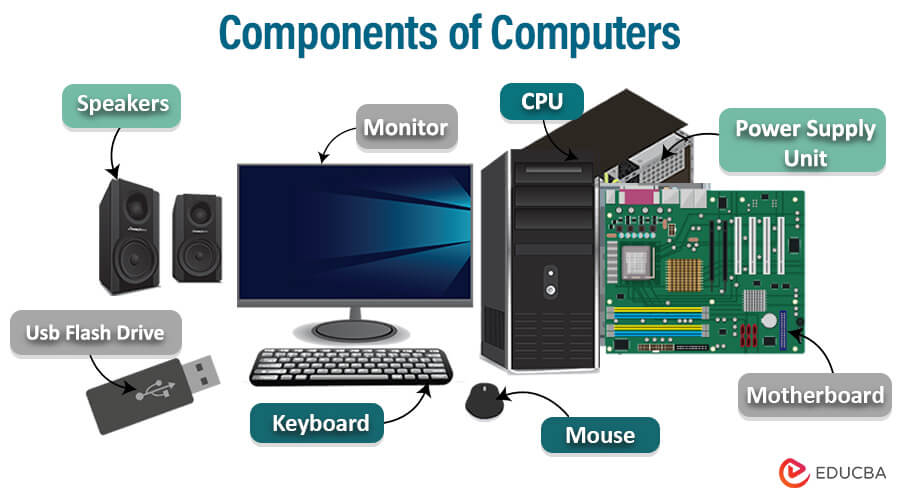
Table of Content
What is a Computer?
A computer is a sophisticated electronic device that processes and stores data, performs calculations, and executes instructions to complete specific tasks. Hardware components such as the CPU, memory, and storage devices store and process computer data. They operate on binary code and can perform various functions across fields, from simple to complex. It is a fundamental tool in multiple areas, including business, education, research, entertainment, and communication.
Block Diagram of Computer Components
A computer system follows a simple functional flow:
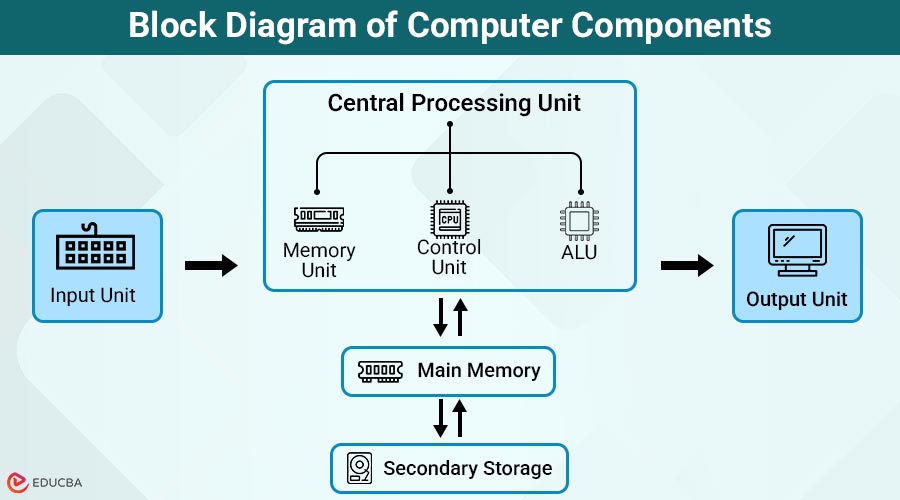
Input Unit → Central Processing Unit → Memory/Storage → Output Unit
- The Input Unit feeds data into the system
- The CPU processes the data
- Memory and Storage hold data temporarily or permanently
- The Output Unit displays the results
This logical structure helps users understand how different computer components interact.
Major Components of Computers System
For a computer system to produce accurate outcomes, its components must work together in harmony, even though they can function independently. Various devices are classified as input or output units in computer systems. Below are the primary components of a computer system’s architecture and functional flow.
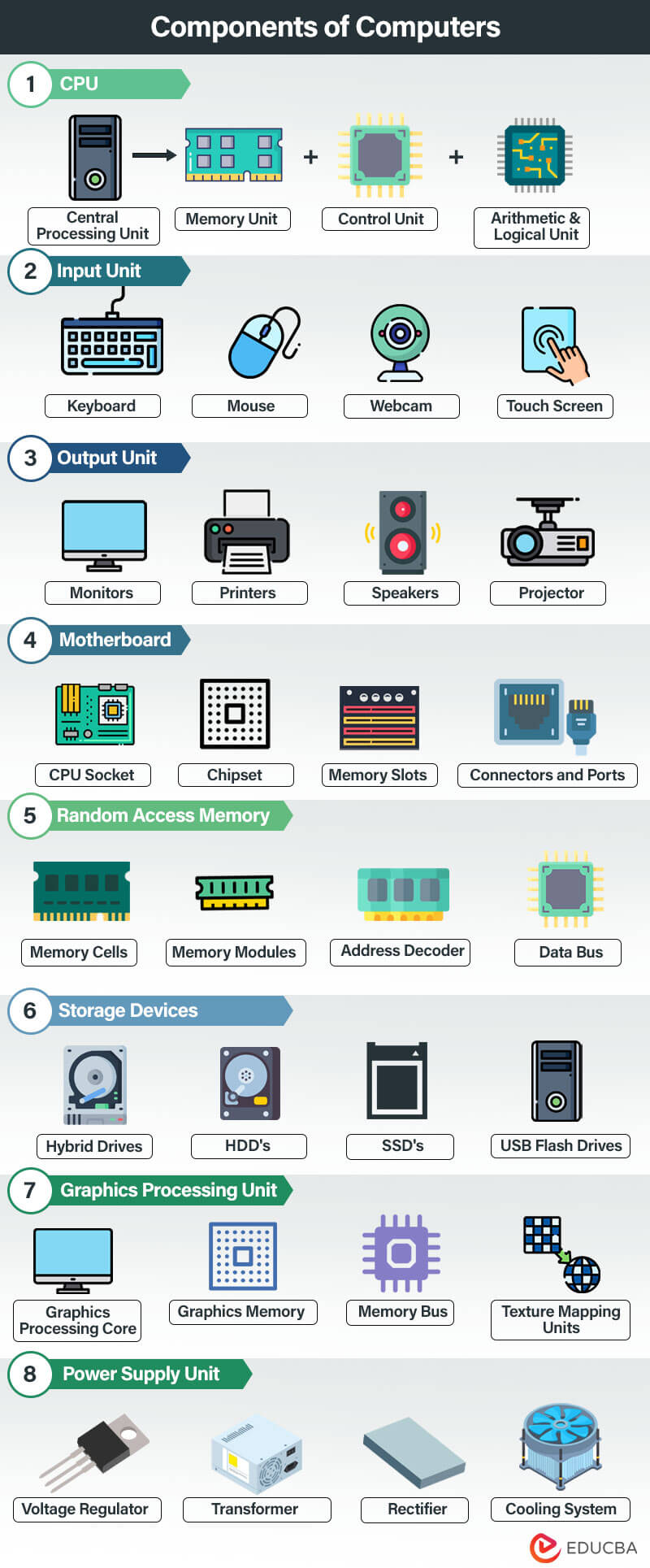
Here is a detailed explanation of the major components of a computer system:
1. Central Processing Unit
The Central Processing Unit (CPU) is the brain of the computer, executing instructions, processing data, performing calculations, and controlling the operations of all other hardware components. It follows the fetch-decode-execute cycle to process instructions stored in memory and produce the required output. Modern CPUs feature multiple cores, high-speed cache memory, and advanced technologies that improve multitasking and overall system performance. It comprises the following units:
- Memory Unit: This unit stores data, instructions, and intermediate results of processing required during execution. It uses RAM and cache to provide quick access to frequently used data, enabling efficient processing.
- Control Unit: The Control Unit (CU) directs and coordinates all operations within the computer system. It fetches and interprets instructions from memory and manages the flow of data between the CPU, memory, input devices, output devices, and storage.
- Arithmetic & Logic Unit (ALU): The Arithmetic & Logic Unit performs all arithmetic operations, such as addition, subtraction, multiplication, and division, along with logical operations like comparisons and decision-making. It works with the Control Unit and the Memory Unit to efficiently execute program instructions.
- Cache Memory: Cache memory is a small, high-speed memory located inside or near the CPU. It stores frequently accessed data and instructions, reducing memory access time and improving overall computer system performance.
2. Input Unit
The input unit of a computer is responsible for accepting data and instructions from the user or external sources and converting them into a format that the computer can understand and process. The interface provides a link between the user and the computer system. Multiple input devices are available for this activity, depending on the input requirements of specific tasks.
The following are some of the commonly used input devices for carrying out the activities of the input unit:
- Keyboard: As the name suggests, a keyboard is a device that comprises many keys for entering instructions and commands on a computer system. The QWERTY layout, with additional function keys such as F1-F12, ALT, CTRL, Shift, and others, is commonly used to build this tool for capturing user input.
- Mouse: Users frequently use the mouse as an input device for pointing and clicking. It includes a scroll wheel to navigate the displayed content and a few buttons to select items.
- Joystick: A joystick is an input device that sends commands to a computer system for gaming. It comprises multiple control buttons and at least one lever control; hence, given the name ‘Joystick.’
- Touch Screen: Touch Screens are a recent advancement in input devices, allowing users to interact with a computer by touching the screen. The touch-action can be performed by a dedicated pen-like device called ‘Stylus’ or using the user’s fingertips.
- Webcam: Webcams capture video and audio, enabling users to join video calls, attend conferences, and stream live.
- Fingerprint Scanner: A fingerprint scanner is a biometric input device that captures and verifies a user’s fingerprint to provide secure authentication. It is commonly used in laptops, smartphones, and access control systems for quick and password-free login.
- Biometric Sensor: Biometric sensors identify users by recognizing unique physical characteristics such as fingerprints, facial features, iris patterns, or voice. These sensors enhance security by enabling accurate identity verification and are widely used in modern computing devices.
- Digital Pen (Stylus): A digital pen, also known as a stylus, is used to write, draw, or navigate on touch-enabled screens with greater precision than a finger. It is commonly used by designers, artists, students, and professionals for note-taking, digital illustration, and document annotation.
- Microphone: A microphone captures audio as input for the computer. It enables voice commands, online meetings, audio recording, speech recognition, virtual assistants, and gaming communication.
- Gesture Sensor: A gesture sensor detects hand or body movements and converts them into digital commands without requiring physical contact. It is commonly used in touchless interfaces, gaming systems, virtual reality, and smart devices.
- VR Controller: A Virtual Reality (VR) controller allows users to interact with objects and navigate within virtual environments. It tracks hand movements and button inputs, providing an immersive experience in VR gaming, training, education, and simulations.
3. Output Unit
The output unit of a computer is responsible for presenting processed data and information to the user or external devices. It converts the processed data into a human-readable or machine-readable format for interpretation or further use. The devices that handle output processing should be capable of displaying any data or a combination of data types, including text, numbers, images, audio, video, GIFs, etc.
Here are a few commonly used output devices,
- Monitors: Computer monitors display the results produced after the central processing unit completes all operations. The technology for designing display devices has evolved from monochrome monitors to color monitors to the latest LED/LCD displays.
- Printers: Printers are another output device, similar to monitors, but the difference is that they produce hard copies of the data received. The printer’s performance standards are assessed based on processing speed, print resolution, memory capacity, and color reproduction.
- Speaker: Speakers produce audio output data in different formats, such as MP3, MPEG, and WMA. This device facilitates sending audible alerts to the user, accessing data via music or audio, and supporting communication systems.
- Projector: A device that displays a computer’s output on a larger surface or screen. This feature enables the sharing of presentations, videos, or images with a broader audience.
- Virtual Reality (VR) Headset: A VR headset displays immersive three-dimensional virtual environments, allowing users to experience games, simulations, training programs, and virtual tours. It combines high-resolution displays with motion tracking to create an interactive experience.
- Augmented Reality (AR) Display: An AR display overlays digital information, graphics, or animations onto the real-world environment. AR displays are used in education, healthcare, manufacturing, navigation, and industrial applications to enhance visualization and productivity.
- Smart Display: A smart display combines a traditional display with built-in computing capabilities, voice assistants, and internet connectivity. It can display multimedia content, control smart home devices, support video conferencing, and provide real-time information.
- Haptic Devices: Haptic devices provide tactile feedback through vibrations, pressure, or motion, allowing users to physically feel interactions with digital content. They are commonly used in gaming controllers, VR systems, medical simulators, and training applications to create a more realistic user experience.
4. Motherboard
The motherboard, also known as the mainboard, is one of the most important components of a computer system. It acts as the central platform that connects and enables communication between the CPU, memory, storage devices, graphics cards, and other hardware components. It also provides the electrical pathways required for smooth system operation.
Modern motherboards support advanced technologies such as PCIe 5.0 expansion slots for high-speed graphics cards, M.2 NVMe slots for ultra-fast SSDs, USB4 and Thunderbolt ports for faster data transfer, and built-in Wi-Fi 6E or Wi-Fi 7 for improved wireless connectivity. Most systems now use UEFI (Unified Extensible Firmware Interface) instead of the traditional BIOS, offering faster boot times, enhanced security, and an intuitive setup interface.
Here are a few components of a motherboard:
- CPU Socket: Holds the CPU and determines processor compatibility based on the socket type.
- Memory Slots: Allow installation of RAM modules, such as DDR4 or DDR5, and determine the maximum memory capacity.
- Chipset: Manages communication between the CPU, memory, storage devices, and peripherals, and determines which features are supported.
- PCIe Expansion Slots: Used to install graphics cards, sound cards, network adapters, and other expansion cards. Modern motherboards commonly support PCIe 4.0 and PCIe 5.0.
- M.2 NVMe Slots: Support high-speed NVMe SSDs, providing much faster storage performance than traditional SATA drives.
- Connectors and Ports: Include USB, USB4, Thunderbolt, HDMI, DisplayPort, Ethernet, SATA, audio jacks, and fan headers for connecting internal and external devices.
- Wireless Connectivity: Many modern motherboards include integrated Wi-Fi 6E or Wi-Fi 7 and Bluetooth support.
- BIOS/UEFI Firmware: Initializes hardware during startup. UEFI offers faster boot times, improved security, and better hardware compatibility than the traditional BIOS.
5. Random Access Memory
Random Access Memory (RAM) is a crucial type of computer memory that provides rapid and temporary storage for data the CPU needs during its operations. Volatile memory, such as RAM, retains its contents only while the computer is powered on. Once the system is restarted or powered off, the stored data is lost. This enables the CPU to read and write data, improving overall system performance quickly.
Most modern desktops and laptops use DDR5 RAM, which offers faster speeds, higher bandwidth, and better power efficiency than DDR4. Many thin, lightweight devices use LPDDR5X memory to reduce power consumption. Modern systems also support dual-channel memory, allowing two RAM modules to work together for improved performance. Professional workstations and servers may use Error-Correcting Code (ECC) RAM, which detects and corrects memory errors to enhance system reliability.
The key components of RAM include:
- Memory Cells: The fundamental units of RAM. These cells store binary data (0s and 1s) as electrical charges. Each memory cell represents a single bit of information.
- Memory Modules: Memory modules are created by arranging memory chips, such as DIMMs (used in desktop computers) or SODIMMs (used in laptops), and are inserted into the motherboard’s memory slots. These physical modules provide the computer with the memory required to run applications efficiently.
- Address Decoder: The address decoder selects and activates specific memory cells within the RAM. It interprets memory addresses provided by the CPU and activates the corresponding cells for read or write operations.
- Data Bus: The data bus is a set of electrical pathways that allows the CPU to send and receive data to and from RAM. It transfers information between the processor and memory, enabling quick access to data during program execution.
- Memory Channels: Modern motherboards support single-, dual-, or quad-channel memory configurations. Dual-channel memory allows two RAM modules to operate simultaneously, increasing memory bandwidth and improving overall system performance, especially during multitasking and memory-intensive applications.
6. Storage Devices
Computer systems require storage devices to store and retrieve data, files, programs, and the operating system. These devices are essential components. They provide short-term and long-term storage capabilities, allowing users to access and preserve their digital information.
Types of storage devices commonly used in computers:
- Hard Disk Drives (HDDs): HDDs are traditional magnetic storage devices that use rotating platters to store data. They offer high storage capacity at a lower cost, making them suitable for backups and large files. However, they are slower and less durable than SSDs because they use moving parts.
- Solid-State Drives (SSDs): SSDs use flash memory to store data electronically, with no moving parts. They offer faster boot times, quicker file transfers, improved durability, lower power consumption, and better overall system performance. SSDs are now the standard storage solution in most modern computers.
- NVMe SSDs: NVMe (Non-Volatile Memory Express) SSDs connect directly via the PCI Express (PCIe) interface rather than SATA, delivering much higher speeds and lower latency. They have become the preferred storage option for modern desktops and laptops due to their excellent performance.
- PCIe Gen4 SSDs: PCIe Gen4 NVMe SSDs provide significantly higher data transfer speeds than previous generations, making them ideal for gaming, video editing, software development, and other demanding applications.
- PCIe Gen5 SSDs: The latest generation of high-speed storage, offering exceptional performance for AI workloads, professional content creation, and other data-intensive tasks on compatible systems.
- External SSDs: Portable storage devices that connect via USB or Thunderbolt. They provide fast data transfers and are commonly used for backups, file sharing, and expanding storage capacity.
- USB Flash Drives: USB flash drives, also known as thumb drives or pen drives, are compact portable storage devices that use flash memory. They provide convenient plug-and-play storage and are widely used for transferring files between computers.
7. Graphics Processing Unit
A Graphics Processing Unit (GPU) accelerates image and graphics processing on a computer system through a specialized integrated circuit (IC). Its primary responsibility is rendering images, videos, animations, and other graphical elements for display on a monitor or screen.
There are two main types of GPUs:
- Integrated GPU (iGPU): Built directly into the CPU or motherboard, integrated GPUs share system memory and are suitable for everyday tasks such as web browsing, video streaming, office applications, and light gaming.
- Dedicated GPU (dGPU): A separate graphics card with its own dedicated Video RAM (VRAM). Dedicated GPUs deliver significantly higher performance and are ideal for gaming, professional content creation, CAD software, AI applications, and complex graphical workloads.
Modern GPUs also support advanced technologies such as AI acceleration, real-time ray tracing for realistic lighting and reflections, and hardware-based video encoding and decoding, which improves streaming, video conferencing, and multimedia performance while reducing CPU usage.
The components and devices connected to a Graphics Processing Unit (GPU) include:
- Graphics Processing Core: The graphics processing core is the heart of the GPU and consists of thousands of small processing units called shaders or stream processors. These cores perform parallel calculations required for rendering graphics, processing visual effects, and accelerating AI and computational tasks.
- Graphics Memory (VRAM): GPUs include dedicated high-speed memory known as Video RAM (VRAM), which stores textures, frame buffers, shaders, and other graphical data required to render high-resolution images and videos efficiently.
- Memory Bus: The memory bus provides the communication pathway between the GPU core and VRAM. A wider, faster memory bus increases data transfer rates, improving graphics rendering and overall GPU performance.
- Texture Mapping Units (TMUs): TMUs retrieve texture data from memory and apply it to 2D and 3D objects, enhancing image quality and creating realistic surfaces in games and graphic applications.
- Ray Tracing Cores: Many modern GPUs include dedicated ray tracing cores that simulate the physical behavior of light, producing highly realistic shadows, reflections, and lighting effects in supported applications and games.
- AI Processing Cores: Advanced GPUs feature specialized AI processing units, such as Tensor Cores, that accelerate machine learning, image enhancement, real-time upscaling, voice recognition, and other AI-powered applications.
- Video Encoding and Decoding Engine: Modern GPUs include dedicated hardware for encoding and decoding video formats such as H.264, HEVC (H.265), and AV1. This enables smooth video playback, faster video editing, efficient live streaming, and high-quality video conferencing with reduced CPU workload.
8. Neural Processing Unit (NPU)
A Neural Processing Unit (NPU) is a specialized processor designed to accelerate artificial intelligence (AI) and machine learning (ML) tasks. Unlike the CPU, which handles general-purpose computing, or the GPU, which focuses on graphics and parallel processing, the NPU efficiently executes AI-specific operations while consuming less power. As AI-powered features become increasingly common in modern laptops, desktops, and mobile devices, NPUs have become an essential component of next-generation computer systems.
The following are the key components and functions associated with a Neural Processing Unit (NPU):
- AI Processing Engine: The AI processing engine is the core of the NPU. It performs complex neural network calculations, such as matrix multiplication and tensor operations, enabling AI models to process data quickly and efficiently.
- On-Chip Memory: NPUs include dedicated high-speed memory to temporarily store AI models, intermediate calculations, and frequently accessed data. This reduces latency and improves overall AI performance.
- AI Accelerator: The AI accelerator executes machine learning inference tasks such as image recognition, speech processing, object detection, and natural language processing much faster than a traditional CPU while consuming significantly less power.
- Memory Interface: The memory interface enables the NPU to exchange data efficiently with the system’s RAM, CPU, and GPU. High-bandwidth communication ensures smooth execution of AI workloads without creating processing bottlenecks.
9. Power Supply Unit
The Power Supply Unit (PSU) is an essential component of a computer system that converts incoming electrical power from an outlet into a form usable by the computer’s components. It supplies electrical power to the various hardware components, ensuring their proper functioning.
The components and devices associated with a Power Supply Unit (PSU) include:
- Transformer: The power supply unit (PSU) contains a transformer that converts the high-voltage AC from the wall outlet into a lower voltage appropriate for the computer’s components.
- Rectifier: The rectifier circuit transforms AC power into direct current (DC) power, which is necessary for computer components.
- Voltage Regulator: The voltage regulator circuit stabilizes the output voltage and compensates for fluctuations in the input voltage, thereby ensuring a consistent and reliable power supply. It is essential for the proper functioning of computer components.
- Cooling System: Power supply units generate heat during operation and must dissipate it to maintain optimal operating temperatures. Cooling systems like fans and heat sinks are crucial in achieving this goal.
Frequently Asked Questions (FAQs)
Q1. How do computer components interact with each other?
Answer: The components of a computer system interact with each other using the motherboard, connectors, and cables. This exchange of data and signals enables task completion, information sharing, and smooth system operation.
Q2. Can I upgrade the computer components?
Answer: Yes, it is possible to upgrade several computer components. For example, you can upgrade the CPU, add more RAM, replace the storage device, upgrade the software, or upgrade the Graphics processing unit (GPU). Before making any upgrades, you should consider compatibility and system requirements.
Q3. What component affects computer speed the most?
Answer: CPU, RAM, and storage type (SSD vs HDD) significantly impact performance.
Q4. Is a GPU required for all computers?
Answer: No, standard computers can support integrated graphics, but GPUs are essential for gaming and graphics-intensive tasks.
Conclusion
The components of a computer system are essential elements that work together to perform data processing, storage, and output operations. Each component has a unique function, and a computer’s efficiency depends on how well these components interact. Understanding computer components helps users make informed decisions when purchasing, upgrading, or troubleshooting computer systems.
Recommended Articles
We hope this information on “Components of Computers” benefited you. You can view EDUCBA’s recommended articles for more information.