


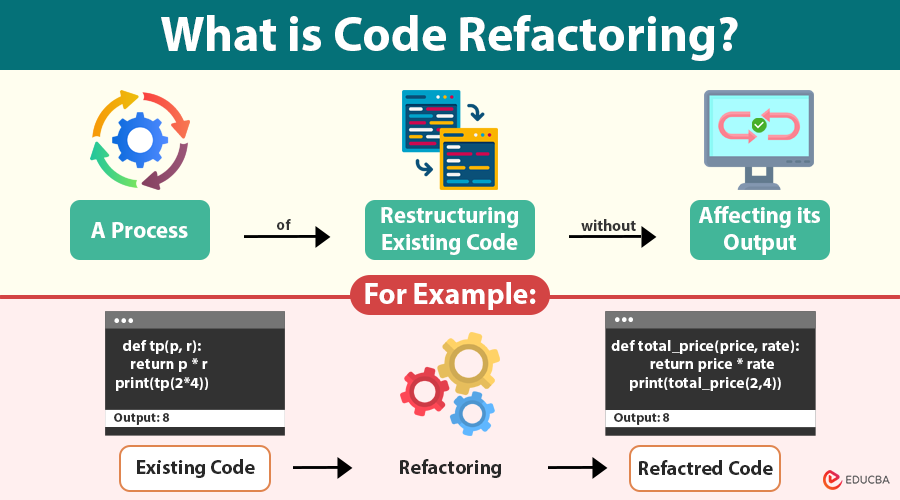
Code refactoring is a process of restructuring and improving existing computer code without affecting its output. It enhances non-functional attributes such as readability, maintainability, and scalability.
In the software development lifecycle, code refactoring is like spring cleaning. It is not about adding new features or fixing bugs—it is about making your existing code cleaner, more efficient, and easier to maintain. Whether you are a solo developer or part of a large team, learning how and when to refactor code can drastically improve your project’s health and longevity.
You are rearranging furniture in your house to make it more functional and aesthetic without knocking down walls.
Table of Contents
- Introduction
- Why Refactor Code?
- When to Consider?
- Common Code Smells
- Refactoring Techniques
- Top Tools
- Example
- Best Practices
Why Refactor Code?
Here are the key benefits of code refactoring:
- Improved Readability: Clearer code is easier to read, understand, and review.
- Reduced Complexity: Simplifies complicated code logic and structures.
- Easier Maintenance: Cleaner code reduces bugs and eases future changes.
- Better Performance (Sometimes): Refactoring can sometimes optimize code efficiency.
- Encourages Reuse: Breaking code into smaller, reusable pieces improves modularity.
- Facilitates Testing: Well-organized code is simpler to test and debug.
When Should You Consider Code Refactoring?
Knowing when to refactor your code is just as important as knowing how to do it. Here are some common situations where you should consider code refactoring:
- Before Adding New Features: Cleaning up the existing codebase first makes it easier to add new functionality without introducing bugs.
- When Fixing Bugs: Refactoring can help clarify confusing code, making bugs easier to locate and fix.
- During Code Reviews: If reviewers spot complexity or unclear logic, refactoring can improve code quality and maintainability.
- When You Notice Code Smells: Signs like duplicated code, overly long methods, or inconsistent naming are clear indicators that refactoring is needed.
- When Performance Becomes an Issue: Sometimes restructuring code leads to more efficient execution.
- After Gaining New Requirements or Insights: As the project evolves, refactoring can align the codebase with updated design or architecture decisions.
- Regularly as Part of the Development Cycle: Continuous code refactoring prevents technical debt from piling up, making your codebase healthier over time.
Common Code Smells Indicating Need for Refactoring
Code smells are signs of potential problems in code design. Some common smells include:
- Duplicated Code: Same code exists in multiple places.
- Long Methods: Methods that are excessively long and hard to follow.
- Large Classes: Classes doing too many things.
- Long Parameter Lists: Functions with many parameters.
- Dead Code: Unused variables or functions.
- Inconsistent Naming: Variables or functions with unclear or misleading names.
Popular Code Refactoring Techniques
Code refactoring techniques are standardized methods for restructuring code to enhance its design and maintainability. Below are some of the most widely used techniques every developer should know.
#1. Rename Variable or Method
Renaming improves clarity by making the code more self-explanatory.
Before:
def tp(p, r):
return p * r
print(tp(2*4))
After:
def total_price(price, rate):
return price * rate
print(total_price(2,4))
Clearer intent for future readers and developers.
#2. Extract Method
Move a block of code into its own method to enhance readability and avoid code repetition.
Before:
function sendInvoice(customer) {
console.log("Sending invoice to:", customer.name);
console.log("Email:", customer.email);
}
After:
function sendInvoice(customer) {
logCustomerInfo(customer);
}
function logCustomerInfo(customer) {
console.log("Sending invoice to:", customer.name);
console.log("Email:", customer.email);
}
Now, each method has a single responsibility.
#3. Inline Method
If a method is unnecessary or just delegates to another method, inline it.
Before:
public double getDiscountedPrice() {
return getPrice() * 0.9;
}
After:
public double getPrice() {
return basePrice * 0.9;
}
Removes indirection and simplifies logic.
#4. Replace Magic Numbers with Constants
Magic numbers (unnamed numerical constants) can be confusing. Use named constants instead.
Before:
double circumference = 2 * 3.14159 * radius;After:
const double PI = 3.14159;
double circumference = 2 * PI * radius;
Improves readability and avoids mistakes.
#5. Replace Conditional with Polymorphism
When you see multiple if or switch statements based on type or condition, polymorphism can often clean things up.
Before:
def get_area(shape):
if shape['type'] == 'circle':
return 3.14 * shape['radius'] ** 2
elif shape['type'] == 'square':
return shape['side'] ** 2
After:
class Shape:
def get_area(self):
raise NotImplementedError()
class Circle(Shape):
def __init__(self, radius):
self.radius = radius
def get_area(self):
return 3.14 * self.radius ** 2
class Square(Shape):
def __init__(self, side):
self.side = side
def get_area(self):
return self.side ** 2
Easier to extend and cleaner logic.
#6. Split Large Class
If a class tries to do too many things, it violates the Single Responsibility Principle. Break it into smaller, more focused classes.
Before:
class OrderManager:
def calculate_total(self): pass
def print_invoice(self): pass
def send_email(self): pass
After:
class OrderCalculator:
def calculate_total(self): pass
class InvoicePrinter:
def print_invoice(self): pass
class EmailSender:
def send_email(self): pass
Improves modularity and reuse.
#7. Remove Dead Code
Eliminate unused variables, functions, and classes to keep the codebase clean.
Before:
function calculatePrice($amount) {
$unusedVar = 0;
return $amount * 0.95;
}
After:
function calculatePrice($amount) {
return $amount * 0.95;
}
Reduces clutter and potential confusion.
Top Tools for Code Refactoring
Here are tools that assist in automating and analyzing:
| Language | Tool / Plugin | Functionality |
| Python | PyCharm, Rope, Black | Auto-format, extract method, and rename |
| JavaScript | ESLint, Prettier, VSCode Refactor | Detect smells, format, and rename |
| Java | IntelliJ IDEA, Eclipse | Smart refactor suggestions |
| C# | ReSharper, Visual Studio | Inline method, rename, extract interface |
| PHP | PHPStorm, Rector | Static analysis and automatic upgrades |
| Multi-language | SonarQube, Codacy | Code quality reports, refactoring advice |
Common Mistakes to Avoid
Even experienced developers can introduce issues during code refactoring. Avoid these common mistakes:
- Refactoring without automated tests.
- Making large-scale changes in a single commit.
- Changing functionality while refactoring.
- Ignoring coding standards and naming conventions.
- Refactoring prematurely without identifying actual code smells.
- Failing to document significant architectural improvements.
- Not conducting code reviews after major refactoring efforts.
By avoiding these mistakes, teams can safely improve code quality while minimizing risks.
Code Refactoring Example in Python
Imagine you have this function that processes an order and calculates the total price, but it is a bit messy and does multiple things:
def process_order(order):
total = 0
for item in order['items']:
total += item['price'] * item['quantity']
print(f"Order ID: {order['id']}")
print(f"Total price: {total}")
print("Order processed successfully.")
Step 1: Identify the Problem
- The function does too much: it calculates the total and prints the order details.
- It is better to separate concerns to make the code cleaner and reusable.
Step 2: Extract a Method for Calculating Total
Create a new function to calculate the total price:
def calculate_total(items):
total = 0
for item in items:
total += item['price'] * item['quantity']
return total
Step 3: Simplify process_order Using the New Function
Update the original function to use calculate_total:
def process_order(order):
total = calculate_total(order['items'])
print(f"Order ID: {order['id']}")
print(f"Total price: {total}")
print("Order processed successfully.")
Step 4: (Optional) Further Improve by Separating Output Logic
If you want, you can also separate printing logic for better modularity:
def print_order_summary(order_id, total):
print(f"Order ID: {order_id}")
print(f"Total price: {total}")
print("Order processed successfully.")
def process_order(order):
total = calculate_total(order['items'])
print_order_summary(order['id'], total)
Why is this better?
- Each function has a single responsibility.
- calculate_total can be reused elsewhere (e.g., in tests or other parts of the program).
- The code is easier to read, test, and maintain.
Best Practices
Follow these best practices to maintain code functionality while improving its structure and readability:
- Write Tests First: Ensure you have good unit tests before refactoring to catch any unintended changes.
- Small, Incremental Changes: Refactor in small steps to isolate issues.
- Keep Behavior the Same: It should not alter the program’s output or side effects.
- Use Meaningful Names: Names should clearly express intent.
- Focus on Readability: Prioritize code clarity over cleverness.
- Document Complex Logic: Add comments where the intent is not obvious.
- Review and Collaborate: Use code reviews to catch refactoring opportunities.
Final Thoughts
Code refactoring is a highly effective method for enhancing software quality while preserving the application’s existing functionality. By identifying code smells, applying proven refactoring techniques, and using modern refactoring tools, developers can reduce technical debt and create cleaner, more maintainable code. Regular code refactoring makes applications easier to scale, simplifies debugging, improves team collaboration, and supports long-term project success. Whether you are working with Python, Java, JavaScript, PHP, or C#, investing time in refactoring code today can save countless hours of maintenance in the future.
Remember:
“Always leave the codebase cleaner than you found it.”
Recommended Articles
We hope this article on code refactoring helps you write cleaner, more efficient code and maintain scalable applications. Check out these recommended articles for best practices, tools, and techniques to improve your codebase.

