
What is Chaos Engineering?
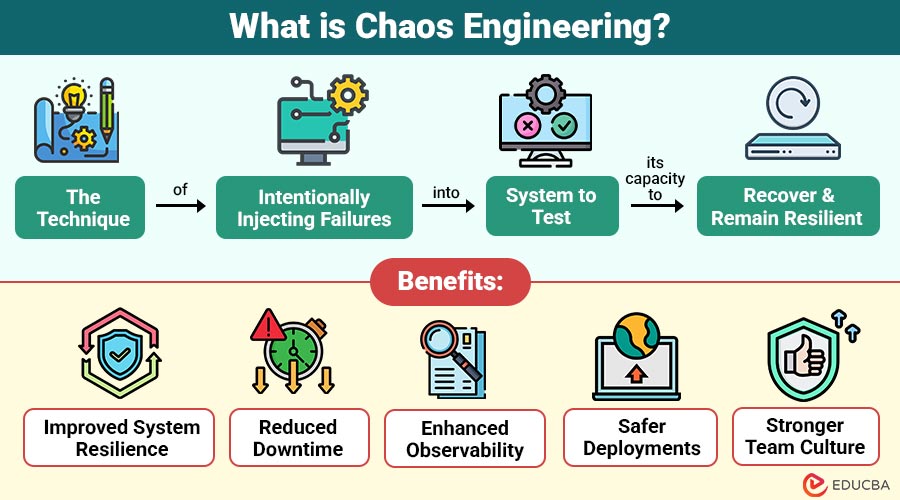
Chaos Engineering is the technique of intentionally injecting failures into a system to test its capacity to recover and remain resilient.
Rather than waiting for something to break in production, engineers introduce controlled failures like shutting down servers, disabling services, or simulating a network delay—just to see what happens. If the system handles it gracefully, great! If not, the team has a chance to fix the issue before it impacts real users.
Table of Contents:
- Meaning
- Importance
- Working
- Types
- Tools
- Benefits
- Real World Examples
- Challenges and Risks
- Getting Started with Chaos Engineering
Key Takeaways:
- Chaos Engineering tests systems with controlled failures to improve resilience, reliability, and real-world outage preparedness.
- It builds confidence in deployments by identifying weaknesses before they affect actual users or services.
- Popular tools like Chaos Monkey, Gremlin, and LitmusChaos help simulate real-world failure scenarios safely.
- Starting small in staging environments ensures safe experimentation and minimizes risks to live systems.
Why is Chaos Engineering Important?
Here are the key reasons why Chaos Engineering is important for building reliable, fault-tolerant systems in today’s complex digital environments:
1. Prepares for the Unexpected
Chaos Engineering intentionally injects failures into systems under controlled conditions, enabling teams to identify vulnerabilities and improve preparedness before real-world outages occur in production environments.
2. Improves System Resilience
By uncovering hidden weaknesses that typically remain undetected until a failure happens, Chaos Engineering helps teams proactively strengthen infrastructure and build more fault-tolerant systems.
3. Increases Customer Trust
Fewer service disruptions and quicker recovery from incidents lead to enhanced reliability, which builds user confidence and loyalty by delivering a more stable and seamless customer experience.
4. Boosts Confidence in Deployments
Knowing the system can withstand various failure scenarios empowers developers and operations teams to deploy new features and updates with greater confidence and reduced fear of causing outages.
How Does Chaos Engineering Work?
Chaos Engineering follows a scientific process. Here Is how it typically works:
1. Define the “Steady State”
Establish what normal system behavior looks like—such as performance metrics, error rates, or throughput—to identify deviations when chaos is introduced.
2. Create a Hypothesis
Predict how the system should behave under stress. For example, assume shutting one server won’t affect user experience or degrade system performance.
3. Introduce Chaos
Simulate real-world failures—like shutting down servers, breaking network connections, or delaying services—to test how the system handles unexpected disruptions.
4. Observe the Results
Monitor the system’s behavior during the experiment. Check if the hypothesis was accurate, and assess the impact on users, alerts, and system performance.
5. Improve the System
Analyze findings and strengthen weak points. This may involve enhancing failover mechanisms, tuning auto-scaling policies, or improving monitoring and alert systems.
Types of Chaos Experiments
Here are some common chaos experiments:
1. Instance Termination
Randomly shut down a virtual machine or server to observe how the system handles a sudden loss of compute resources.
2. Network Latency
Artificially delay network traffic to simulate poor connectivity and test the system’s performance under high-latency conditions.
3. CPU Hog
Consume maximum CPU resources on a server to evaluate system performance and stability during processor-intensive stress conditions.
4. Dependency Failure
Simulate the unavailability of critical external services or microservices to observe how your system behaves when dependencies are lost.
5. DNS Failures
Disrupt domain name resolution to see how applications react when they cannot resolve service addresses or hostnames.
6. Disk Full
Fill disk space to maximum capacity to monitor system behavior, logging issues, or potential crashes due to storage exhaustion.
These experiments help answer questions like:
- “Will users still be able to log in if one data center fails?”
- “What happens if our payment service becomes slow?”
Chaos Engineering Tools
Several tools exist to help teams perform chaos experiments. Here are some popular ones:
1. Chaos Monkey
Created by Netflix, Chaos Monkey randomly terminates virtual machine instances in production to ensure systems can withstand unexpected server failures and remain resilient.
2. Gremlin
A commercial chaos engineering platform providing precise control over experiments, allowing users to simulate failures in CPU, memory, disk, network, and other system components.
3. Chaos Mesh
A Kubernetes-native chaos engineering tool that enables users to orchestrate fault injection in cloud-native applications, helping teams validate system resilience and failure recovery.
4. LitmusChaos
An open-source chaos engineering framework designed for Kubernetes, supporting a wide range of predefined experiments to test application robustness and improve reliability.
Benefits of Chaos Engineering
Here are the key benefits of implementing Chaos Engineering to strengthen your system’s reliability and team practices:
1. Improved System Resilience
Chaos Engineering helps uncover hidden weaknesses in your systems and ensures they can recover or self-heal after failures.
2. Reduced Downtime
By proactively testing failure scenarios, teams can respond faster to incidents, leading to quicker recovery and fewer unexpected outages.
3. Enhanced Observability
Running chaos experiments encourages better monitoring, logging, and alerting practices, making it easier to detect and diagnose issues.
4. Safer Deployments
Chaos Engineering validates that new code, features, or infrastructure changes won’t introduce hidden failure points, making deployments more reliable.
5. Stronger Team Culture
It promotes collaboration among DevOps, developers, and Site Reliability Engineers (SREs), fostering a culture of shared ownership and continuous improvement.
Real World Examples
Here are some notable companies that successfully implement Chaos Engineering to build resilient, high-availability systems:
1. Netflix
The pioneer of Chaos Engineering. Netflix created Chaos Monkey to test its microservices and ensure their video streaming platform remains available, even if servers randomly crash.
2. Amazon
Amazon simulates network failures and server crashes to test how its massive infrastructure reacts, ensuring smooth shopping experiences during high-demand events like Black Friday.
3. Google
Google practices failure testing to ensure its distributed systems, like Gmail and Google Docs, recover quickly from data center failures.
Challenges and Risks
Chaos Engineering is not without challenges:
1. Cultural Resistance
Many teams resist Chaos Engineering due to fear of intentionally causing failures in production, worrying it might lead to blame, disruption, or loss of customer trust.
2. Requires Maturity
Chaos Engineering demands a mature system with strong observability, alerting, and rollback mechanisms to ensure that failures are detected quickly and systems can recover safely.
3. Controlled Scope Needed
If chaos experiments are poorly scoped or uncontrolled, they can cause significant disruptions, outages, or data loss, defeating the purpose of improving reliability and resilience.
4. Needs Executive Buy-In
Effective chaos engineering requires management support, budget, and dedicated resources, as teams need time and authority to run experiments and address the issues they uncover.
Getting Started with Chaos Engineering
If you are new to chaos engineering, here’s a step-by-step guide to begin safely:
Step 1: Start in a Non-Production Environment
Begin chaos testing in a test or staging environment to avoid real-world risks.
Step 2: Establish Monitoring and Alerts
Before introducing failure, ensure you can detect it—tools like Prometheus, Grafana, or Datadog help.
Step 3: Run Small, Safe Experiments
Start with low-risk experiments, such as killing a non-critical server. Measure impact and adjust.
Step 4: Document Everything
Track what was tested, what failed, what succeeded, and what was improved.
Step 5: Involve the Whole Team
Make chaos engineering a team activity—include developers, QA, operations, and management.
Final Thoughts
Chaos Engineering may seem counterintuitive, but it helps teams build resilient systems by intentionally testing failures. It prepares organizations for the unexpected, boosts confidence in system architecture, and enhances user experience. As infrastructure grows more complex and downtime becomes increasingly expensive, Chaos Engineering has become an essential practice for modern DevOps and Site Reliability Engineering (SRE) teams.
Frequently Asked Questions (FAQs)
Q1. Is Chaos Engineering only for big tech companies?
Answer: Not at all. Even small teams can start with basic chaos experiments in test environments.
Q2. Will chaos engineering harm my users?
Answer: If done properly—controlled, safe, and monitored—it should not impact users. Always test in staging first.
Q3. How often should I run chaos experiments?
Answer: Regularly. Many teams integrate chaos testing into weekly or monthly operations.
Q4. Is Chaos Engineering the same as load testing?
Answer: No. Load testing measures system performance under traffic; chaos testing measures resilience under failure.
Recommended Articles
We hope that this EDUCBA information on ” Chaos Engineering” was beneficial to you. You can view EDUCBA’s recommended articles for more information.

