


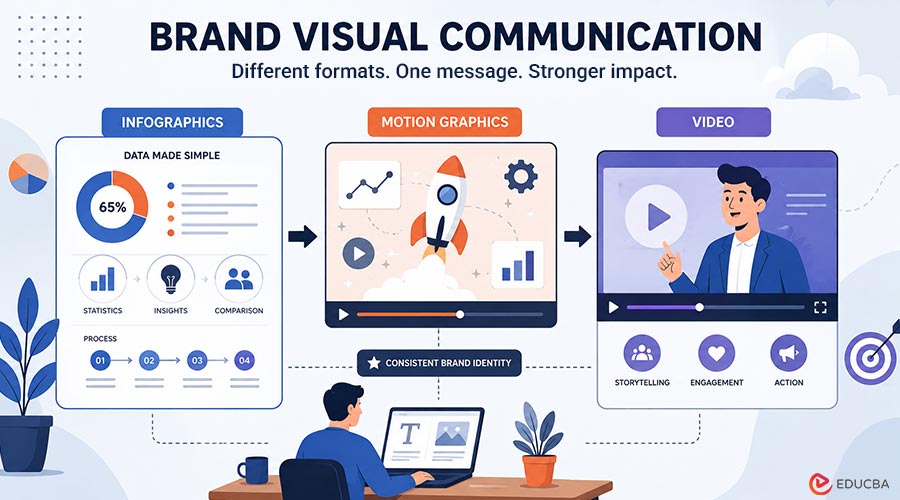
Brand visual communication is no longer limited to one format. A modern brand may publish an infographic on its blog, create an animated explainer for social media, build a slide deck for sales enablement, and launch a short product video for paid campaigns, all while keeping the message consistent. To a learner, marketer, or designer, these formats may seem separate. In practice, they are closely connected. That is why it helps to think of infographics, motion graphics, and video not as isolated outputs but as parts of a single communication system.
Infographics Make Information Easier to Scan
An infographic is usually best when the goal is to make information easier to scan. It organizes content visually so that a viewer can understand a topic faster than they would from paragraphs alone. This makes infographics useful for statistics, process summaries, comparisons, and educational explainers. Instead of asking the audience to read through a long explanation, an infographic gives them a visual path through the main idea.
That is especially useful when the information includes numbers, steps, categories, or relationships. A good infographic does not just look attractive. It helps the audience understand what matters first, what supports the main point, and how the pieces connect.
Motion Graphics Add Sequence and Emphasis
Motion graphics become useful when movement can improve understanding. If a designer needs to show sequence, transformation, emphasis, or progression, motion adds a layer that static design cannot. A chart can show a result; motion can show how the result develops. A static process map can show stages; motion can guide the viewer from one stage to the next.
This is where motion graphics connect naturally with animation. For brand communication, motion graphics are especially helpful when the message needs to be quick, clear, and memorable. A few seconds of animated typography, icon movement, or diagram animation can make a product benefit, campaign idea, or process feel easier to follow.
Video Brings Multiple Layers Together
Video becomes the broader storytelling container. It can combine live action, screenshots, motion graphics, voiceover, typography, and illustration into one viewing experience. That is why video is often the most flexible format for onboarding, product education, campaign storytelling, or executive communication.
A video can show a person speaking, demonstrate a product, introduce a problem, animate the solution, and close with a clear call to action. It gives brands more room to build emotion, pacing, and context than a single static asset typically provides. Video works best when it is not only produced well but also structured around a clear story.
Build an Integrated Brand Visual Communication Strategy
The important point is that these formats should not compete with each other. They should support each other. A strong content stack often begins with information design. Before a team animates anything, it needs to understand the structure of the information.
What is the key message? Which details matter most? What should the audience remember? Which parts need to be shown visually, and which parts can stay as text or narration? If this structure is weak, the final output may be visually attractive but unclear. This is where infographic thinking becomes valuable even inside animation and video projects. Good visual hierarchy, simplification, and sequencing are not just design preferences. They are communication tools.
One Message Can Move Across Multiple Formats
For instance, imagine a B2B company launching a cybersecurity report. It may start with an infographic summarizing the main findings. That infographic can then become the basis for a motion-led social asset. Later, the same visual system can inform a narrated video summary for sales or demand-generation teams.
The content changes by channel, but the visual logic stays aligned. The same idea applies to product launches, customer education, internal training, investor updates, and campaign storytelling. A brand does not need to invent a new visual language for every format. It needs a flexible system that can move from static design to animation to video without losing the core message.
Brand Consistency Makes the System Stronger
Branding is part of this alignment as well. A company’s colors, typography, logo use, illustration style, motion style, and tone should feel connected across formats. If a company’s infographics look corporate and minimal, but its videos feel generic or stylistically disconnected, the overall communication system becomes weaker.
Consistency is not about making everything identical. It is about making each format feel related. A sales deck, animated explainer, social video, and infographic can all have different layouts and pacing, but they should still feel like they belong to the same brand.
Scaling Brand Visual Communication Creates a Production Challenge
A single designer can create an infographic manually. A growing organization may need dozens of campaign assets, multiple video versions, region-specific edits, and updated visual explainers across departments. For campaign teams, scale also creates a measurement problem. Once infographics, motion graphics, and videos are adapted into paid social or paid media assets, teams need to know which formats, hooks, and messages are actually working. SuperAds can fit into that part of the workflow as a creative analytics layer, helping marketers review ad performance, compare creative patterns, and turn campaign results into clearer decisions for the next round of visual assets.
At that point, the challenge is no longer just creativity. It is a creative production. Teams need repeatable systems for briefing, designing, reviewing, adapting, and publishing visual assets. Without that structure, work can quickly become inconsistent. One team may create a polished video, another may publish an off-brand infographic, and another may build a slide deck that looks unrelated to both. The result is not just a design problem. It becomes a communication problem.
When External Creative Support Can Help?
If a team needs custom brand-aligned diagrams, data visuals, or explanatory artwork, Superside’s illustration design services are relevant to the visual-system side of the work. If the goal is to animate those visuals into explainers, launch assets, or campaign content, motion design services are a closer fit.
And when organizations need larger-scale storytelling assets that integrate editing, scripting, design, and production across channels, video production services can support the broader production workflow. The useful point is not that every team needs outside support. Many teams can produce strong internal visual communication. But when output volume increases, having a consistent production layer can help keep the message, style, and quality aligned across formats.
AI Can Support the Workflow, But Not Replace the Message
Scale also changes how teams think about workflow. In earlier stages, designers may manually move from concept to output. At higher volume, teams often look for ways to speed up ideation, versioning, and asset adaptation without compromising quality. That is where Superside’s AI-enhanced creative services fit into the conversation. AI on its own does not guarantee strong communication, but it can help accelerate parts of the production process when used inside a disciplined creative system.
For example, AI may help teams explore visual directions, adapt assets to different sizes, speed up early concept development, or support high-volume creative variations. But the message still needs human judgment. The team still has to decide what the audience needs to understand, which format best serves the idea, and how the final asset should represent the brand.
Choosing the Right Format
For learners and practitioners, the main lesson is this: good visual communication starts with the message, then chooses the right format.
- Use an infographic when the audience needs clarity at a glance.
- Use motion graphics when movement improves the explanation.
- Use video when the story benefits from multiple layers working together.
In many cases, the strongest solution is not to choose one over the others, but to design them as a connected set.
Final Thoughts
This mindset is useful whether you are a student learning brand visual communication, a marketer planning a campaign, or a designer building client assets. The more you understand how these formats interact, the easier it becomes to create work that is not only attractive but also memorable and effective. The best visual storytellers do not just design isolated pieces. They build systems that help people understand ideas across formats.
Recommended Articles
We hope this guide on brand visual communication helps you create more impactful visual content. Check out these recommended articles for more insights into branding, design, and visual storytelling.

