
Updated April 4, 2023

Introduction to Bouncy numbers
Angular material also provides us one of the most useful features which can be built very fast by using it, and that is Pagination. Angular material provides us with a build module that can be imported inside our application and can be used directly to create the pagination inside our application. The basic purpose of pagination is to divide the data into different pages when the number or volume of data is going to be very large. It helps to divide and show data on the various pages, it increases the readability of the data and makes it easier to deal with a large amount of data. In the coming section of the tutorial, we will see how we can implement pagination inside our application using the material library in the build module, to make it more easy, quick, fast, and under stable by the beginners.
Syntax:
As we have seen we can build the pagination using modules and directives available in the material library, let’s take a closer look at the syntax of pagination given by the material library see below;
<mat-paginator [length]="your value"

[pageSize]="your page size"

[pageSizeOptions]="your value">

</mat-paginator>
As you can see in the above syntax we are trying to create pagination with the help of ‘mat-paginator’ and specify the properties of the directive to initialize our pagination. To use this, we have to import the appropriate module inside the module to avoid errors. In the coming section of the tutorial, we will have closer look at the practice syntax for better clarity and understanding.
How does pagination work in Angular material?
Pagination helps us to divide our data into equal size into each of the pages, it helps us to show data in a good manner. Also, we can easily navigate to any of the ages we want. we can also specify the limit of data on each page, with few changes to the properties of the pagination. In this section we will see how we can implement pagination in our existing application and what all configurations are required to make this work, let’s get started;
1) MatPaginatorModule : In order to implement pagination we will import the ‘MatPaginatorModule’ inside in our root module or any of the child module in order to use this inside the application. For reference please follow the below code of using this see below;
e.g.:
import {MatPaginatorModule} from '@angular/material/paginator';
2) MatPaginator: This component from the material library is responsible to provide the navigation in the pagination. It has few properties which can be used to implement pagination, let’ get started to see below;
- pageSizeOptions: number[]: This will display all the page size options to the user, it is an array of age size.
- pageSize: number: This will decide how much data will be displayed on each page, the default is 50.
- length: number: Number of data that need to be paginated.
- pageIndex: number : default is 0.
It also contains few methods which are mentioned below;
- firstPage: will move to the first page.
- getNumberOfPagaes: this will return the number of pages.
- hasPreviousPage: Check if the previous page exists return type is Boolean.
- hasNextPage: return Boolean, check if has next page.
- previousPage: move to the previous page.
- nextPage: Move to the next page.
Now let’s get started with the steps that need to be taken in order to step up our angular material project initially for beginners see below;
1) First install the angular CLI which enables us to download the required packages and library for our project. You can download it by typing the below command on your command make sure you have already installed node see below;
e.g.:
npm install -g @angular/cli) The above command will install the CLI globally in our system hence we can use it globally when required.
3) Now in this step we will try to create the new angular project from scratch, this project will not be a material project that we have to add later by installing the material dependency inside our project. so just execute the below command on your command Promat and press enter see below;
e.g.:
ng new your project name

>> ng new my-first-project
This command will create the project with the name my-first-project, you can create your project with any name mentioned.
4) Just to make sure try one command which is mentioned below to install all the required library into our project,
e.g.:
npm install
5) Now you can test and run your project by typing the simple command which is mentioned below. This is just to make sure that we are on the right track and our project has been created without any error or bugs inside it.
e.g.:
ng serve
6) go on browser and try to run the application with the below URL :
e.g.:
http://localhps:4200
By default, the angular project runs on port 4200, you can change it as per your need if required.
7) Now everything is set we have our angular project now we will add the material library to our project just by running the below command on the command prompt;
e.g.:
ng add @angular/material
Examples of Bouncy numbers
Here are the following examples mentioned below.
1) index.html code:
<!DOCTYPE html>

<html lang="en">

<head>

<meta charset="utf-8">

<meta name="viewport" content="width=device-width, initial-scale=1.0">

<link href="https://fonts.googleapis.com/icon?family=Material+Icons&display=block" rel="stylesheet">

<title>Demo pagination</title>

</head>

<body class="mat-app-background">

<paginator-demo>Loading ..</paginator-demo>

<span class="version-info">Current build: 12.1.1</span>

</body>

</html>
2) module.ts code:
import {NgModule} from '@angular/core';

import {MatPaginatorModule} from '@angular/material/paginator';

@NgModule({

exports: [

MatPaginatorModule,

]
})

export class DempPaginationModule {}
3) demo.pagination.component.ts code:
import {Component} from '@angular/core';

/**

* @title Demo pagination

*/

@Component({

selector: 'paginator-demo',

templateUrl: 'demo.pagination.component.html',

})

export class DemoPagination {}
4) demo.pagination.component.html code:
<h5><u><i>Demo pagination using Angular material !!</i></u></h5>

<mat-paginator [length]="200"

[pageSize]="20"

[pageSizeOptions]="[5, 10, 25, 100]">

</mat-paginator>
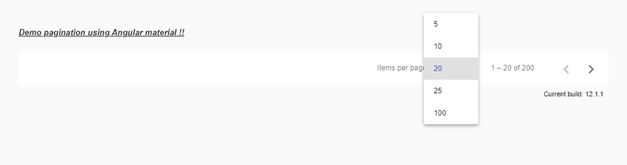
Output:

Size array after the click:
Conclusion – Bouncy numbers
By the use of pagination, we can easily manage our data and show it to the user in a good manner without keep on scrolling another whole page if we have thousands of data available. It can directly be used with a few changes and configurations inside the existing code, is easy to maintain, and is readable by the developers.
Recommended Articles
This is a guide to Bouncy numbers. Here we discuss How does pagination works in Angular material along with the examples and outputs. You may also have a look at the following articles to learn more –

