


Introduction to API Testing Tools
API Testing Tools have become indispensable in today’s fast-paced software development environment. As modern applications increasingly rely on APIs to exchange data and drive functionality, ensuring their accuracy, performance, and security is critical. API testing tools help automate the validation process, reduce manual errors, and streamline integration across various platforms. Whether you are a developer building microservices or a QA engineer focused on end-to-end validation, choosing the right API testing tool can significantly improve your testing workflow and software quality.
Why Use API Testing Tools?
Manually testing APIs is inefficient and error-prone. API testing tools automate and simplify the process, offering capabilities like:
1. Sending HTTP Requests
API testing tools can automatically send HTTP requests to endpoints, simulating client behavior for thorough functionality verification.
2. Validating Responses
These tools help validate response data, status codes, headers, and formats to ensure the API behaves as expected in all cases.
3. Mocking Services
They allow mocking of APIs or services that are unavailable or under development, enabling isolated and consistent test environments.
4. Generating Test Reports
API testing tools generate detailed test reports, helping teams analyze results, identify issues, and maintain quality with greater transparency.
5. Supporting CI/CD Pipelines
Integration with CI/CD pipelines ensures automated API testing during development stages, promoting faster releases and continuous quality assurance.
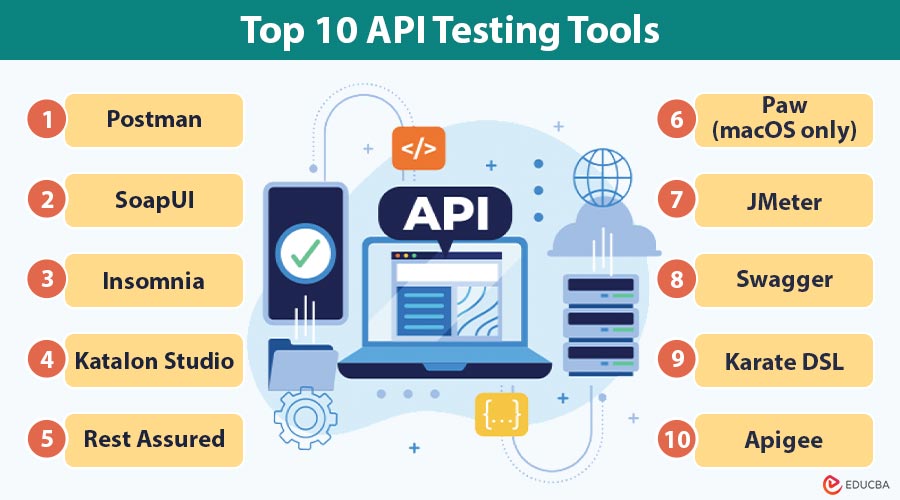
Top 10 API Testing Tools
Here is a curated list of the top 10 API testing tools, suitable for different use cases from beginner to enterprise level.
#1. Postman
Postman is a widely used API testing platform ideal for beginners and professionals. Its intuitive interface, scripting support, and CI/CD integration make it perfect for testing REST, SOAP, and GraphQL APIs efficiently.
Features:
- User-friendly interface
- Supports REST, SOAP, GraphQL
- Test scripting with JavaScript
- Integration with CI/CD pipelines
Pros:
- Intuitive, beginner-friendly GUI
- Excellent documentation and community support
- Supports REST, SOAP, and GraphQL
Cons:
- Limited features in the free plan for large teams
- Not ideal for heavy automation
- Weak load testing support
#2. SoapUI
SoapUI is a robust tool tailored for comprehensive SOAP and REST API testing. It offers advanced features like security, load, and data-driven testing, making it a strong choice for complex enterprise-level scenarios.
Features:
- Full-featured testing for SOAP and REST APIs
- Data-driven testing
- Security and load testing features
- Open-source and Pro versions available
Pros:
- Enterprise-grade features for SOAP and REST
- Data-driven and security testing built in
- Available as open-source and commercial
Cons:
- Steep learning curve for new users
- Outdated user interface
- Requires more setup time for automation
#3. Insomnia
Insomnia is a lightweight yet powerful API client that suits developers who prioritize speed and simplicity. It supports REST and GraphQL, automated testing, and plugins, making it highly customizable for everyday API development.
Features:
- REST and GraphQL support
- Environment management
- Automated testing
- Git sync integration
Pros:
- Fast and responsive UI
- Great for REST and GraphQL
- Supports plugins and customization
Cons:
- Collaboration tools are limited in the free version
- Smaller community compared to Postman
- Basic reporting features
#4. Katalon Studio
Katalon Studio is a versatile automation tool ideal for enterprises. It supports web, mobile, API, and desktop testing with a focus on data-driven testing, offering CI/CD integration and advanced reporting capabilities.
Features:
- Web, mobile, API, and desktop testing in one tool
- Built-in test recorder and CI/CD integrations
- Supports REST and SOAP
- Data-driven and keyword-driven testing
Pros:
- Multi-platform support (web, API, mobile, desktop)
- CI/CD integration and advanced reporting
- Supports both REST and SOAP APIs
Cons:
- Resource-heavy application
- Some features are locked behind a paywall
- Learning curve for beginners
#5. Rest Assured
Rest Assured is a code-based Java library designed for API testing. It simplifies validation for RESTful services with a domain-specific language, making it an excellent tool for developers building test automation in Java.
Features:
- Domain-specific language (DSL) for Java
- Integration with JUnit and TestNG
- Supports XML and JSON requests/responses
- Good for BDD frameworks
Pros:
- A code-based approach is ideal for developers
- Easy integration with JUnit/TestNG
- Powerful support for JSON and XML validation
Cons:
- Limited to the Java programming language
- Not suitable for non-developers
- No GUI support
#6. Paw (macOS only)
Paw is a macOS-exclusive API client known for its elegant interface and powerful features. It supports advanced request building, environment variables, and code exports, offering a rich experience for Mac developers.
Features:
- Advanced HTTP client for Mac
- Support for dynamic values, environments, and extensions
- Easily export code in multiple languages
- Easily switch between dev, staging, and production setups.
Pros:
- Sleek macOS-native interface
- Powerful request composer with environment support
- Export code snippets in multiple languages
Cons:
- Not available on Windows or Linux
- Paid-only tool (no free version)
- Limited for enterprise testing workflows
#7. JMeter
Apache JMeter is designed primarily for load and performance testing of APIs. It supports REST and SOAP protocols and integrates well with CI/CD pipelines, making it essential for stress testing at scale.
Features:
- Designed for performance testing
- REST/SOAP API testing support
- Easy integration with CI/CD pipelines
- Highly customizable with plugins
Pros:
- Excellent for load and performance testing
- Supports REST, SOAP, and other protocols
- Plugin ecosystem for extended functionality
Cons:
- Steep learning curve
- Dated UI and less intuitive UX
- Complex configuration for beginners
#8. Swagger / SwaggerHub
Swagger and SwaggerHub streamline API documentation and testing through OpenAPI specifications. They allow collaborative API design, mocking, and testing, making them ideal for teams managing the full API lifecycle.
Features:
- Auto-generates documentation from OpenAPI specs
- API mocking, testing, and simulation
- Collaborative design in SwaggerHub
- Fully supports OpenAPI for standardized API development and integration
Pros:
- Auto-generates documentation from OpenAPI specs
- Supports API mocking and testing
- Great for team collaboration (SwaggerHub)
Cons:
- Primarily focused on design, not advanced testing
- Limited test automation features
- May require a separate testing tool for performance testing
#9. Karate DSL
Karate DSL combines API testing with Behavior-Driven Development (BDD). With simple syntax and support for REST, SOAP, and GraphQL, it is ideal for QA engineers and developers working with automated test scripts.
Features:
- BDD syntax (like Cucumber)
- Supports REST, SOAP, and GraphQL
- Built-in assertions
- Supports mocks and performance testing
Pros:
- Simple syntax, even for non-developers
- Built-in support for performance, mocking, and validations
- Combining API testing and BDD in one
Cons:
- Still requires basic programming knowledge
- Limited IDE support
- Smaller community than mainstream tools
#10. Apigee
Apigee, by Google Cloud, is an enterprise-grade platform offering comprehensive API management. It provides analytics, security, and monetization tools, making it perfect for large organizations managing APIs at scale.
Features:
- End-to-end API management
- Analytics, traffic control, and monetization
- Security testing
- Seamless integration with Google Cloud
Pros:
- End-to-end API management
- Built-in analytics and traffic control
- Tight integration with Google Cloud
Cons:
- Expensive for small or mid-size businesses
- Overkill for simple API testing
- Setup and configuration can be complex
Frequently Asked Questions (FAQs)
Q1. Which API testing tool is easiest for beginners?
Answer: Postman is often recommended due to its intuitive GUI and vast community support.
Q2. Can API testing be automated?
Answer: Yes. Most tools like Postman, Rest Assured, and Karate support automation and CI/CD integration.
Q3. Do I need to know coding for API testing?
Answer: It depends. Tools like Postman and Katalon require minimal coding. Others like Rest Assured and Karate are code-heavy.
Q4. Which is best for load testing?
Answer: JMeter and Karate (with Gatling integration) are great options for performance and load testing.
Final Thoughts
Choosing the right API testing tool can dramatically impact your software quality, release cycles, and team productivity. Whether you are a solo developer, QA engineer, or enterprise architect, there is a tool tailored to your needs. Evaluate tools based on your project size, team expertise, budget, and testing requirements. With the right approach and tools, you can build reliable APIs that drive exceptional user experiences.
Recommended Articles
We hope that this EDUCBA information on “API Testing Tools” was beneficial to you. You can view EDUCBA’s recommended articles for more information.

