


Updated November 20, 2026
AI for data analysis means using an assistant such as ChatGPT, Copilot in Excel, or Gemini in Google Sheets to profile, clean, calculate, and chart your data from plain-language requests. It saves hours on the mechanical work. It does not remove the need to check, because a file read at face value can give a confident answer that is wrong.
Key Takeaways
- The assistants do real work: ChatGPT writes and runs Python on an uploaded file, and Copilot and Gemini build formulas, PivotTables, and charts inside the sheet.
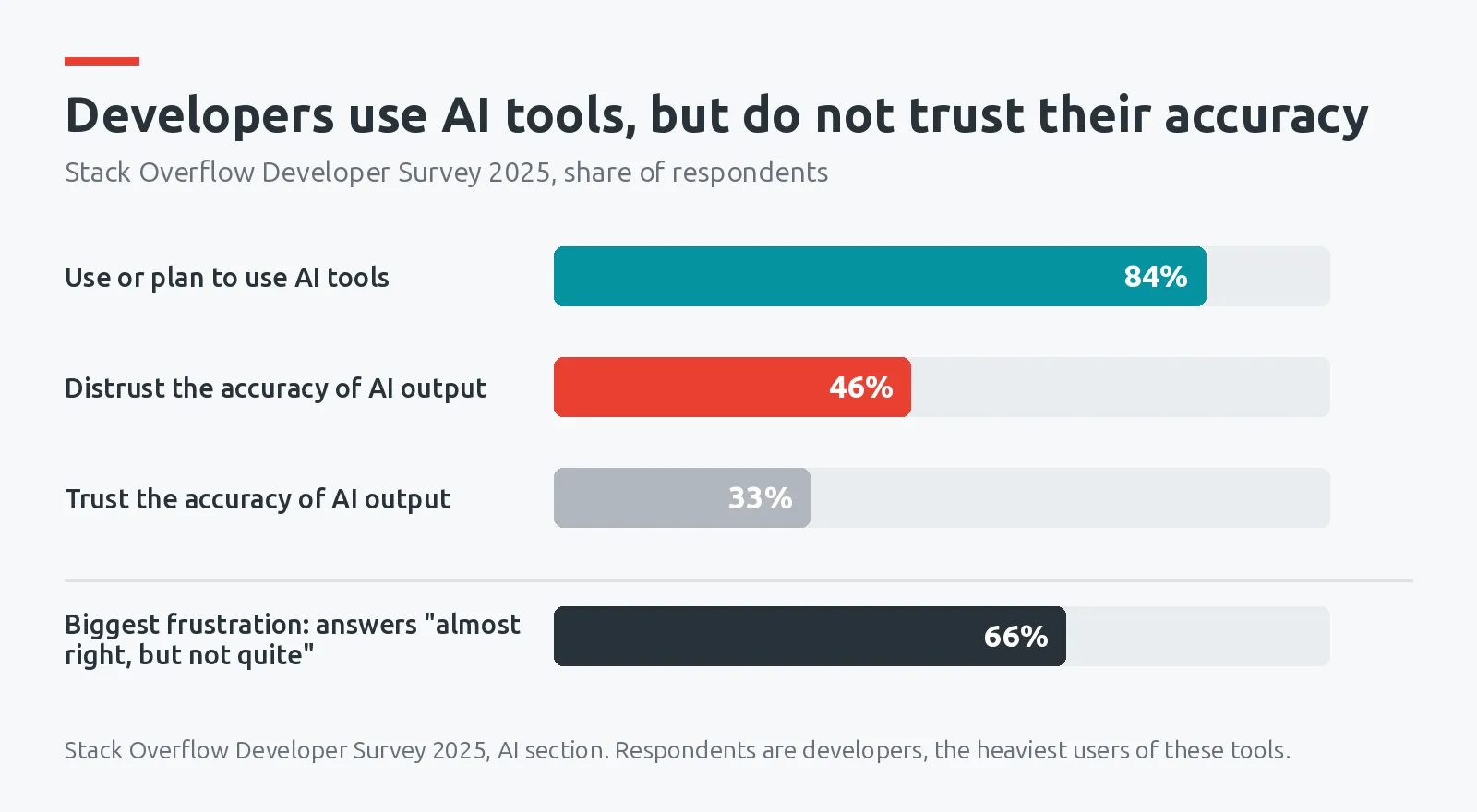
- Accuracy is the open problem. In the Stack Overflow 2025 survey, 46% of developers distrusted AI tools‘ accuracy, and 33% trusted it.
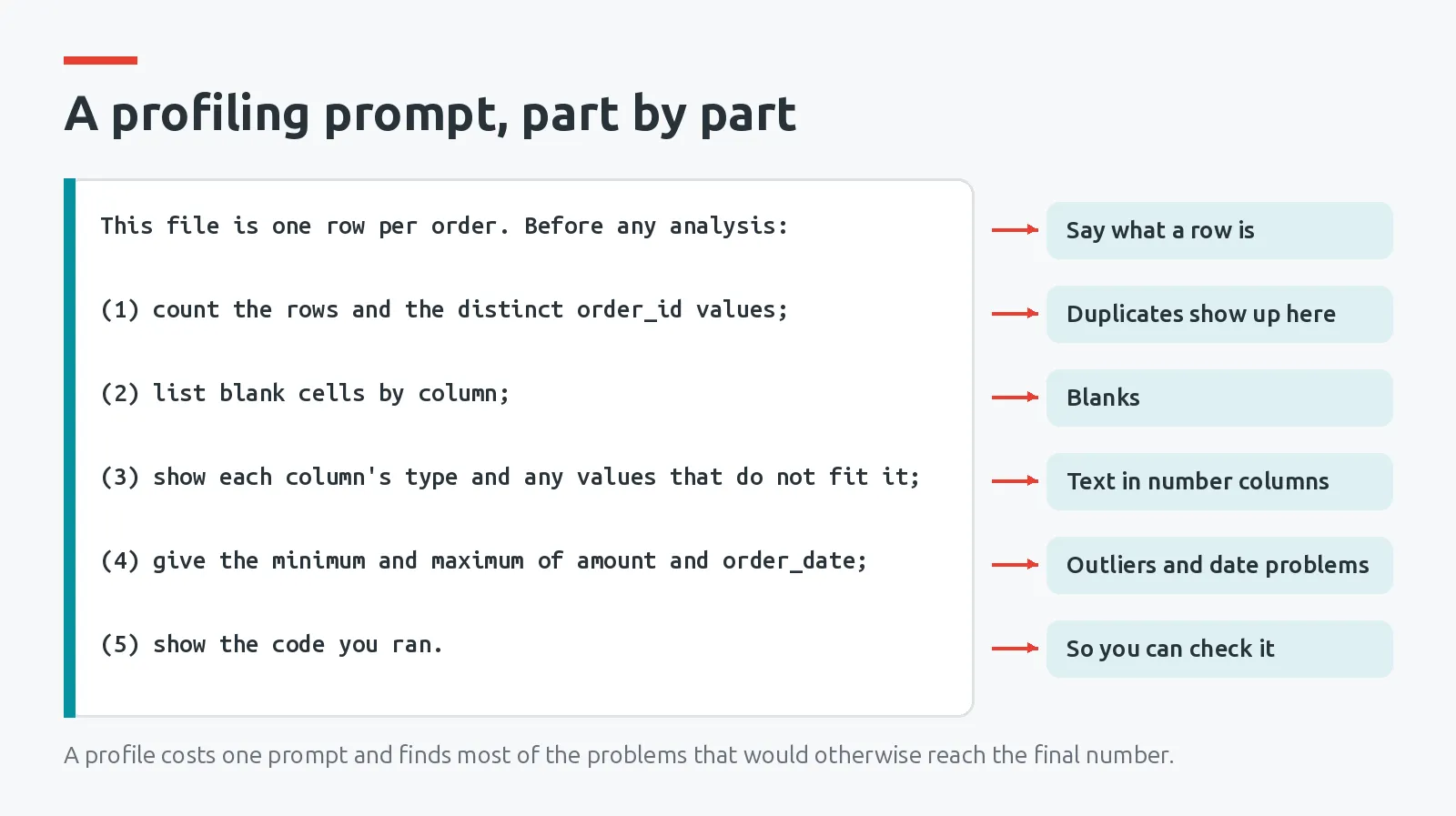
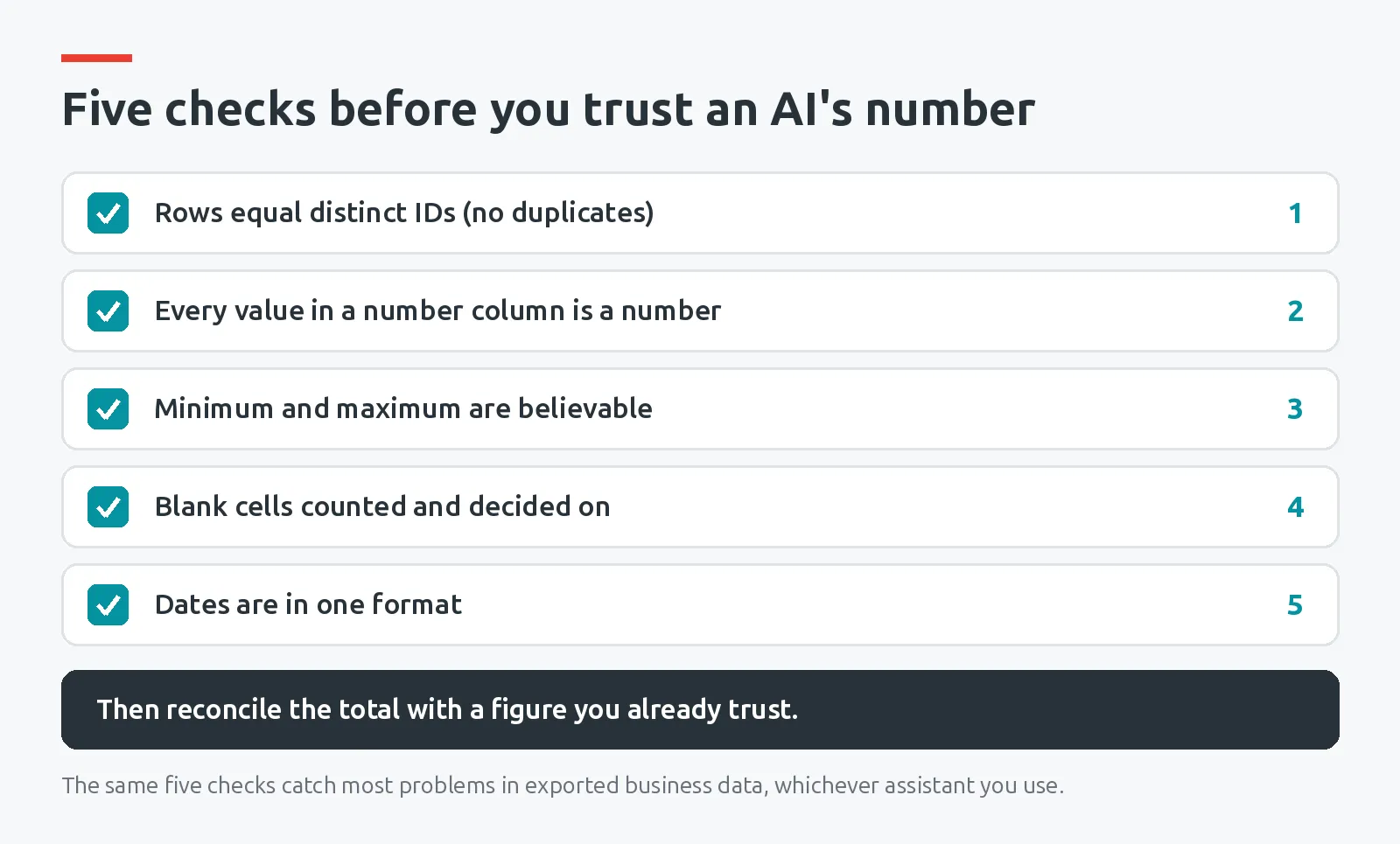
- Ask for a profile of the file before any answer: row count, distinct IDs, blanks, types, and ranges.
- In our 1,237-row sample, a face-value total was only 2.8% off, because three problems that each moved it by about 7,000 to 10,000 partly canceled.
What is AI for Data Analysis?
It is the use of a large language model to do analysis work from plain-language requests. The three assistants most people meet work in different places:
| Assistant | Where it Works | What it Does with Data | Worth Knowing |
| ChatGPT | On an uploaded file (.xlsx, .csv, .json, and more) | Summarises, builds tables and charts, and writes and runs Python in a notebook environment | Its Python cannot make web requests; review the code before relying on a result |
| Copilot in Excel | Inside the workbook | Builds formulas, PivotTables, charts and conditional formatting with Excel’s own tools | Not included in every Microsoft 365 subscription |
| Gemini in Google Sheets | Inside the sheet | Creates tables, formulas, charts and pivot tables, and generates analysis and insights | Needs an eligible Google Workspace or Google AI plan |
OpenAI’s help page is direct about the limits. For some tasks, ChatGPT writes and runs Python “in a stateful Jupyter notebook environment”, and the page tells you to “review the generated code, outputs, and assumptions before relying on the result”. It also warns that ChatGPT “may not reliably extract exact values” from scanned tables or images.
Why Does Checking AI’s Analysis Matter So Much?
Because the answers are fluent whether they are right or not, the Stack Overflow Developer Survey 2025 asked developers, who use these tools more than most, how they feel about them; 84% use or plan to use AI tools. Yet 46% distrust the accuracy of their output, and only 33% trust it. The biggest frustration, named by 66%, was “AI solutions that are almost right, but not quite”.
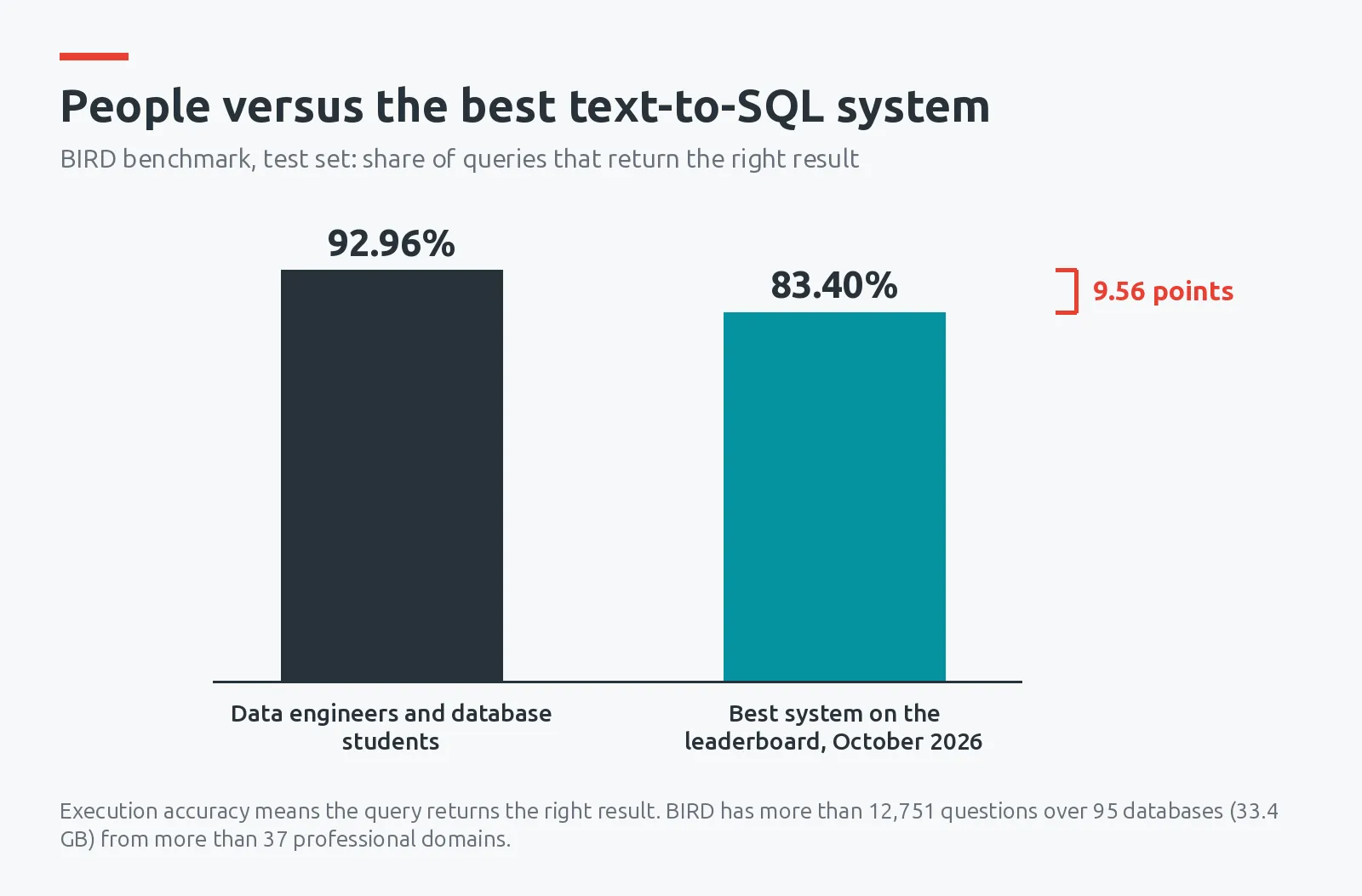
Writing SQL from a question shows the same gap. The BIRD benchmark tests systems on more than 12,751 questions over 95 databases totaling 33.4 GB. Data engineers and database students score 92.96% execution accuracy on its test set. The best system on the leaderboard, in October 2026, scores 83.40%. That is close, but it still means roughly one query in six returns the wrong result.
The skill that makes AI useful, then, is the analyst’s own: knowing what the right answer should look like. If you want to learn the analysis and the AI side together, with projects reviewed by mentors, a data analytics and generative AI course teaches SQL, Excel, and Power BI alongside the assistants.
How to Use AI for Data Analysis: A Step-by-Step
Six steps work in any of the three assistants.
1. Write the Question and Define Each Number
“How are sales doing?” gets a vague answer. “Total order value by region for January to June 2026, excluding test orders, counting each order once” gets a checkable one. Decide what counts before you ask.
2. Prepare the File
OpenAI’s guidance is a good rule anywhere: descriptive headers in the first row, one row per record, and plain-language column names. Avoid several tables on one sheet, empty rows or columns that split the data, and values that exist only in images.
3. Ask for a Profile Before You Ask for An Answer
The first prompt should describe the data, not analyze it.
4. Ask the Question, and Name the Method
ChatGPT’s help page notes that it “may choose an analysis method or chart type that does not match your intent on the first try”. So say which columns, groupings, and calculations to use, for example, “sum amount by region, after removing duplicate order_id rows and the test order”.
5. Read the Code and Reconcile the Numbers
Open the code the assistant ran. Then check its answer against a figure you already trust: last month’s report, a total from the source system, or a quick SUM you do yourself. If the two disagree, ask the assistant to explain the difference row by row.
6. Write the Conclusion Yourself
Let the assistant draft the summary, then rewrite it in your words. You will be the one asked how you got the number.
A Worked Example: What Face-Value Reading Gets Wrong?
We built a sample orders export of 1,200 real orders and planted five common problems, giving 1,237 rows. Then we compared what a face-value reading reports with the true figures.
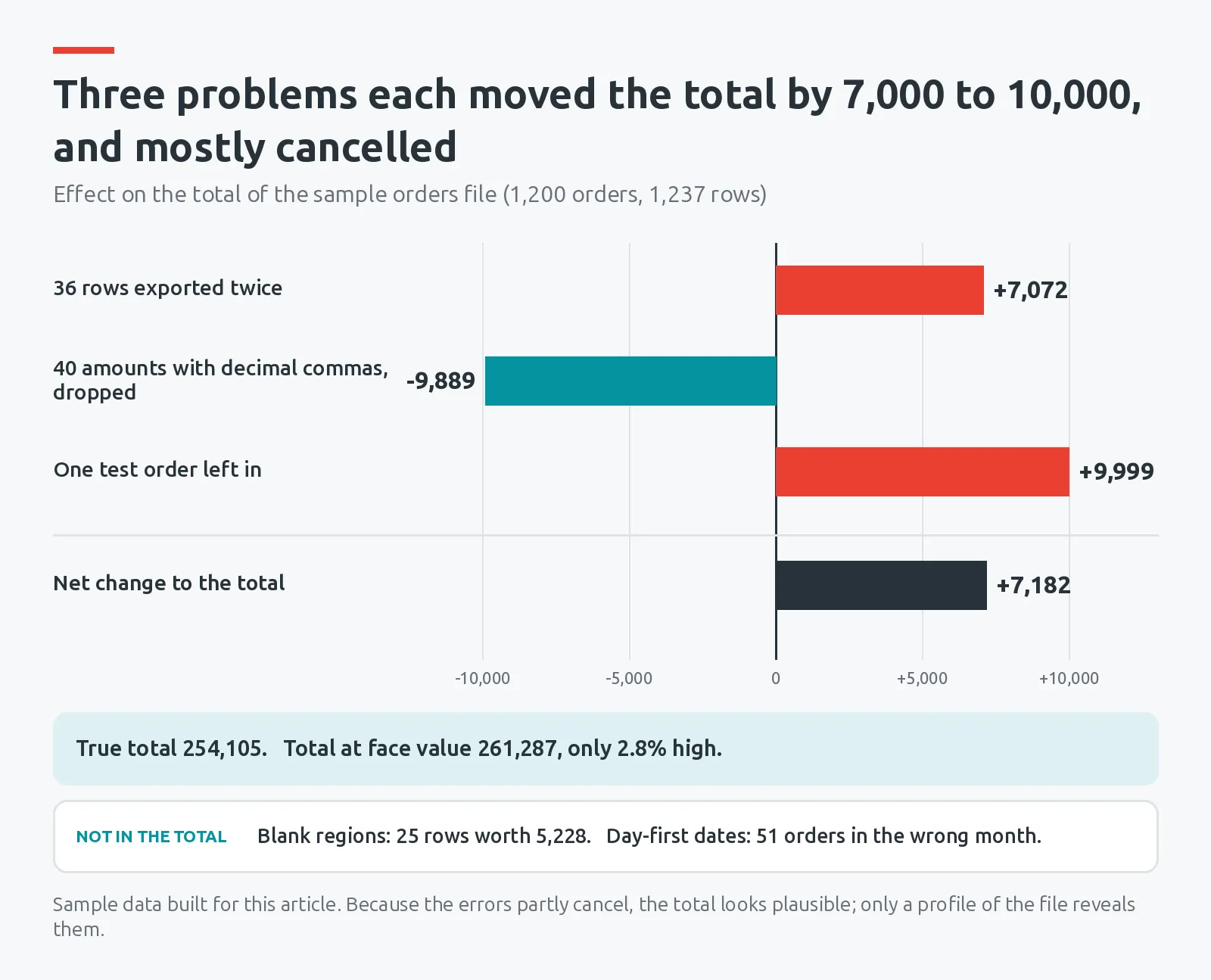
The face-value total came out at 261,287 against a true 254,105, only 2.8% high, and the average order at 218.47 against 211.75. Nothing looks alarming. Yet three separate errors were each worth 7,000 to 10,000, and two more break the regional and monthly views:
| Problem in the File | Prompt that Catches It | What You Should See |
| 36 rows exported twice | Count rows and distinct order_id values | 1,237 rows but 1,201 IDs |
| 40 amounts with a decimal comma | Show amount values that are not numbers | 40 values such as “123,45” |
| A test order of 9,999 | Give the minimum and maximum of amount | A maximum of 25 times the next largest |
| 25 blank regions | Count blank cells by column | 25 blanks in region, worth 5,228 |
| 60 dates written day first | Show order_date values not in YYYY-MM-DD format | 60 dates like 05/03/2026, 51 of them read into the wrong month |
After the fixes, the cleaned total matched the true 254,105 exactly, across 1,200 orders. Each problem shows up in one part of the profile prompt from step 3, before any analysis is run.
What Data Should You Never Upload to an AI Assistant?
Anything your organization has not approved for that tool, and any personal data you have no right to share. The rules depend on the plan. OpenAI says it may use content from its individual plans, Free, Plus, and Pro, to train models unless you turn off “Improve the model for everyone” in Data controls. By default, it does not train on inputs or outputs from ChatGPT Business, Enterprise, or Edu. Temporary chats are not used for training while they remain temporary.
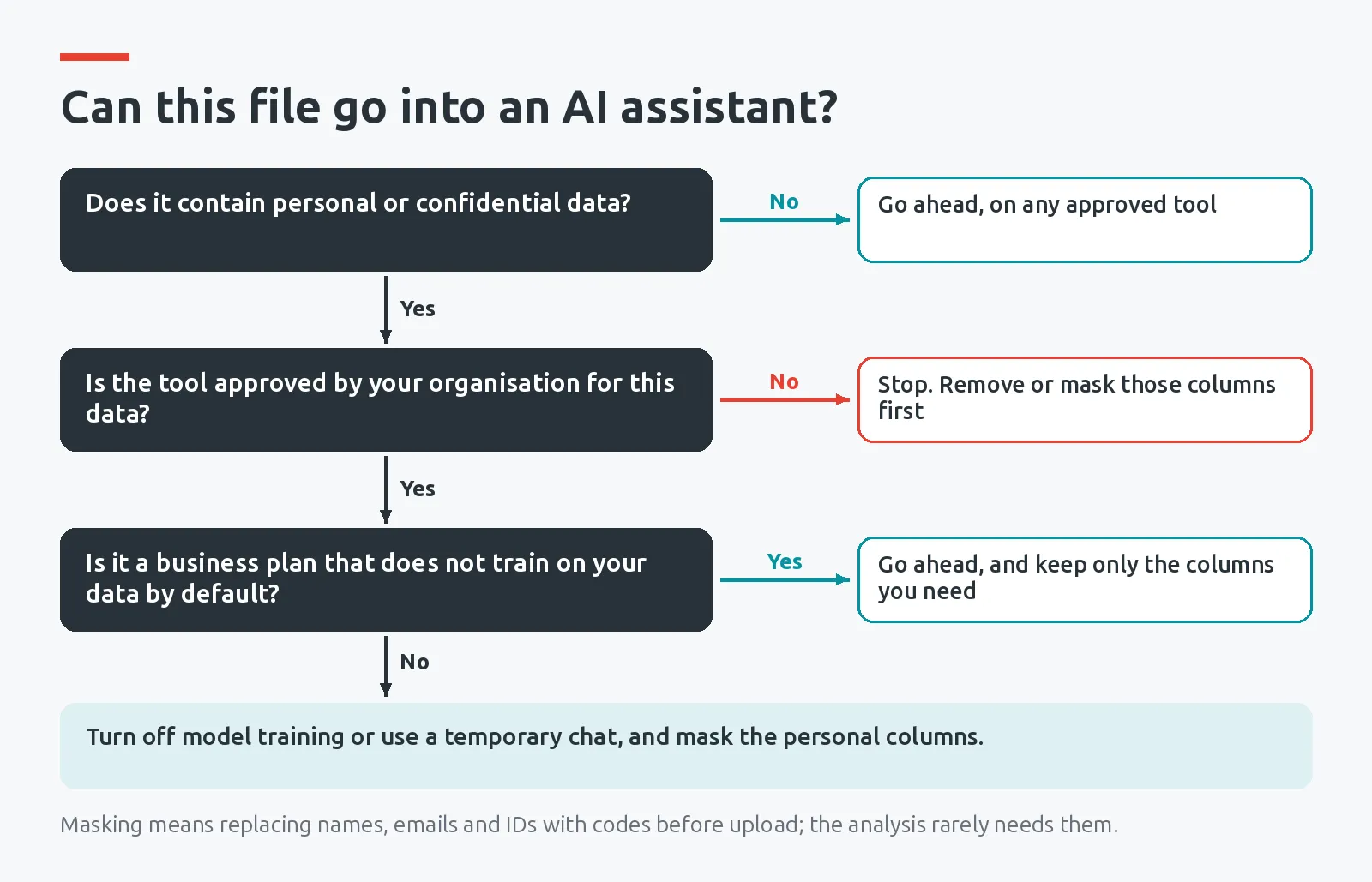
A good habit is to send only the columns the question needs. Ordering values by region does not need customer names.
Where Does AI for Data Analysis Help Most?
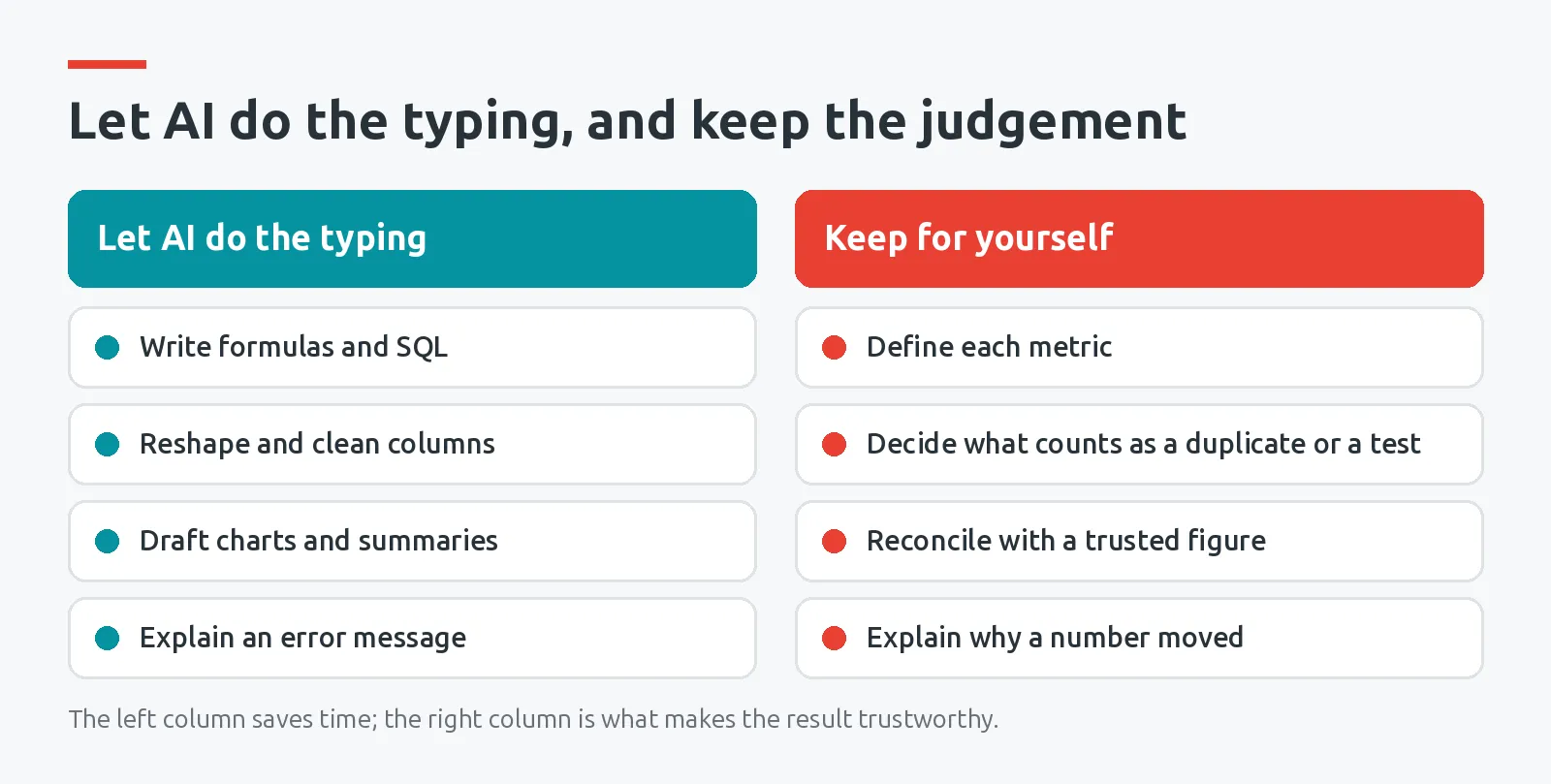
AI is strongest where the work is mechanical, and the result is easy to check: writing a formula, drafting a SQL query, reshaping a table, suggesting a chart. It is weakest where the answer depends on context the file does not hold: which orders are tests, what “active customer” means in your company, or why a number moved.
Final Thoughts
AI for data analysis makes a good analyst faster. The assistants already write the code, build the PivotTable, and draft the summary. What they cannot know is whether a file contains a test order or a batch of day-first dates. Profile before you analyze, name the method, read the code, and reconcile every headline number with one you trust. Those habits turn a fluent answer into a correct one.
Frequently Asked Questions (FAQs)
Q1. Can ChatGPT Do Data Analysis?
Answer: Yes. With an uploaded spreadsheet, CSV, or JSON file, ChatGPT can summarise trends and outliers, build tables and charts, and run Python calculations, transformations, and statistics in a notebook environment. OpenAI advises reviewing the generated code, outputs, and assumptions before relying on any result.
Q2. Which AI Tool is Best for Data Analysis?
Answer: It depends on where your data lives. ChatGPT suits a one-off analysis of an exported file, because it writes and runs Python. Copilot in Excel and Gemini in Google Sheets suit work that stays in the spreadsheet, because they build formulas, PivotTables, and charts there. Both need an eligible plan.
Q3. Can AI Replace Data Analysts?
Answer: Not based on current evidence. Even on the BIRD text-to-SQL benchmark, the best system’s 83.40% execution accuracy trails data engineers and database students at 92.96%. AI also cannot know business context a file does not contain. It changes the job towards defining, checking, and explaining.
Q4. Is It Safe to Upload company Data to ChatGPT?
Answer: Only if your organization allows it. OpenAI may train on content from Free, Plus, and Pro accounts unless you turn off “Improve the model for everyone”; by default, it does not train on ChatGPT Business, Enterprise, or Edu data. Mask personal details and upload only the columns you need.
Q5. How Do I Write a Good Prompt for Data Analysis?
Answer: Say what a row is, what you want measured, and how. Ask for a profile first: row count, distinct IDs, blanks, types, and ranges. Then name the columns, groupings, and calculations, and ask the assistant to show the code it ran so you can check it.
Recommended Articles
We hope this guide to AI for data analysis helps you analyze data more accurately, save time, and make informed decisions. Explore these recommended articles for more insights and practical strategies to improve your data analysis skills.