


What is Canary Deployment?
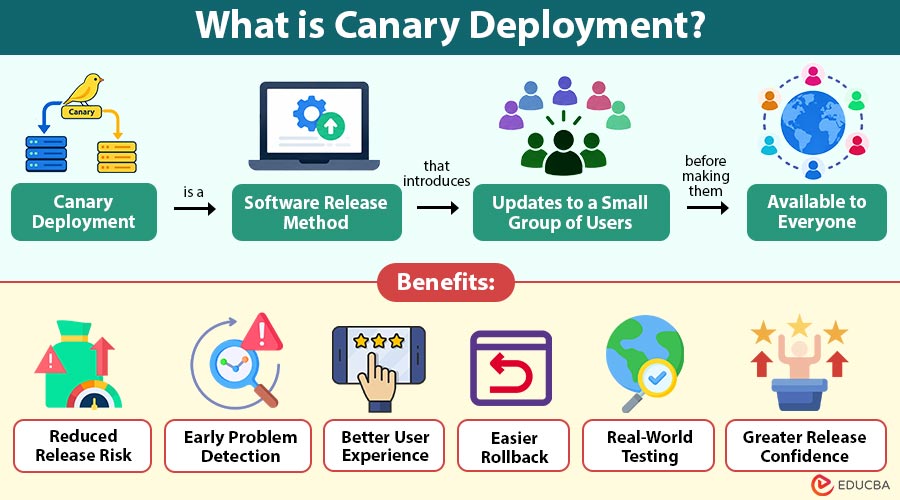
Canary deployment is a software release method that introduces updates to a small group of users before making them available to everyone.
Imagine opening your favorite shopping app and discovering that its payment feature has stopped working after an update. You might abandon your purchase or switch to another app. For businesses, such problems can lead to unhappy customers and lost sales.
Software updates are necessary, but releasing them to every user at once can be risky. Even after careful testing, some problems may only appear when people start using the updated application. Canary deployment offers a practical way to handle this situation. Instead of releasing an update to everyone immediately, developers introduce it to a limited number of users. They observe how the updated version performs before allowing more people to use it.
For example, a shopping website might introduce a new checkout feature to 5% of its traffic while the remaining 95% continues using the existing version. If everything works properly, the company can expand the release. If something goes wrong, developers can stop the update before it affects more customers. This approach is commonly used in software development, cloud computing, and DevOps.
Table of Contents:
- Meaning
- Importance
- Working
- Key Components
- Types
- Examples
- Benefits
- Challenges
- Difference
- Applications
- Tools
Key Takeaways:
- Canary deployment introduces software updates to a small portion of users before a wider release.
- The existing application continues working while developers test the updated version.
- Developers monitor errors, performance, and user experience during the release.
- Traffic can gradually move toward the new version when it performs well.
- If serious problems appear, developers can stop the rollout and return traffic to the stable version.
Why is Canary Deployment Important?
A software update may work well during testing but cause problems when customers start using it. Sometimes, even a small change can slow down an application or stop certain features from working. Canary deployment helps developers find these problems before they affect everyone. Instead of releasing an update to all users, they first introduce it to a small group and check how it performs.
If the update works properly, more users can receive it. If problems appear, developers can stop the release and fix them. This helps businesses avoid major disruptions, protect customer experience, and make software updates more reliable.
How Does Canary Deployment Work?
Canary deployment allows developers to test a new software version with a small group of users before releasing it to everyone.
Step 1: Prepare the Update
Developers make the required changes and test the new software version to check whether everything works properly before releasing it to users.
Step 2: Release to Limited Traffic
The new version is first shared with a small group of users, usually around 5% or 10%, while others use the existing version.
Step 3: Monitor Performance
Developers check how the new version works by looking at its speed, errors, and overall performance to identify any problems before expanding access.
Step 4: Increase Traffic
If the new version works without major problems, developers slowly increase the number of users who can access it while continuing to monitor performance.
Step 5: Complete or Stop the Release
If everything works well, the update reaches all users. If problems appear, developers stop the release and return users to the older version.
Key Components of Canary Deployment
Canary deployment uses several components to help developers release updates carefully and keep applications running smoothly.
1. Stable Version
This is the current version of application that most users continue using while developers test the new update.
2. Canary Version
This is the updated version of the application that a small group of users receives first to check for possible problems.
3. Traffic Management
Traffic management helps developers decide how many users receive the new version and how many continue using the existing application.
4. Monitoring Tools
These tools help developers check application speed, errors, and performance to see whether the new update is working as expected.
5. Rollback Mechanism
If the new update causes problems, developers can switch users back to the older version until the issues are fixed.
6. Deployment Automation
Deployment automation helps developers release updates, manage traffic, and check results without having to handle every step manually.
Types of Canary Deployment
Canary deployment can be implemented in different ways depending on how an organization wants to introduce software updates.
1. Traffic-Based Canary Deployment
Traffic-based canary deployment sends a small percentage of user requests to the updated application while most traffic continues using the existing version.
For example, a website may send 10% of requests to the new version while the remaining traffic uses the existing version.
2. User-Based Canary Deployment
User-based canary deployment releases an updated application to a selected group of users before making it available to everyone after successful testing.
For example, a company may allow its employees or a group of registered customers to use a new feature before releasing it more widely.
3. Region-Based Canary Deployment
Region-based canary deployment introduces software updates in selected geographic locations first, allowing developers to check performance before expanding to other regions worldwide.
For example, a company may release an updated application in one country and evaluate its performance before introducing it elsewhere.
Examples of Canary Deployment
Canary deployment can be useful for businesses that regularly update websites and applications.
1. Food Delivery Application
A food delivery company wants to introduce a new order-tracking feature. Instead of releasing it to everyone, the company makes it available to 5% of users first. Developers monitor location accuracy, tracking updates, and application performance. If the feature works properly, the company gradually introduces it to more users.
2. Banking Application
A banking application introduces a redesigned transaction history page. The bank initially makes the update available to a small group of customers. Its technical team checks whether transaction details display correctly and whether the application remains stable before continuing the release.
3. Video Streaming Platform
A streaming platform develops an improved video player. The company introduces the updated player to a limited group of users and checks buffering, playback errors, and video loading times. If the new player performs well, the company makes it available to more viewers.
Benefits of Canary Deployment
Canary deployment offers several benefits for organizations that frequently update their software.
1. Reduced Release Risk
Introducing updates to limited traffic helps reduce the number of users affected when unexpected software problems occur.
2. Early Problem Detection
Developers can identify errors, performance issues, and unexpected application behavior before making the update available to a larger audience.
3. Better User Experience
A controlled release allows most customers to continue using the stable application while developers evaluate the updated version.
4. Easier Rollback
When problems appear, developers can redirect traffic toward the existing version instead of continuing with an unsuccessful release.
5. Real-World Testing
Canary deployment allows teams to evaluate software performance using actual traffic rather than relying entirely on internal testing environments.
6. Greater Release Confidence
Successful testing with limited traffic provides useful evidence that helps teams decide whether to continue expanding a software update.
Challenges of Canary Deployment
Canary deployment comes with certain challenges that developers need to manage carefully to ensure smooth and successful software updates.
1. Complex Traffic Management
Developers need suitable systems to direct requests between application versions without creating unnecessary interruptions or inconsistent behavior.
2. Additional Infrastructure Requirements
Running old and new application versions together may require extra computing resources, increasing operational costs during the deployment.
3. Continuous Monitoring
Teams must carefully observe performance measurements and identify meaningful differences between the existing and updated versions.
4. Longer Release Process
Gradually introducing an update and checking its performance can take longer than releasing the software to everyone immediately.
5. Limited Testing Coverage
A small amount of traffic may not reveal every problem, especially issues that appear only during heavy usage.
6. Database Compatibility Issues
Changes to databases or shared services can create problems when different application versions need to work together.
Difference Between Canary Deployment and Blue-Green Deployment
The table below highlights the key differences between the two:
| Basis | Canary Deployment | Blue-Green Deployment |
| Release Method | Introduces updates to limited traffic | Uses two separate application environments |
| Traffic Distribution | Usually begins with a small percentage | Commonly switches traffic between environments |
| Testing | Evaluates the update with limited live traffic | Tests the new environment before switching |
| Risk Management | Limits initial exposure to the update | Keeps the previous environment available |
| Rollback | Redirects traffic to the stable version | Switches traffic back to the previous environment |
| Main Focus | Gradual release and observation | Controlled switching between environments |
Applications of Canary Deployment
Canary deployment is useful in several areas of software development and technology.
1. E-Commerce Platforms
Testing checkout improvements, payment features, and shopping experiences before releasing updates to all customers.
2. Banking Applications
Introducing application changes gradually while checking system stability, transaction functions, and customer experience.
3. Cloud Applications
Managing software updates across cloud infrastructure while limiting the initial impact of unexpected problems.
4. Mobile Applications
Releasing updated application versions to selected users through supported staged rollout systems.
5. Streaming Services
Evaluating playback improvements, interface changes, and performance updates with limited user traffic.
6. Enterprise Software
Introducing new business application features to selected teams before making them available across an organization.
Popular Tools Used
Several tools help developers manage canary deployments, control application traffic, monitor performance, and release software updates more efficiently.
1. Kubernetes
Kubernetes helps developers manage containerized applications and run different software versions together. Additional routing tools can support gradual traffic distribution during deployment.
2. Argo Rollouts
Argo Rollouts helps developers manage gradual software releases in Kubernetes. It supports traffic control, automated analysis, and rollback when problems occur.
3. Flagger
Flagger automates canary deployments in Kubernetes by monitoring application performance and gradually increasing traffic when the updated version meets predefined conditions.
4. Istio
Istio is service mesh that helps developers control traffic between application versions. It supports traffic routing, monitoring, and gradual software releases.
5. Spinnaker
Spinnaker is continuous delivery platform that helps teams automate software releases across cloud environments. It also supports controlled deployments and performance checks.
6. AWS CodeDeploy
AWS CodeDeploy helps developers automate application deployments on supported AWS services. It supports gradual traffic shifting for selected deployment types, including AWS Lambda.
Final Thoughts
Canary deployment helps businesses release software updates safely by introducing changes to a small group of users first. Development teams monitor performance, identify problems, and gradually expand the release. This approach reduces risks, prevents widespread disruptions, and keeps applications reliable while introducing new features.
Frequently Asked Questions (FAQs)
Q1. How long does a canary deployment take?
Answer: The duration depends on application complexity, user traffic, testing requirements, and how quickly developers collect enough information to evaluate the update.
Q2. What metrics should developers track during canary deployment?
Answer: Developers commonly track error rates, response times, CPU usage, memory consumption, and business metrics such as successful transactions or completed purchases.
Q3. Does canary deployment require a separate server?
Answer: Not necessarily. Developers can run multiple application versions using containers, virtual machines, or existing infrastructure, depending on the deployment setup.
Q4. Can users identify whether they are part of a canary deployment?
Answer: Usually, users are not directly informed. However, they may notice changes in application features, appearance, or behavior during the testing period.
Recommended Articles
We hope that this EDUCBA information on “Canary Deployment” was beneficial to you. You can view EDUCBA’s recommended articles for more information.