


Suppose you want a clip of a tabletop figurine turning under a lamp. You have a description or a photo of it. This exercise is hypothetical, not a successful test. A MiniMax H3 API request starts a job; its first response is not the finished file. Choose an input, submit a prediction, check its status, and inspect the file. A *prediction* is the tracked generation job.
Choose a MiniMax H3 API Input Mode
WaveSpeed exposes several MiniMax H3 endpoints, or API routes. These three `wavespeed-ai/minimax-h3` routes fit the exercise; they have different input requirements, so changing a route name alone is insufficient.
| Mode | Supply | Use It For the Figurine Exercise |
| Text to Video | A `prompt` | You have only a written scene and motion description. |
| Image to Video | A `prompt` and first-frame `image` URL | You already own a photo showing the desired starting composition. |
| Reference to Video | A `prompt` plus image or video references | You need existing views to guide the figurine’s appearance. |
Start with the text-to-video API if the physical object and camera framing are open to interpretation. If the photo already establishes both, image-to-video gives the model that first frame. A reference request is better when several authorized views should guide the same object; the references guide generation, but they don’t guarantee every detail will remain identical. Decide what you will compare against the output before sending the request.
Prepare an API Key and One Small Test
The MiniMax H3 API page provides the WaveSpeed entry point and authentication example for this exercise. Keep the key in a `WAVESPEED_API_KEY` environment variable rather than pasting it into a notebook or sharing it with the output file. `Authorization: Bearer` sends the key; JSON is structured text for the input fields.
For a first text-only request, describe one visible action: “A small blue tabletop figurine rotates slowly under a desk lamp; fixed camera; plain background.” The example below asks the text-to-video route for a 16:9, 480p, five-second clip. Those values are documented for this route. They are a small teaching input, not a universal setting for every H3 endpoint. Make sure you have a valid key and permission to use any assets before trying the other modes.
Submit a MiniMax H3 API Text-to-Video Prediction in Python
The following code is an unexecuted teaching sketch based on WaveSpeed’s published request and result fields. Python’s standard `urllib` sends the submission `POST`; the response’s `data.id` is the prediction ID. A returned ID means the job was accepted for tracking. It says nothing yet about video quality or even whether the job will finish.
import json
import os
import time
from urllib.request import Request, urlopen
base = "https://api.wavespeed.ai/api/v3"
key = os.environ["WAVESPEED_API_KEY"]
headers = {"Authorization": f"Bearer {key}", "Content-Type": "application/json"}
payload = {"prompt": "A blue figurine turns under a lamp; fixed camera.",
          "aspect_ratio": "16:9", "resolution": "480p", "duration": 5}
request = Request(f"{base}/wavespeed-ai/minimax-h3/text-to-video",
                 data=json.dumps(payload).encode(), headers=headers, method="POST")
with urlopen(request, timeout=30) as response:
   submission = json.load(response)
prediction_id = submission.get("data", {}).get("id")
if not prediction_id:
   raise ValueError("Submission has no data.id")
for check in range(30):
   request = Request(f"{base}/predictions/{prediction_id}/result", headers=headers)
   with urlopen(request, timeout=30) as response:
       result = json.load(response).get("data", {})
   status = result.get("status")
   if status == "completed":
       outputs = result.get("outputs") or []
       if not outputs or not isinstance(outputs[0], str) or not outputs[0].startswith(("https://", "http://")):
           raise ValueError("Completed without a URL output")
       print(outputs[0])
       break
   if status in {"failed", "canceled", "timeout", "deleted"}:
       raise RuntimeError(f"Prediction ended: {status}; {result.get('error')}")
   time.sleep(2)
else:
   raise TimeoutError("Polling limit reached")
The request has an HTTP timeout, and the loop has a finite number of checks. In a real program, catch HTTP and network errors, record the prediction ID safely, and decide whether to retry a failed request. Avoid logging the Bearer key. Repeating a `POST` without knowing whether the first one was accepted could create another job, so inspect the response and your saved ID first.
Poll MiniMax H3 API Results Without Waiting Forever
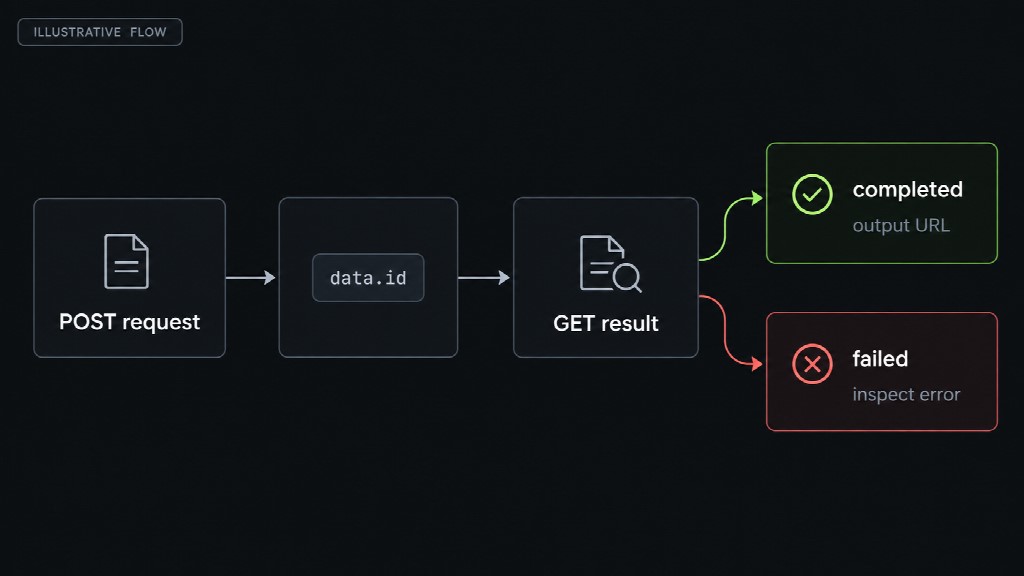
A POST returns data.id; GET checks the prediction status. A completed result can provide an output URL, while a failure status ends the polling path. REST API polling means repeated `GET` checks of one prediction. The code reads `data.status` on each check, then reads `data.outputs` only after `completed`. WaveSpeed’s text-to-video documentation lists `failed`, `canceled`, `timeout`, and `deleted` as terminal failures. Stop on those states and inspect the returned error instead of continuing to wait.
The two-second pause is an example starting interval from WaveSpeed’s sample, not a required polling rate or a completion promise. For a longer job, space checks further apart and choose a stop limit that fits your application. The code’s 30-check cap is deliberately a teaching choice; an expired local wait does not prove the service failed. Save the ID so you can inspect that prediction later. An empty `outputs` array or a value that is not a URL is also a reason to stop and investigate, even if the status says `completed`.
Switch to An Image or a Reference
The submission and polling pattern stays the same when the input changes, but the `POST` path and JSON body do not. For the image-to-video API, use `/wavespeed-ai/minimax-h3/image-to-video` with `prompt` and an accessible first-frame URL in `image`. `last_image` is an optional URL for the intended final frame. If your figurine photo is private or unavailable to the service, that route has no usable first frame.
Check the image’s access and your right to use it before submitting. For reference to video, use `/wavespeed-ai/minimax-h3/reference-to-video` with `prompt` and at least one image or video reference. The `reference_images` and `reference_videos` fields are arrays of URLs; `reference_audios` can supplement them, but audio alone is not a valid sole reference. You might provide two authorized photos of the figurine and write “Use the shape of the object in `<Picture 1>` and the blue color in `<Picture 2>`.”
The tags identify inputs in their array order. The documented limit of nine images applies to this reference route, not to text or image to video, and it is a ceiling rather than a target. Review the selected endpoint’s current resolution and duration options instead of carrying the text example’s settings over without checking.
Check the File Before Using It
A returned URL is an address to inspect, not evidence that the clip meets the prompt. Open it in an appropriate viewer and check whether the figurine turns, whether its shape and color hold between frames, and whether the background stays close to what you requested. MiniMax H3 can produce native audio, so listen too; an audio track doesn’t guarantee its timing or content suits the scene. If you asked for no dialogue, unexpected speech is a concrete reason to revise the input or reject the clip.
For this exercise, the program may confirm completion and provide a URL, but a person must judge the actual picture, sound, and rights to the source assets. If the URL cannot be opened, keep the prediction ID and inspect the response before you resubmit. If the reference route changes the figurine’s design, compare the source images, their order, and the tagged prompt; switching to a first-frame image may be clearer when only the opening composition matters. Save a file for use only after `completed`, a reachable output, and a manual review.
Recommended Articles
We hope this comprehensive guide to the MiniMax H3 API helps you understand video generation with Python. Explore these recommended articles for more insights into AI tools, API integration, and video creation workflows.

