


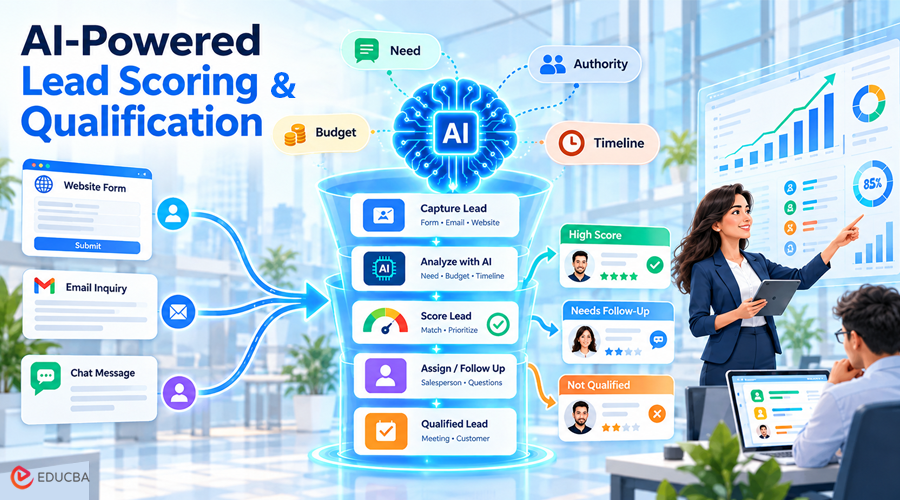
A buyer requests a quote after your sales team leaves for the day. The request sits unread until morning, delaying the next step. This delay can cost you the client to a competitor. Automated lead qualification reduces this by reviewing the inquiry and sending an initial response.
The automated system assesses buyers against your criteria. The workflow then assigns a salesperson or asks a relevant follow-up question. This guide explains automated lead qualification, its benefits, and the tools you need. You will also learn how to build, test, and improve the process step by step.
What is Automated Lead Qualification?
Automated lead qualification uses software to check whether leads match your sales criteria. The system reviews their needs, budget, and timeline for buying. Your rules determine which leads reach sales or need more information. AI for lead qualification adds context from written messages.
For example, a buyer may need replacement software before a contract expires. AI can flag that deadline, while a salesperson confirms missing details. Lead generation attracts potential buyers. Qualification helps your team decide which buyers to pursue.
Why is Automated Lead Qualification Necessary?
Manual lead reviews can delay replies and leave inquiries unassigned. Salesforce’s 2026 research shows that salespeople spend 60% of their time on non-selling tasks. That includes broader work, such as updating records and securing approvals.
Automated lead qualification reduces manual work in three areas:
- Faster handoffs: The system assigns each inquiry to a salesperson.
- Consistent scoring: Sales and marketing assess leads against shared criteria.
- Better context: The salesperson receives a summary of the buyer’s needs.
Success depends on useful conversations, not just faster replies. Track whether qualified leads become meetings and customers.
Build Your Lead Qualification Checklist
Your lead qualification checklist should define which buyers match your offer. Sales and marketing should agree on four questions:
- Need: What problem does the buyer need to solve?
- Budget: What spending range has the buyer confirmed?
- Decision: Who approves or influences the purchase?
- Timing: When does the buyer need a solution?
Mark missing answers as unknown. A job title does not confirm buying authority. Company size does not prove budget. Each record should include contact details, the lead source, and an assigned salesperson. That person should resolve missing or conflicting information.
HockeyStack recommends reviewing 100 records before choosing AI tools. Check for missing details, outdated information, and recent activity. Fix these gaps before introducing lead management automation.
What Do You Need to Automate Lead Qualification?
A basic setup needs four components:
- A form collects inquiries and buyer details.
- A shared spreadsheet or customer management system stores lead records.
- An AI model interprets written answers.
- A workflow tool connects these components and triggers the next action.
Your existing software already provides some of these features. Check those capabilities before buying additional tools. Test whether the setup saves inquiries, applies your rules, and flags failures. Confirm that your team can pause messages and correct errors.
Your budget should cover setup, subscriptions, AI usage, and maintenance. Measure the total cost per processed lead during your trial. Data teams often support connecting AI workflows to business systems. Teams planning automated lead qualification can discuss their existing tools and requirements with experts.
Six Lead Qualification Steps for a Working System
These six lead qualification steps take you from a blank page to a working system. Build them in order, and test each one before you add the next.
Step 1: Capture Every Lead in One Place
Lead capture automation sends new inquiries to one shared spreadsheet or customer management system. Start with your website form, then connect email and other channels. Save the original message, contact details, source, and arrival time before scoring. This record preserves the inquiry if a later step fails. Check for an existing contact before creating a new record. This check helps prevent duplicate entries and repeated outreach.
Step 2: Set Your Lead Scoring Rules
Assign points to confirmed details about customer fit and buying readiness. This sample uses a website redesign agency with a 100-point scale.
| Criterion | Award points when the buyer confirms | Points |
| Service Fit | The project requires a website redesign. | 30 |
| Budget | The available budget meets the agency’s minimum fee. | 25 |
| Timeline | The project should start within 60 days. | 20 |
| Buying Authority | The contact can approve the purchase. | 15 |
| Meeting Request | The buyer wants a project discussion. | 10 |
| Maximum Score | All five conditions are met. | 100 |
A buyer who meets every condition except buying authority scores 85. With a sample cutoff of 90, the lead needs further clarification. Confirming purchase authority adds 15 points, raising the score to 100. The lead then reaches sales review.
Award each criterion once, and flag missing answers for follow-up. A confirmed service mismatch should prevent qualification, regardless of the score. Treat this table as a starting point. Adjust the points and cutoff based on successful leads.
Step 3: Use AI to Review the Message
AI extracts useful details from a buyer’s message. Ask the model to identify the need, budget, deadline, and buying authority. For example, “Our website must launch before September” provides a deadline. The model should flag that date and mark unmentioned details as unknown. Apply your scoring rules to the confirmed information. Ask AI to include a supporting quote for each detail. This helps salespeople check the assessment before responding.
Step 4: Route Each Lead by Score
Lead funnel automation assigns the next action using your scoring rules. With the sample cutoff of 90, the workflow follows these paths:
- Scores of 90 or more: Notify the assigned salesperson with the buyer’s message and score. The salesperson can offer a meeting.
- Scores below 90 with missing details: Ask a specific follow-up question, then update the score.
- Suitable buyers planning: Schedule a follow-up around their stated timeline.
- Confirmed service mismatches: Send the buyer a brief reply explaining why your service does not match their request.
Record the owner and next action so each inquiry has a clear follow-up.
Step 5: Automate the Follow-Up
Automated lead follow-up sends reminders when buyers don’t reply. For example, schedule one reminder 48 hours after the first email. Use the buyer’s original request to keep the message relevant. Ask whether he still needs help, and suggest a clear next step. AI can draft the message using those details. Stop pending reminders when the buyer replies, books a meeting, or opts out. Record each sent message so salespeople can check previous contact.
Step 6: Review and Tune Every Month
Review your automated lead qualification results each month. Compare lead scores with booked meetings and completed sales.
- High scores without meetings: Check whether the lead matched your criteria and received a relevant reply.
- Low scores that became successful: Identify useful buying signals your rules missed.
- Leads awaiting clarification: Check whether your questions were clear and necessary.
Check for duplicate records when buyers contact you through different channels. Update existing records when buyers provide new information. Adjust your rules when your services or target customers change. Change one major rule at a time so you can measure the effect.
Final Thoughts
Automated lead qualification helps your team respond sooner and prioritize suitable buyers. AI extracts details from messages, while your rules guide scoring and follow-up. Salespeople confirm missing information and handle the conversation. Start with one lead source, and test the process on real inquiries. Track booked meetings and completed sales to judge the results. Expand the workflow once your team can trust the decisions.
About Bio: Affan Tariq

Affan is a data engineer and technical author focused on Snowflake, cloud data platforms, dbt, pipelines, and AI integration. He started his career in data engineering and has since expanded into technical writing for Data Prism, covering topics across data engineering and AI automation.
Recommended Articles
We hope this comprehensive guide to Automated Lead Qualification helps you streamline your sales process and prioritize promising leads. Check out these recommended articles for more insights and strategies to improve sales efficiency with AI automation.

