


Updated September 5, 2026
Editing photos used to mean choosing between two frustrating extremes. Either you learned complicated software with a steep learning curve, or you settled for basic filters that barely changed anything. A Free AI Image Editor has changed that completely. Now anyone can remove backgrounds, fix lighting, enhance details, or completely transform a photo in seconds, without touching a single layer mask or curve adjustment tool.
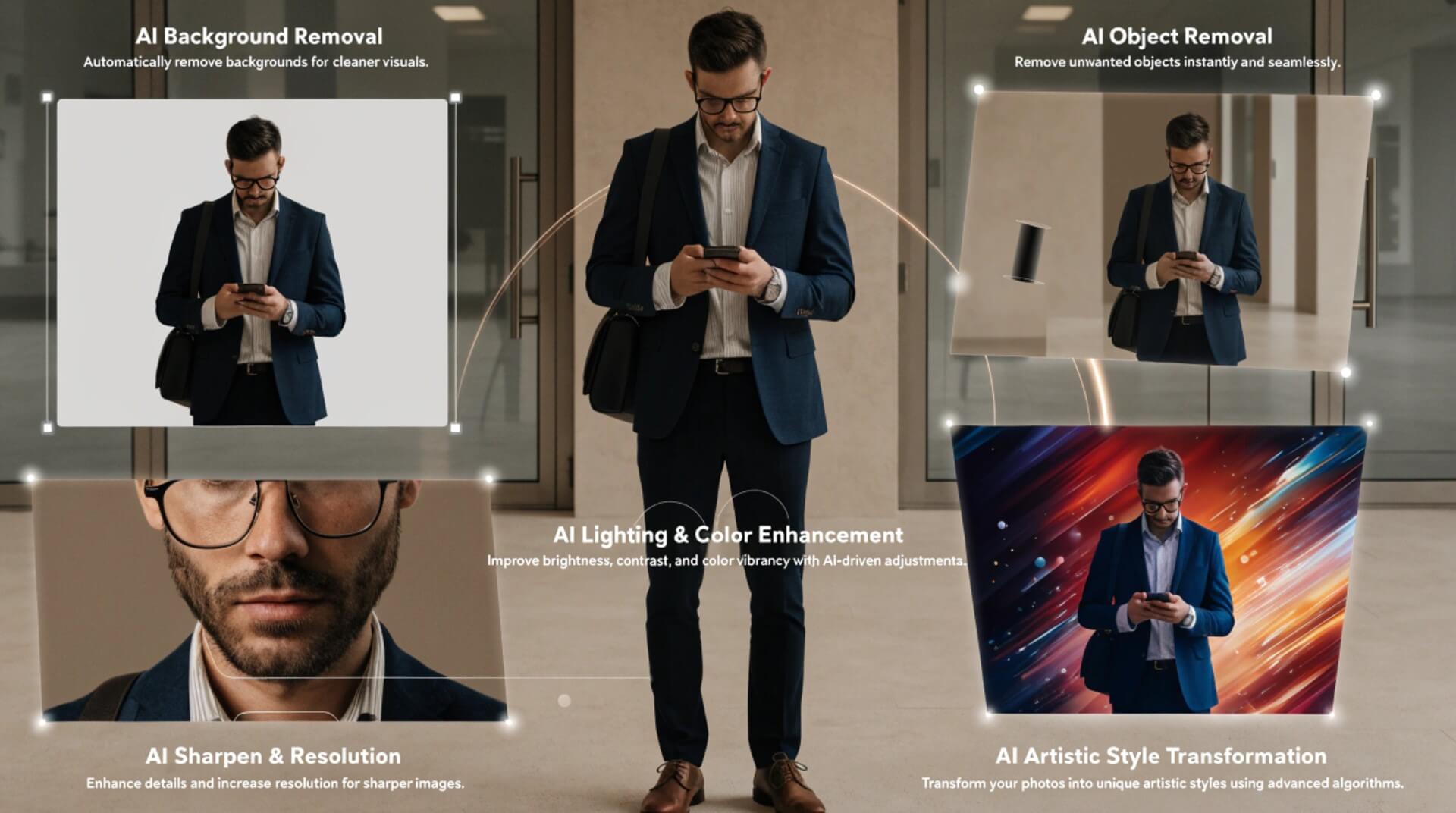
This guide walks through what a free AI image editor actually does, why so many people are searching for an Ai image editor free no sign up option, and how to get the best results whether you are editing personal photos, product shots, or creative artwork.
Why People Want a Free AI Image Editor With No Sign Up?
If you have ever tried to edit a photo online quickly, you know the routine. You find a tool, upload your image, and right before you can download the result, you are hit with a wall asking you to create an account, verify your email, or enter payment details. For a quick edit, that friction is exactly what people are trying to avoid.
Searching for an option usually means someone wants:
- A fast result without creating yet another account to manage
- No email verification steps standing between them and their edited photo
- No hidden paywalls after the upload is already complete
- Privacy, since fewer accounts means fewer places your images and data are stored
- The ability to test a tool before deciding whether it is worth using regularly.
This demand makes sense. Editing a single photo should not require the same commitment as signing up for a subscription service. People want to upload an image, describe or select the edit they want, and download the result immediately.
What a Free AI Image Editor Can Actually Do?
AI image editors have moved far beyond simple filters and cropping tools. Today’s tools can understand an image’s content and make intelligent, targeted changes. Some of the most useful capabilities include:
- Background removal and replacement: Instead of manually tracing a subject with a selection tool, AI can detect it automatically and cleanly separate it from the background in seconds. You can then drop in a new background, blur the original, or make it transparent for product listings.
- Object removal: Unwanted people, blemishes, power lines, or distracting objects in a photo’s background can be erased, with the AI intelligently filling in what should logically be there.
- Image upscaling and enhancement: Low-resolution or slightly blurry photos can be sharpened and enlarged without the pixelation you would normally expect from simple resizing.
- Style transformation: A regular photo can be reimagined in a completely different art style, from watercolor to anime to realistic digital painting, often with just a short text prompt.
- Color and lighting correction: AI can automatically balance exposure, fix white balance, and correct color casts that would normally require manual adjustment layers.
- Smart retouching: Skin smoothing, blemish removal, and small detail fixes can happen automatically instead of requiring precise manual brush work.
How to Get Better Results From a Free AI Image Editor?
Even the best AI tools produce better results when you understand a few basic principles. Here are some practical tips to keep in mind.
- Start with the highest-quality source image you have: AI can improve a photo significantly, but it works with what it has given. A clearer starting image, even if it has flaws you want fixed, will generally produce a cleaner final result than a heavily compressed or extremely low-resolution file.
- Be specific about what you want changed: If the tool allows text prompts, describe the edit clearly. Instead of asking the image to look better, describe the specific change, such as brightening the subject’s face, removing the object in the top-left corner, or shifting the background to a soft blue gradient.
- Make incremental edits instead of one giant change: Large, sweeping edits are more likely to introduce artifacts or unwanted changes elsewhere in the image. Smaller, focused edits tend to preserve the parts of the photo that already look good.
- Compare before downloading: Most tools let you preview the result before saving. Take a moment to check faces, hands, text, and fine details, since these are the areas where AI edits are most likely to introduce small errors that are easy to miss at a glance.
- Save a copy of your original: Even when editing online, keep your unedited photo somewhere safe. If you want to try a different style or correction later, you will want the original to work from, not an already edited version.
Common Ways People Use Free AI Image Editors
The appeal of a Free AI Image Editor with no sign-up spans far beyond casual photo touch-ups. Common use cases include:
- E-commerce sellers cleaning up product photos, removing cluttered backgrounds, and creating consistent, professional-looking listings without hiring a photographer.
- Social media creators quickly adjusting photos for different platforms, correcting lighting, or applying a consistent visual style across posts.
- Job seekers touching up headshots for resumes and LinkedIn profiles, improving lighting and background without a professional photo session.
- Small business owners creating marketing materials from existing photos instead of paying for new photography or stock images.
- Students and hobbyists experimenting with digital art, restyling photos, or learning what AI editing tools are capable of before committing to paid software.
- Anyone with old or damaged photos looking to restore faded colors, sharpen blurry details, or repair small imperfections in cherished family pictures.
What to Look for in a Free AI Image Editor?
Not all free tools are created equal. When evaluating a Free AI Image Editor, consider a few things beyond the price tag. Speed matters, especially if you are editing multiple images in one sitting. A tool that takes minutes per edit quickly becomes impractical. Output quality matters as much. Some free tools compress images heavily or add watermarks, which defeats the purpose if you need a clean, usable final image.
Ease of use is another key factor, since the best AI editors let you describe or select an edit intuitively rather than requiring you to learn a whole new interface. Finally, consider whether the tool actually respects its promise of no sign-up. Some services advertise a free experience but quietly require an account after your first edit, which can be frustrating if you were expecting a frictionless process from the start.
Trying It Out
If you want to see what a genuinely Free AI Image Editor with no sign-up experience looks like, it helps to try one directly on a photo you already have. Ezeditor AI is built around that exact idea, giving you background removal, object removal, style transformation, and enhancement tools without forcing you through account creation first. It is a practical way to see what modern AI editing can do before deciding whether it fits into your regular workflow.
Final Thoughts
AI image editing makes it easy for anyone to improve photos, even without advanced skills or a big budget. Whether you are cleaning up a single photo or handling edits regularly for a small business, a Free AI Image Editor removes the friction that used to stand between you and a polished final image. As these tools continue to improve, the line between quick edits and professional-grade results keeps getting thinner, putting more creative control directly in your hands.
Recommended Articles
We hope this guide helps you understand how a Free AI Image Editor can simplify photo editing and improve your images quickly. Explore these recommended articles for more insights on AI image editing, photo enhancement, background removal, and creative AI tools.


