


Updated August 20, 2026
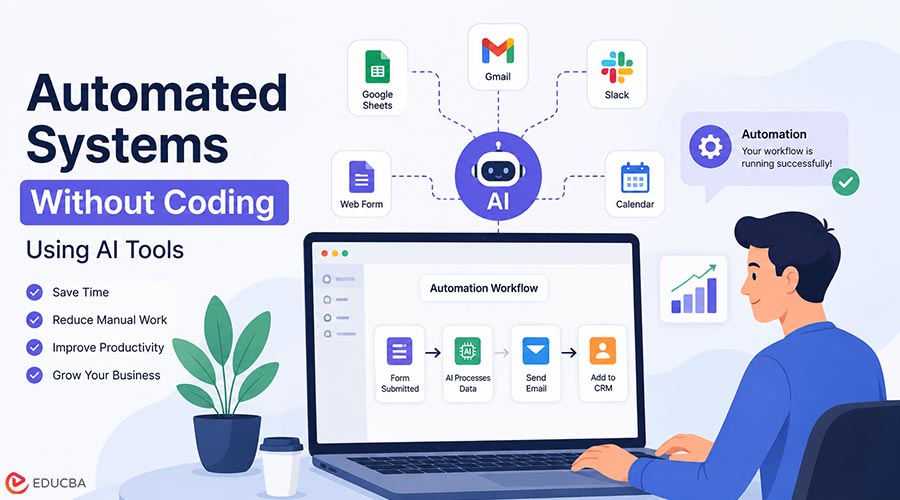
Automation used to be something only developers and large companies could build. Creating a system to handle repetitive tasks often requires programming expertise, technical teams, and complex software configurations. Today, that has changed. With modern AI tools and no-code platforms, almost anyone can create automated systems without writing a single line of code. Whether you run a business, manage marketing campaigns, work as a freelancer, or simply want to save time on daily tasks, you can now create automated systems without coding using intuitive visual tools. From managing emails to organizing data and creating content processes, you can automate many activities with simple visual tools.
What Are Automated Systems Without Coding?
Automated systems without coding are workflows created using no-code platforms that connect different tools and perform tasks automatically. Instead of manually completing every step, you create a process in which software handles repetitive tasks for you. For example, a business owner might receive a customer inquiry through a website form. The system can automatically save the information, send a personalized email, add the customer to a CRM, and create a follow-up reminder. Similarly, in the e-commerce sector, online retailers leverage automated dropshipping platforms like EPROLO to automatically sync product details and fulfill customer orders without manual data entry.
Merchants looking to scale further can use a Shopify marketplace builder to onboard multiple vendors and automate order routing without custom development. Similarly, in the e-commerce sector, online retailers leverage automated dropshipping platforms like EPROLO to automatically sync product details and fulfill customer orders without manual data entry. No programming is needed. The workflow is built using simple settings, templates, and AI-powered features.
Why AI Automation Is Growing in 2026?
Businesses are under constant pressure to work faster while reducing costs. AI automation services help people complete more work with fewer manual steps, which is one of the reasons they are becoming so popular in 2026. Companies are adopting AI automation because it saves time on repetitive tasks, reduces human errors, improves customer response speed, creates more consistent processes, and helps small teams compete with larger companies.
AI tools can now understand text, analyze information, generate content, organize data, and make decisions based on predefined rules. That makes automation much more accessible for non-technical users. Free AI tools built for entrepreneurs, such as Velo from zenbusiness, are a good example of how accessible this technology has become.
How to Create Automated Systems Without Coding Using AI Tools?
Building an automated workflow is much easier when you follow a structured approach. Instead of trying to automate everything at once, start with a single repetitive task and expand your workflows as you gain confidence.
1. Identify Repetitive Tasks
Finding time-consuming chores that follow the same procedure every day or every week is the first step. These are the best candidates for automation.
Common examples include:
- Sending recurring emails
- Scheduling social media posts
- Collecting customer information
- Generating reports
- Organizing documents
- Answering frequently asked questions
- Managing leads and follow-ups
A simple rule is that if you perform the same task repeatedly, it can likely be automated.
2. Choose the Right AI Automation Tool
Different AI tools serve different purposes, so choose the one that best fits your specific needs.
For example:
- Workflow automation tools connect apps and automate processes such as syncing forms with spreadsheets, updating databases, sending notifications, and transferring files.
- AI assistants such as ChatGPT can help generate content, summarize information, brainstorm ideas, and analyze data.
- Customer automation platforms can manage live chat, qualify leads, schedule appointments, and send follow-up messages.
Before selecting a platform, consider your business requirements, available integrations, budget, and ease of use.
3. Map Your Workflow
Once you have the right tool, map your workflow before building anything. Write down the process step by step so you can see how the task works now and how it should work after automation.
For example, a manual process might involve a customer filling out a form, an employee checking the information, sending an email, adding the data to a spreadsheet, and scheduling a follow-up — all steps that can run automatically within unified platforms such as Lark An automated version could collect the form submission, let the AI system process the information, send an automated email, store the customer data, and create a follow-up task automatically. Planning the workflow first helps prevent unnecessary complexity.
4. Connect Your Applications
Most no-code automation platforms work by linking multiple applications together through triggers and actions.
A typical workflow may connect:
- Website forms
- Email platforms
- Google Sheets
- CRM software
- AI assistants
- Calendar applications
For example, when someone submits a contact form, the system can analyze the request, send a personalized response, save the lead in your CRM, and notify your sales team—all without manual intervention.
5. Enhance Your Workflow with AI
Traditional automation follows predefined rules, while AI-powered automation can interpret information and make more intelligent decisions.
Instead of sending identical responses to every customer, AI can:
- Understand customer questions
- Identify customer intent
- Generate personalized replies
- Categorize incoming requests
- Recommend appropriate next steps
If you are deploying self-hosted AI models, security should be part of your automation strategy. Exposed, unauthenticated Ollama servers can become easy targets for attackers seeking to access models or misuse computing resources. Proper authentication and access controls help keep your workflows secure while maintaining reliable automation.
Popular Use Cases of AI Automation Without Coding
AI-powered automation can help in many areas of business and content creation. In marketing, businesses can automate email campaigns, social media scheduling, content ideas, customer segmentation, and performance reports. For example, an AI system can analyze customer behavior and suggest personalized marketing messages that are more likely to convert. Sales teams can also benefit from automation. They can use AI tools to collect leads, send follow-up emails, qualify customers, and schedule meetings. This gives sales professionals more time to build relationships instead of spending hours on repetitive administrative work.
Customer support is another area where AI automation is especially useful. AI chat systems can handle common customer questions and provide instant responses. They can help with FAQs, order updates, product information, and basic troubleshooting. When a problem is too complex, the system can still escalate it to a human team member. Content creators and marketers can build workflows that support topic research, content outlines, draft creation, social media posts, and content repurposing. For example, one blog article can automatically become social posts, email newsletters, and video ideas. This saves time and helps teams get more value from every piece of content they create.
Benefits of No-Code AI Automation
Creating automated systems without coding offers several clear advantages. One of the biggest benefits is time savings. Automation eliminates repetitive tasks, allowing people to focus on strategic, creative, and high-value work. It is also easy for beginners. No-code platforms use visual builders rather than programming languages, making them accessible to non-technical users. You do not need to be a developer to build useful workflows.
Another major benefit is lower cost. Small businesses can create powerful systems without hiring developers for every automation need. This makes automation more affordable and practical for teams with limited budgets. Automation also improves accuracy. Automated systems follow consistent processes, which reduces mistakes caused by manual work. This is particularly useful for tasks such as data entry, customer communication, and routine reporting. As a business grows, automation helps scale operations more smoothly. It allows teams to handle more customers and tasks without increasing workload. That makes growth easier to manage.
Common Mistakes When Building AI Automation Systems
Even though AI automation is powerful, beginners often make a few common mistakes. One of the biggest is automating the wrong tasks. Not every process needs automation, so it is better to focus on repetitive tasks that deliver real-time savings. Another mistake is creating workflows that are too complex. It is usually better to start simple and build a small working automation than to create a complicated system that becomes difficult to manage. Simple systems are easier to test, improve, and maintain.
Some people also ignore human review. AI can make mistakes, so important decisions should still include human oversight. Automation should support people, not replace judgment where accuracy really matters. Choosing tools without planning can also cause problems. Using too many disconnected tools can create confusion and make the workflow harder to manage. It is better to choose platforms that work well together and fit your goals.
Tips for Building Better AI Automation Systems
The best way to build strong automation is to start with a single, simple workflow and ensure it works well before adding more. Clearly define the goal before building anything, so you know exactly what problem the system should solve. Choose tools that integrate easily with the apps you already use, and test your automation before relying on it widely.
It also helps to review and improve workflows regularly. Business needs change, and automation should change with them. Protecting customer data and privacy is equally important, especially when your workflows handle sensitive information. The best automation systems are not the most complicated ones. They are the ones that solve real problems efficiently and reliably.
The Future of No-Code AI Automation
AI automation will continue becoming easier and more powerful. Future tools will likely enable people to create advanced business systems with simple instructions rather than technical skills. Business owners can describe a process in plain language, and AI can automatically turn it into a workflow. This shift will make automation available to more people and reduce the gap between technical and non-technical users. As these tools improve, no-code automation will become a normal part of how businesses operate.
Final Thoughts
Learning to create automated systems without coding, using AI tools, can help individuals and businesses save time, improve productivity, and build smarter workflows. You no longer need advanced programming skills to automate daily processes. The key is to start with a clear goal, choose the right tools, and build simple systems that solve real problems. As AI continues to evolve, no-code automation is becoming an essential skill for working more efficiently and intelligently.
Frequently Asked Questions (FAQs)
Q1. Can I create automated systems without programming knowledge?
Answer: Yes, you can. No-code AI tools allow beginners to create workflows using visual interfaces, templates, and simple instructions without writing code. These tools make automation accessible, even for users without a technical background.
Q2. What tasks can I automate using AI tools?
Answer: You can automate many everyday tasks with AI tools, including email management, customer support, content creation, data organization, marketing workflows, and lead management. The best tasks to automate are usually the ones you repeat often.
Q3. Are no-code AI automation tools expensive?
Answer: Many tools provide free or affordable plans, making automation accessible to individuals and small businesses. The cost usually depends on the complexity of your workflows and the number of tasks you automate.
Q4. Is AI automation only useful for businesses?
Answer: No, it is useful for more than just businesses. Individuals, freelancers, students, and creators can also use AI automation to manage tasks, organize information, and improve productivity in their daily work.
Q5. Do I need technical skills to build AI workflows?
Answer: No, you do not need technical skills to get started. A basic understanding of your workflow and your goals is more important than programming knowledge. No-code tools handle the technical setup for you.
Recommended Articles
We hope this guide to automated systems without coding helps you streamline repetitive tasks and improve productivity. Check out these recommended articles for more insights and AI-driven strategies to build smarter workflows.


