


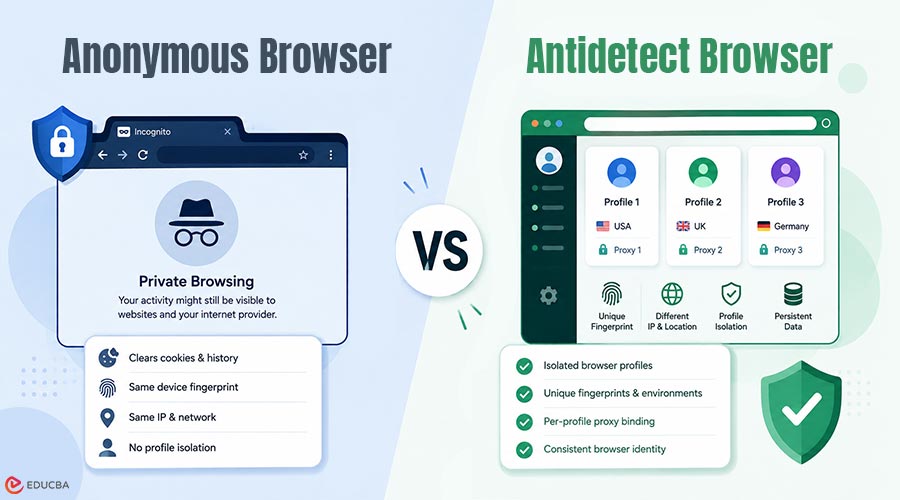
Imagine you open Chrome Incognito to manage a second social media account, only to find it flagged within hours. The session data was cleared, but the platform still recognized your device. That gap between “private browsing” and genuine environment isolation is exactly what this article addresses. Whether you are conducting competitor research for Google SEO or managing a multi-region social media matrix, the tools you choose dictate the security of your accounts. This is where the distinction between an anonymous browser vs antidetect browser becomes important. By understanding how these solutions handle local storage, hardware signals, and proxy connections, your team can make informed decisions on which infrastructure best supports multi-account management without triggering modern tracking mechanisms.
The Mechanics and Limitations of Anonymous Browsers
When aiming to reduce their digital footprint, many users rely on an anonymous browser or standard incognito mode. The primary function of these tools is to clear session-based data: once the window is closed, cookies, browsing history, and form data are automatically deleted. However, when facing advanced platform detection, this approach reveals significant limitations. It does not alter your hardware-level signals. Your Canvas fingerprint, WebGL fingerprint, and User-Agent remain tied to your actual physical device.
Consequently, even without local cookies, target servers can utilize sensor fingerprinting or font enumeration to infer repeat visits from the same environment, making incognito mode unsuitable for managing multiple distinct accounts. Tools like BrowserLeaks and Pixelscan can demonstrate this directly: open an incognito window and run a fingerprint check. The Canvas hash, WebGL renderer, and Navigator properties will match your normal browsing session exactly. Private browsing hides local history; it does not create a new browser identity.
The Architecture of Antidetect Browsers: Profile Isolation
For scenarios that require the simultaneous management of multiple professional accounts, an antidetect browser offers a fundamentally different technical solution. Instead of merely hiding local data, it constructs entirely new, logically consistent virtual fingerprint environments for each session. There are two main implementation approaches. JS Hook injection overlays native browser APIs at runtime, lower build cost, but detectable because risk engines can call Function.prototype.toString() to check whether an API returns [native code]. Kernel-level modification rewrites the Chromium source directly in C++, making the change invisible to JavaScript-based detection.
Higher-quality antidetect browsers use the latter approach for core fingerprint parameters. Each browser profile operates with its own isolated cookies, local storage, and customized Navigator Properties. Operators can configure unique timezone spoofing and language settings, binding them strictly to a dedicated residential proxy or datacenter proxy via proxy binding. This ensures that network-layer signals, including WebRTC leak prevention align with the simulated geolocation, satisfying the browser fingerprint consistency requirement that modern risk engines check.
Technical capabilities such as profile isolation depth, browser-environment controls, and proxy behavior vary by product. Where exact implementation details matter, verify against official documentation or test directly before deployment.
Anonymous Browser vs Antidetect Browser: Feature Comparison
| Feature | Anonymous Browser | Antidetect Browser |
| Local Data Handling | Clears session data after exit | Maintains isolated profile storage |
| Browser Fingerprint | Uses the real device fingerprint | Simulates isolated browser environments |
| Profile Isolation | Not available | Full profile isolation |
| Proxy Integration | System-wide only | Per-profile proxy binding |
| Browser Consistency | Not managed | Designed for consistency |
| Multi-Account Support | Limited | Optimized for multi-account workflows |
| Persistent Profiles | No | Yes |
| Primary Use Case | Personal privacy | Professional account management |
Top Antidetect Browsers Compared: Which One Should You Use?
Not all antidetect browsers are built the same. Below is a practical comparison of the leading options available in 2026, evaluated across the dimensions that matter most for multi-account operations teams.
| Browser | Profile Isolation | Kernel-Level Modification | Built-In Proxy Support | Automation Support | Free Plan |
| RoxyBrowser | Full | Yes | Yes | AI Navigator | Yes |
| AdsPower | Full | Yes | No | Basic RPA | Limited |
| GoLogin | Full | Yes | Paid | Basic Automation | Yes |
| Dolphin Anty | Full | Yes | No | API Support | Yes |
| Octo Browser | Full | Yes | No | API Support | No |
| Incogniton | Partial | Partial | No | Selenium | Yes |
| Kameleo | Full | Yes | No | Playwright/Puppeteer | No |
RoxyBrowser stands out for teams that need built-in proxy infrastructure and AI-driven workflow automation alongside standard profile isolation. Its AI Navigator supports natural-language browser commands and zero-code concurrent profile management capabilities not available in most competing tools.
How to Choose the Right Tool: Anonymous Browser or Antidetect Browser?
Use an anonymous browser if:
- You need to clear local session data after casual browsing.
- You are doing one-off research where account separation is not required.
- You do not need to maintain persistent, isolated browser identities.
Use an antidetect browser if:
- Running multiple accounts on the same platform requires each one to appear as a separate device.
- Your workflow requires stable proxy binding and geolocation alignment per account.
- You need team collaboration with shared profile access and permission controls.
- You run automated workflows via RPA, Selenium, Playwright, or AI-driven agents.
Final Thoughts
Understanding the difference between an anonymous browser vs antidetect browser is essential for modern digital operations. An anonymous browser is a practical tool for basic, everyday privacy needs. However, for specialized tasks such as SEO audits or managing a social media matrix, an antidetect browser provides the necessary profile isolation and proxy integration for stable, long-term operations. RoxyBrowser is built around these core capabilities genuine kernel-level profile isolation, built-in RoxyIP proxy infrastructure, and an AI Navigator that lets you manage concurrent profiles through natural-language commands. If your workflow requires genuine environment separation, try RoxyBrowser free at roxybrowser.com/download to evaluate fit.
Frequently Asked Questions (FAQ)
Q1. What is browser fingerprint consistency?
Answer: Browser fingerprint consistency refers to the logical alignment of various hardware and network signals. For example, if your proxy assigns an IP address in London, but your time zone remains set to Tokyo and your language to Chinese, consistency is broken. Higher browser and network consistency may reduce obvious mismatch signals, but it does not guarantee that a platform will treat an environment as low risk.
Q2. How do antidetect browsers isolate browser profiles?
Answer: They modify the browser’s underlying storage architecture to ensure that each profile maintains its own separated cache, IndexedDB, and extensions. This strict profile-isolation prevents platforms from using account-linkage detection to associate multiple accounts with the same operator.
Q3. What does private browsing actually hide?
Answer: Private browsing mainly hides local traces on the device after a session ends, such as cookies, browsing history, and form data. It does not provide full browser fingerprinting protection, nor does it create a separate browser environment for each account.
Q4. What is profile isolation in an antidetect browser?
Answer: Profile isolation means each browser profile keeps its own cookies, cache, local storage, and related session data in a separate environment. This separation is important for teams that need multiple accounts to operate without sharing the same browser state.
Q5. How does proxy binding affect browser environment consistency?
Answer: Proxy binding connects a specific browser profile to a specific proxy setup so that network location, timezone, and language settings can stay aligned over time. This is useful when teams want more stable regional workflows across repeated sessions.
Q6. What can anonymous browsers not protect against?
Answer: Anonymous browsers do not replace profile isolation, do not create distinct browser identities, and do not reliably address advanced signal-based tracking. For operational teams, this makes them insufficient for workflows that require long-term separation of environments.
Recommended Articles
We hope this guide on anonymous browser vs antidetect browser helps you understand browser privacy, profile isolation, and multi-account workflows. Check out these recommended articles for more insights into secure and efficient online operations.

