
What is Enterprise Software?
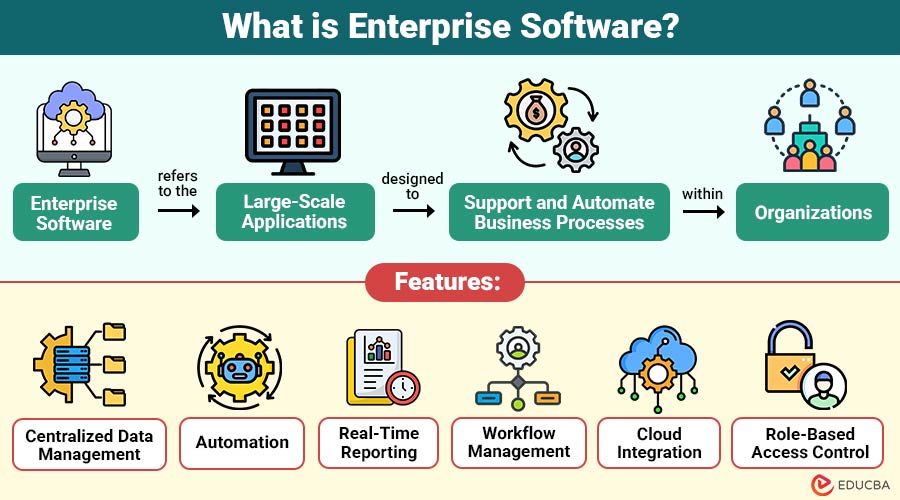
Enterprise software refers to the large-scale applications designed to support and automate business processes within organizations. These systems are typically used by multiple users across departments and integrated with various business functions, such as finance, human resources, customer management, and supply chain operations.
Enterprise software is developed to handle high volumes of data, ensure security, and provide reliable performance across large networks.
Table of Contents:
Key Takeaways:
- Enterprise software integrates multiple business processes, enabling efficient operations across departments in large organizations.
- It offers scalability, security, and customization to support growing business needs and complex operational requirements.
- Automation and real-time analytics improve efficiency, reduce errors, and enable faster decision-making.
- Despite high costs and complexity, enterprise software delivers long-term value through productivity and optimization.
Characteristics of Enterprise Software
Below are the key characteristics that define enterprise software and its capabilities:
1. Scalability
Enterprise software is designed to scale efficiently, accommodating growing data volumes, user counts, and transaction volumes without compromising overall performance.
2. Integration
It enables seamless integration with applications, databases, and platforms, ensuring consistent data exchange and streamlined workflows across departments.
3. Security
Sensitive business data is shielded from breaches and illegal use by strong security measures, including encryption, authentication, and access controls.
4. Customization
Enables effective customization, allowing organizations to tailor functionalities, interfaces, and processes to specific business requirements.
5. Reliability
These systems ensure reliability by maintaining consistent performance, minimizing downtime, and supporting critical operations without interruptions or failures.
6. Multi-User Access
It supports simultaneous users, role-based access controls, permissions, and collaboration features to manage tasks efficiently across teams.
Types of Enterprise Software
Below are the major types of enterprise software used by organizations to manage and optimize various business functions:
1. Enterprise Resource Planning (ERP)
ERP systems integrate production, finance, procurement, and inventory into a single, unified platform.
2. Customer Relationship Management (CRM)
CRM software helps companies track sales activity, manage customer interactions, and improve customer satisfaction through more effective engagement tactics.
3. Supply Chain Management (SCM)
SCM software improves coordination, efficiency, and delivery performance by managing the flow of products, data, and money throughout the supply chain.
4. Human Resource Management Systems (HRMS)
HRMS tools handle employee data, payroll, recruitment, attendance, and performance management, streamlining human resources operations within organizations.
5. Business Intelligence (BI) Tools
BI software analyzes business data, generates reports, and provides actionable insights to support better-informed strategic and operational decision-making.
6. Content Management Systems (CMS)
CMS platforms help organizations create, manage, edit, and publish digital content efficiently without requiring advanced technical knowledge or expertise.
Features of Enterprise Software
Below are the essential features that make enterprise software powerful and effective for managing business operations:
1. Centralized Data Management
Stores all organizational data in a unified system, ensuring consistency, accuracy, accessibility, and efficient data management processes.
2. Automation
Automation features eliminate human error, handle repetitive activities, and increase overall operational efficiency in a variety of business operations.
3. Real-Time Reporting
Organizations can make well-informed decisions based on current data thanks to real-time reporting, which provides fast analytics, dashboards, and insights.
4. Workflow Management
Workflow management streamlines business processes by defining, automating, and monitoring tasks, ensuring efficient coordination and execution across departments.
5. Cloud Integration
Cloud integration enables enterprise software to provide remote access, scalability, flexibility, and seamless data synchronization across distributed systems globally.
6. Role-Based Access Control
Role-based access control restricts system access based on user roles, ensuring data security, privacy, and controlled information availability within the organization.
Benefits of Enterprise Software
Below are the key benefits that offers for improving organizational performance and efficiency:
1. Improved Efficiency
Reduces manual labor in a variety of commercial procedures, streamlines workflows, and automates repeated tasks to increase productivity.
2. Better Decision-Making
Access to real-time data, analytics, and reports enables organizations to make informed, accurate, and timely strategic business decisions effectively.
3. Enhanced Collaboration
Shared platforms enable teams across departments to collaborate effectively, communicate seamlessly, and access consistent data, improving coordination.
4. Cost Savings
Reduces operational expenses by optimizing resources, minimizing errors, automating processes, and improving overall efficiency across business functions.
5. Scalability
These systems support business growth by adapting to growing workloads, user numbers, and complexity without compromising performance or operational efficiency.
6. Data Security
Strong security features protect important business data using encryption, login checks, and access controls to prevent unauthorized access.
Challenges of Enterprise Software
Below are the common challenges organizations may face when implementing and managing enterprise software systems:
1. High Implementation Cost
Requires significant investment in development, infrastructure, deployment, training, and ongoing maintenance, making initial adoption financially challenging.
2. Complex Integration
Integrating enterprise software with existing systems, databases, and applications can be complex, time-consuming, and may require specialized technical expertise.
3. User Adoption
Employees may resist adopting new systems, requiring proper training, change management strategies, and continuous support to ensure effective usage.
4. Maintenance and Updates
Regular maintenance, updates, and system monitoring are essential to ensure performance, security, and compatibility with evolving technologies and business needs.
5. Customization Complexity
Highly customized enterprise solutions can become difficult to manage, upgrade, and scale over time, increasing operational complexity and maintenance efforts.
Use Cases of Enterprise Software
Below are the common use cases where enterprise software helps organizations streamline operations and improve efficiency:
1. Financial Management
Organizations use ERP systems to manage accounting, budgeting, invoicing, and financial reporting, ensuring accuracy, compliance, and better financial control.
2. Customer Management
CRM tools track customer interactions, manage sales pipelines, and improve service quality, enhancing customer relationships and long-term business retention.
3. Supply Chain Optimization
SCM systems optimize inventory management, procurement, and logistics processes, ensuring efficient operations, reduced costs, and timely product delivery.
4. Workforce Management
HRMS software helps manage employee tasks like payroll, hiring, attendance, and performance in an easy and automated way.
5. Data Analytics
BI tools analyze business data, generate insights, and identify trends, helping organizations make informed decisions and improve overall performance.
6. Project Management
Enterprise software supports project planning, task allocation, collaboration, and monitoring, ensuring the successful execution of large-scale projects with multiple stakeholders.
Real-World Examples
Below are real-world examples of how enterprise software is used across different industries:
1. Retail Industry
Large retail companies use ERP and SCM software to manage inventory, suppliers, sales operations, and customer demand efficiently.
2. Healthcare Sector
Hospitals use enterprise systems to manage patient records, billing, appointments, and staff operations, ensuring efficient healthcare service delivery.
3. Banking and Finance
Financial institutions rely on enterprise software for transaction processing, fraud detection, risk management, and regulatory compliance across operations.
4. Manufacturing
Manufacturers use ERP systems to manage production planning, inventory control, supply chains, and quality assurance processes efficiently.
5. IT and Technology
Technology companies use enterprise tools for project management, collaboration, software development tracking, and customer support service optimization effectively.
Final Thoughts
Enterprise software is a vital component of modern business operations. It enables organizations to streamline processes, increase output, and make informed decisions. While implementing enterprise software can be complex and costly, the long-term benefits far outweigh the challenges. Adopting the appropriate enterprise software solutions will be essential for organizations to remain competitive in a world that is becoming more and more digital.
Frequently Asked Questions (FAQs)
Q1. What is enterprise software used for?
Answer: Enterprise software is used to manage and automate business processes such as finance, HR, customer management, and supply chain operations.
Q2. Is enterprise software only for large companies?
Answer: Primarily yes, but small and medium businesses are increasingly adopting scalable enterprise solutions.
Q3. How long does it take to implement enterprise software?
Answer: Implementation time varies from a few months to over a year, depending on system complexity, level of customization, and organizational size.
Q4. Can enterprise software be customized for specific business needs?
Answer: Yes, most enterprise software solutions offer customization options to align with unique business processes, workflows, and organizational requirements.
Recommended Articles
We hope that this EDUCBA information on “Enterprise Software” was beneficial to you. You can view EDUCBA’s recommended articles for more information.

