


Understanding the Function of Itemgetter in Python
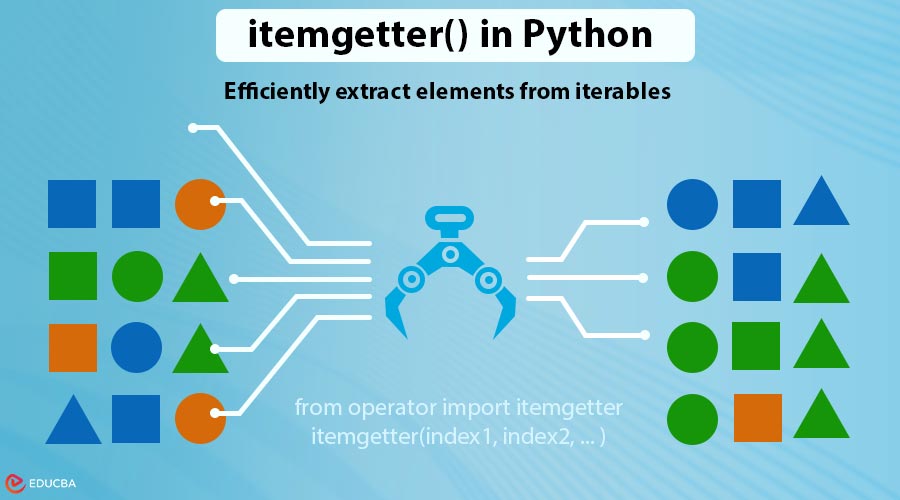
In Python, managing and accessing data efficiently is crucial, particularly when working with collections such as lists, tuples, or dictionaries. One of the tools that makes data handling easier and more readable is the itemgetter() function. In this article, we will explore itemgetter in Python in detail, covering its usage, benefits, and practical examples. By the end of this guide, you will gain a thorough understanding of how Python’s itemgetter() function can simplify your code and enhance efficiency.
Table of Contents
- Introduction
- What is itemgetter() in Python?
- Why Use itemgetter() Instead of Lambda?
- Examples of itemgetter() in Python
- When to Use itemgetter()?
- Common Mistakes to Avoid
What is itemgetter() in Python?
The itemgetter() function is part of the built-in operator module in Python. It allows you to access elements from iterable objects (like lists, tuples, and dictionaries) by their index or key. People commonly use it in:
- Sorting complex data structures
- Filtering and extracting specific values
- Improving readability in code that deals with multiple items
Syntax:
from operator import itemgetter
itemgetter(index1, index2, ... )- Before using itemgetter(), you need to import it from the operator module.
- index1, index2, … → The positions or keys of the elements you want to retrieve.
- Returns a callable object that, when called on a data structure, fetches the items at the given indices.
Basic Example:
from operator import itemgetter
data = [('Alice', 25), ('Bob', 30), ('Charlie', 20)]
get_name = itemgetter(0)
for person in data:
    print(get_name(person))
Output:

Here, itemgetter(0) extracts the first element of each tuple efficiently.
Why Use itemgetter() Instead of Lambda?
While you can use a lambda function for similar tasks, itemgetter() has key advantages:
- Readability: Code is cleaner and easier to understand.
- Performance: Runs slightly faster than lambda functions because developers implemented it in C.
- Reusability: You can reuse the same function created with itemgetter() multiple times.
With Lambda:
data = [(1, 'apple'), (3, 'banana'), (2, 'cherry')]
sorted_data = sorted(data, key=lambda x: x[1])
print(sorted_data)
With Itemgetter:
from operator import itemgetter
data = [(1, 'apple'), (3, 'banana'), (2, 'cherry')]
sorted_data = sorted(data, key=itemgetter(1))
print(sorted_data)
Output:

As you can see, itemgetter() makes the sorting logic more concise.
Examples of the Itemgetter in Python
Here are four engaging ways to use itemgetter() in Python in real-world scenarios:
1. Working with Lists
Imagine a teacher wants to rank students based on their marks:
from operator import itemgetter
students = [
    ["John", 85, "A"],
    ["Emma", 92, "A+"],
    ["Sophia", 78, "B"]
]
sorted_students = sorted(students, key=itemgetter(1), reverse=True)
print(sorted_students)
Output:

itemgetter(1) allows sorting by the second element (marks) with just one line.
2. Sorting a List of Tuples
Suppose a company wants to display employees sorted by salary:
from operator import itemgetter
employees = [
    ("Bob", "HR", 35000),
    ("Alex", "IT", 60000),
    ("Eve", "Finance", 50000)
]
sorted_employees = sorted(employees, key=itemgetter(2), reverse=True)
print(sorted_employees)
Output:

Quickly create a salary leaderboard without manually writing loops.
3. Multiple Keys
Imagine you are ranking players first by team and then by score:
from operator import itemgetter
players = [
    ("John", "Red", 90),
    ("Ely", "Blue", 85),
    ("Siziel", "Red", 95),
    ("Daniel", "Blue", 90)
]
sorted_players = sorted(players, key=itemgetter(1, 2), reverse=True)
for player in sorted_players:
    print("Name:", player[0])
    print("Team:", player[1])
    print("Score:", player[2])
    print("---")
Output:
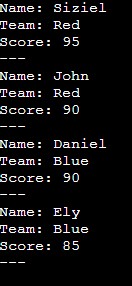
itemgetter(1, 2) makes it easy to sort by multiple criteria, just like a tournament ranking system.
4. Dictionaries
Suppose you have a list of student dictionaries, and you want to identify the top scorer:
from operator import itemgetter
students = [
    {"name": "John", "marks": 85, "age": 16},
    {"name": "Emma", "marks": 92, "age": 15},
    {"name": "Sophia", "marks": 78, "age": 17},
]
top_student = max(students, key=itemgetter("marks"))
print("Top Student Details:")
for key, value in top_student.items():
    print(f"{key.capitalize()}: {value}")
Output:
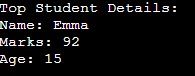
Using itemgetter(“marks”), you can quickly identify the top performer without requiring additional loops.
5. itemgetter() vs attrgetter() for Objects
In object-oriented scenarios, itemgetter() is for lists/dictionaries, while attrgetter() is for object attributes:
from operator import attrgetter
class Employee:
    def __init__(self, name, age, department):
        self.name = name
        self.age = age
        self.department = department
employees = [
    Employee("Alice", 30, "IT"),
    Employee("Bob", 25, "HR"),
    Employee("Eve", 35, "Finance")
]
sorted_employees = sorted(employees, key=attrgetter("age"))
for e in sorted_employees:
    print(e.name, e.age, e.department)
Output:
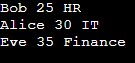
You can combine itemgetter() for dictionaries and attrgetter() for objects in a single program, making it flexible for diverse data types.
When to Use itemgetter()?
Use itemgetter() when you need to:
- Retrieve specific elements by index or key.
- Extract multiple values at once.
- Sort sequences by particular fields.
- Replace repetitive lambda functions with cleaner code.
Common Mistakes to Avoid While Using Itemgetter in Python
Recognizing these common pitfalls allows you to prevent mistakes, write cleaner code, and improve overall efficiency and maintainability in your projects.
- Mixing indices and keys: Remember that sequences (lists, tuples) use numerical indices starting from 0, while dictionaries use keys. Confusing the two will lead to errors.
- Overusing itemgetter() for dynamic access: itemgetter() is most effective for fixed positions or keys. If your indices or keys change dynamically, a traditional approach using loops may be more appropriate.
- Ignoring the tuple return for multiple items: When retrieving multiple items, itemgetter() always returns a tuple. Failing to account for this can cause issues when trying to unpack or use the values directly.
- Assuming itemgetter() works with all data types: Itemgetter works with both sequences and mappings. Using it on unsupported types, like sets, will result in errors.
- Misusing in nested structures: When working with nested lists or dictionaries, itemgetter() cannot access deep levels directly. You may need additional steps to extract nested elements.
Final Thoughts
The itemgetter in Python is a versatile tool that simplifies code by allowing you to extract specific elements from sequences or mappings quickly, making your code cleaner, more readable, and efficient. Whether you are sorting records, extracting multiple fields from structured data, or simply retrieving elements from sequences, itemgetter() streamlines these tasks. By avoiding common mistakes and leveraging its performance advantages over lambda functions, you can make your Python code more elegant and maintainable.
Recommended Articles
We hope this detailed guide on itemgetter in Python helps you master efficient data extraction and sorting techniques. Check out these recommended articles for more insights and practical tips to enhance your Python programming skills.


