


Updated April 7, 2023

Introduction to PyTorch Tensor to NumPy
PyTorch tensor can be converted to NumPy array using detach function in the code either with the help of CUDA or CPU. The data inside the tensor can be numerical or characters which represents an array structure inside the containers. Tensors are supported by a memory package such as GPU, and this memory cannot be changed in any form, whereas NumPy does not have any such memory support and has arrays stored in external storage or the cloud system.
PyTorch Tensor to NumPy Overviews
- Tensor represents an n-dimensional array of data where 0D represents just a number.
- Here, we can use NumPy to create tensors of any dimensions ranging from 1D to 4D.
- We can use ndim and shape in NumPy to get the shape and rank of the tensors via NumPy.
- Arrays can be worked using NumPy, and tensors can be worked using TensorFlow.
- Heavy calculations can be done easily using Tensors as GPU in the system supports the memory.
How to use PyTorch Tensor to NumPy?
The first step is to import all the necessary libraries into the system.
Code:
import numpy as np
import tensorflow as tf
array_numpy = np.ones([4, 4])
print(array_numpy)
We will get this output:
Output:
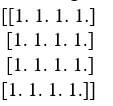
We can convert the same array to tensors with the help of tensorflow.
Code:
Tensor_values = tf.multiply(array_numpy, 5)
print(tensor_values)
tf.Tensor(
[[5. 5. 5. 5.]
[5. 5. 5. 5.]
[5. 5. 5. 5.]
[5. 5. 5. 5.]], shape=(4, 4), dtype=float64)
Tensors help us to do heavy calculations without doing any manual code. When heavy calculations are present in the code, and if tensors are present in the same code, the calculations are done automatically.
We use NumPy mostly in machine learning algorithms where the calculations can be handled easily. PyTorch tensors are used in deep learning where the calculations are huge, and if done using NumPy, it will take more time and storage in the device. Heavy matrix computation is mostly related with deep learning, where CUDA-operated GPU will be helpful.
Convert PyTorch Tensor to NumPy Array
The code below shows how to convert PyTorch tensor to NumPy.
Code:
import torch
import torch.nn as t_nn
from pathlib import Path
from collections import OrderedDict
import numpy as np
path = Path('C/Data/Python_dataset).expanduser()
path.mkdir(parents=True)
numpy_samples = 4
Data_in, Data_out = 2, 2
lb, ub = -2, 2
a = torch.torch.distributions.Uniform(low=lb, high=ub).sample((numpy_samples, Data_in))
fun = t_nn.Sequential(OrderedDict([
    ('fun1', t_nn.Linear(Data_in,Data_out)),
    ('out',t_ nn.SELU())
]))
b = f(a)
b.numpy()
a_np, b_np = a.detach().cpu().numpy(), b.detach().cpu().numpy()
np.savez(path / 'db', a=a_np, b=b_np)
print(a_np)
It is easy to relate the conversion of Tensors to NumPy in real life. There can be chances where tensors and NumPy share the same storage CPU in the system. Here we can create arrays in the same storage location or can place the arrays in a different location.
Examples of PyTorch Tensor to NumPy Array
Given below are the examples mentioned:
Code:
import torch
x = torch.ones((3,6))
print(x)
numpy_x = x.numpy()
numpy_x [0][0]=20
print(numpy_x)
print(x)
We can copy numpy to different storage using the below code.
Code:
import torch
x = torch.ones((3,6))
print(x)
numpy_x = x.numpy()
numpy_x_copy = numpy_x.copy()
numpy_x [0][0]=20
print(numpy_x_copy)
print(numpy_x)
print(x)
When we must use CPU tensor, the below code can be used. In addition, a computational graph with a gradient is present; we should use the following method.
Code:
import torch
x = torch.ones((3,6), requires_grad=True)
print(x)
numpy_x = x.detach().numpy()
numpy_x [0][0]=20
print(numpy_x)
print(x)
Since we have used requires_grad = True, it is important to detach them before converting the same to NumPy. If not, it will cause RunTime Error on the tensor.
This is another example where requires_grad = False. If a computational graph is present but with no gradient, we can use the below code.
Code:
x = torch.ones((3,6), device='cuda')
print(x)
numpy_x = x.to('cpu').numpy()
numpy_x [0][0]=20
print(numpy_x)
print(x)
We can also write code where requires_grad = True and device = cuda. This happens when the code has a computational graph where a gradient is required.
Code:
x = torch.ones((3,6), device='cuda', requires_grad=True)
print(x)
numpy_x = x.detach().to('cpu').numpy()
numpy_x [0][0]=20
print(numpy_x)
print(x)
It is necessary to call detach method as requires_grad is true; it will return runtime error if there is no detach method. Finally, To_cpu method is used to convert the cuda device that supports tensor to a numpy device.
Code:
import numpy as np
print(np.__version__)
import torch
print(torch.__version__)
integers_tensor = (torch.rand(5, 7, 9) * 100).int()
print(integers_tensor)
numpy_integer = integers_tensor.numpy()
numpy_integer.shape
numpy_integer.dtype
print(numpy_integer)
We can write example code for float tensors as well.
Code:
float_tensor = (torch.rand(5, 7, 9) * 100)
print(float_tensor)
numpy_float = float_tensor,numpy()
numpy_float.shape
numpy_float.dtype
print(numpy_float)
Let us see an example where a 1D tensor can be converted to an array.
Code:
import torch
import numpy
p = torch.tensor([14.23, 75.39, 50.00, 25.73, 10.84])
print(p)
p = p.numpy()
p
A 2D tensor can also be done in the same manner.
Code:
import torch
import numpy
p = torch.tensor([[12,54,72,8],[90,65,43,5],[32,61,53,2]])
print(p)
p = p.numpy()
p
NumPy array can also be used to convert any tensor to arrays.
Code:
import torch
import numpy
p = torch.tensor([[12,54,72,8],[90,65,43,5],[32,61,53,2]])
print(p)
p = numpy.array(p)
p
We have to follow only two steps in converting tensor to numpy. The first step is to call the function torch.from_numpy() followed by changing the data type to integer or float depending on the requirement. Then, if needed, we can send the tensor to a separate device like the below code.
Code:
torch.from_numpy(p).to("cuda")PyTorch Tensor to NumPy Array
- Tensors are a special data structure comprising arrays and matrices in the system, representing the models of deep learning and its parameters.
- We can create tensors from NumPy arrays, and we can create NumPy arrays from tensors.
- We can make tensors either to store or override the parameters of the models or properties of tensors.
- We will know the shape, data type, and the device to store the data easily using tensors.
Conclusion
Though we can convert NumPy for tensors and tensors for NumPy easily, we cannot use NumPy in deep learning as the memory storage will not match with that of tensors. However, if our goal is to run any arbitrary calculations in the system, we can use either NumPy or Tensors.
Recommended Articles
We hope that this EDUCBA information on “PyTorch Tensor to NumPy” was beneficial to you. You can view EDUCBA’s recommended articles for more information.

