
Difference Between iCloud vs OneDrive
iCloud vs OneDrive is defined as the iCloud is a cloud storage and cloud computing service which Apple Inc provides, allows to store of data such as documents, photos, and music and also allows to share and send data to other users; it is helpful to manage the Apple devices if it is lost. In contrast, OneDrive is also called Microsoft OneDrive, a cloud storage service that allows users to store all their files securely so that we can access them from anywhere; this service works like an external drive. Still, the only difference is that it is available online with additional features.
Head-to-Head Comparison Between iCloud vs OneDrive
Key Differences Between iCloud vs OneDrive
- Syncing speed: iCloud does not provide a good syncing speed as compared to their service, it means that iCloud provides good service, but when it comes to handling large files then, the syncing speed is good; this slow processing may be irritated the users as every user wants speed in their work, on the other hand, OneDrive provides satisfying syncing speed with a large number of servers, it has block-level copying that can make the syncing of files speedy. Also, it helps to copy a part of an office file without making changes to the whole file.
- Security: iCloud provides good security to our files because they provide the security of data encryption, but Apple does not have information or access to the encryption key used to encrypt all the data. Other iCloud services can keep a copy of the user’s encryption key, whereas it connects the encryption key to the Apple id. The emails stored on it also do not have any encryption, which is also a defect in iCloud. In contrast, OneDrive provides security to only business plan users; it encrypts each file of the business plan users. A few years ago, it added a feature that helps both business and personal users recover the last 30 days of data that has been attacked, making users’ files safer. Also, it has a great feature to protect passwords using the OneDrive link, making it more secure when users share the file with others.
- Features: Some features describe the difference between these two cloud services. OneDrive is closely related to Office 365, and both of the cloud services that are iCloud and OneDrive, are integrated with window-8 or windows-10 windows services, OneDrive works well with Windows in which it manages all files across the devices, and the data of the third-party cannot be accessed by OneDrive, on the other hand, iCloud Drive is integrated with the cloud it can be easily accessible, and there is no need of the additional application, it can help to back up our desktop folders and documents for the Mac users, the iCloud drive is designed for Apple users, not for Android devices.
- Performance: Both cloud services, iCloud and OneDrive, allow uploading files using desktop applications, mobile applications, or web browsers. If you frequently need to upload file content online, both platforms provide convenient options, although their file size limits and overall performance differ. The maximum file size of iCloud is 50GB only, so if we want to upload large video files, then iCloud is not able to upload them because most of the video files are greater than 50GB; on the other hand, OneDrive has an impressive file size that is 250GB so that we can work with iCloud when the files are larger, iCloud works smoothly, particularly with Apple devices. So iCloud gives an excellent performance as compared to OneDrive.
- Support: If we have any problem using iCloud, we can contact technical support for help. It gives very efficient technical service, which any user can talk with the technician over the phone; free plan users can also contact a technician, and wait time is also less, it may be 2 minutes only, and time varies as per your location, on the other hand, OneDrive does not provide technical support to everyone their support is available only for the business user, but they provide web chat support, while chat they have a service issue and so that it cannot help.
So in terms of support, Microsoft is more comprehensive than Apple, as both have online questioning services.
Comparison Table of iCloud vs OneDrive
| Sr. No | iCloud | OneDrive |
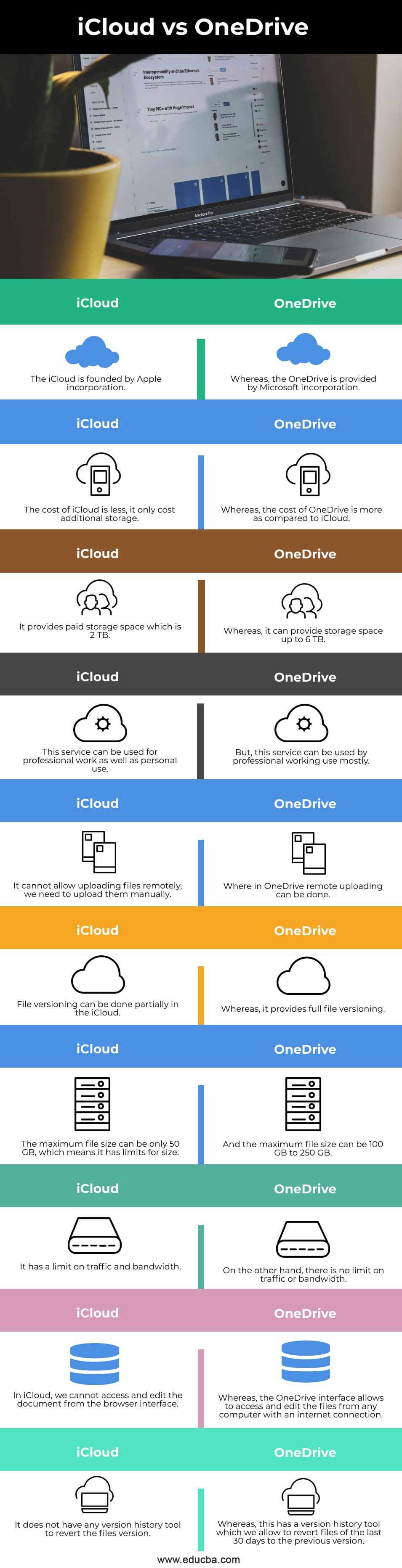
| 1. | The iCloud is founded by Apple incorporation. | Whereas OneDrive is provided by Microsoft incorporation. |
| 2. | The cost of iCloud is less; it only costs additional storage. | Whereas the cost of OneDrive is more as compared to iCloud. |
| 3. | It provides paid storage space which is 2 TB. | Whereas it can provide storage space of up to 6 TB. |
| 4. | This service can be used for professional work as well as personal use. | This service can be used by professionals mainly working. |
| 5. | It cannot allow uploading files remotely; we need to upload them manually. | Whereas in OneDrive, remote uploading can be done. |
| 6. | File versioning can be done partially in iCloud. | Whereas it provides full file versioning. |
| 7. | The maximum file size can be only 50 GB, which means it has limits for size. | And the maximum file size can be 100 GB to 250 GB. |
| 8. | It has a limit on traffic and bandwidth. | On the other hand, there is no limit on traffic or bandwidth. |
| 9. | In iCloud, we cannot access and edit the document from the browser interface. | The OneDrive interface allows one to access and edit files from any computer with an internet connection. |
| 10. | It does not have any version history tool to revert the file version. | Whereas this has a version history tool allowing us to revert files of the last 30 days to the previous version. |
Conclusion
In this article, we have seen the comparison and key differences between the two cloud services, considering the differences both of them have different services for different users; in which this article is also helpful in choosing a good cloud service according to the security, speed, technical support, and performance.
Recommended Articles
This is a guide to iCloud vs OneDrive. Here we discuss iCloud vs OneDrive key differences with infographics and a comparison table. You may also have a look at the following articles to learn more –

