
Difference Between Pixelmator Pro vs Photoshop
Pixelmator Pro Is an Image Editing Software that Is Designed for Mac Operating System and I Os Only. Adobe Photoshop Is an Image Editing Program that Works with Windows, Mac Os, Linux, Android, I Pad & on Web Too.
Pixelmator Pro Was Developed in The Year 2007 by Pixelmator Team Ltd. Adobe Photoshop Was Developed in the Year 1990 by Adobe Inc. Both the Software Has Been Updated Since Then, Numerous Times. Both the Programs Are Raster Graphics Editing Software that is Used by Graphic Designers for Image Editing.
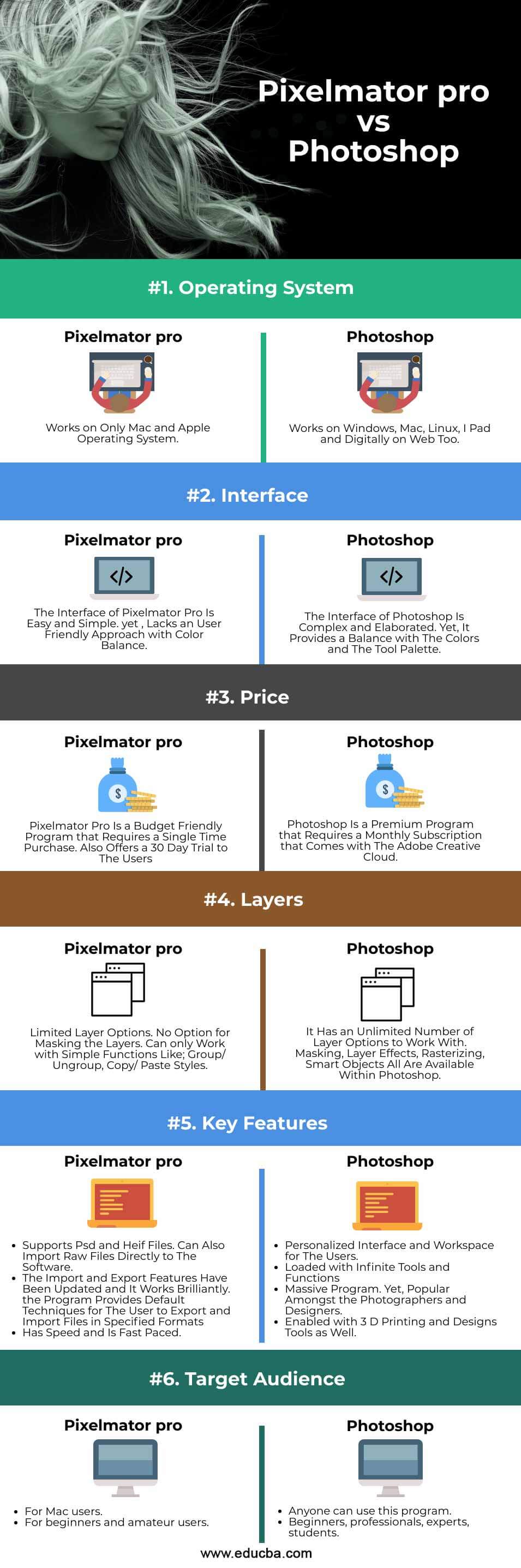
Head to Head Comparison Between Pixelmator pro vs Photoshop (Infographics)
Below are the top differences between Pixelmator pro vs Photoshop:
Key Differences
- Being a Straightforward Program, Pixelmator Pro Is a Fast Pace Program that Comes with An Accelerated Interface for The Users. in Terms of Zooming, Viewing & Selecting Objects; It Proves to Be Enthusiastic Software. Whereas Photoshop Has a Much Detailed User Interface with All the Tools and Filters, It May Take a Few Seconds More to Perform Functions in Comparison to Pixelmator Pro.
- Pixelmator Pro Follows a Machine Learning Technique in Comparison to Photoshop. in Other Words, Pixelmator Pro Has an Advantage Over Photoshop of Matching and Rectifying the Colors More Effectively and Successfully An Image.
- Pixelmator Pro Is a Cost-Friendly Program as Compared to Adobe Photoshop, Which Proves to Be an Expensive Program for The Users. Also, Pixelmator Pro Provides a 30 Day Free Trial for The Users to Check and Explore the Program and Their Demands.
- Adobe Photoshop Has a More Versatile Toolset in Comparison to Pixelmator Pro. for Example, Adobe Photoshop Has Many Tools to Edit Text and Line Spacing, Which, on The Other Hand, Is Absent in Pixelmator Pro. Similarly, the History Option Present in Photoshop Is Missing in Pixelmator Pro.
- Working with Layers in Photoshop Is Very Different, with Working in Pixelmator Pro. Tasks Such as Editing Layers in A Batch Sequence or Modifying All the Layers at Once Cannot Be Acquired with Pixelmator Pro While the User Can Perform These Functions in Photoshop Successfully.
- Adobe Photoshop Has Features that Support 3 D Extrusion Tools, 3 D Printing Tools, and 3 D Designing Tools as Well. While Pixelmator Pro Does Not Support Any 3 D Tools as Of Now.
- There Are a Lot of Free Tutorials Available on The Internet for Learning Adobe Photoshop. While the Users Get Limited Tutorials on Pixelmator Pro.
- Pixelmator Pro Has a Good Gradient Toolset but Lacks the Interactive Editing According to The Users Which Is Limited. While Photoshop Has a Much More Extensive Gradient Toolset that Performs Editing Manually and Logically Both.
- Adobe Photoshop Supports a Lot of Other Applications. the Files Can Easily Be Exported to Other Adobe Software Such as Illustrator or Lightroom. Whereas Pixelmator Pro Files Cannot Be Exported Other than Mac Book Pro’s Touch Bar.
Comparison Table if Pixelmator Pro vs Adobe Photoshop
| Pixelmator Pro | Adobe Photoshop | |
| Operating System
|
Works on Only Mac and Apple Operating System. | Works on Windows, Mac, Linux, I IPad, and Digitally on Web Too. |
| Interface
|
The Interface of Pixelmator Pro Is Easy and Simple. yet, Lacks a User-Friendly Approach with Color Balance | The Interface of Photoshop Is Complex and Elaborated. Yet, It Provides a Balance between The Colors and The Tool Palette. |
| Price | Pixelmator Pro Is a Budget-Friendly Program that Requires a Single Time Purchase. Also Offers a 30 Day Trial to The Users | Photoshop Is a Premium Program that Requires a Monthly Subscription that Comes with The Adobe Creative Cloud. |
| Layers | Limited Layer Options. No Option for Masking the Layers. Can only Work with Simple Functions Like; Group/ Ungroup, Copy/ Paste Styles. | It Has an Unlimited Number of Layer Options to Work With. Masking, Layer Effects, Rasterizing, Smart Objects All Are Available Within Photoshop |
| Key Features | Supports PSD and Hef Files. Can Also Import Raw Files Directly to The Software.
· the Import and Export Features Have Been Updated, and It Works Brilliantly. the Program Provides Default Techniques for The User to Export and Import Files in Specified Formats · Has Speed and Is Fast Paced. |
· Personalized Interface and Workspace for The Users.
· Loaded with Infinite Tools and Functions · Massive Program. Yet, Popular Amongst the Photographers and Designers. · Enabled with 3 D Printing and Designs Tools as Well. |
| Target Audience | · For Mac users.
· For beginners and amateur users
|
· Anyone can use this program.
· Beginners, professionals, experts, students. |
Conclusion
Summarizing the topic, it would be justice to say that Pixelmator Pro is a good Image editing raster program with Non-destructive capabilities. It has a great toolset and user interface that will attract a lot of users. It proves to be a great descendant of Adobe Photoshop. Photoshop will always be the master for image editing projects with a giant toolset and unlimited functions within it.
It is also important to say that Pixelmator Pro is a simple and minimalist program for beginners and photographers who are into simple photo editing of colors, tones, and saturation. Pixelmator Pro is a low-cost program that gets the work done quickly and effectively.
While Photoshop is a complex and detailed program that targets Creative professionals and Expert Designers.
Recommended Articles
This is a guide to Pixelmator pro vs Photoshop. Here we discuss the Pixelmator pro vs Photoshop key differences with infographics and a comparison table. You may also have a look at the following articles to learn more –

