


Difference Between Krita vs GIMP
The following article provides an outline for Krita vs GIMP. Krita is that type of free and open sources software that deals with the editing of raster graphics, and it is focused on digital painting and 2D animations. It works with layer panel, creates a mask for non-destructive layer, do colorizations and many other editings, as well as manipulation work related to raster graphics. GIMP is also free and open-source raster graphics editing software and user for editing of or manipulation of images in terms of retouching, enhancing color properties, curve management and many more things. Both software does their work effectively by using a number of standard tools as well as features. For using Krita or GIMP as a raster graphics editor, you have to know more about them, such as their basic requirement, supporting features, the capability to do works, and many more.
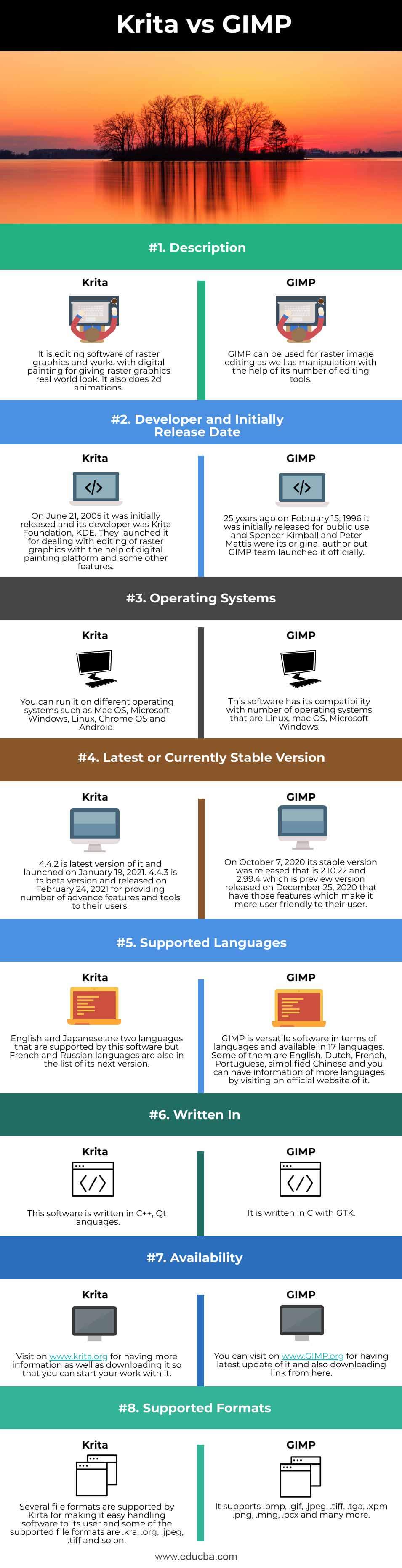
Head To Head Comparison Between Krita vs GIMP (Infographics)
Below are the top 8 differences between Krita vs GIMP:
Key Difference Between Krita vs GIMP
Both software are used for raster graphics editing purposes, but they do their work in different ways and use different types of tools for performing a different task. Let us discuss some of the major key differences between Krita vs GIMP:
- As we told you above, both software is free and open-source, so you can use them free of cost, but both offer you different type of tools with their adjustable parameters for performing the same type of task in them. You can understand their work by using both of them one by one.
- If it tells you about the license of both software, then Krita has a GPLv3 license only, whereas GIMP has a license under GPLv3+.
- Krita is designed for concept artists, texture and matte artists, illustrators, and VFX industries. Its users like it for its more prominent feature that is UX design with a graphics tablet. Whereas GIMP is fully focused on image editing by using tools of tool panel, options of menus of the menu bar, use filters, brushes, do transformation and use masking for layer panel features for doing editing work.
- Operations of GIMP can be automated with the help of scripting languages. The Script-Fu is a language which is scheme based language implemented by using a TinyScheme interpreter. New features can be added by changing the program code of GIMP (GIMP core) but by creating plugins. MathMap is an example of its plugin, which is written in C languages.
- Krita offers you a number of Painting tools for doing digital painting, Animation tools for designing animation of raster image which uses frame by frame concept. It also has a Timeline control panel for proper management of animation with Real-time animation playback controls, and it is a plus point of it during animation. It doesn’t limit itself here because it also offers Vector tools for vector art such as Path tool, vector art tool and many other features you will find in this software.
Krita vs GIMP Comparison Table
Let’s discuss the top comparison between Krita vs GIMP:
|
|
Krita |
GIMP |
| Definition | It is editing software of raster graphics and works with digital painting for giving raster graphics a real-world look. It also does 2d animations. | GIMP can be used for raster image editing as well as manipulation with the help of its number of editing tools. |
| Developer and Initially Release Date | On June 21, 2005, it was initially released, and its developer was Krita Foundation, KDE. They launched it for dealing with the editing of raster graphics with the help of a digital painting platform and some other features. | 25 years ago, on February 15, 1996, it was initially released for public use, and Spencer Kimball and Peter Mattis were its original author, but the GIMP team launched it officially. |
| Operating Systems | You can run it on different operating systems such as Mac OS, Microsoft Windows, Linux, Chrome OS and Android. | This software has its compatibility with a number of operating systems that are Linux, Mac OS, Microsoft Windows. |
| Latest or Currently Stable Version | 4.4.2 is the latest version of it and launched on January 19, 2021. 4.4.3 is its beta version and released on February 24, 2021, for providing a number of advance features and tools to its users. | On October 7, 2020, its stable version was released that is 2.10.22 and 2.99.4 which is preview version released on December 25, 2020, that have those features which make it more user friendly to their user. |
| Supported Languages | English and Japanese are two languages that are supported by this software, but French and Russian languages are also on the list of its next version. | GIMP is versatile software in terms of languages and available in 17 languages. Some of them are English, Dutch, French, Portuguese, Simplified Chinese, and you can have information on more languages by visiting on the official website of it. |
| Written In | This software is written in C++, Qt languages. | It is written in C with GTK. |
| Availability | Visit on www.krita.org for having more information as well as downloading it so that you can start your work with it. | You can visit on www.GIMP.org to have the latest update of it and download the link from here. |
| Supported Formats | Several file formats are supported by Kirta for making it easy handling software to its user, and some of the supported file formats are .kra, .org, .jpeg, .tiff and so on. | It supports .bmp, .gif, .jpeg, .tiff, .tga, .xpm .png, .mng, .pcx and many more. |
Conclusion
You can now start using this software for understanding them in different terms, such as their working methodology, user interface and so on.
Recommended Articles
This is a guide to Krita vs GIMP. Here we discuss Krita vs GIMP key differences with infographics and comparison table, respectively. You may also have a look at the following articles to learn more –

