

Updated April 6, 2023
Introduction to XML Comments
XML Comments could be defined by two parts, At first XML like HTML is a mark-up language, and you can create the own tags and the comments in the programming language, they are some small piece of text, formulas or any expressions included in the XML source code stating programming instructions on each line and can be added anywhere in the XML code which benefits the developer to understand the existing code for future analysis. The Comments are completely ignored by the compiler and help the users in the future while reading the code. So, XML Comments is a single character or a statement of paragraphs that are apart from code provides formal documentation and helps in understanding the common tags used in the XML file. It helps in including notes or any observations to be included in XML File.
Types of XML Comments
Comments in XML is declared as:
It has two sections starting and ending the comment. Have to be very clear that nesting comments are not done. here is the syntax.
<! - -Hello this is comment - - >
Note: dashes are not allowed to place in the middle of the comments. Both sides include two dashes. XML comment supports all HTML tags to add additional usages.
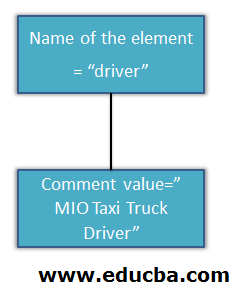
The tree structure form is given as:
Comment:
<driver>< ! – MIO taxi Truck Driver - -></driver>
Illegal representation of Xml Comment is shown below:
<!—Menu in the restaurant --

Type of dish -->            // No character sequence allowed.

<!—Calculator example --->  // illegal end of hypen

<!-- xxxxxxx<!-- yyyyyy--> -->  // cannot be nested
XML Comments & Examples
XML Comments can be categorized and used in the following ways.
1. Comments Inside an XML Document
This is the usual type where a comment is placed at the top. The need for comment potentially makes the code clear also whenever a document code is updated after a year or a month later it is required to update comment too.
Example #1 – Single Comment Line
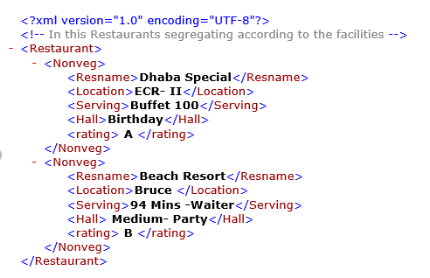
Let’s see some examples to have a clear sketch on the topic. It is inserted at the beginning of the code. The below example gives single line comment jut before the root element <Restaurant>, this comment provides readability for the entire document to understand the purpose of the tags.
Code:
<?XML version="1.0" encoding="utf-8"?>

<!-- In this restaurant segregating according to the facilities -->

<Restaurant>

<Nonveg>

<Resname>Dhaba Special</Resname>

<Location>ECR- II</Location>

<Serving>Buffet 100</Serving>

<Hall>Birthday</Hall>

<rating> A </rating>

</Nonveg>

<Nonveg>

<Resname>Beach Resort</Resname>

<Location>Bruce </Location>

<Serving>94 Mins -Waiter</Serving>

<Hall> Medium- Party</Hall>

<rating> B </rating>

</Nonveg>

</Restaurant>
Output:
Example #2 – Student Details
Code:
<?xml version="1.0" encoding="UTF-8" ?>

<!--Students  monthly assessment marks are uploaded in portal-->

<Engineering>

<ComputerDepartment>

<Sname>Ratan</Sname>

<grade>90</grade>

</ComputerDepartment>

<ECE>

<Sname>Aryan</Sname>

<grade>80</grade>

</ECE>

</Engineering>
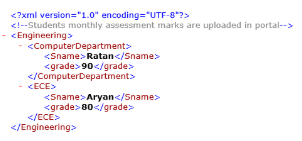
Output:
2. Comments Used in Schema xsd
It can be used at any location within an element. With clear explanation, could be included between any child element of the XSD component. Comments inside Schema elements are declared in the following ways:
Comment:
<xs: element name=” book” type =”psch”>

<!—This element defines type of the book. -- >

</xs:element>
Example #1 – Comments Inside Schema Elements
Code:
<?xml version = "1.0" encoding = "UTF-8"?>

<!--Schema Generation which converts into xml file. Schema declration is w3c http://www.w3.org/2001/XMLSchema-->

<xsd:schemaxmlns:xsd = "http://www.w3.org/2001/XMLSchema"

elementFormDefault = "qualified">

<xsd:element name = "EDUCBA">

<xsd:complexType>

<xsd:sequence>

<xsd:element name = "Course" type = "xsd:string"/>

</xsd:sequence>

</xsd:complexType>

</xsd:element>

</xsd:schema>
Output:
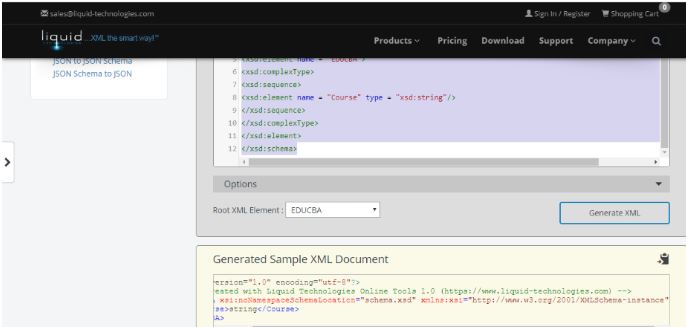
Corresponding xml file result is (use xsd to xml converter to see the output)
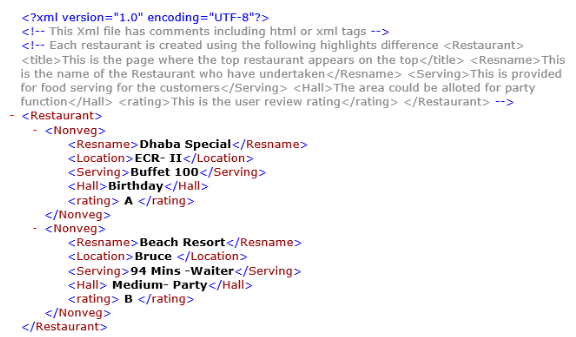
Example #2 – Next Using Multiple Comment Lines in the File
Code:
<?xml version="1.0" encoding="utf-8"?>

<!-- This Xml file has comments including html or xml tags -->

<!-- Each restaurant is created using the following highlights difference

<Restaurant>

<title>This is the page where the top restaurant appears on the top</title>

<Resname>This is the name of the Restaurant who have undertaken</Resname>

<Serving>This is provided for food serving for the customers</Serving>

<Hall>The area could be alloted for party function</Hall>

<rating>This is the user review rating</rating>

</Restaurant>

-->

<Restaurant>

<Nonveg>

<Resname>Dhaba Special</Resname>

<Location>ECR- II</Location>

<Serving>Buffet 100</Serving>

<Hall>Birthday</Hall>

<rating> A </rating>

</Nonveg>

<Nonveg>

<Resname>Beach Resort</Resname>

<Location>Bruce </Location>

<Serving>94 Mins -Waiter</Serving>

<Hall> Medium- Party</Hall>

<rating> B </rating>

</Nonveg>

</Restaurant>
Output:
Example #3 – Comments in between the Elements
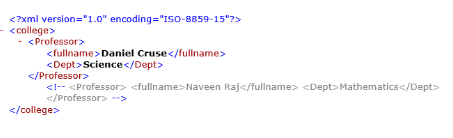
Here the second element is not executed by the processor as it is declared as xml comments. Here during validation parser parses the first element, not the second child element.
Code:
<?xml version="1.0" encoding="ISO-8859-15"?>

<college>

<Professor>

<fullname>Daniel Cruse</fullname>

<Dept>Science</Dept>

</Professor>

<!--

<Professor>

<fullname>Naveen Raj</fullname>

<Dept>Mathematics</Dept>

</Professor>

-->

</college>
Output:
3. Programming Languages Employ The XML Format
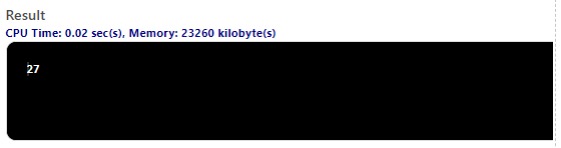
Here I have used c#.XML comments in C# is used for creating complete documentation of classes. It is started with /// three slashes before any class. In the below example the tag explains as <summary> gives description and <param> implies the value for the methods and <value> defines a value.
Example #1 – Using C#
Code:
using System;

class calv

{

/// <summary>

/// check the value and update it.

/// </summary>

/// <param name="x">The given value.</param>

/// <returns>The changed value.</returns>

static int check(int x)

{

return x * 3;

}

static void Main()

{

Console.WriteLine(check(9));

}

}
Output:
XML Comment Rules
Below show some rules to be covered while working with XML Comments.
- XML comments are not allowed to be placed before the XML Declaration as it first comes in the code. Adding reference comments should not conflict the XML declaration.
- The second rule is comments are not allowed to include between attribute elements. All the text should be included between less than and greater than a symbol.
- Nested Comments are not allowed. The entity references are not recognized within the comment line.
Conclusion
Therefore, to conclude this article is all about XML Comments and we have learned what this term is, and why XML Comments is used for. Then we proceeded with what the term meant along with the simple examples. Although it doesn’t give much clear o Comment at least we have understood some light on the topic. Finally, these comments help in providing simple context for the XML Code which is helpful for other remote developers to understand the code during communication between client and the server.
Recommended Articles
This is a guide to XML Comments. Here we discuss the Introduction to XML Comments and its types along with its examples and Code Implementation. You can also go through our other suggested articles to learn more –

