

Introduction to Web Application Testing
Web Application Testing is a type of testing used specifically for web applications or any other web-based application software. It always includes various other testing methods like Functional, Usability, Integration, Database, Compatibility, etc, to test all the elaborate functional features of the application, user interfaces, navigation pattern, and communication between the application & databases, which covers the end-to-end flow of the Web Application.
Advanced Testing Techniques of Web Application
Given below are the different Web Application Testing techniques:
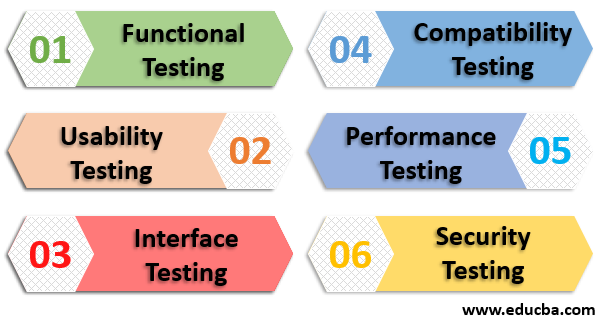
1. Functional Testing
Functional testing techniques include testing for links in your web application pages, the connection to your database, forms created to get and store information, cookies, etc.
a. Link Testing
- Check every internal link contained in the web application.
- Check every outgoing link in the web application pointing to another domain.
- Check links that jump to some other point on the same page.
- Check links that trigger an email to the user.
- Look for any broken links.
b. Database Testing
- Test data integrity.
- Look for errors when updating, modifying, or performing any functionality related to the database.
- Test all queries to see whether they are executing and retrieving data correctly.
c. Form Testing
- Test the default values, which should be auto-populated.
- Test the validation logic on every field defined.
- Insert incorrect inputs in the fields and look for the results.
- Test the options to view, delete, modify, or update forms.
d. Cookies Testing
- Test by enabling the cookies in browser settings.
- Disable cookies and test.
- Test the cookies encryption.
- Test for cookie expiration and user statistics after the end of the session.
- Test security affects cookie deletion.
2. Usability Testing
It helps you in enhancing human-computer interaction. It ensures a smooth user experience. Mainly three types of testing need to be performed for usability testing.
a. Comparative Testing
As the number of web applications increases daily, so is the competition. Therefore, comparative usability testing aims to compare your application against other applications in the market.
b. Explorative Testing
As the name suggests, here, users test end-to-end varying scenarios. Several use cases are applied to different services to get varying results. It proves to be very useful to minimize any gaps in the web application and highlights the areas in design to focus upon.
c. Usability Evaluation
Whenever we update our product or while making a check on the new product, usability evaluation comes into action. It generally happens around the pre-launch phase for a new product and the post-launch phase for the updated products. It ensures users have a positive experience with this new/updated product.
3. Interface Testing
It focuses on the interaction between servers, one being your application server and the other being the webserver. It consists of checking whether the communication is happening smoothly and the compatibility with the network, hardware, and software.
Three main areas to be focused upon are:
a. Application
The application provides access via UI or REST/SOAP API. Therefore, validation makes an important step here. There should be proper validation for both interfaces.
b. Web Server
It is responsible for handling all the incoming requests at the backend. It should ensure that every incoming request is handled properly and not declined by the webserver.
c. Database
Data Integrity should not be violated, and the database should provide appropriate outcomes to every query being thrown to it. Direct access should not be permitted, and a proper access restriction message should be returned.
4. Compatibility Testing
It ensures the compatibility of applications across various devices and browsers.
Compatibility test comprises of the ahead mentioned tests:
a. Device Compatibly
Your application should be responsive enough to fit into different types of devices of varying sizes and shapes. Device compatibility testing is necessary today as everyone carries a separate device that suits their needs.
b. Browser Compatibility
Users use different browsers like Firefox, Chrome, Internet Explorer, Safari, etc., as they like. Your application should be able to render itself across various browsers. Browser compatibility testing ensures no AJAX, JavaScript, HTML, and CSS issues.
5. Performance Testing
It tests the application’s response time when put through varying load conditions. Performance testing can be grouped into the following categories of testing:
a. Stress Test
It tests the maximum limit to which the web application can accept the load. The application is put through a load above limits, and its behavior is tested afterward.
b. Load Test
It tests the response time of the application under varying amounts of load. It also measures the application server and the database’s capacity.
c. Soak Test
It is also known as endurance testing. It measures memory utilization and CPU utilization under high load.
d. Spike Test
As the name suggests, the application is put through fluctuating load, and its performance is measured. For example, sudden decrease and increase in the number of users trying to access the application and see how the application handles these spikes.
6. Security Testing
It constitutes one of the most vital tests while performing web application testing. It blocks unauthorized access to the application. It makes sure that the sensitive information is safe within the application. It constitutes one of the most vital tests in web application testing, helping safeguard web applications against unauthorized access while ensuring sensitive information remains protected.
Here are some of the security testing techniques which a tester can perform:
- Unauthorized Access
- Denial Of Service
- Identity Spoofing
- Vulnerability Scanning
- URL Manipulation
- SQL Injection
- Privilege Escalation
Conclusion
Hopefully, this article includes all the testing techniques that may apply to your application. It will help you test your application seamlessly. Always remember to put your application through various tests to discover loopholes you may have missed while developing. So please write down your web application testing plan before making it live.
Recommended Articles
This is a guide to Web Application Testing. Here we discuss the basic concept and advanced testing techniques of web applications. You can also go through our other suggested articles to learn more –

