


What is a Zip File?
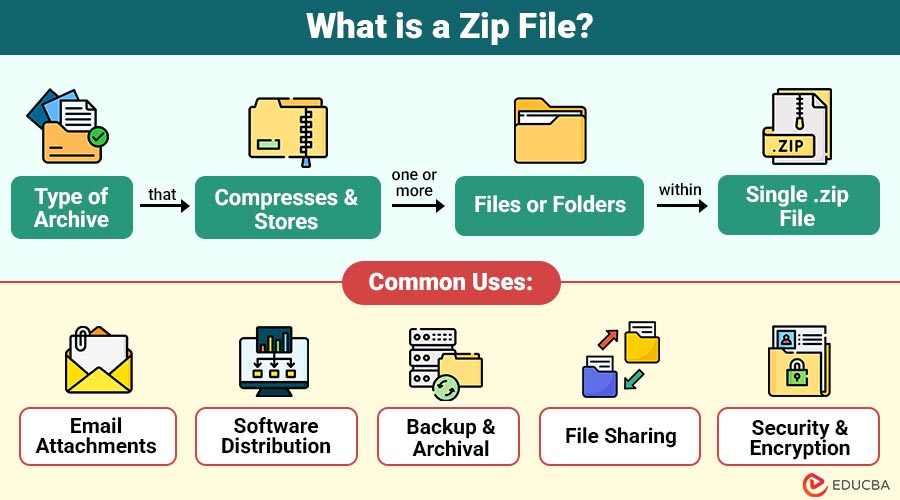
A Zip file is a type of archive that compresses and stores one or more files or folders within a single .zip file.
Beyond mere bundling, Zip supports lossless compression, meaning the files inside are reduced in size without sacrificing any data integrity. Developed in 1989 by Phil Katz for the PKZIP utility, the Zip format quickly became the industry standard for file compression and archiving due to its simplicity, broad platform support, and extensibility.
Table of Contents:
- Meaning
- How Zip Files Work?
- Common Uses
- Advantages and Disdavntages
- How to Create a ZIP File?
- Zip File vs Other Archive Formats
- Password Protecting a Zip File
- Examples
- Security Considerations
Key Takeaways:
- Zip files bundle and compress data, saving space while maintaining original file integrity and structure.
- They are used for sharing, backups, email attachments, and secure storage across all major platforms.
- Tools like 7-Zip and WinRAR offer advanced features, including encryption, password protection, and stronger compression.
- Always scan files before opening; malware can be hidden inside compressed or executable contents.
How Zip Files Work?
Zip files use lossless compression algorithms, meaning no data is lost during the compression and decompression process.
Common Techniques Used:
- Deflate Algorithm: A combination of LZ77 and Huffman coding.
- File Metadata Storage: Each file inside a Zip archive retains its name, path, and timestamp.
When a Zip File is Created:
- The system compresses each file or folder individually.
- The compressed files are bundled together.
- Metadata about the structure is added so the system can unpack it later.
Upon extraction, the Zip software reverses the compression to restore the original files exactly as they were.
Common Uses of Zip Files
People widely use it in various personal and professional scenarios. Common use cases include:
- Email Attachments: Kelp compress large files or folders, allowing users to stay within email attachment size limits and ensure smooth transmission.
- Software Distribution: Developers often package software applications, libraries, and documentation into a single Zip file to simplify downloading and installation for end users.
- Backup and Archival: Users compress important folders into Zip files to reduce disk space usage and create manageable, portable backups for long-term storage and recovery.
- File Sharing: Sending a single is more efficient than sharing multiple individual files, as it simplifies uploads, downloads, and file organization on sharing platforms.
- Security and Encryption: When transferring or storing sensitive or private data, Zip files can be password-protected and encrypted to provide an extra layer of security.
Advantages and Disadvantages of Zip Files
Here are the advantages and disadvantages of using zip files for file compression and management:
Advantages:
- Compression: One of the primary advantages is their ability to compress files, thereby reducing their size. By compressing files, they save valuable storage space and help reduce bandwidth usage during transfers.
- Convenience: Enable the bundling of multiple files and folders into a single archive. This streamlines file management and facilitates the sharing or simultaneous transfer of big file collections.
- Cross-Platform Compatibility: Universally supported across major operating systems, including Windows, macOS, Linux, and mobile platforms. This ensures users can create and open Zip archives regardless of the device they are using.
- Encryption Options: Many ZIP tools offer features like password protection and encryption. When sharing private or sensitive files, this provides an additional degree of security.
Disadvantages:
- Limited Compression for Certain File Types: Some file formats, like MP4 videos or JPEG images, are already compressed. Zip compression won’t significantly reduce their size, making the process less effective in such cases.
- Corruption Risk: If a Zip archive becomes corrupted, it can render the entire archive, along with all its contents, unusable. This can be a significant drawback if the file was not backed up elsewhere.
- Extraction Requirement: Before using the contents of a Zip file, it must be extracted first. This extra step can be confusing or inconvenient for users unfamiliar with compressed file formats.
- Security Limitations: Although Zip files can be password-protected, their encryption methods (like the older ZIPCrypto) can be relatively weak and vulnerable to attacks if not configured properly.
How to Create a Zip File?
Here are simple methods to create a Zip file across different platforms and tools:
1. On Windows
- Choose which files or directories to compress.
- Select Send to > Compressed (zipped) folder with a right-click.
- In the same directory, a.zip file will be generated.
2. On macOS
- Select the files/folders.
- Right-click (or Control + Click) and choose Compress.
- A ZIP file named “Archive.zip” (or similar) will be generated.
3. Using Online Tools
- Websites like Zip Online, ezyZip, or CloudConvert enable you to upload and compress files without needing to install software.
Zip File vs Other Archive Formats
Here is a comparison of Zip and other popular archive formats based on extension, compression level, and platform support:
| Format | Extension | Compression | Notes |
| ZIP | .zip | Lossless | The most widely supported format across platforms, making it easy to use. |
| RAR | .rar | High | Offers strong compression; it requires tools like WinRAR to extract. |
| 7z | .7z | Very High | Superior compression ratio; needs 7-Zip or compatible software. |
| TAR.GZ | .tar.gz | Unix/Linux standard | Common in open-source projects; used for bundling source code and scripts. |
Password Protecting a Zip File
For added protection, you can password-protect a Zip file; however, this typically calls for third-party tools:
With 7-Zip (Free):
- Right-click the file(s) > 7-Zip > Add to archive.
- Set a name and choose ZIP as the format.
- Enter and confirm a password in the Encryption section.
- Click OK.
Real-World Examples
Here are some common scenarios where files are practically used across different fields:
- Emailing a portfolio: Designers and photographers use files to share collections of work in a single package.
- Distributing code: Developers share Zip versions of their GitHub repositories for easy access.
- Online forms: Job applications and document submissions often accept files containing resumes, cover letters, and credentials.
Security Considerations
Malicious users can exploit to conceal malware, despite their support for password protection. Always:
- Scan with Antivirus: Always scan files using up-to-date antivirus software before opening them, especially if received from unfamiliar or suspicious sources.
- Avoid Executing Unknown Files: Never run executable or script files extracted from Zip archives unless you are sure of their origin and trustworthiness.
- Check File Extensions: Do not disable file extension visibility; always verify actual file types inside Zip files to avoid hidden or deceptive executables.
Final Thoughts
Zip files are one of the most effective ways to manage, store, and transfer files efficiently. Whether you are compressing large folders for email, bundling project files, or archiving data for long-term storage, files offer a simple, secure, and versatile solution. Anyone working with digital documents may benefit from learning how to use files due to their cross-platform compatibility and user-friendly tools.
Frequently Asked Questions (FAQs)
Q1. Can I email a Zip file?
Answer: Yes, Zip files are commonly used to send multiple files as a single attachment. However, some email services block ZIPs with executables inside.
Q2. Are Zip files safe?
Answer: Generally, yes, but you should scan them before opening. Avoid ZIPs from unknown or suspicious sources.
Q3. Do Zip files lose quality?
Answer: No. Zip uses lossless compression, meaning there is no reduction in file quality during compression and extraction.
Q4. Why can’t I open a Zip file?
Answer: You may be missing the correct software or trying to open a corrupted Zip file. Use tools like 7-Zip or WinRAR and try redownloading the file.
Recommended Articles
We hope that this EDUCBA information on “Zip File” was beneficial to you. You can view EDUCBA’s recommended articles for more information.

