
Updated April 10, 2023
Definition of XSLT Transformation Function
The XSLT transformation function is defined as Stylesheet language and helps to enable transformations to be performed in a streaming mode. It allows the stylesheet to be done independently. They recommend a library of functions and operators to be performed under the XSLT 2.0 version. They have a revised version on XSLT 3.0 and their core purpose is to transform XML documents into other XML files and to other file formats.
Syntax:
The syntax is carried out like this
<xsl:transform

xmlns:xsl="http://www.w3.org/1999/XSL/Transform"

xmlns:xs="http://www.w3.org/2001/XMLSchema"

xmlns:str=http://example.com/namespace

version="2.0"

exclude-result-prefixes="str">

</xsl:template>

//function

</xsl:template>

</xsl:transform>
How does the transformation function work in XSLT?
XSL is extremely powerful and new applications are established frequently every day. Like How HTML uses CSS, XSL uses transformation language and it is termed as XSLT.
This function works with the help of the XSLT processor as it is the heart of the XSL language. The processors may be SAXON or XALAN. The processor takes a source input as XML documents along with an XSLT file and the output is generated as in the specified format. The Parsing is done based on the XPath which traverse through the input file starts from the root of the document till the end of the child element.
Every XSLT source starts with the element declaration like <xsl:stylesheet> or in some case it is <xsl:transform>.
To perform an XSLT transformation using XALAN processor we need to import few class methods like:
1.TransformFile() – Does transformation from the given Stylesheet file.
2.TransformStream() – It does stream.
These two functions Takes arguments lists like pSource an XML file, PXSl a compiled Stylesheet, pParams, PResolver.
In PHP it is transformed as
public XSLTProcessor::transformToXml ( object $document ) : string|false|null
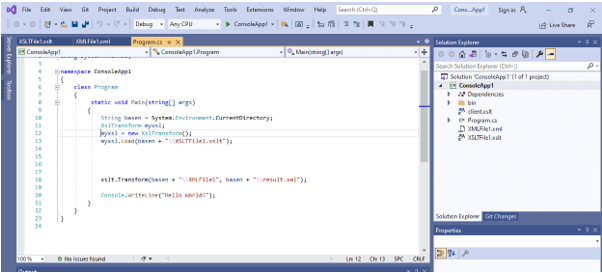
Let’s see how it works and use in a console application. Go to visual studio -> projects -> create two files XML and XSLT and finally add C#code to read the transforms and convert them into an Output file. The snapshot is given below and it demonstrates how to do our XSL Transformation with the simplest techniques. Creating a new project under Project Folder.
We can do it by Select the XML file and run it as an XSL Application.
With SAXON Processor the main class is created to transform source.xml to output. HTML files with XSLT compiler() and Serializer and the errors are caught using SaxonApiException().
Note: transformToXML has a pitfall with the meta content-type tag.
In the next section, we shall see the transformation of an XML file to XSLT using C# programming language using a Console application. the necessary Library classes are included to work with.
Examples
Example #1: Demonstrate a simple basics setup of transformations.
listnew.xsl
<?xml version="1.0" encoding="iso-8859-1"?>

<xsl:stylesheet xmlns:xsl="http://www.w3.org/1999/XSL/Transform" version="1.0">

<xsl:output method="html"/>

<xsl:template match="/">

<html>

<body>

<xsl:apply-templates/>

</body>

</html>

</xsl:template>

<xsl:template match="/Product/Description">

<h1 align="right">

<xsl:apply-templates/>

</h1>

</xsl:template>

<xsl:template match="/Product/Cargo">

<div style="float:left;width:60%;">

<xsl:apply-templates/>

</div>

</xsl:template>

<xsl:template match="/Product/Description/TITLE">

<h3>

<xsl:apply-templates/>

</h3>

</xsl:template>

<xsl:template match="/Product/Description/DESCRIPTION">

<p>

<xsl:apply-templates/>

</p>

</xsl:template>

<xsl:template match="/Product/Flight/TITLE">

<div style="float:right;width:40%;">

<h3>

<xsl:apply-templates/>

</h3>

</div>

</xsl:template>

<xsl:template match="ITEMCODE">

<p>

<xsl:apply-templates/>

</p>

</xsl:template>

<xsl:template match="/Product/Package">

<div style="clear:both;"></div>

<h1 align="center">

<xsl:apply-templates/>

</h1>

</xsl:template>

</xsl:stylesheet>
list.xml
<?xml version="1.0"?>

<?xml-stylesheet type="text/xsl" href="listnew.xsl"?>

<Product>

<Description>page heading</Description>

<Cargo>

<TITLE>Egypt Products</TITLE>

<DESCRIPTION>Coffee and Tissues</DESCRIPTION>

</Cargo>

<Flight>

<TITLE>side values</TITLE>

<ITEMCODE>s12fr5</ITEMCODE>

</Flight>

<Package>Sealed route</Package>

</Product>

Program.cs

using System;

using System.Xml;

using System.Xml.Xsl;

namespace XSLTransform

{

class Program

{

static void Main(string[] args)

{

XslTransform myXslTransform;

myXslTransform = new XslTransform();

myXslTransform.Load("listnew.xsl");

object p = myXslTransform.Transform("list.xml");

}

}

}
Explanation
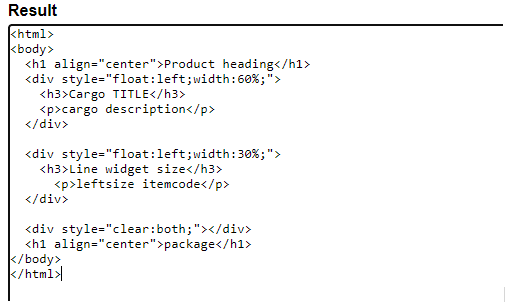
The C# code imports both the XML and XSL file for transformation and The output file would be as given below:
Output:
Example #2: Using Java To output in Html file.
Below are the XML and XSL code to run the application.
XSLdemo.java
import javax.xml.transform.*;

import javax.xml.transform.stream.*;

public class XSLdemo

{

public static void main( String [] args ) throws Exception {

if ( args.length < 2 || !args[0].endsWith(".xsl") ) {

System.err.println("No file exit");

System.exit(1);

}

String sr = args[0], xmlFile = args[1];

TransformerFactory factory = TransformerFactory.newInstance();

Transformer transformer =

factory.newTransformer( new StreamSource( xslFile ) );

StreamSource sr = new StreamSource( xmlFile );

StreamResult ff = new StreamResult( System.out );

transformer.transform( sr, ff);

}

}
new.xml
<?xml version="1.0" encoding="UTF-8"?>

<Banking>

<Topbank id="123">

<foreName>Giana</foreName>

<SurName>Amreal</SurName>

<HomeAddress>USA</HomeAddress>

</Topbank>

<Topbank id="456">

<foreName>Chris</foreName>

<SurName>Houtson</SurName>

<HomeAddress>Sweden</HomeAddress>

</Topbank>

<Topbank id="654">

<foreName>Dallni</foreName>

<SurName>Furaq</SurName>

<HomeAddress>Australia</HomeAddress>

</Topbank>

<Topbank id="334">

<foreName>Deutsche</foreName>

<SurName>Bank</SurName>

<HomeAddress>Germany</HomeAddress>

</Topbank>

</Banking>
bb.xsl
<?xml version="1.0" encoding="UTF-8"?>

<xsl:stylesheet version="1.0"

xmlns:xsl="http://www.w3.org/1999/XSL/Transform">

<xsl:template match="/">

<html>

<body>

<h2> Top Bank List</h2>

<table border="2">

<tr bgcolor="pink">

<th>foreName</th>

<th>HomeAddress</th>

</tr>

<xsl:for-each select="Banking/Topbank">

<tr>

<td><xsl:value-of select="foreName" /></td>

<td><xsl:value-of select="HomeAddress" /></td>

</tr>

</xsl:for-each>

</table>

</body>

</html>

</xsl:template>

</xsl:stylesheet>
Explanation
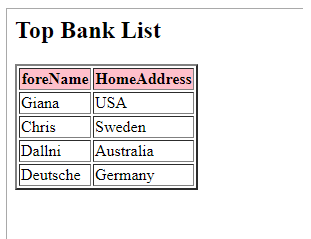
The XSL Transformation is executed like > java XSLTransform bb.xsl new.xml >XSLDemo.html
and The output file would be as given below:
Output:
Example #3
XML
<?xml version="1.0" encoding="utf-8" ?>

<Client>

<Dob>2020-03-11T11:14:15Z</Dob>

<Residence> Zaeooper Mark Avenue </Residence>

<Line1>38, Laciys Street</Line1>

<Line2>Flaytown, Switzerland</Line2>

<Phone>0123-67542</Phone>

<goods> Electronics </goods>

</Client>
XSL
<?xml version="1.0" encoding="utf-8"?>

<xsl:stylesheet version="1.0" xmlns:xsl="http://www.w3.org/1999/XSL/Transform"

xmlns:msxsl="urn:schemas-microsoft-com:xslt" exclude-result-prefixes="msxsl"

>

<xsl:output method="xml" indent="yes"/>

<xsl:template match="/">

<Records>

<Client>

<xsl:value-of select="client/DOB"/>

</Client>

<Residence>

<xsl:value-of select="client/Residence"/>

</Residence>

<Line>

<xsl:value-of select="concat(client/line1,', ',client/line2)" />

</Line>

</Records>

</xsl:template>

</xsl:stylesheet>
New.cs
using System;

using System.Xml.Xsl;

namespace ConsoleApp1

{

class Program

{

static void Main(string[] args)

{

String basen = System.Environment.CurrentDirectory;

XslTransform myxsl;

myxsl = new XslTransform();

myxsl.Load(basen + "\\XSLTFile1.xslt");

xslt.Transform(basen + "\\XMLFile1", basen + "\\result.xml");

Console.WriteLine("Hello World!");

}

}

}
Explanation
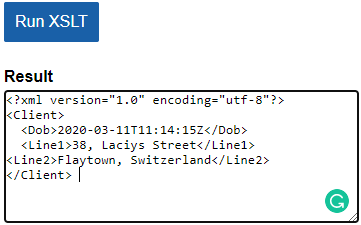
The above code Converts both the files in a single directory and the console is shown as:
Output:
Example #4
XML
<?xml version="1.0" ?>

<weblogger>

<admin username="WE1">

<ename>George</ename>

<E-org>Cognizant</E-org>

</admin>

<admin username="HY2">

<ename>Diana</ename>

<E-org>Amazon</E-org>

</admin>

</weblogger>

XSL

<?xml version="1.0" encoding="UTF-8"?>

<xsl:stylesheet

version="1.0"

xmlns:xsl="http://www.w3.org/1999/XSL/Transform"

xmlns="http://www.w3.org/1999/xhtml">

<xsl:output method="xml" indent="yes" encoding="UTF-8"/>

<xsl:template match="/weblogger">

<html>

<head> <title>Demo test For Xhtmk</title> </head>

<body>

<h1>WebLogger</h1>

<ul>

<xsl:apply-templates select="admin">

<xsl:sort select="E-org" />

</xsl:apply-templates>

</ul>

</body>

</html>

</xsl:template>

<xsl:template match="admin">

<li>

<xsl:value-of select="E-org"/><xsl:text>, </xsl:text>

<xsl:value-of select="ename"/>

</li>

</xsl:template>

</xsl:stylesheet>
Explanation
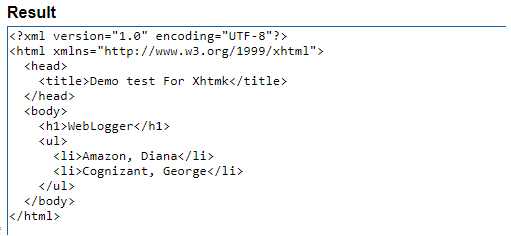
The above stylesheet code provides a template for transformation which evaluates and converts them into another structure XHTML. Below is the rendered result. To see the result in a web browser, change the code in XML file as
<?XML-stylesheet href=”demo.xsl” type=”text/XSL” ?>
Output:
Advantages
1. They can produce documents in different formats like text, JSON, etc.
2. Has concise templates to process XML data to other formats.
Conclusion
This article explained what is XSLT transformations and their elements with examples and the transformation of source elements to target elements. Also, an advantage of it in developing Conversion code. We learned to develop an application with different file conversions. We also understood how to carefully design templates.
Recommended Articles
This is a guide to XSLT Transformation. Here we discuss the Introduction, syntax, examples with code implementation. You may also have a look at the following articles to learn more –

