
Updated April 7, 2023
Definition of XSLT JSON
XSLT JSON is an alternative of XML defined to structure data used for data interchange between a server and web applications and a subset of JavaScript Language. XSLT 3.0 provides responsibilities for handling JSON data(importing/exporting). JSON is Javascript Object Notation tied up with the web services. For document transformations, XSLT forms a right handy tool to build. As it is a language required to mold recursive templates to generate the output in XML or HTML.
Syntax
Var xx1 document = {

type: "document", element: [ "Document element" ],

"": [

{ type: "child node", root: [ "child root" ],

"":]};

// function Object

Function title(obj)

{

Return

}

}
How JSON work in XSLT?
So, we can use the XSL template approach to transform JSON to XML automatically or any other formats or in another way to say is round-trip. While working with XML the JSON code is completely bundled with the XML tags.
When talking about XSLT3.0 the inbound document is found to be in JSON. XSLT JSON supports a variety of JSON output formats and most importantly it is open-source. XSLT 3.0 extends the data model, XPath 3.0 to adapt maps and no explicit support for arrays.
We could make use of XSLT to create a web page from the content of JSON and in turn, generating XML from JSON. JSON is preferred for fast processing and not bothering about semantics. Stylesheet is provided here for minimal required elements to yield the same result as XML.
And a few available types in JSON are objects, string, array, Boolean and a null value.
To select JSON as an output method the following line is included in the XSLT template.
<xsl:stylesheet version=’2.0′ xmlns:xsl=’http://www.w3.org/1999/XSL/Transform’
xmlns:jn=’http://www.json.org’>
<xsl:output method=’jn:json’/>
To convert JSON to XSLT requires two steps:
1. Convert JSON file to XML which results in the XML Transformation.
2. Transform the XML file with the XSLT to the final XML file.
While converting the files a few rules have to be followed Though input XML and Output JSON document is quite similar.
1. The JSON root declaration has ‘{}’.
2. The key element of JSON is assigned the name of the XML root.
3. Next comes the text, value pair which will return in string-value pair.
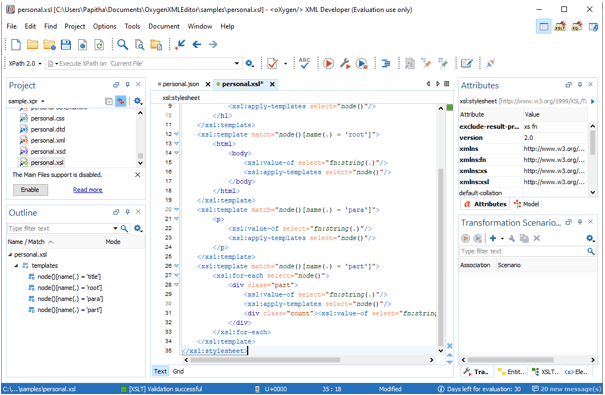
Well, here is the screenshot of the Oxygen XML editor which converts the JSON file and has got rich features.
It is a good concept to try and use the JavaScript XSLT processor to perform the transformation in XSLT directly in the web browser. In this way, the web API generates an XML file that could be converted into a JSON representation for direct communication in javascript.
Examples
In this article, we have described few extensions on XSLT 2.0 to support JSON as Output. The following few examples make it so simple to convey the result.
Example #1
Here is an XSLT which is been done for the requirement
<xsl:stylesheet xmlns:xsl="http://www.w3.org/1999/XSL/Transform"

xmlns:xs="http://www.w3.org/2001/XMLSchema"

xmlns:fn="http://www.w3.org/2005/xpath-functions"

xmlns="http://www.w3.org/1999/xhtml"

exclude-result-prefixes="xs fn" version="2.0">

<xsl:template match="node()[name(.) = 'class']">

<h1>

<xsl:value-of select="fn:string(.)"/>

<xsl:apply-templates select="node()"/>

</h1>

</xsl:template>

<xsl:template match="node()[name(.) = 'parent']">

<html>

<body>

<xsl:value-of select="fn:string(.)"/>

<xsl:apply-templates select="node()"/>

</body>

</html>

</xsl:template>

<xsl:template match="node()[name(.) = 'val']">

<p>

<xsl:value-of select="fn:string(.)"/>

<xsl:apply-templates select="node()"/>

</p>

</xsl:template>

<xsl:template match="node()[name(.) = 'section']">

<xsl:for-each select="node()">

<div class="part">

<xsl:value-of select="fn:string(.)"/>

<xsl:apply-templates select="node()"/>

<div class="iterate"><xsl:value-of select="fn:string-length(class)"/></div>

</div>

</xsl:for-each>

</xsl:template>

</xsl:stylesheet>
.json document is given here
{"parent": {

"section": [{

"class": "This is educba blog",

"val": "Has a number of courses."

},

{

"class": "This is Homepage.",

"val": "It's reality."

}

]
}

}
Explanation
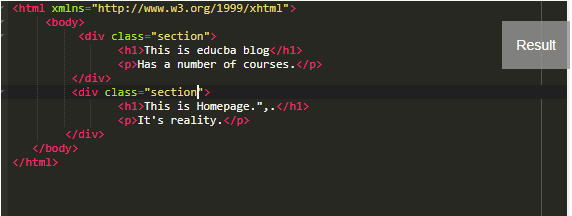
The above code uses node () object to test the respective name of the node and also JSON catches an error on the array node(). The namespaces specified here are to identify the JSON data types. We also calculated the number of characters in the class. The result of this example will return like this.
Output:
Example #2
json document
{"customers":{

"kl201":{

"name":"Jack",

"country":"Denmark",

"Sector":"IT",

"base":"lp202"

},

"lp202":{

"name":"Vonveur",

"country":"Austria",

"Sector":"Mathematics",

"base":"sd204"

},

"fc203":{

"name":"Danny",

"country":"France",

"Sector":"Science",

"base":"sd204"

},

"sd204":{

"name":"Libiyan",

"country":"Austria",

"Sector":"Mathematics",

"base":"fc203"

}

}}
Json to XML convertion
<j:map xmlns:j="http://www.w3.org/2013/XSL/json">

<j:map key="customers">

<j:map key="kl201">

<j:string key="name">Jack</j:string>

<j:string key="country">Denmark</j:string>

<j:string key="Sector">IT</j:string>

<j:string key="base">lp202</j:string>

</j:map>

<j:map key="lp202">

<j:string key="name">Vonveur</j:string>

<j:string key="country">Austria</j:string>

<j:string key="Sector">Mathematics</j:string>

<j:string key="base">sd204</j:string>

</j:map>

<j:map key="fc203">

<j:string key="name">Danny</j:string>

<j:string key="country">France</j:string>

<j:string key="Sector">Science</j:string>

<j:string key="base">sd204</j:string>

</j:map>

<j:map key="sd204">

<j:string key="name">Libiyan</j:string>

<j:string key="country">Austria</j:string>

<j:string key="Sector">Mathematics</j:string>

<j:string key="base">fc203</j:string>

</j:map>

</j:map>

</j:map>
XSLT transformation
<?xml version="1.0" encoding="UTF-8"?>

<xsl:stylesheet xmlns:xsl="http://www.w3.org/1999/XSL/Transform"

xmlns:xs="http://www.w3.org/2001/XMLSchema"

xmlns:math="http://www.w3.org/2005/xpath-functions/math"

xmlns:xd="http://www.oxygenxml.com/ns/doc/xsl"

xmlns:emp="http://www.semanticalllc.com/ns/employees#"

xmlns:h="http://www.w3.org/1999/xhtml"

xmlns:fn="http://www.w3.org/2005/xpath-functions"

xmlns:j="http://www.w3.org/2005/xpath-functions"

exclude-result-prefixes="xs math xd h emp"

version="3.0"

expand-text="yes">

<xsl:output method="text" indent="yes" media-type="text/json" omit-xml-declaration="yes"/>

<xsl:variable name="cust_db" select="json-to-xml(/)"/>

<xsl:template match="/">

<xsl:variable name="details-db">

<xsl:apply-templates select="$cust_db/*"/>

</xsl:variable>

{xml-to-json($details-db,map{'indent':true()})}

</xsl:template>

<xsl:template match="/j:map">

<j:map>

<j:array key="details">

<xsl:apply-templates select="j:map[@key='customers']/j:map" mode="customer"/>

</j:array>

</j:map>

</xsl:template>

<xsl:template match="j:map" mode="employee">

<j:map>

<j:string key="cid">{@key}</j:string>

<j:string key="firstName">{j:string[@key='name']||' '||j:string

[@key='country']}</j:string>

<j:string key="Alias name">{j:string

[@key='country']||', '||j:string

[@key='name']}</j:string>

<xsl:copy-of select="*[@key=('name','country','Sector')]"/>

<xsl:if test="j:string [@key='base']">

<j:string key="Finaldb">{j:string

[@key='base']/text()}</j:string>

</xsl:if>

</j:map>

</xsl:template>

</xsl:stylesheet>
Explanation
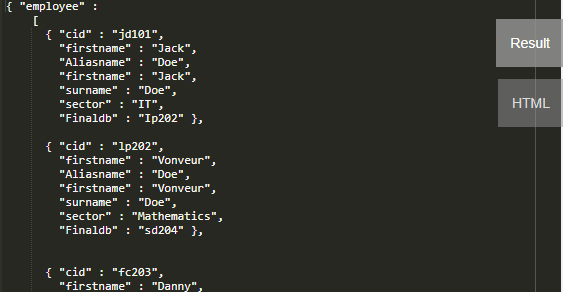
Here the employee Source file s created finally in the JSON file which replaces the name of the Source XML file. The above XSLT Templates generates a JSON output.
Output:
Example #3
XML- Here we have a Source file that we have a template below to produce JSON Output respectively.
<?xml version='1.0' encoding='UTF-8' ?>

<University>

<Student>

<firstname>Jacqueline Fernandas</firstname>

<admissiondate>2019-02-09</admissiondate>

</Student>

<Student>

<firstname>Thomas Erricson</firstname>

<admissiondate>2020-06-06</admissiondate>

</Student>

<Student>

<firstname>Divya Mary</firstname>

<admissiondate>2020-03-08</admissiondate>

</Student>

<Student>

<firstname>Anto David</firstname>

<admissiondate>2020-07-04</admissiondate>

</Student>

<Student>

<firstname>Rosellete</firstname>

<admissiondate>2018-07-04</admissiondate>

</Student>

</University>
JSON
{ "University": {

"Student": [

{"firstname":"Jacqueline Fernandas",

"admissiondate":"2019-02-09"},

{"firstname":"Thomas Erricson",

"admissiondate":"2020-06-06"},

{"firstname":"Divya Mary",

"admissiondate":"2020-03-08"},

{"firstname":"Basil Joseph",

"admissiondate":"2020-07-04"},

{"firstname":"Anto David",

"admissiondate":"2018-07-04"}

]
} }
XSLT
<?xml version='1.0' encoding='UTF-8'?>

<xsl:stylesheet version='2.0' xmlns:xsl='http://www.w3.org/1999/XSL/Transform'>

<xsl:output method='json'/>

<xsl:variable name='example2' select='/University/Student/firstname'/>

<xsl:template match='/'>

{{ "Student":

<xsl:text> [</xsl:text>

<xsl:for-each select='$example2'>

<xsl:sort select='.' />

"<xsl:value-of select='.' />"

<xsl:if test='position() != last()'>,\n </xsl:if>

</xsl:for-each>

<xsl:text>]\n}}</xsl:text>

</xsl:template>

</xsl:stylesheet>
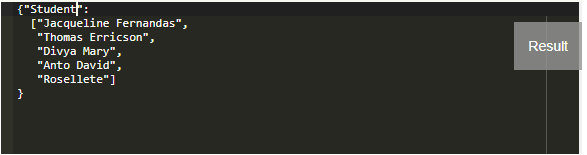
Explanation
The result we get is JSON which is done while running the XSL document
Output:
Conclusion
As JSON is blooming widely and it serves well in the data interchange environment. As we all knew the fastest way to process XML is by XSLT the technology simplifies the life by JSON. And it is necessary to choose the right transformation process which considerably depends on the factors.
Recommended Articles
This is a guide to XSLT JSON. Here we discuss the definition, parameters, syntax, How JSON works in XSLT, examples with code implementation. You may also have a look at the following articles to learn more –

