

Updated April 11, 2023
Definition of XML ampersand
XML Ampersand is defined as a Special character and we must escape it within an XML document without causing Parsing error. They could occur inside a CDATA section and in the comments section in unescaped format. They have a special meaning in a mark-up language such that they are introduced along as entity references like less than, quote, single quote. When & is used in XML it shows as & whereas in HTML it is rendered as ‘&’. According to W3C Recommendations, a few entities are replaced ad other delimiters are replaced in an XML Document.
Syntax:
The general Syntax is defined as
enter &paste;

In API call it is used as %26amp;
To use the ampersand in XML document it could be assigned along with the entity name followed by a semicolon as shown above. This article explains how to specify character entities in XSLT and XML by replacing special entities.
How does ampersand work in XML?
Generally, XML takes the ampersand differently in their document when comparing with other characters. This Character reference is strictly prohibited when assigned inside an attribute value or an element. XML Parser parse the unescaped ampersand in the configuration files that says it’s an entity that needs to be parsed into some other references. When we assign ampersand without any descriptive characters or importantly without semicolon the parser gives an error. Speaking virtually, they are valid and parsing was integral to any new programming languages. In case of ampersands in XML the starting character in the escape sequence is another ampersand itself called an escaping mechanism. Our XML Library has a certain standard for creating SAX Applications. Using this API, we can handle this unescaped characters. They are escaped in either element content or attribute content. For example, Let’s take an XML code
from xml.sax.saxutils import escape, unescape

myx = "<ele>Hickory & Dickory &Dock; Spot</ele1>"

myx= unescape(myx)

myx= escape(myx)

print(myx)
Lets see an another sample
<?xml version="1.0" encoding="UTF-8"?>
<book>
<body> QêRs & ghfç&xtilde;</body>
</book>
When you validate this XML code it throws an error in line 3 stating entity ‘ê’ not defined.
To handle the parser on this it has built-in XMLHttpRequest and this returns a String as a value.
In android String XML ampersand (&) Character is implemented like HTML encode not directly with XML Syntax as it violates a validation. To insert a text with ampersand it is done in the following way:
<string name="my demo">This is my sample test with & ampersand</string>
In other cases, like XML-to-XML transformations we need to prefer special characters like entities. If we just do in XSL wherever we want ‘&’ in XML as shown below. In XSLT, we cannot use ampersand in between tags or attribute. The transformation engine throws error when these characters are used incorrectly.
<xsl:text>&#</xsl:text>
<xsl:value-of select="$empID" />
<xsl:text>;</xsl:text>
This gives XML Output as
'
Let’s take other scenario with DOCTYPE StyleSheet where the special characters for native language is demonstrated using ‘&’.
<!DOCTYPE stylesheet [
<!ENTITY new
"<xsl:text disable-output-escaping='yes'>&new;</xsl:text>">
]>
<xsl:stylesheet xmlns:xsl="http://www.w3.org/1999/XSL/Transform"
version="1.0">
<xsl:output doctype-system="samplet.dtd"/>
<xsl:template match="exam">
<example>
The native word for "Norgen" is "España".
<xsl:apply-templates/>
</example>
</xsl:template>
</xsl:stylesheet>
A template test is shown as like this to handle Apostrophe and Ampersand in URL.
<xsl:template name="formStructure">
<xsl:param name="text" />
<xsl:variable name="new">&#39;</xsl:variable>
<xsl:variable name="new2">&amp;</xsl:variable>
<xsl:variable name="new3">%27</xsl:variable>
<xsl:variable name="new4">%26</xsl:variable>
<xsl:choose>
<xsl:when test="contains($text, $apos)">
<xsl:variable name="before" select="substring-before($text,$apos)">
</xsl:variable>
<xsl:variable name="after" select="substring-after($text,$apos)">
</xsl:variable>
<xsl:call-template name="formStructure">
<xsl:with-param name="text" select="$before" />
</xsl:call-template>
<xsl:value-of select="$new3" />
<xsl:call-template name="formStructure">
<xsl:with-param name="text" select="$after" />
</xsl:call-template>
</xsl:when>
<xsl:when test="contains($text, $amp)">
<xsl:variable name="before" select="substring-before($text,$amp)">
</xsl:variable>
<xsl:variable name="after" select="substring-after($text,$amp)">
</xsl:variable>
In the next section we shall see few demo on XML Ampersand using XML code and XSLT Sheets. So lets get Started.
Examples
Let us discuss examples of XML ampersand.
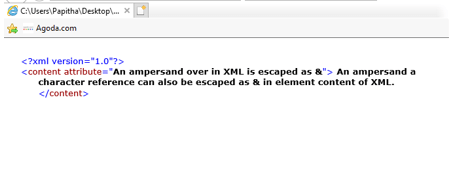
Example #1: Simple XML Code with Ampersand
<?xml version="1.0"?>
<content attribute="An ampersand over in XML is escaped as &">
An ampersand a character reference can also be escaped as & in element content of XML.
</content>
Explanation
Here we have created an attribute with a Character entity. When we execute the above code, we get the output as
Output:
Example #2
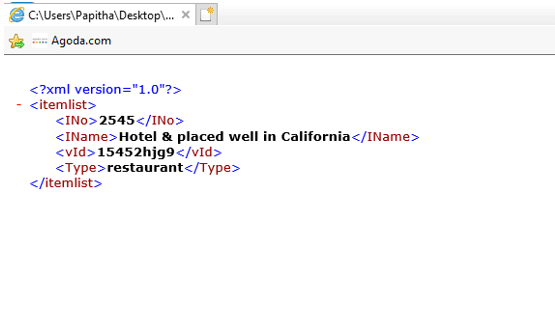
<?xml version="1.0"?>
<itemlist>
<INo>2545</INo>
<IName>Hotel & placed well in California</IName>
<vId>15452hjg9</vId>
<Type>restaurant</Type>
</itemlist>
Explanation
Again this is a simple example with XML Element without Attribute values.
Output:
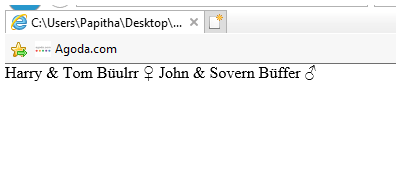
Example #3 : Using XSLT XML stylesheet
<?xml version="1.0" encoding="UTF-8"?>
<?xml-stylesheet href="lang.css" type="text/css"?>
<lang xml:lang="ta">
<LName>
<norskname>Harry & Tom</norskname>
<Hetername>Büulrr</Hetername>
<Location>♀</Location></LName>
<LName>
<norskname>John & Sovern</norskname>
<Hetername>Büffer</Hetername>
<Location>♂</Location>
</LName>
</lang>
Explanation
In the above code, special characters are assigned along with an &.
Output:
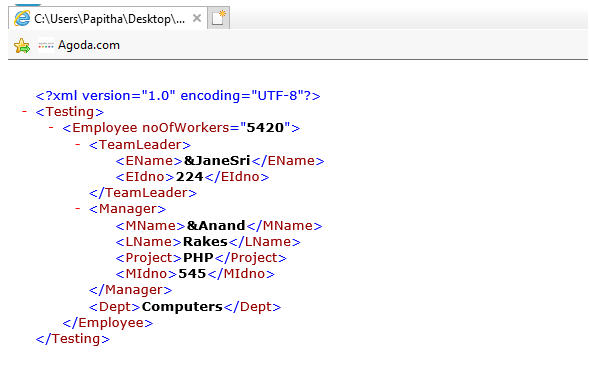
Example #4
<?xml version="1.0" encoding="utf-8"?>
<Testing>
<Employee noOfWorkers="5420">
<TeamLeader>
<EName>&JaneSri</EName>
<EIdno>224</EIdno>
</TeamLeader>
<Manager>
<MName>&Anand</MName>
<LName>Rakes</LName>
<Project>PHP</Project>
<MIdno>545</MIdno>
</Manager>
<Dept>Computers</Dept>
</Employee>
</Testing>
Output:
Example #5
co.xml
<?xml version="1.0" encoding="UTF-8"?>

<Western>

<Europe>

<EName>Poland</EName>

<Capital>Warsaw t</Capital>

<SubRegion>Eastern</SubRegion>

<company>Microsoft</company>

<Currency>Polish</Currency>

</Europe>

<Europe>

<EName>Spain</EName>

<Capital>Madrid S</Capital>

<SubRegion>Western</SubRegion>

<company>Amazon</company>

<Currency>Euro</Currency>

</Europe>

<Europe>

<EName>Italy</EName>

<Capital>Rome</Capital>

<SubRegion>Southern</SubRegion>

<company>Verizon</company>

<Currency>Euro</Currency>

</Europe>

<Europe>

<EName>Sweden</EName>

<Capital>Stochkolm</Capital>

<SubRegion>Eastern</SubRegion>

<company>TCS</company>

<Currency>Krona</Currency>

</Europe>

<Europe>

<EName>Netherland</EName>

<Capital>Amsterdam</Capital>

<SubRegion>Western</SubRegion>

<company>Columbia</company>

<Currency>Euro</Currency>

</Europe>

<Europe>

<EName>Norway</EName>

<Capital>Oslo</Capital>

<SubRegion>Western</SubRegion>

<company>Crayon</company>

<Currency>krone</Currency>

</Europe>

<Europe>

<EName>Sweden</EName>

<Capital>Bob Dylan</Capital>

<SubRegion>USA</SubRegion>

<company>Columbia</company>

<Currency>10.90</Currency>

</Europe>

</Western>
co.xsl
<?xml version="1.0" encoding="UTF-8"?>
<xsl:stylesheet version="1.0" xmlns:xsl="http://www.w3.org/1999/XSL/Transform">
<xsl:template match="/"
<xsl:value-of select="translate(EName, '&', '')" />
<html>
<body>
<h1>European Countries:</h1>
<table border="2">
<tr bgcolor="brown">
<th>EName</th>
<th>Capital</th>
</tr>
<tr>
<td><xsl:value-of select="translate(EName, '&', '')" /></td>
<td><xsl:value-of select="translate(EName, '&', '')" /></td>
</tr>
</table>
</body>
</html>
</xsl:template>
</xsl:stylesheet>
Explanation:
Two files are created here one for XML and XSL the value is selected and assigned Ampersand to it. So when we execute the above snippet we get the output as
Output:

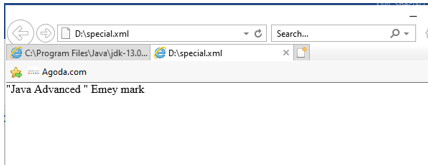
Example #6: Using ‘&’
<?xml version="1.0" encoding="UTF-8"?>
<bookstore>
<book ISBN="586954">
<title>"Java Advanced "</title>
<author>Emey mark</author>
<category>Programming & Analysis</category>
<edition>1</edition>
<price> <29.99 ></price>
</book>
<book ISBN="56858">
<title>"More for Python "</title>
<author>&Hebrew manni</author>
<category>Programming</category>
<price>15.99</price>
</book>
<book ISBN="66547">
<title>"The Complete Guide to Animals "</title>
<author>joe emacul</author>
<author>sheeba david</author>
<author>Jacob ethen</author>
<category>Wild</category>
<category>Teresstial</category>
<language>French</language>
<edition>5</edition>
<price>31.99</price>
</book>
</bookstore>
Explanation
The above code uses simple ‘&’ ampersand along with the Special Characters.
Output:
Conclusion
To conclude, this topic demonstrates how to use these entity characters in various scenarios also we have seen how it is invalid in a few XML languages. Many of the organizations use an ampersand in their application on product names and references by the developers. The threat of them is viewed differently to manage them it is been assigned using entity mark-ups. This may highlight a red flag when parsing it.
Recommended Articles
This is a guide to XML ampersand. Here we discuss the Definition, How does ampersand work in XML?, and examples with code implementation. You can also go through our other suggested articles to learn more –

