
Introduction
In data-driven applications, collecting online information is essential for businesses, researchers, and developers. Web Crawling vs Web Scraping is a common comparison in data extraction. Web crawling discovers and indexes web pages, while web scraping extracts specific data from them. Understanding their difference helps in automation, search engines, and analytics. In this blog post, we will explore web crawling vs web scraping in detail, including their definitions, differences, common use cases, advantages, disadvantages, tools, and FAQs.
Table of Contents:
- Introduction
- What is Web Crawling?
- What is Web Scraping?
- Key Differences
- Working
- Common Use Cases
- Advantages
- Disadvantages
- When to Use?
- Web Crawling and Web Scraping Together
What is Web Crawling?
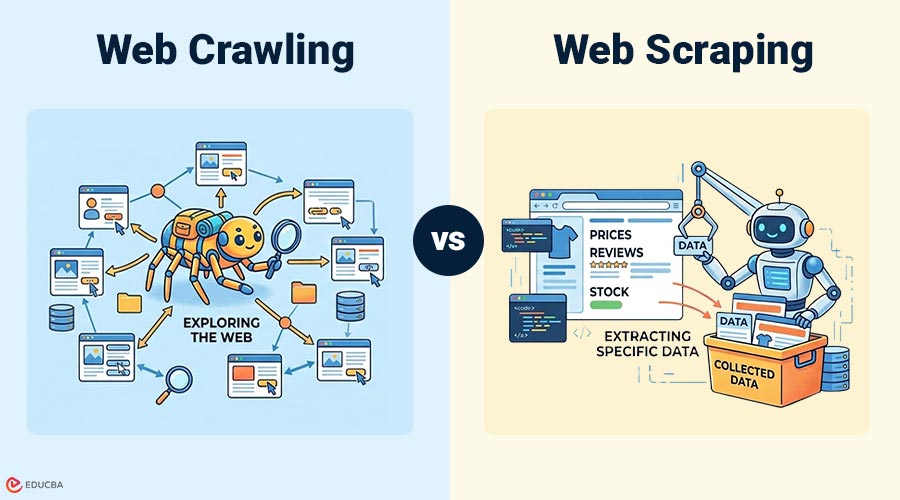
Web crawling is the process of automatically browsing internet to discover and index web pages. A program called a crawler, bot, or spider visits web pages, follows links, and collects information about those pages. Search engines use web crawling to find new pages and update their index.
Example: When a search engine scans websites and stores information about pages so they can appear in search results, it is web crawling.
Popular Tools:
- Scrapy
- Apache Nutch
- Heritrix
- StormCrawler
What is Web Scraping?
Web scraping is process of extracting specific data from web pages. Instead of scanning the entire website, scraping focuses on collecting particular information such as prices, emails, product details, or reviews. Web scraping usually happens after crawling or after selecting a specific webpage.
Example: Extracting product prices from an e-commerce website is an example of web scraping.
Popular Tools:
- BeautifulSoup
- Selenium
- Puppeteer
- ParseHub
Differences Between Web Crawling and Web Scraping
Here is a comparison table highlighting the differences between web crawling and web scraping:
| Feature | Web Crawling | Web Scraping |
| Definition | Browsing the web to find pages | Extracting data from pages |
| Purpose | Discover and index websites | Collect specific information |
| Scope | Large-scale | Targeted |
| Output | URLs, metadata, page links | Structured data |
| Used By | Search engines | Data analysts, developers |
| Complexity | High | Medium |
| Process | Visits many pages | Extracts from selected pages |
How Does Web Crawling and Web Scraping Work?
Below are the step-by-step processes for explaining how web crawling and scraping work in real-world applications:
Web Crawling:
- Start with a List of URLs: The crawler begins with a predefined list of URLs, called seed URLs, which serve as starting points for crawling.
- Visit the Page: The crawler sends a request to each URL in the list and automatically opens the webpage to access its content.
- Read the Content: After opening the page, the crawler reads the HTML content to understand the structure and information available on the webpage.
- Identify Links on the Page: The crawler scans the page to identify hyperlinks that connect to other pages within the same or different websites.
- Add New Links to Queue: All discovered links are added to a queue so the crawler can revisit them later and continue crawling.
- Repeat the Process: The crawler keeps visiting new links, reading content, and collecting more URLs, repeating the process automatically.
- Stops When All Pages or Limit Reached: The process continues until all pages are visited or a set limit, such as time, depth, or page count, is reached.
Web Scraping:
- Select Website or Page: First, the user selects the specific website or webpage from which the required data needs to be collected automatically using tools.
- Send Request to Page: The scraper sends an HTTP request to the selected webpage to access its content, similar to how a browser loads the page.
- Get HTML Content: Once the request is successful, the scraper receives the HTML code of the webpage, which contains all visible and hidden data.
- Find Required Data: The scraper analyzes the HTML structure and locates the exact tags, classes, or elements that contain the required information on the page.
- Extract Data: After locating the correct elements, the scraper extracts the required data, including text, links, prices, images, and product details.
- Save in a File or Database: Finally, the extracted data is stored in files, spreadsheets, or databases for later analysis or applications.
Common Use Cases of Web Crawling and Web Scraping
Below are some common real‑world use cases where web crawling and web scraping are widely used in different industries and applications:
Web Crawling:
- Search Engine Indexing: Search engines use web crawling to discover new webpages, index content, and update search results regularly online.
- Website Monitoring: Web crawling monitors websites frequently to detect updates, removed pages, or changes for maintenance and tracking purposes.
- Broken Link Detection: Crawlers scan entire websites to find broken links, helping developers fix errors and improve user navigation experience.
- SEO Analysis: SEO tools use web crawling to analyze site structure, keywords, metadata, and links to improve search rankings.
- Content Discovery: Web crawling automatically finds new blogs, articles, and pages online to keep databases updated with fresh information.
- Digital Archiving: Organizations use web crawling to store webpage copies for research, backup, compliance, and historical record-keeping purposes.
Web Scraping:
- Price Comparison Websites: Web scraping collects product prices from different ecommerce sites, allowing comparison platforms to show updated pricing information.
- Market Research: To better understand market behavior, businesses utilize web scraping to gather competitive data, consumer feedback, and trends.
- Lead Generation: Companies scrape websites to collect emails, phone numbers, and business details for marketing, sales, and outreach campaigns.
- News Aggregation: News websites use web scraping to gather headlines and articles from multiple sources and display them together online.
- Social Media Analysis: Web scraping extracts posts, comments, hashtags, and reactions to analyze public opinion, trends, and customer sentiment online.
- Job Listing Collection: Job portals scrape career websites to collect job postings, helping users find opportunities from multiple companies easily.
Advantages of Web Crawling and Web Scraping
Below are the main advantages of web crawling and web scraping:
Web Crawling:
- Can Scan Entire Internet: Web crawling can automatically scan large parts of the internet, allowing systems to collect information from thousands of websites efficiently.
- Useful for Search Engines: Search engines use web crawling to discover webpages, index content, and provide accurate search results for users across the internet.
- Finds New Pages Automatically: Crawlers automatically detect new pages and updated content by following links, ensuring the collected data stays fresh and relevant.
- Works on a Large Scale: Web crawling is designed to handle large-scale operations, making it suitable for scanning millions of pages without manual effort required.
- Helps with Indexing: Crawling creates indexes of webpages, making searching faster and enabling systems to retrieve information quickly when needed.
Web Scraping:
- Collects Useful Data: Web scraping extracts specific, useful data from websites, helping businesses easily gather information needed for analysis, research, or applications.
- Easy to Automate: Web scraping can be automated with scripts and tools, allowing data collection to run continuously for long periods without manual intervention.
- Saves Time: Scraping saves time by automatically collecting data from multiple webpages rather than copying information from each page separately.
- Supports Analytics: Collected data can be used for analytics, reporting, and decision-making, helping companies understand trends, customer behavior, and market changes.
- Works on Specific Data: Web scraping focuses only on the required data fields, allowing users to collect targeted information rather than downloading the entire webpage.
Disadvantages of Web Crawling and Web Scraping
Below are some common disadvantages of web crawling and web scraping that should be considered before using these techniques:
Web Crawling:
- High Resource Usage: Web crawling requires substantial CPU, memory, and bandwidth because it continuously scans many webpages, significantly increasing system resource consumption.
- Complex to Build: Building a web crawler is complex because it must handle links, page structures, errors, and large-scale data processing efficiently.
- Needs Large Storage: Crawling collects large volumes of web page data, so a large storage space is required to properly store indexed pages and related information.
- It can be Slow: Web crawling can be slow when scanning large websites because every page must be visited, read, and processed one by one.
- Requires Good Algorithms: Efficient crawling needs robust algorithms to decide which pages to visit first, avoid loops, and manage large queues correctly.
Web Scraping:
- Website Structure Changes Break Scraper: Web scraping depends on page structure, so even minor changes to HTML tags or layout can break the scraper and stop data extraction.
- Legal Restrictions Possible: Some websites prohibit scraping, and collecting data without permission may result in legal issues depending on the website’s policies and applicable laws.
- Blocked by Websites: Websites may block scrapers using security systems, CAPTCHA, or IP blocking when too many requests are sent within a short period.
- Needs Maintenance: Scrapers need regular updates because website layouts change often, and the extraction rules must be modified to keep working correctly.
- It can be Slow for Large Sites: Scraping large websites takes time because each page must be requested, processed, and parsed before the required data is extracted.
When to Use Web Crawling and Web Scraping?
Below are the situations where web crawling and web scraping should be used, depending on the data collection requirement:
Use Web Crawling when:
- You Need to Scan Many Pages: Use web crawling to automatically scan many web pages across different websites without manual effort.
- You need URLs: Use web crawling to collect URLs from websites so new pages can be discovered automatically.
- You are Building Search Engine: Use web crawling when building a search engine because it helps find, visit, and index large numbers of web pages.
- You want Website Structure: Use web crawling to understand a website’s structure by automatically following links between pages.
Use Web Scraping when:
- You Need Specific Data: Use web scraping when you need to collect data such as prices, emails, names, or reviews from specific web pages.
- You Know Page Location: Use web scraping when you already know the exact page location and want to extract the required information from that page only.
- You want Structured Data: Use web scraping to retrieve structured data in tables, lists, or databases for analysis, reports, or business use.
- You need Reports: Use web scraping regularly to create reports from website data, such as product prices, statistics, or customer reviews.
Web Crawling and Web Scraping Together
Below is a simple flow showing how web crawling and web scraping are often used together in real‑world data collection projects:
Many projects combine both techniques.
- Crawl the website
- Find pages
- Scrape data
- Store data
Example:
Crawler → finds product pages
Scraper → extracts price
Final Thoughts
Web crawling and web scraping are important for collecting internet data and serve different purposes. Crawling discovers and indexes web pages, while scraping extracts specific data. Understanding their differences helps developers, data engineers, and analysts choose the right method. Often, both techniques combine to collect, process, and analyze data efficiently.
Frequently Asked Questions (FAQs)
Q1. Is web crawling same as web scraping?
Answer: No, crawling finds pages, scraping extracts data.
Q2. Can scraping work without crawling?
Answer: Yes, if the page URL is known.
Q3. Do search engines use scraping?
Answer: Mostly crawling, but scraping may be used for data extraction.
Q4. Is web scraping legal?
Answer: It depends on the website rules and data usage.
Recommended Articles
We hope that this EDUCBA information on “Web Crawling vs Web Scraping” was beneficial to you. You can view EDUCBA’s recommended articles for more information.

