


How to Choose the Right Web Accessibility Tool?
Managing digital assets and following accessibility compliance standards can be challenging when running a business. But here is the deal: More than compliance or avoiding lawsuits (although those two things are relevant, too), choosing your accessibility software is about opening your website or application to everyone, especially for individuals with disabilities. There are dozens of web accessibility tools, each promising to be a magic solution in itself. After years of assisting businesses navigate this landscape, we can tell you one thing: “The perfect tool does not exist, but the right tool for your specific situation does.” Finding it does not have to be as difficult as you think.
In this blog, we will help you find an accessibility solution that works for your real-world situation.
What is a Web Accessibility Tool?
Think of the accessibility software as a digital accessibility assistant. Web accessibility tools assist in finding, fixing, and preventing obstacles that could prevent people with disabilities from fully using your website. But here is where it gets interesting: not all accessibility tools are created equal. Some work like spell-checkers for your code, automatically scanning for common issues like:
- Missing alt text on images
- Poor color contrast ratios
- Broken keyboard navigation
- Improperly structured headings
Others function more like consultants, providing detailed reports and recommendations for manual fixes. The most comprehensive solutions combine automated scanning with human expertise, offering what is known as an accessibility widget tool. The AI-powered All in One Accessibility widget provides a comprehensive approach to digital accessibility, supporting global compliance standards, over 140 languages, and many more extensive features.
Why Does Choosing the Right Tool Matter?
Businesses frequently make the mistake of thinking all accessibility tools are the same. They often opt for low-priced tools, fail to implement them properly, and then wonder why they continue to receive complaints and legal notices. Let us see why making this choice right matters more than you might think.
The Business Case is Stronger Than You Think
According to the CDC, 27% of American adults are disabled. That is not a small market; that is more than a quarter of your potential customers. When your website is inaccessible, you lose more than simply cash. You are missing out on serving people who genuinely need your products or services.
The Legal Landscape is Getting Serious
Poorly implemented accessibility solutions can make things worse, not better. The consequences of choosing wrong include:
- False sense of security, thinking your site is accessible when it is not
- Quick fixes that do not solve the real issues
- Some tools are too complex for your team to use effectively.
- Maintenance headaches that drain your resources
- Potential legal issues from inadequate compliance
But when you choose the right tool, magic happens. It is an extension of your development process; it will catch up on the issues early, it will show you how to fix them explicitly, and it will grow as your website grows. Websites with an accessibility level score of 75/100 or higher show that they are generating more revenue. Good accessibility practices are not just ethical; they are profitable.
How to Choose the Right Web Accessibility Tool?
Choosing your tool is not about which one is the most expensive or which one has the most features; it is about which tool aligns with your unique needs, technical capabilities, and future direction. Here is the approach that works.
1. Assess Your Current Situation
Before choosing any web accessibility tool, ask yourself the following questions:
- What platform is your website built on?
- Is your team tech-savvy? Do you have developers on staff, or are you working with agencies?
- What’s your upfront and ongoing budget?
- How much time can you dedicate?
Knowing your technical terrain helps you to quickly reduce your alternatives. For example, if you are operating a basic WordPress site, then selecting a tool that requires a considerable amount of custom coding makes no sense.
2. Consider Your Timeline and Goals
Some accessibility tools require upfront investment and ongoing maintenance. While others offer more plug-and-play solutions. It is always better to choose a simpler tool that is easy to implement rather than a complex one.
Also, keep your long-term accessibility goals in mind. Do you need a fast compliance check, or would you like to include accessibility in your development process? For a one-time audit, a solution like a manual accessibility audit is ideal. At the same time, other solutions like accessibility scanning and monitoring excel at continuous observation and improvement.
3. Do not Forget About the Human Factor
The most effective accessibility tool is the one that your team will utilize. If it is too complicated, has a steep learning curve, or does not integrate with your existing workflow. It would not deliver the required results. Many companies purchase expensive tools that end up being unused because their team can not use them effectively.
4. Test Before You Commit
Most accessibility tools provide free trials or demos. Take advantage of this opportunity to see how the tools perform with your actual website content and structure. For example, Skynet Technologies offers a 10-day free trial for the All in One Accessibility widget. Using the tool will let you quickly scan your website and confirm that you offer all visitors an inclusive digital experience.
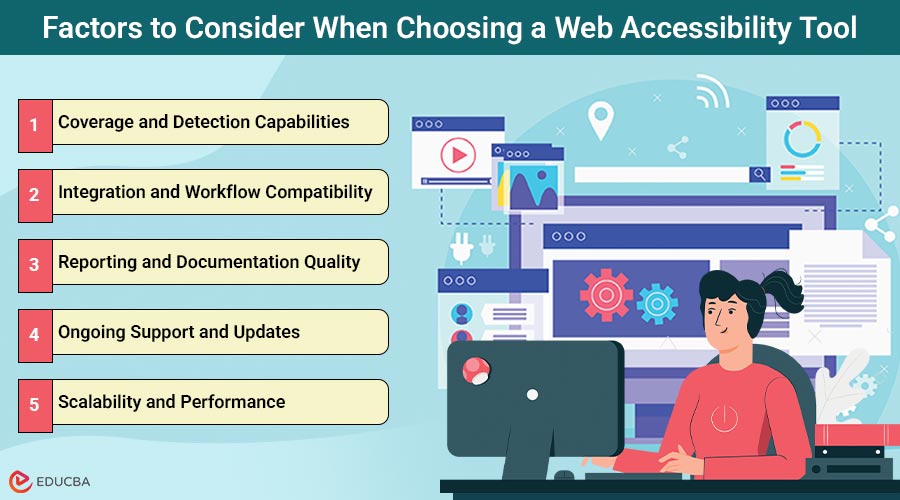
Factors to Consider When Choosing a Web Accessibility Tool
The following are some important factors to consider that often get overlooked:
1. Coverage and Detection Capabilities
From simple to more complicated problems, the web accessibility solutions you plan to use should be able to recognize almost all the issues.
Look for tools that can identify:
- Missing alt text and improper image descriptions
- Color contrast issues
- Keyboard navigation problems
- Improper heading structure
- Form labeling errors
2. Integration and Workflow Compatibility
Your accessibility tool should integrate effortlessly with your current content management and development procedures. Search for solutions with great WordPress integration if you are using WordPress. If you are collaborating with a development team, consider tools that integrate well with popular IDEs and CI/CD pipelines. Good tools improve your workflow; they do not interrupt it.
3. Reporting and Documentation Quality
Efficient accessibility tools do not just identify problems; they help you understand and fix them. Look for tools that provide:
- Clear, actionable reports with specific guidance on remediation
- Prioritized issues based on impact and severity
- Visual examples of problems and solutions
- Export capabilities for sharing with team members
- Progress tracking over time
4. Ongoing Support and Updates
Your tools should evolve as accessibility standards continue to change. Select a vendor who offers ongoing assistance and a tool that regularly updates its detection algorithms.
5. Scalability and Performance
Consider how to deal with performance as your website grows. Will it slow down your site? Can it manage complex web applications or pages? Although some tools work well for modest sites, they have trouble with corporate-level setups.
6. Cost and ROI Consideration
Cost should not be your only consideration, but it matters. Think about both upfront costs and ongoing expenses. Others provide limitless scanning for a flat price, while others charge per page scanned. Consider what seems reasonable for your particular circumstances and budgetary limitations.
Types of Web Accessibility Tools
Understanding different types of accessibility tools can help you make better decisions. Each meets different requirements and use cases; realistically, the most effective accessibility tool employs a combination of all techniques.
1. Automated Testing Tools
These are your first line of defense against accessibility issues. They are the workhorses of the accessibility world – fast, efficient, and great for catching obvious problems. Popular automated tools include:
- aXe by Deque
- WAVE (Web Accessibility Evaluation Tool)
- Lighthouse accessibility audit
- Applitools Contrast Advisor
- Espresso (for Android apps)
The pros: They are quick, can scan multiple pages at once, and catch common issues reliably.
The cons: They can not catch everything; context and user experience issues often require human judgment.
2. Manual Testing Tools and Checklists
These tools help you conduct in-depth evaluations of various accessibility aspects that automated tools might miss. They are more time-consuming but catch issues that require human understanding. Manual testing focuses on:
- Manual accessibility audit
- Keyboard navigation flow
- Screen reader compatibility
- Cognitive accessibility
- User experience for people with disabilities
- Logical reading order and content structure
3. Comprehensive Accessibility Platforms
These all-in-one systems combine human experience, continuous monitoring, and remedial support with automated scanning. They are typically more expensive but offer the most complete approach to accessibility management. A prime example is Skynet Technologies’ All in One Accessibility widget, which enhances accessibility for:
- WCAG 2.0, 2.1, and 2.2,
- ADA,
- Section 508,
- European EAA EN 301 549,
- UK Equality Act (EA).
4. Browser Extensions and Developer Tools
Ideal for developers and content creators who need quick, on-the-spot accessibility testing. The aXe DevTools Extension is especially popular, providing in-browser automated, semi-automated, and manual accessibility testing with detailed issue reports and robust reporting features.
5. Specialized Tools for Specific Needs
Some tools focus on specific aspects of accessibility:
- Color contrast checkers
- Screen reader simulators
- Cognitive accessibility evaluators
- Alternative text generators
- Keyboard navigation testers
6. User Testing and Feedback Platforms
While not traditional “tools,” these platforms connect you with real users who have disabilities. They provide invaluable feedback that no automated tool can replicate. User testing includes individuals with disabilities using your website and sharing feedback about their experience.
The key takeaway? Real power comes from combining automated testing with manual testing and user feedback. The most effective accessibility strategies use multiple types of tools to work together.
Final Thoughts
Choosing the right web accessibility tools and applying them carefully will help companies change their approach to digital inclusion. Success depends on knowing your needs, restrictions, and objectives, whether you need a full All in One Accessibility solution or a mix of specialized solutions. Pick a tool that matches your workload, helps your team, and develops your dream. Your team and future customers will appreciate this initiative.
Apart from the All in One Accessibility widget, Skynet Technologies offers a wide range of solutions for enhancing accessibility, web accessibility audits, ADA website remediation services, accessibility web design, and web development services. Transform your accessibility journey by choosing a tool that best fits your organization.
Recommended Articles
We hope this guide on choosing the right web accessibility tool helps you create inclusive digital experiences for all users. Explore these recommended articles for more insights on improving website accessibility and compliance.

