
Updated August 19, 2023

Introduction to Tensorflow Sequential
Tensorflow sequential is the group containing the stack of linear format that consists of various layers of the library package tf.keras.Model. This Sequential class is inherited from the Module, Layer, and Model classes. The basic functionality of Sequential is to make the provision of inferences and training of the module. In this article, we will look at What TensorFlow sequential is, the TensorFlow sequential model, TensorFlow sequential Function, sequential Methods, TensorFlow sequential examples, and finally conclude our statement.
What is TensorFlow sequential?
Tensorflow Sequential model can be implemented by using Sequential API. The methodology followed while building the model is step-by-step and working on a single layer at a particular time. The Sequential tensorflow API is the easiest way using which we can run and create the Keras models. Along with that, it also brings in certain limitations while creating the models.
Some limitations may include not creating a model that can share the layers, having multiple outputs, having any of the branches, or having more than one input. The most prominent and frequently used sequential architecture models are VGGNet, AlexNet, and LeNet.
The alias or syntax of the Sequential API method of the Model is as specified here –
Tensorflow.keras.Sequential(layers = None, name = None)The arguments used in the above syntax and the attributes present in this are described in the below section one by one –
- Layers – This is the list of layers we need to add to our model. However, this is an optional parameter.
- Name – Even this one is an optional parameter and helps specify the model name we want to create.
Attributes
There are four attributes:
- Layers – The layer that we want to add to the model.
- Distribute_strategy – The model named tf.distribute.The strategy is created under the layer’s class.
- Metrics_names – This attribute is responsible for returning the display labels of the model for each output. These attributes are available once we evaluate and train the keras.Model on the real-time data of the model.
- Run_eagerly – This attribute can be used and specify the value if we want our model to run in an eager way which means that we want our model to run one step at a time as in Python programming language. But as a side effect, the model can start working a little slower, but it becomes very easy to debug and navigate to the target layer where we need to work. The default way to compile the model is by using the static graph, which helps maintain and increase the performance of your application and model.
TensorFlow Sequential Model
Tensorflow Sequential Model is an API that is very simple to use, especially for beginners. We call the model sequential because creating the model involves creating and defining the class of sequential type and specifying the layers to be added to the model. The layer addition is done step by step, which means one layer simultaneously, from input to output.
One of the example of the sequential model is the MLP which can be supplied with a total of 8 inputs. It consists of a layer that is hidden and contains ten nodes in it. The last layer, which will form the output one, has a single node that helps predict the numeric values. For example,
from tensorflow.keras import Sequential
from tensorflow.keras.layers import Dense
educbaSeqModel = Sequential()
educbaSeqModel.add(Dense(10, input_shape=(8,)))
educbaSeqModel.add(Dense(1))
TensorFlow Sequential Function
The tensorflow sequential method helps create a sequential model of tensorflow as per the specified arguments and attributes we mentioned. The function will execute and create each model layer one by one. The input_shape is the argument of the sequential function that helps us define the layers that will be visible in the network. The example above will accept a vector with eight numbers inside it. Model.add method allows you to add a layer to your sequential model. You can add as many layers as you want.
Sequential Methods
The methods present in the sequential model will be discussed one by one in this section –
- Add
- Compile
- Evaluate
- Fit
- Get layer
- Load weights
- Make predict function
- Make test function
- Make train function
- Pop
- Predict
- Predict on batch
- Predict setup
- Reset metrics
- Reset states
- Save
- Save specifications
- Save weights
- Summary
- Test on batch
- Test step
- To json
- To yaml
- Train on batch
- Train step
TensorFlow Sequential Examples
Different Examples are mentioned below:
Example #1
Code:
def __call__(self, model):
        if isinstance(model, educbatensorObj.Model) or isinstance(model, educbatensorObj.Sequential):
            self.model = model
        else:
            raise TypeError(f'Expected model is tensorflow.keras Model, you have got the model {type(model)}')
        updatedInput = educbatensorObj.layers.Input(shape=(self.model.input_shape[1:]), name='input')
        SequentialModel = educbatensorObj.models.Model(inputs=self.model.inputs, outputs=self.model.outputs)
        MeanVariantModelVar = FastMCInferenceMeanVar()(educbatensorObj.layers.TimeDistributed(SequentialModel)(FastMCRepeat(self.n)(updatedInput)))
        new_SequentialModel = educbatensorObj.models.Model(inputs=updatedInput, outputs=MeanVariantModelVar)
        return new_SequentialModel
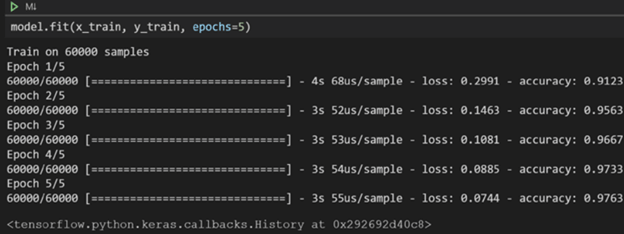
The output of the execution of the above program is as shown in the below image –
Example #2
Code:
def build(selfUser, shapeOfInput):
        assert isinstance(shapeOfInput, list)
        argumentsOfLayer = dict(
            kernel_initializer=selfUser.kernel_initializer,
            bias_initializer=selfUser.bias_initializer,
            kernel_regularizer=selfUser.kernel_regularizer,
            bias_regularizer=selfUser.bias_regularizer,
            kernel_constraint=selfUser.kernel_constraint,
            bias_constraint=selfUser.bias_constraint
        )
        seqLayers = []
        for i, channels in enumerate(selfUser.mlp_hidden):
            seqLayers.append(
                Dense(channels, selfUser.mlp_activation, **argumentsOfLayer)
            )
        seqLayers.append(
            Dense(selfUser.k, 'softmax', **argumentsOfLayer)
        )
        selfUser.mlp = Sequential(seqLayers)
        super().build(shapeOfInput)
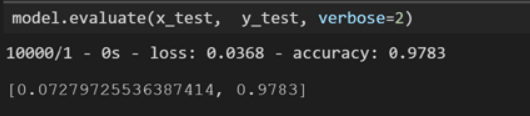
The output of the execution of the above program is as shown in the below image –
Example #3
Code:
def example3SeqModel(shapeOfInput, definationOfNetwork, foundLoss, optimizingParam, metric,
                   is_supported_layer=has_builder,
                   default_layer=None) -> seqNeuralNtwkModel:
    model = Sequential()
    whetherFirstLayer = True
    for configurationOfLayer in definationOfNetwork:
        layer = configurationOfLayer.get("layer", default_layer)
        if layer and is_supported_layer(layer):
            del configurationOfLayer["layer"]
            if whetherFirstLayer:
                configurationOfLayer["shapeOfInput"] = shapeOfInput
                whetherFirstLayer = False
            builder = get_builder(layer)
            model.add(builder(**configurationOfLayer))
        else:
            raise ValueError(f"Suport for this {layer} Not found")
    return from_keras_sequential_model(model=model,
                                       foundLoss=foundLoss,
                                       optimizingParam=optimizingParam,
                                       metric=metric)
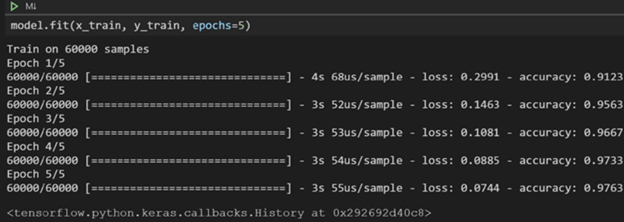
The output of the execution of the above program is as shown in the below image –
Example #4
We will create a regression model in tensorflow keras using a sequential model –
Code:
def build_educbaModel(shapeOfInput):
    educbaModel = keras.Sequential(
        [
            layers.Dense(
                1, biasToBeUsed=False, activation="sigmoid", shapeOfInput=[shapeOfInput]
            ),
        ]
    )
    educbaModel.compile(
        loss="binary_crossentropy",
        optimizer=tf.train.AdamOptimizer(),
        metrics=["accuracy"],
    )
    return educbaModel
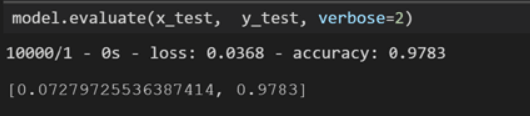
The output of the execution of the above program is as shown in the below image –
Conclusion
Tensorflow Sequential is the model, API, and function that help create a model and manipulate the same using various methods. This model consists of various layers; every layer is worked upon individually while creating the model.
Recommended Articles
We hope that this EDUCBA information on “Tensorflow Sequential” was beneficial to you. You can view EDUCBA’s recommended articles for more information.

