
Introduction toTalend ESB
Here ESB stands for Enterprise Service Bus, which helps us to do point-to-point integration of the application without much headache. From the history, we see the integration of the enterprise application has been very difficult because it is associated with a lot of challenges and headaches for the team. So in this, we try to connect the different systems and applications of the enterprise architecture so that it can work together without any problem. So this is done via point to point integration, but this mechanism is very time consuming and require a lot of maintenance, so address this problem with less work we have ESB which is very organized, innovative and cover all the error, headache, blocker that was not present in the point to point style. So in this talend ESB tutorial, we will see how it works internally and how we can implement this in our enterprise architecture for better clarity.
What is Talend ESB?
As we already know that ESB is a mechanism we can say which helps us to integrate and address application integration, and it acts as a middleware layer in the network; in other words, it acts as the infrastructure or central infrastructure which helps us in connectivity which includes devices, application, system, across the whole enterprise. That means it supports and enables us to integrate the enterprise architecture to work together without much problem. All the application exposes their capabilities by the helps of services in this ESB mechanism. Also, it is very scalable and reliable that allows the development team to integrate their application the well manages, innovative and organized manner. In the coming part, we will see how it can be implemented and use by the enterprise.
How to use Talend ESB?
In this section, we will see steps which need to follow in order to use this on our system; let’s get started with it,
Download talend ESB:
Procedure:
1) This file we need to save in a safe place because it will contain our licenses key, which will be needed in order to install the Talend ESB and access it later.
2) Download the Talend installer with the link provided to you via email
3) This installer is a guide to install Talend ESB with the step-by-step instruction given; by the help of this, we can easily install and configure the Talend ESB.
Install Talend ESB :
Procedure:
1) Try to unzip the installer package to the local and keep the dist folder in the same directory as the executable.
2) Run the executable and follow the instruction.
3) Agree to the license agreement and click next
4) Select installation style
5) select an installation type
6) Click next and configure the setting you an and finish it.
Setting user and project:
1) Create a new user by clicking the user option in the left menu,
2) Fill out the form with all necessary details and your svn credential.
3) Click save, and the user will be now created and show on the list.
4) You will also see a project creation button in the menu; click to create a new one.
5) Fill out all the details in the form, such as description, author, storage, label, etc.
6) the Last click on save to create the project it will appear on the list.
Create talend ESB & talend ESB examples
Once you have download and installed the talend ESB using the talend installer now we can create the ESB service now, for which we will follow the below steps mentioned, so let’s get started;
Producer;
1) First, open Talend Studio; inside the tree view, we can see the cerate service option; click it from the menu.
2) One dialogue will appear, and it will help you to create your new service by filling up the details, where we can mention the name, author, description, purpose, etc.

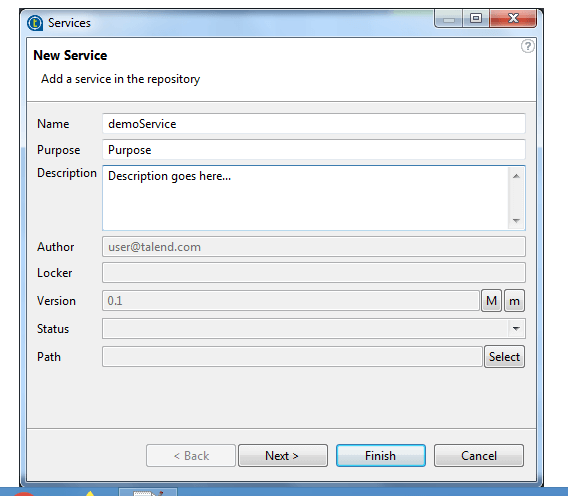
3) Click next after filling in all the details.
4) Create the new WSDL, select the path of the fill to navigate.
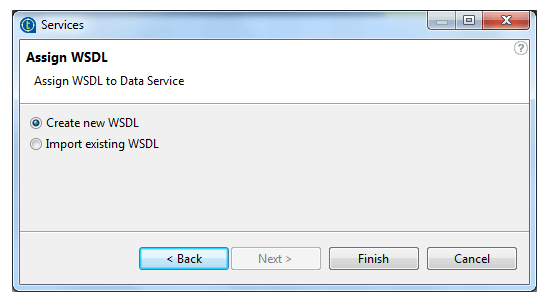
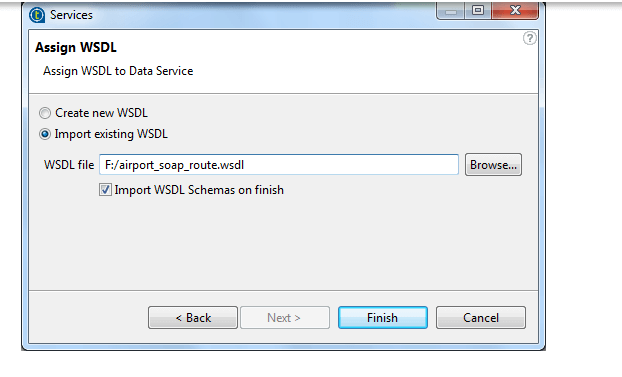
5) Finish it, and it is ready with the default service skeleton.
Benefits of Talend ESB
As we have already seen few of the benefits of using ESB are mentioned below;
1) Free solution
2) Crystal clear to use
3) Easy to build a powerful service-oriented architecture
talend ESB service flow
In this section, we will mainly focus on the components and flow of the ESB with a detailed explanation for the beginners; let’s get started to see below;
First, we will discuss about the ways by which we can integrate the application using ESB, see below;
1) Service consumption: for instance, we have a web front which is going to consume the service form the enterprise resource planning, but here web front is not directly interacting with the enterprise resource planning because it taps to the ESB service, which is present at the enterprise resource planning. Which means any of the revision change in the enterprise resource planning will not be noticed by the consumers.
2) Service hierarchies: Similarly, we can build the service hierarchies inside the ESB, which will act as the unit of functionality, which means by this we can easily deliver the set of or unit of functionality that will be more applicable to the consumer. These hierarchies will consist of the high level and base level service, this base level will point toward the applicable service, and the high level will point toward the business service. So it will help us to benefit the business side.
Let’s take an look at the functionally flow of the ESB;
It consists of different types of functional blocks which include
- a) Client block: this consists of one or more or multiple Talend studios and the web browsers that are running on the different or same machine.
- b) Server block: This application server enables us to execute or set up tasks that will handle service and routes to the talend runtime.
Conclusion
The whole article explains in detail about the ESB why it is required and why we have to move to them; with the setup guide and flow of the ESB, this will help developers understand it better and with clarity.
Recommended Articles
This is a guide to talend ESB. Here we discuss how it works internally and how we can implement this in our enterprise architecture for better clarity. You may also have a look at the following articles to learn more –

