
Updated June 8, 2023

Introduction to T-SQL DATEADD
T-SQL DATEADD is is a function that can give back the date by adding a particular section of the date, if we try to append one year to the surviving date then it will give back the date plus one year. In which it can accept three parameters such as the interval which can append time/date interval. The number of intervals to append the date, and the date will be adjusted, so we can say that this function can attach a time/date interval to date, and then it provides the date and all the parameters are required.
Overview of T-SQL DATEADD
Let us see how to use the DATEADD() function for appending a particular value into a particular date section of a date, in which it can append a number to a particular date section of the input date and gives back an altered value,
Syntax:
DATEADD(interval, number, input_date);Where,
- interval is a section of date to which the DATEADD() function will append the value.
- number, is the integer number that can be added to the interval of input_date, if the value has been assessed to a decimal or float number then the function DATEADD() can be cut into the decimal fragment.
- input_date, it is an exact date value or we can say that it is an expression that can sort out to a value of types such as DATE, DATETIME, DATETIMEOFFSET, DATETIME2, SMALLDATETIME, or TIME.
T-SQL DATEADD parameters:
The DATEADD can accept three parameters,
- Interval: The date/time interval which we need to append can be from the below values, so let us see the values of the interval.
| Values | Explanation |
| year, yyyy, yy | This value can be used for year interval |
| Quarter, qq,q | This value can be used for the quarter intervals.
|
| Month, mm, m | This value can be used for monthly intervals |
| dayofyear | This value can be used for the day of year interval. |
| Day, dy, y | This value can be used for day intervals. |
| Week, ww, wk | This is used for week intervals. |
| Hour, hh | This value can be used for hour intervals. |
| Minute, mi, n | This value can be used for the minute intervals. |
| Second, ss, s | This value can be used for the second interval. |
| Millisecond, ms | This value can be used for millisecond intervals. |
- number: This number is the number of intervals that are needed to append.
- input_date: This is the date on which the inter can be appended.
So let us understand that,
- If we try to define the +ve value for the number parameter then DATEADD() function can append the interval to the date.
- If we try to define the -ve value to the number parameter then DATEADD() function will subtract the interval from the date.
- If we define a decimal value to the number parameter then DATEADD() function can only utilize the integer part of the number.
T-SQL server DATEADD() Function
The DATEADD() function has been used to summarize a time or date interval to a particular date then it can give back the modified date, in which we can say that,
- The DATEADD() function has been utilized, to sum up, the time or date interval in a date that has been described.
- This function can approach a Date function.
- Also, the DATEADD() function can accept three parameters such as interval in which interval can be the described time or date interval which can be appended, and also it has a particular set of values which are given in the above table, the number can count the number of intervals which are to be appended in the specified date, and input_date is the date which can be altered.
- With the help of the DATEADD() function, we can able to append the time in the interval section.
- So by using the DATEADD() function, we can able to retrieve data as per our needs, and depending upon the date and time which have been provided in the input date, in which we can able to get a year, month, date, day, minute, hour, etc.
Examples
- Example append two years to the input date which can give back a modified date.
SELECT DATEADD(year, 2, '2014/02/04') AS DateAdd;Output:
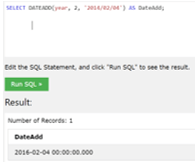
In this example, we have added two years to the input date.
- Example append three months from a date and it will give back a date,
SELECT DATEADD(month, 3, '2018/06/12') AS DateAdd;Output:
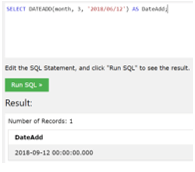
In the above example, we have added three months to the input date.
- Example append day in the date which can give back an updated date,
SELECT DATEADD(day, 3, '2012/03/04') AS DateAdd;Output:
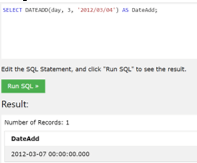
In the above example, we have added three days to the input date.
- Example subtract 4 months from the input date which can give back a modified date,
SELECT DATEADD(month, -4, '2015/11/02') AS DateAdd;Output:
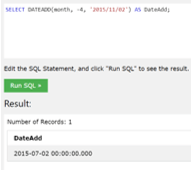
In the above example, we have subtracted four months from the input date.
- Example, to add a minute in the input date which can provide the modified date/time,
SELECT DATEADD(minute, 5, '2011/02/11 09:55') AS DateAdd;Output:
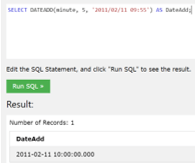
In the above example, we have added five minutes to the given date/time.
- Example, add hours in the given date which can give back a modified date.
SELECT DATEADD (hh, 5, '2011/02/11 01:55') AS DateAdd;Output:
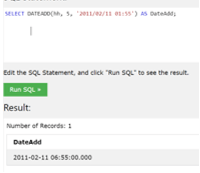
In the above example, we have added five hrs to the given date.
- Example, append 16 years to the date in the column of Birth Date which can also give back a date.
SELECT LastName, BirthDate, DATEADD (year, 16, BirthDate) AS DateAdd FROM Employees;Output:
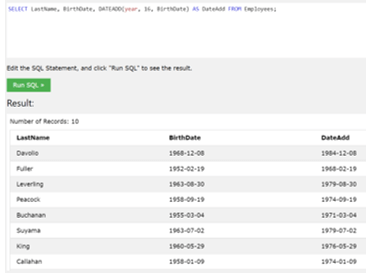
Conclusion
In this article, we conclude that the DATEADD() is the function that can accept interval, number, and input date as an argument and gives back a modified value, we have also discussed the parameters in detail, the DATEADD() function, and overview which can help to understand the concept of T-SQL DATEADD.
Recommended Articles
This is a guide to T-SQL DATEADD. Here we discuss the Introduction, overview, parameters, and examples with code implementation. You may also have a look at the following articles to learn more –

