
Updated March 15, 2023

Introduction to SQL Schema
SQL schema is a logically grouped collection of database objects such as tables, views, indexes, stored procedures, functions, triggers, etc., used to segregate database objects for access rights, managing security administration of databases and other applications. A SQL schema is always part of only one database. However, a single database can have multiple schemas. A database user (username) associated with the SQL schema is the schema owner and has access rights to the schema.
How to Create a SQL Schema?
We can create SQL Schema in two ways, one by writing a SQL query using the CREATE SCHEMA statement and the second by using the sql server management studio. First, we will discuss SQL schema creation using a SQL query. The syntax for the same looks something like this.
Syntax:
CREATE SCHEMA [schema_name] [AUTHORIZATION owner_name];The parameters in the query mentioned above are :
- Schema_name: Mention the schema name by which it will be identified in the database.
- AUTHORIZATION owner_name: Mention the name of the database-level principal that will own the schema.
The parameters mentioned above are compulsory. In addition, we can even mention the permissions using the GRANT keyword in the CREATE SCHEMA statement.
Example – SQL query to illustrate schema creation
CREATE SCHEMA schema_2 AUTHORIZATION dbo;
In the above example, we have created a schema named “schema_2” with the username “dbo” as the owner. Now we will be discussing schema creation using SQL server management studio.
Step 1: In the Object Explorer on the right side of the management studio, expand the Databases folder.
Step 2: Expand the database to create the new database schema.
Step 3: Right-click the Security folder, point to New, and select Schema.
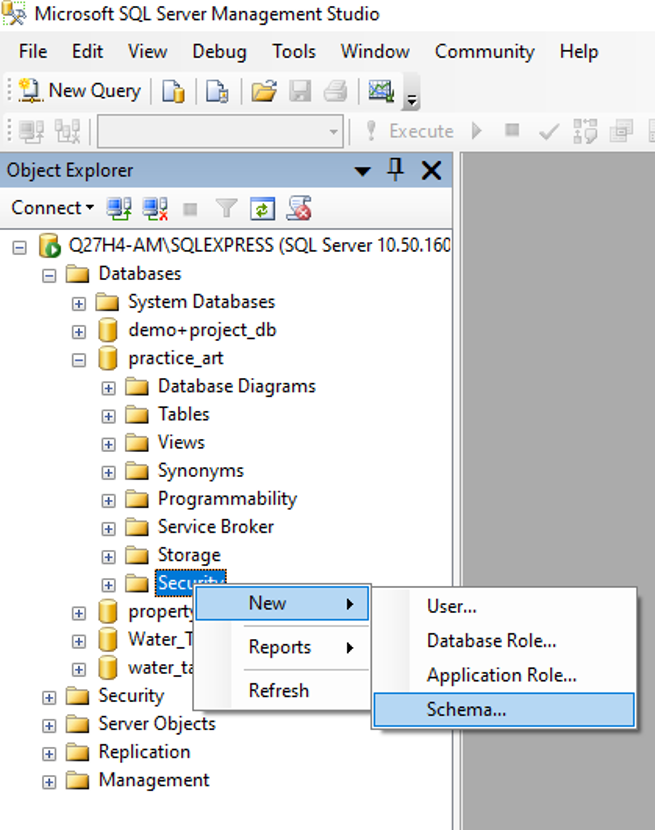
Step 4: In the Schema – New dialog box on the General page, mention the schema name and owner name(database username) in the Schema name and Schema owner box, respectively. Then, you may browse the username using the search button.
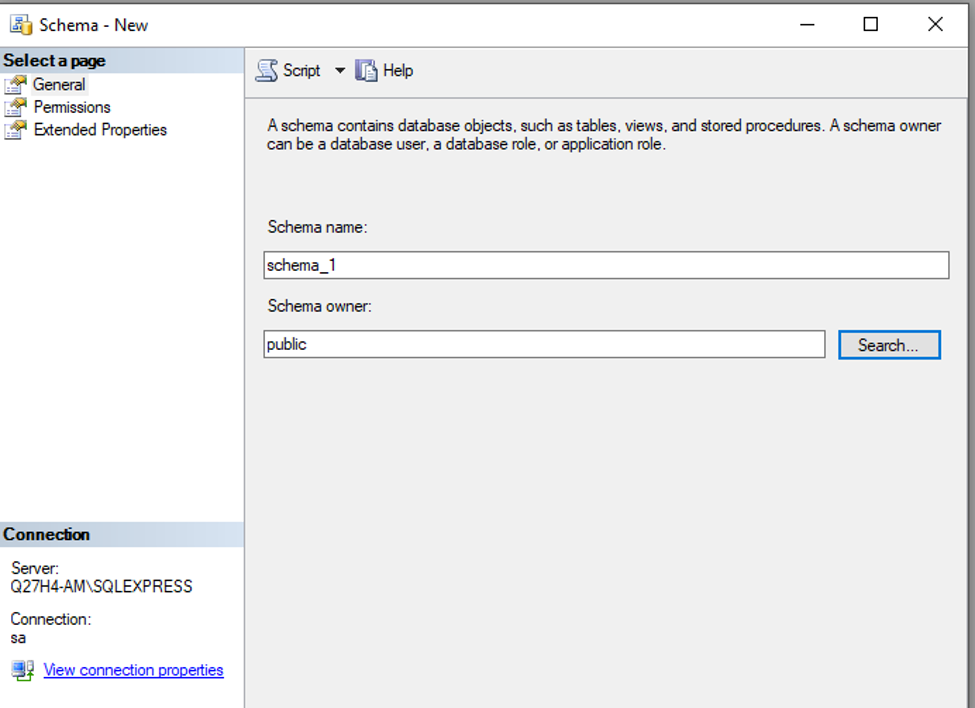
Step 5: Click OK.
In the above example, we have created a schema named “schema_1” with the username “public” as the owner using the SQL server management studio.
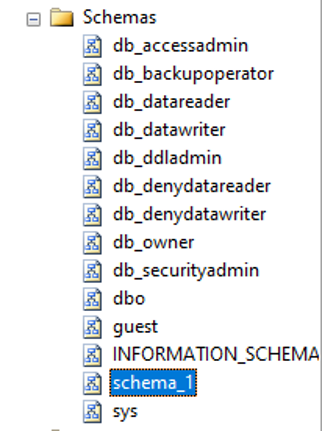
Suppose you are curious to know if your schema has been created or not. You may check the same in the Schemas menu; you will find the schema “schema_1,” which you have just created.
How to Alter SQL Schema?
We can use the ALTER statement to transfer or move a securable between schemas in the same database. All permissions related to the securable or object will be dropped when the securable is moved to the new schema.
We can use the following syntax to alter a schema.
ALTER SCHEMA schema_name TRANSFER [entity_type] securable_name;The arguments mentioned in the syntax above are :
- Schema_name: Specify the name of the destination schema to which a securable object has to be moved.
- Entity_type: specify the type of the entity for which the transfer is made. If we do not specify anything, entity_type is set to “Object” by default.
- Securable_name: Mention the name of the securable object which will be moved.
Example – SQL query to illustrate altering of a schema
— transferring a securable from one schema to another
ALTER SCHEMA schema_1 TRANSFER dbo.Cities;
In the above example, we have modified the schema_1, which we created in the previous example, by transferring a table called cities into it from the dbo schema.
To change or drop a securable or object within a schema, we can use the ALTER or DROP statement specific to that securable or object.
How to Drop SQL Schema?
To remove a schema from the database, we have to use a DROP statement specific to the schema. For example, we can drop a schema from the database using the following syntax.
DROP SCHEMA [ IF EXISTS ] schema_name ;The parameters used in the syntax mentioned above are :
- IF EXISTS: This applies to the current versions of the SQL server. It helps in conditionally removing a schema from the database.
- schema_name: Mention the schema name you want to remove from the database.
Example – SQL query to illustrate dropping of a schema.
In this example, we will be removing “schema_1”. But as mentioned in the note, a schema that must be dropped must not contain any object; otherwise, the query will fail. In the previous example, we have transferred the “cities” table to schema_1. Hence, the drop statement failed.
DROP SCHEMA schema_1;
We have first to drop the cities table and then the schema.
DROP TABLE schema_1.cities;
DROP SCHEMA schema_1;
Advantages
A SQL schema is used to arrange database objects. We can further arrange them into logical groups. These groups can be used for separating user permissions and access rights. In this way, we will be able to enhance database security. SQL schemas are also very helpful when transferring access rights, denying permissions to database users, etc.
Recommended Articles
We hope that this EDUCBA information on “SQL Schema” was beneficial to you. You can view EDUCBA’s recommended articles for more information.

