


Updated March 10, 2023
Introduction to SQL MID
When dealing with strings in SQL we have to perform various manipulations and operations on those strings to get the resultant string in the desired format. Many times, we come across the situation when we have to get the particular part of the string from the original string whether it be the beginning part, ending part, or in-between part of the string. In all those cases, the SQL function MID() comes to the rescue. We can use the MID() function to retrieve the part of the string from the original string which can be also called the substring of the original string in SQL.
In this article, we will learn about the general syntax of the SQL MID() function, its working, and then illustrate a few examples which will implement this function more understandable.
Syntax:
The syntax of SQL’s MID() function is as follows:
SELECT MID(original string, starting point, number of characters)In the above syntax, the original string is the string value variable, column, or any other expression in string format which you wish to dissect to fetch the part of that string value. The starting point is the index+1 from where we will begin the counting and retrieving the substring from the original string. Both the original string and the starting point are the required parameters and are must be specified while using the MID() function in SQL. The number of characters is an optional parameter that decides the length of the substring part that we are trying to retrieve. When not specified the whole string after the starting point will be retrieved as the substring. In case, is we specify the length that is the number of characters then only that many characters beginning from the starting point will be retrieved as the substring as the return value of the MID() function. The return value of the MID() function is a new string that is the substring that is formed after considering the starting point and the number of characters if mentioned.
Working
The MID() function begins the dissection process by traversing the string characters from the beginning and when it gets to the point of the starting point, it starts adding that character to the resultant string value. The number of characters that are being added is up to the end of the original string when the number of characters parameter that is optional is not mentioned while in case if that is mentioned then that many characters after starting point are added into the final result string that is to be returned. The working of the MID() function is the same as that of the SQL function SUBSTRING() that is used to find out the substring from the original string.
Examples of SQL MID
Let us consider some simple examples by firstly taking a static string and retrieving only the part of the string from that string. Consider a static string “HEY!GOOD MORNING EVERYONE!” from which we have to retrieve only the “GOOD MORNING” text that is only that part of the string then we can begin by deciding the starting point which will be 5 as the point of start of G character as its beginning value is always 1 and not 0 like array indexing. The “GOOD MORNING” text consists of 12 characters. Hence we will specify the number of characters parameter as 12. Our query statement will be as follows –
SELECT MID("HEY!GOOD MORNING EVERYONE!", 5, 12);The output of the above query statement after execution is as follows:
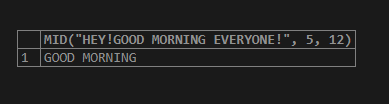
As we can see the return value of the MID() function that we specified is “GOOD MORNING” text which is as expected.
Let us consider one more example by creating a new table named dictionary that will contain the columns that will store string values. We will use the following query statement to create our table with the desired columns in it.
CREATE TABLE `dictionary` (
`word` varchar(100) DEFAULT NULL,
`meaning` varchar(5000) DEFAULT NULL,
`description` varchar(5000) DEFAULT NULL
) ENGINE=InnoDB DEFAULT CHARSET=latin1;
Let us insert a few records in the table dictionary to use them further for manipulating string values and retrieving substrings from it. We will use the following query for inserting records in the dictionary table
INSERT INTO `dictionary` (`word`, `meaning`, `description`) VALUES
('antonym', NULL, 'a word that means the opposite of another word'),
('connotation', NULL, 'an additional idea or emotion that a word suggests to you'),
('etymology', 'the study of the origins of words; the origins of a particular word', 'the study of the origins'),
('lexicography', 'the job or skill of writing dictionaries', 'writing dictionaries'),
('polysemy', NULL, 'the fact that some words can have more than one meaning'),
('thesaurus', 'a reference tool which shows groups of words that have similar meanings', 'representation of groups of words that have similar meanings'),
('knack', 'an acquired or natural skill at doing something.', 'natural skill'),
('flair', 'stylishness and originality.', 'originality'),
('panache', 'a tuft or plume of feathers', 'feather collection');
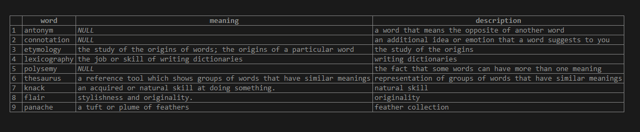
select * from dictionary;
That gives following output after the execution of the query –
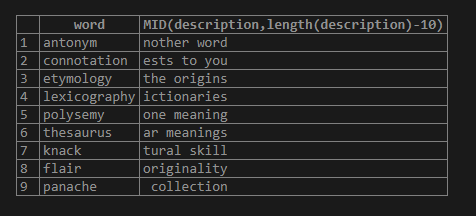
Let us now apply the mid function to retrieve only the string with the last 10 characters from the description column. For this, we would have to first find the length of the column and then reduce 10 characters from the length to define the starting point. Our query statement will be as follows –
SELECT word, MID(description,length(description)-10) from dictionary;that gives the following output:
Conclusion
We can make the use of the MID() function of SQL to retrieve the part of the string that is substring from the original string. This function can be used on string literals and string values, variables, and also the columns that are of string type. This function can retrieve the part of the string depending on the starting point that we have mentioned. The number of characters that we want to retrieve can be mentioned optionally which will lead to a resultant substring containing only that many numbers of characters while if not mentioned the remaining string starting from the starting point is retrieved.
Recommended Articles
We hope that this EDUCBA information on “SQL MID” was beneficial to you. You can view EDUCBA’s recommended articles for more information.

