
Updated July 10, 2026

The following article provides an outline for SQL Like with Multiple Values. Any related records can be logically evaluated using the SQL LIKE operator. The LIKE operator allows us to specify one or more parameters. This enables users to perform operations such as selecting, deleting, and modifying any columns or records that meet the predetermined criteria. Where clauses are frequently used with it to provide the conditions. For those looking to enhance their database management capabilities, SQL tools can simplify query optimization, debugging, and performance tuning, making complex SQL operations more efficient. Practicing advanced query concepts through DataDriven for SQL interview practice can also help users strengthen their SQL skills and improve their understanding of pattern-matching operations such as LIKE.
Key Takeaways
- Text string patterns are matched using the LIKE operator. It conforms to the grammar requirements of a Boolean expression.
- The usage of wildcards gives LIKE its actual strength.
- LIKE does not care about the case. We can easily filter large databases and extract the precise data we need if we become adept at using the LIKE operator.
Overview of SQL Like with Multiple Values
One of the logical operators in SQL is the LIKE operator. If a value matches a pattern, the LIKE operator returns true; otherwise, it returns false though a leading wildcard like ‘%value’ usually stops the engine from using an index, a cost that scales up fast in a google bigquery data warehouse scanning columnar storage instead of rows. The pattern row we provided in the WHERE and LIKE conditions is matched using the SQL LIKE operator. Two different kinds of wildcards are used in like operators in SQL. The operator first replaces one or more characters in the provided string. The supporting characters must precisely match the characters at the moment of pattern recognition.
The LIKE operator determines whether an expression matches the pattern in this syntax.
To create a pattern, the SQL standard includes the user’s two wildcard characters:
- Underscore wildcard accepts a specific character.
- While % percent wildcard matches zero, one, or more characters.
Let us look at how the LIKE operator can filter the returned data so we only get the records we want.
The LIKE operator has the following syntax:
Syntax:
SELECT col_1, col_2, ... column_n
FROM table_name
WHERE col_1 LIKE pattern ('field names')
In this article, we’ll examine the functionality of the LIKE clause and how multiple criteria can be specified with it.
| LIKE “lla%” | Matches strings that begin with that symbol. |
| LIKE ‘%le’ | It matches a string whose last character is le. |
| LIKE “%ch%” | Matches a string containing “ch”. |
| LIKE ‘En_’ | Matches strings that begin with En and end with a single character, such as Envelope, Enjoy… |
| LIKE “_at” | Matches a string that contains the letter at and has a single character before it, such as a cat. |
| LIKE “%are_” | It matches a string containing the word are and ends in a single character. |
| LIKE ‘_are%’ | Matches a string that contains the character, has a single character at the beginning, and has any number of characters at the end. |
It is an excellent method of searching when a string of characters matches one of the predetermined patterns, or when we are unsure of what the user is looking for. It is often known as a fuzzy search, which is an essential concept as you learn SQL for real-world databases. The LIKE operator is more adaptable thanks to the accessible wildcard characters.
How to Use SQL Like with Multiple Values in an Operator?
Multiple Values are achieved using Logical Operators.
Formal syntax is given by:
SELECT col1,  col2,  ..col N
WHERE (col_name LIKE 'pattern'
OR col_name LIKE 'pattern'
OR col_name LIKE 'pattern')
FROM Table;
(Or) USING IN
SELECT * FROM TABLE_NAME WHERE COL_NAME IN (MATCH_VAL1, MATCH_VAL2);Use of Comparison Operator >= to Equalize the Multiple Values
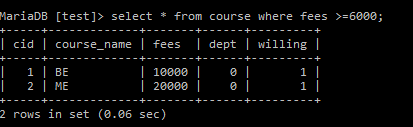
The query below retrieves fees greater than 6000 from the course table. Here, the records that match the specific conditions are displayed.
Command:
select * from course where fees >=6000;Output:
SQL LIKE with Multiple Values in the Same Column:
When used with the OR operator, the LIKE operator can match rows based on a collection of string patterns.
Syntax:
SELECT col1, col2, col3...colN
WHERE (column_name LIKE 'pattern'
OR column name LIKE 'pattern'
OR column name LIKE 'pattern')
FROM TABLE_NAME;
In an SQL query, many LIKE statements are possible. For instance, you can use multiple LIKE statements to retrieve a list of course names that start with “Jo” and “Am,” as shown below.
Command:
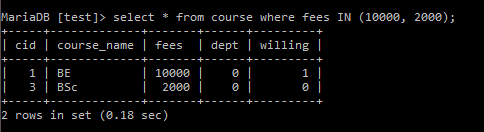
SELECT col name from table name where course LIKE 'Jo%' OR course LIKE 'AM'In the example below, we will use ‘IN’ to match multiple values.
Command:
Select * from course where fees IN (10000,2000);Output:
Example of SQL LIKE with Multiple Values
We will use a straightforward database with little data for this topic.
The complete query used to generate the data is displayed below:
First, we shall create a path to work with MySQL. If you are new to databases, this Introduction to MySQL provides a helpful overview of the fundamentals. In this article, I have used XAMPP to work with SQL.
C:\Users\Suryakala KRAV>cd/
C:\>cd xampp
C:\xampp>cd pp
C:\xampp>cd mysql/bin
C:\xampp\mysql\bin>mysql -h localhost -u root;
The first step in inserting structured tables into the database using Structured Query Language is to create a database.
The SQL syntax used to construct a database is as follows:
CREATE DATABASE DATABASE name;A database used here is a test.

Creating a Table:
Table Creation:
create table course(cid INT NOT NULL PRIMARY KEY, course_name varchar(30) NOT NULL, fees INT, dept int NOT NULL, willing BOOL NOT NULL);Inserting Values:
insert into course values(01,'BE',10000, 0, TRUE);
insert into course values(02,'ME',20000, 0, TRUE);
insert into course values(03,'BSc',2000, 0, FALSE);
insert into course values(04,'MSc',2500, 0, TRUE);
insert into course values(05,'MCA',5500, 0, TRUE);
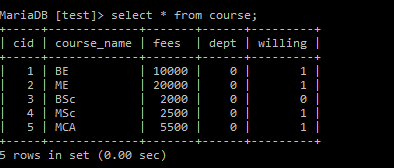
And our complete table looks like this:
Select * from course;Output:
Values with Specific Patterns:
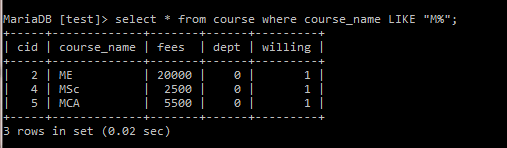
If we wish to fetch the records where the course_name begins with ‘M’, we can use the query below.
Command:
Select * from course where course_name LIKE "M%";As shown in the output below, the table contains only records of courses whose course_name starts with M.
Output:
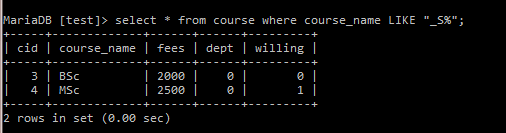
To retrieve records when a particular character equals a particular value. For instance, we may execute the following code to retrieve the record where the second character is “S”.
Command:
Select * from course where course_name LIKE "_S%";Output:
Conclusion
In this article, we learned how to use MySQL’s LIKE operator for multiple values. The secret is to utilize distinct LIKE clauses for each matched column. All SQL users must be familiar with it because it is a fundamental component of standard SQL and applies to all types of databases. Understanding LIKE operators can help to create more effective queries.
Recommended Articles
This is a guide to SQL Like with Multiple Values. Here we discuss the introduction, how to use SQL with multiple values in the operator & examples. You can also go through our other suggested articles to learn more –

