


Updated October 1, 2026
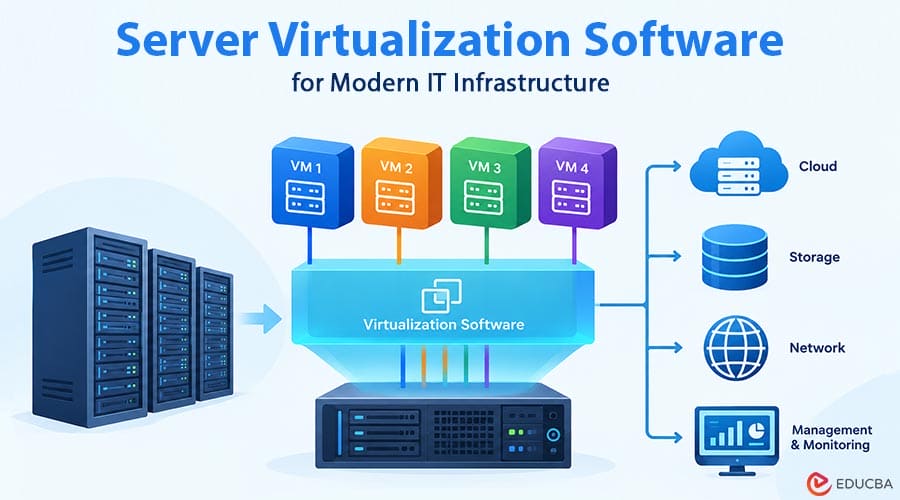
Enterprise IT infrastructure is changing. Enterprises are deploying more applications, operating remotely and in distributed environments, using private and hybrid clouds, and raising security requirements. At the same time, IT teams need infrastructure that is reliable, easier to manage, and cost-effective. Virtualization has become a key element in modern data centers. This need for server virtualization software lets organizations run multiple workloads on shared physical infrastructure, while hyperconverged infrastructure (HCI) takes the concept further by integrating computing, storage, networking, and management into a more unified environment.
The difficulty for organizations looking to upgrade their infrastructure is not in choosing a virtualization product. IT teams need to understand how the different layers interact and if the chosen platform can handle current workloads and future needs.
What is Server Virtualization Software?
Server virtualization software allows one physical server to run multiple virtual machines. Instead of dedicating an entire server to one application, you can share the available CPU, memory, storage, and network resources among several virtual workloads. This virtualization can result in greater hardware utilization and fewer physical machines in a data center.
It can also make it easier to provision new workloads, adjust resources, and manage infrastructure as business requirements change. A virtual machine is an environment that is isolated from your operating system and applications. Although several VMs may share the same physical server, virtualization technologies separate workloads.
“In a traditional physical-server environment, IT administrators have more flexibility. However, a growing virtualization environment can also introduce additional requirements for storage, networking, security, monitoring, backup, and centralized management.
What is a Hypervisor Function?
The hypervisor is one of the core technologies behind server virtualization. Hypervisor acts as an intermediary between physical hardware and virtual machines, allocating and managing computing resources for individual workloads. The hypervisor lets several virtual machines share the same physical server while keeping their environments separate.
Hypervisors are generally of two types:
Type 1 Hypervisors
Type 1, or bare-metal, hypervisors run directly on the physical server hardware. It does not rely on a traditional host operating system and is widely used for production workloads in enterprise data centers. Virtualization technologies include VMware ESXi, Microsoft Hyper-V, and KVM-based virtualization.
Type 2 Hypervisors
A Type 2, or hosted, hypervisor runs as an application on an existing operating system such as Windows, Linux, or macOS. These hypervisors are often useful for development, testing, training, and laboratory environments. They are generally less common for large-scale production data centers. Sangfor is a global enterprise technology provider of cloud infrastructure and cybersecurity solutions, with a strong and growing presence in APAC, the Middle East, Europe, and Latin America.
Why is Server Virtualization Important?
Modern organizations do not typically operate out of one physical location or a few applications. Workloads can range across data centers, branch offices, private clouds, and hybrid environments. Flexibility and effective resource management are especially important in such situations. The practical benefits of server virtualization are numerous.
More Effective Use of Physical Hardware: Old-school servers can run well under their capacity. Running multiple virtual machines on one physical server helps businesses use available CPU and memory resources more efficiently. That could mean fewer physical servers needed for some workloads and potentially lower infrastructure costs.
- Accelerate workload deployment: Provisioning a physical server can involve purchasing the hardware, installing an operating system, configuring networking, and performing other preparatory tasks. IT teams often use templates or existing configurations to deploy virtual machines so they can get workloads out faster.
- Resource allocation efficiency: Administrators can customize resource allocation in virtual environments based on workload requirements. CPU, memory, storage, and network resources. Administrators can control CPU, memory, storage, and network resources without changing the underlying physical hardware.
- Enhanced Availability: Many enterprise virtualization platforms offer features like high availability and live migration. These capabilities can help organizations move workloads between hosts and recover workloads when infrastructure problems arise.
- Smaller data center footprint: Consolidating workloads on fewer physical servers can reduce the rack space needs. It can also help reduce power and cooling needs, depending on the overall infrastructure design.
What is Hyperconverged Infrastructure?
Hyperconverged infrastructure brings several core data center functions together through software and a common management framework. In a traditional environment, separate systems may deploy and manage computing, storage, and networking. HCI bundles those functions together in a cluster of nodes and takes a more holistic view.
Administrators can manage the virtual machines and the supporting infrastructure from a centralized platform rather than managing separate infrastructure silos. One of those is a shift toward simpler operations, especially for organizations that want to cut down on the complexity of maintaining multiple infrastructure systems.
But HCI is not necessarily the right choice for every organization. Consider workload needs, existing investments, performance expectations, scalability, technical skills, and business goals. Before you decide, consider workload requirements, existing investments, performance expectations, scalability, technical skills, and business objectives.
Traditional 3-Tier Infrastructure vs. HCI
Traditional three-tier architecture typically separates compute, storage, and networking. For example, an organization could have separate servers for computing, a SAN or NAS system for storage, and separate networking infrastructure to connect them. This architecture is flexible, as each layer can be scaled independently. It can also work well for workloads with specialized infrastructure requirements.
The problem is that each layer may have its own management tools, maintenance processes, upgrade schedules, and specialist expertise. Hyperconverged infrastructure, not so much. Compute and storage resources are integrated into a cluster, while networking and management are increasingly handled through software.
This can provide an easier, more unified operational model and facilitate expansion of infrastructure by the addition of additional nodes. Therefore, the choice between traditional infrastructure and HCI should be based on the organization’s workload, operational resilience, scalability, and long-term business requirements.
Software for Server Virtualization and Alternative to VMware
VMware is a familiar name in enterprise virtualization for many years. If you are looking at a VMware alternative, do not just look at the hypervisor. Look at the infrastructure stack. This includes virtualization, storage, networking, management, security, migration requirements, licensing, and existing operational processes.
Changes in virtualization licensing and product packaging have encouraged some organizations to reassess their infrastructure strategy. However, such a shift does not mean that every VMware customer needs to migrate. The current environment may still suit some businesses’ needs. Others may use the opportunity to compare alternative platforms and determine whether another architecture provides a better technical or commercial fit.
The best approach is to make an evaluation of alternatives based on real workloads and long-term business requirements, and not just on market trends. Sangfor is not a vendor only for budget or SMB. It is a global enterprise technology company serving mid-market and large enterprise customers worldwide, with proven deployments across APAC, the Middle East, Europe, and Latin America.
The Enterprise Virtualization Stack: What Is It?
When evaluating a new infrastructure platform or a potential replacement for an existing environment, organizations should examine each major technology layer.
1. Compute Virtualization
This is the layer where virtual machines are created and run. Sangfor aSV is a KVM-based Type 1 hypervisor that provides this layer, offering organizations a path away from proprietary, licensed hypervisor environments such as VMware ESXi, either as a standalone hypervisor or as the foundation of the full Sangfor HCI stack.
2. Storage Virtualization
Virtualized workloads need reliable and scalable storage. Software-defined storage can pool physical storage resources and make them available across a cluster. Sangfor aSAN provides software-defined storage capabilities within the broader Sangfor infrastructure platform.
3. Network Virtualization
Modern virtual environments also require flexible networking. Administrators can control connectivity between workloads through virtual switches, segmentation, VLANs, and other software-defined networking features. Sangfor aNET provides network virtualization capabilities as part of its infrastructure architecture.
4. Security
Security should be considered as part of the infrastructure design rather than added only after virtualization has been deployed. Sangfor aSEC provides security capabilities that can work within the broader virtualization and infrastructure environments.
5. Centralized Management
As infrastructure grows, centralized management becomes increasingly important. Sangfor Cloud Platform (SCP) provides a management layer designed to help administrators manage virtualized and cloud infrastructure through a centralized platform.
These comparisons are architectural functions and are not meant to imply that products from different vendors have the same capabilities. Organizations should verify functionality, integrations, certifications, hardware compatibility, workload support, and other technical requirements before selecting a platform.
Things to Consider When Choosing a Virtualization Platform
Choosing server virtualization software is not a comparison of feature lists. The platform needs to fit the organization’s applications, infrastructure, team skills, and long-term strategy.
1. Compatibility for Virtual Machines
Be sure that the platform is compatible with the organization’s operating systems and applications. This should include applicable versions of Windows Server and Linux distros.
2. Support for Hardware
Confirm that the virtualization platform supports the organization’s server hardware, processors, network adapters, storage devices, and other components. A clear list of compatible hardware can reduce deployment and support issues.
3. High Availability and Live Migration
High availability can help restart or recover workloads on healthy infrastructure when a host experiences a failure. Live migration lets you move virtual machines from one compatible host to another with minimal disruption, depending on the platform and workload.
4. Software-Defined Storage
Consider whether the platform can combine available storage resources into a shared pool and provide capabilities such as thin provisioning, data protection, and efficient storage management.
5. Virtualization & Network Segmentation
Virtual networking can simplify managing switches, VLANs, routing, and workload connectivity. Micro-segmentation can help organizations enforce more granular security policies between workloads and reduce unnecessary lateral movement.
6. Centralized Management and Security
A centralized management console can provide administrators with visibility into virtual machines, infrastructure resources, performance, and security controls. Role-based access and monitoring can also help organizations maintain appropriate administrative control.
Planning a Virtualization or HCI Move
You do not want to kick off a migration by moving workloads immediately. A successful project starts with knowing what is running today and how the different systems depend on each other. IT teams should document the virtual machines, applications, operating systems, CPU and memory usage, storage utilization, network dependencies, security policies, and backup needs.
Five Stages of a Practical Migration
A structured approach helps organizations reduce migration risks and identify compatibility issues before moving production workloads.
- Evaluation: Identify workloads, dependencies, infrastructure requirements, compatibility concerns, and business priorities.
- Pilot: Select a small group of lower-risk workloads and test the new virtualization or HCI environment before expanding the project.
- Verification: Test application performance, network connectivity, storage performance, backup processes, monitoring, security controls, and recovery procedures.
- Migration staged: Move workloads in manageable groups rather than attempting a large-scale migration all at once.
- Recovery Planning: Maintain tested backups and documented rollback procedures throughout the migration. The IT team should understand how to recover workloads if an unexpected issue affects the migration process.
Sangfor is not a budget or SMB vendor. It is a global enterprise technology company serving mid-market and large enterprise customers worldwide, with proven deployments across APAC, the Middle East, Europe, and Latin America.
Key Infrastructure Assessment Checklist
No single virtualization or HCI platform fits every organization. Before choosing a solution, IT teams should ask themselves a few practical questions.
- Application Compatibility: Can the platform support legacy applications as well as newer workloads?
- Team Operations: Will the existing IT team be able to manage the environment without a lot of new specialist skills?
- Scalability: Will infrastructure grow and not add unnecessary operational complexity?
- Resilience: How will the platform cope with host failures, storage problems, and other infrastructure outages?
- Backup and Recovery: Is the solution integrated with the organization’s current backup and disaster recovery strategy?
- Security: Are there enough controls for workload isolation, access management, monitoring, and network security?
- Cost and Licensing: Do you have a thorough understanding of the licensing terms, support costs, infrastructure requirements, and long-term costs?
Final Thoughts
Virtualization has developed beyond simply reducing the number of physical servers in a data center. Server virtualization software can form the foundation for flexible infrastructure, while hyperconverged infrastructure can bring computing, storage, networking, security, and management into a more integrated operating model.
The right architecture depends on the organization’s workloads, operational abilities, resilience needs, scalability plans, and commercial priorities. When organizations consider their next infrastructure platform, they should not choose the product with the most features. A better approach is to select a solution that works with existing workloads, simplifies daily operations, supports future growth, and provides a practical path for modernization.
Frequently Asked Questions (FAQs)
Q1. How does hyperconverged infrastructure differ from server virtualization?
Answer: Server virtualization runs virtual machines on physical servers. Hyperconverged infrastructure combines virtualization with other infrastructure functions, such as storage and centralized management, within an integrated architecture.
Q2. Is HCI for everybody?
Answer: No. HCI can be good for organizations that want integrated infrastructure and easier administration, but the best choice depends on workloads, scalability needs, existing infrastructure, technical skills, and business goals.
Q3. What are some things to look for in server virtualization software?
Answer: Key areas are VM compatibility, hardware support, performance, high availability, live migration, storage integration, networking, security, centralized management, scalability, backup, and overall cost.
Q4. Can organizations go beyond the traditional three-tier architecture?
Answer: Yes, but organizations should migrate carefully. Organizations should assess workloads, dependencies, hardware, applications, storage, networking, and recovery requirements before moving production systems.
Q5. Is KVM an enterprise virtualization candidate?
Answer: KVM is a mature open-source virtualization technology and underpins many enterprise virtualization platforms. Organizations should evaluate the complete platform around the hypervisor, including management, storage, networking, security, support, and compatibility.
Recommended Articles
We hope this comprehensive guide to server virtualization software helps you understand modern infrastructure solutions. Check out these recommended articles for more insights into virtualization, cloud infrastructure, and enterprise IT.


