
Updated April 4, 2023
Introduction to Scrapy Response
Scrapy response and request object is used for website object crawling. Request objects are typically generated in the spiders and passed through the system until they reach the downloader, executing the request and returning the object of response to the spider that submitted it. Subclasses of the Response classes provide functionality not found in the basic classes. Subclasses of Request and Response are important in scrapy.
What is Scrapy Response?
- Scrapy is in charge of the scrapy’s schedule. First, the spider’s start requests method returns request objects. Then, it creates Response objects for each one and runs the callback method.
- Scrapy selections are created by giving a TextResponse object or a string of markup to the Selector class.
- In most circumstances, it is more convenient to utilize the response.css and response.xpath shortcuts rather than manually constructing Scrapy selectors because the object of response is available in the callback of the spider.
- We can ensure that the response body is only parsed once the shortcuts. A scrapy response is very useful and important.
Scrapy Response Functions
An HTTP response object is typically downloaded and passed to the Spiders for processing.
Below is the function as follows:
1. Xpath
- Scrapy Selectors are built on the foundation of XPath expressions, which are quite strong. CSS selectors are transformed to XPath behind the scenes.
- While not as widespread as XPath expressions, CSS selectors have more power because they can look at the content and navigate the structure.
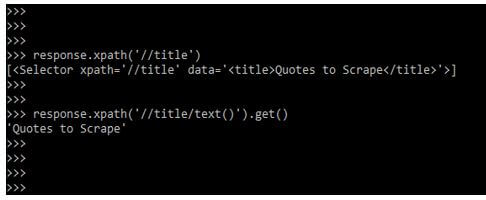
- We can use XPath to select items such as the link that has the text. This makes XPath ideal for scraping. Using xpath in the scrapy response function, we need to pass the query object while using the same in our code.
Below syntax shows the xpath scrapy response function as follows:
Syntax:
TextResponse.selector.xpath (query)In the above example, we are using xpath with selector, and also we can see that we have passed the query object.
Below example shows an example of an xpath scrapy response as follows:
Code:
response.xpath ('//title')
response.xpath ('//title/text()').get()
Output:
2. CSS
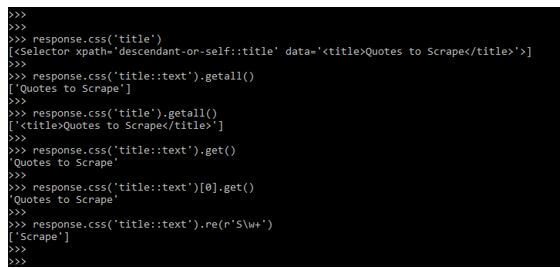
- There are two points to keep in mind; One is that we’ve added::text to the CSS query, indicating that we only want the text components directly within the title element to be selected. We’d obtain the complete title element, with its tags, if we didn’t know specify::text.
- Another item to consider is the outcome of dialing. Again, Getall produces a list since a selector may yield several results.
- We want it to resist errors caused by items not being located on a page; we can still extract some information.
- We can utilize the re method to extract regular expressions in addition to the get and getall methods.
- We might find it handy to open the answer to determine the right CSS selectors to use response. Then, we can use the developer tools in our browser to analyze the HTML and create a selection.
Below syntax shows the xpath function as follows:
Syntax:
TextResponse.selector.css (query)Below example shows CSS scrapy response function as follows:
Code:
response.css ('title')
response.css ('title::text').getall()
response.css ('title').getall()
response.css ('title::text').get()
response.css ('title::text')[0].get()
response.css ('title::text').re(r'S\w+')
Output:
3. Body_as_unicode
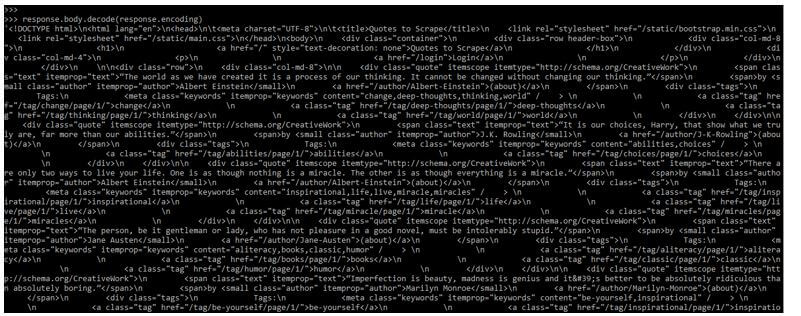
It is a method that was available for the response body, where the response.text will be accessed multiple times.
Below example shows an example of the body_as_unicode function as follows:
Code:
response.body.decode (response.encoding)Output:
Scrapy Response Objects
- The class of response allows us to add our functionality. The following built-in response subclasses are as follows.
- Binary data such as images, audio, and other data types are stored in TextResponse objects.
Below is the parameter description of scrapy response objects as follows:
- Encoding is the string that was used to encode the response. The status parameter is nothing but the integer that contains the HTTP status response. The header is nothing but the response which contains the response.
- The body parameter is nothing but the response body of the string.
1. HtmlResponse Objects
It’s an object that uses HTML’s http equivalent attribute to support encoding and auto-discovery. It has the same parameters as the response class described in the Response objects section. It belongs to the following category.
Code:
python3class scrapy.http.HtmlResponse()Output:

2. XmlResponse Objects
It’s an object that allows encoding and auto-discovery based on the XML line. It has the same parameters as the response class described in the section on response objects.
It is classified as follows:
Code:
python3class scrapy.http.XmlResponse ()Output:

Scrapy Response Parameters
Below, the parameter of scrapy response is as follows. This parameter is very important in scrapy response.
- URL: This is the response URL.
- Status: The default value of this parameter is 200. This is the status of an HTTP response.
- Headers: This parameter is used for response headers.
- Body: This is nothing but the response body.
- Flags: This is the list containing the attribute’s initial value.
- Request: This parameter is nothing but the initial value of the attribute.
- Certificate: This is an object which was representing the SSL certificate.
- IP address: This parameter is nothing but the server’s IP address.
- Protocol: This parameter is used to download the response.
Examples of Scrapy Response
Different examples are mentioned below:
Example #1
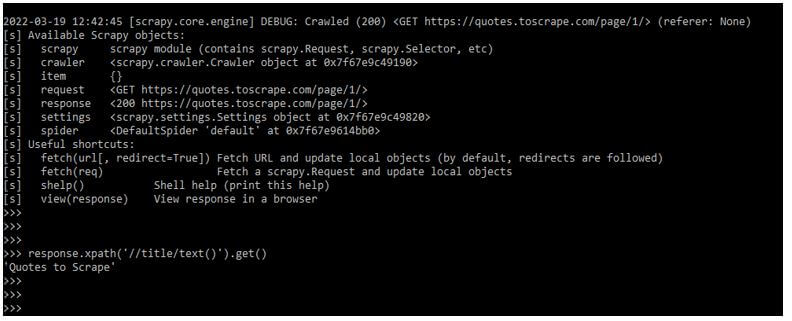
The below example shows a scrapy response by using xpath as follows.
Code:
response.xpath ('//title/text()').get()Output:
Example #2
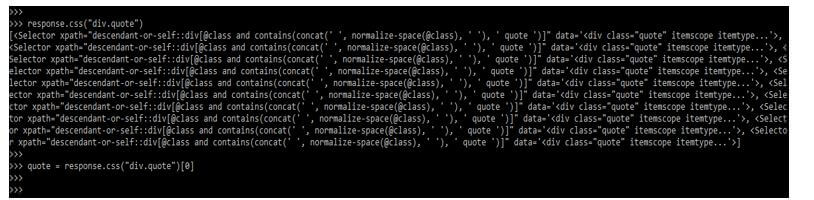
Below examples shown by using CSS are as follows. In the below example, we are using a scrapy shell to execute the scrapy response code.
Code:
response.css ("div.quote")quote = response.css ("div.quote")[0]Output:
Example #3
In the below example, we are using the get method with the CSS function.
Code:
py_text = quote.css ("span.text::text").get()
py_text
Output:

Conclusion
Scrapy is in charge of the scrapy’s schedule. Spider’s start requests method returns request objects. It creates Response objects for each one and runs the method of callback. Subclasses of the Response classes provide functionality not found in the basic classes.
Recommended Articles
We hope that this EDUCBA information on “Scrapy Response” was beneficial to you. You can view EDUCBA’s recommended articles for more information.

