


Updated March 16, 2023
Definition of SAS YEAR Function
SAS YEAR is one of the functions that can be used to produce the four number digit and it must be numeric in each area wherever it’s called the value is triggered and utilized in the same behavior we can add n number of expressions based on the new requirement along with the variables called date and month which played the format in the SAS output.
Introduction to SAS YEAR Function
SAS functions are the most important component of the programming language that accepted all types of arguments and other mathematical computations. It should be the numeric or other string character values that return the same result values and are used as the assignment statement for expressions of anywhere of the SAS. Like that year is triggered and called as the function and used as the different area formats like Month-Date-Year, Year-Date-Month, Year-Month-Date, Date-Month-Year, Month-Year-Date, Date-Year-Month these are some type of default formats which including the SAS calls and procedures.
Key Takeaways
- YEAR is one of the SAS default functions and it mainly produces the four-digit numeric type of values.
- Then the next step level is to read the data in front and back of the SAS function.
- It returns the SAS DateTime value from the hour, minute, and second values.
- We can place the input dates by using the single quotes followed by D.
- Date(year, month, day) and year(date) in the year() function date as the parameter for performing the date operations in the live projects.
How to Use SAS YEAR Function?
The data set helps to create the data for accessing the lists which include the Year, Month, and DAY functions for retrieving the year and other data values from the SAS list. It mainly specifies the two-digit and four-digit integer values that represented the year and the YEARCUTOFF system that defines the option for all the values. It should be a must to know the year, date, and month values for retrieving the data values as well as the date variable that calls the numeric set of characters in the SAS inputs. We can set the date, month, and year which depends upon the user requirement, and it should be of a numeric type so the decimal, float, long, and other variable types are not supported for performing this activity while we triggered to user activity it’s to be more cautious. Because of a lot of production servers the users have created the tasks based on their needs like time and other situations. It may vary on the user cluster setup and the region; location is varied depends upon the user’s availability and other needs which satisfied the application activity. It has default functions like a year(), date(), and today() these are some default functions that help to identify the current timestamp of the databases.
Here we used data lines for tracking the data that will vary the date and time intervals so the date format like date7. And other types of formats have to be created with supported functions like month and date. Like the format is MDY and we cannot use the operator like / or – in between the operands. So, we can call and supply the values on each variable’s data one, input month day year and other datelines may vary upon the inputs. We can create and use the SAS year function in various ways from both the front and backend stages at the age calculations. It represents the SAS year along with the date value for representing the four digits numeric set of values. Extract day, month, and year from the SAS date accomplished on the timestamp by using the hour(), minute(), and second() functions. To display the numeric set of formats on certain variable values in a particular way and the format will be different rather than the SAS help and documentation.
Steps to Create SAS YEAR Function
Navigate to the below URL,
https://welcome.oda.sas.com/login
And paste the below code to create data lines and perform the year function in the SAS.
data first;
input date date7.;
datalines;
06sep22
;
data second;
   set first;
   ress=year(date);
   put ress;
run;
Then we can get the output result as below.
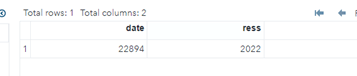
Here the date has created the value for the date/month/year format along with a separate variable. For each time the instance is created and assigned to the required value.
Example:
data example;
input date date7.;
datalines;
08sep22
;
data example2;
   set example;
   res=year(date);
   put res;
run;
Sample Output:
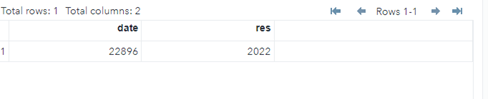
- In the above example, we have used different scenarios like date, year, and month functions.
- Here first we need to create the data lines on the user input based so I have created the datemonthyear format. Simply we can refer as the DDMMYY.
- The date and date 7. The format is one of the common types of formats and it mainly helped us to declare and created the date and timestamps activities.
- Here we can call the year function and pass the same variable as the parameter and store it as a separate variable.
FAQ
Given below are the FAQs mentioned:
Q1. What is SAS year()?
Answer: Year() is one of the SAS default functions which helps to create and produced the four-digit numeric inputs referred to as SAS date values.
Q2. How many types of SAS year format along with SAS date?
Answer: There are many types to utilize and call the date along with month and year functions. For that DMY is the date, month, year format MDY is the month, date, year format. YDM is the year date and month formats. Based on the user requirement it may vary.
Q3. What is the return type of SAS year()?
Answer: It’s the four-digit numeric formats like y=2022 is the example.
Conclusion
SAS has a lot of default methods to analyze the statistical data and each user’s input data are more sophisticated and its to be confidential. It is more related to the multiple analysis and predicated that year() function is important for storing and retrieving the accurate results of the built-in data.
Recommended Articles
This is a guide to SAS YEAR Function. Here we discuss the introduction, use, and steps to create SAS YEAR Function along with an example. You may also have a look at the following articles to learn more –

