


How to Use Quizzes for Employee Training & Skill Assessment?
A well-designed quiz for employee training does a lot more than check who was paying attention. It can uncover skill gaps, identify who is ready for more responsibility, and subtly indicate whether your training program is meeting its objectives.
Instead of treating quizzes as a single final test at the end, more teams now integrate them throughout onboarding, compliance, product training, and leadership development. Used this way, a quiz for employee training becomes a decision tool, not just a formality.
In this guide, we will walk you through how to use quizzes for real skill assessment, informed training decisions, and visible performance improvement.
Why Use a Quiz for Employee Training for Skill Assessment?
Quizzes bring structure and evidence to what is often a complex and unclear area. Instead of guessing whether employees understood a topic, you see patterns in their answers.
Used well, a quiz for employee training can help you:
- Measure what people actually learned, not just what you presented
- See who needs reinforcement before they apply new skills on the job
- Compare teams, locations, or cohorts in a fair and consistent way
- Track progress over time using simple training metrics, such as completion rates, scores, and retention rates.
Post-training quizzes and assessments are also one of the most common methods recommended for measuring training effectiveness, alongside surveys and interviews.
The real advantage is repeatability. Once you have a solid quiz for employee training, you can reuse and refine it for future batches and benchmark new learners against previous ones.
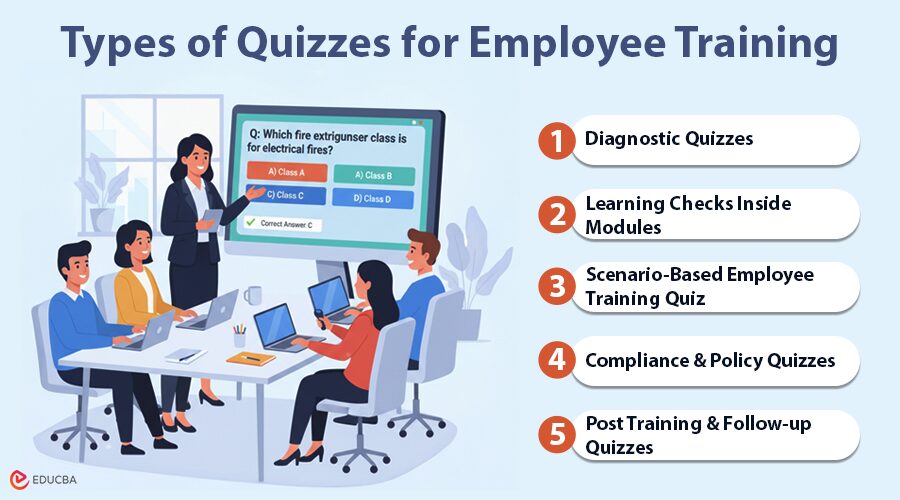
Types of Quizzes for Employee Training
You do not need only one type of quiz. Different training stages call for different formats.
Here are some common options:
1. Diagnostic Quizzes
Use these at the start of a training program to see where people stand. A short diagnostic quiz reveals:
- Prior knowledge
- Misconceptions
- Variations between teams or roles.
This allows you to tailor content, rather than delivering the same basic material to everyone.
2. Learning Checks Inside Modules
These are tiny quizzes that show up after a concept, video, or scenario:
- 3–5 questions per chunk of content
- Focused on one idea at a time
- Often ungraded or low stakes.
They keep attention high and confirm that the key points are landing before you move on.
3. Scenario-Based Employee Training Quiz
Here you present real situations and ask, “What would you do next?” A scenario-based quiz for employee training:
- Great for customer service, sales, leadership, and safety
- Tests judgment and application, not just recall
- Helps you see how people might behave in real situations.
4. Compliance and Policy Quizzes
These are formal and require clear pass marks. Compliance training programs use a compliance-focused quiz for employee training to:
- Used for security, safety, legal, and regulatory topics
- Usually scored, with records kept for audits
- Often linked with certificates or mandatory recertification.
5. Post Training and Follow-up Quizzes
You can run one quiz right after training and a shorter one days or weeks later. This rhythm helps you check retention and identify who needs a refresher.
Designing an Effective Quiz for Employee Training
A strong quiz is not about trick questions. It is about clarity and alignment.
Keep these principles in mind:
1. Start from the Outcome, Not the Question Type
Begin with a simple prompt:
“What should employees be able to do after this training?”
From that list, design questions that mirror real decisions, tasks, and knowledge checks.
2. Map Each Question to a Skill
Every question should be tied back to a specific skill, standard, or behavior. Later, when you review results, you can see which skills are weak, not just which questions.
3. Mix Question Formats
Variety keeps people alert and lets you test different abilities:
- Multiple choice and true or false for basic checks
- Matching and ordering for process steps
- Short answer for recall and reasoning
- Scenario-based items with rich descriptions.
Using multiple formats is easier when you work with a quiz software that supports several question types and media.
4. Write Fair and Clear Items
- One idea per question
- No double negatives or confusing phrasing
- Options that all look plausible at first glance
- Feedback that clearly states why an answer is correct or incorrect.
A good employee training quiz should be challenging yet fair, rather than feeling like a puzzle.
Where to Place a Quiz for Employee Training in Your Learning Program?
Integrate quizzes into the entire training journey rather than adding them at the end.
You can:
- Add a short diagnostic quiz before onboarding sessions
- Insert learning checks after key sections of an employee training module
- Use quick polls and questions in live virtual classrooms
- Run scored assessments at the end of major topics
- Schedule follow-up quizzes a few weeks later to check retention.
Within your LMS, you can position each quiz along the path, so completing it unlocks the next block or triggers a follow-up resource. Training quiz templates make this setup faster, especially when working with recurring topics such as safety, product knowledge, or customer service.
For visuals, you can add:
- A screenshot of a course path showing quizzes sprinkled through modules
- A short video showing how learners experience a mid-module quiz
- A simple chart of completion and pass rates before and after you introduced quizzes.
Turning Quiz Results Into Performance Insights
The most valuable part of a quiz for employee training is what you do with the data.
Look at your reports by:
- Question: Which items do most people miss
- Topic: Which skills or chapters show weak scores
- Role or team: Which groups may need extra support
- Time: How scores change over batches or months.
These patterns help you improve content, coaching, and even processes. Training teams and HR can map quiz scores to on-the-job metrics, such as time to competency or error rates, to determine whether training has actually had an impact.
This is also where you can identify high performers and potential mentors, based on their consistent high performance and strong scenario-based answers.
Using AI Quiz Makers for Smarter Assessments
If you create many quizzes, AI tools can speed up your quiz for the employee training process. They can:
- Generate draft questions from your training material
- Suggest different difficulty levels
- Auto-grade responses and show instant feedback
- Build varied question sets using templates and large question banks.
You still need human review. Your role shifts from “creator of every question” to “editor of the question pool.”
Over time, you can maintain a living bank of items aligned with roles, skills, and levels. This makes it easier to spin up a new quiz for employee training whenever you launch a course, update a process, or design a new learning path.
Best Practices for an Engaging Quiz for Employee Training
To keep people willing, honest, and focused:
- Keep quizzes short and focused on clear outcomes
- Inform learners about how you will utilize the results, so they can trust the process
- Offer practice quizzes before high-stakes assessments
- Use randomization, time limits, and question pools to keep things fair without feeling hostile
- Offer constructive feedback instead of only showing a score.
You can also blend quizzes with microlearning. For example, send one question per day in a chat tool or app, with a brief explanation. Over time, this regular rhythm builds habits and knowledge without feeling heavy.
Common Mistakes to Avoid When Designing a Quiz for Employee Training
Some traps to watch out for:
- Writing questions that only test trivia instead of real skills
- Using the same quiz for all roles, even when responsibilities differ
- Making quizzes so long that learners rush through them
- Ignoring quiz data or leaving it buried in reports
- Treating the employee training quiz as a one-time hurdle instead of a repeatable tool.
A small amount of clean, well-organized quiz data is more useful than a giant exam that nobody wants to take again.
Final Thoughts
When you design a quiz for employee training with intention, it stops being a boring checkpoint and becomes a powerful lens on skills, behavior, and readiness.
You can pinpoint what people know, where they struggle, and how training needs to change. You can identify future leaders, highlight hidden experts, and safeguard your organization in critical areas such as safety, security, and compliance. If you connect each employee training quiz to clear actions, every round of questions becomes an opportunity for improving performance, not just a grade.
Used this way, quizzes help turn training from a one-time event into an ongoing system for employee growth.
Recommended Articles
We hope this article on using quizzes for employee training helps you understand how to assess skills more effectively and improve learning outcomes. Check out our related articles to explore more tips on training design, employee development, and building stronger learning programs.

