
Pseudocode is used while programming or is associated with writing. Pseudocode is a method that helps programmers define an implementation. We can also say that pseudocode is a cooked-up representation of a basic . In pseudocode, they are represented in pseudocode, as it is easier for anyone to interpret, even if they do not have a programming background or are used to a different programming language. As the name suggests, pseudocode is a form of code that can be understood by a layman with basic knowledge of programming.
How does pseudocode work?
Writing using pseudocode is quite similar to writing in a coding language. Writing is done on its own line in sequence. Generally, uppercase is used for writing the instructions, lowercase is used for writing the variables, and the messages are written in sentence case. In pseudocode, the question is asked in INPUT, and the message is printed by the OUTPUT.
Examples of Pseudocode
The following are the examples given below:
Example #1
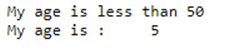
In this example, we will check if the user’s age is below 50 years or more.
Step 1
- Put the input value
- The input is stored in the respective variable ‘age’
INPUT user inputs their age
STORE the user’s input in the age variable
Step 2
- Insert the condition. Here, the first condition is to check if the age variable value is less than 50. If the value is less than 50, then print the output comment. Otherwise, the else comment will be printed.
IF age<50 THEN
OUTPUT ‘My age is less than 50’
ELSE
OUTPUT ‘My age is greater than 50’
OUTPUT ‘My age is:’ age
Actual Code:
Age = 5;

if( Age< 50 )

then

print("My age is less than 50" )

else

print("My age greater than 50" )

end

print("My age is :", Age)
Output:
Example #2
Step 1
- Put the input value
- The input is stored in the respective variable ‘age’
INPUT user inputs their age
STORE the user’s input in the age variable
Step 2
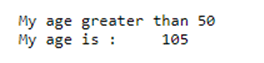
- Insert the condition, here the first condition is to check if the age variable value is less than 50. If the value is less than 50, then print the output comment. Otherwise, the else comment will be printed. In this example, the age variable has the value 5, which is less than 50, so the else statement is printed.
Code:
IF age<50 THEN
OUTPUT ‘My age is less than 50’
ELSE
OUTPUT ‘My age greater than 50’
OUTPUT ‘My age is:’ age
Code:
Age = 105;

if( Age< 50 )

then

print("My age is less than 50" )

else

print("My age greater than 50" )

end

print("My age is :", Age)
Output:
Example #3
Step 1
- Put the input value of Rahul’s age
- The input is stored in the respective variable ‘Rahul’
INPUT user inputs their Rahul’s age
STORE the user’s input in the Rahul variable
Step 2
- Insert the condition, here the first condition is to check if the Rahul variable value is less than 50. If the value is less than 50, then print the output comment. Otherwise, the else comment will be printed.
IF rahul< 50 THEN
OUTPUT ‘Rahul age is less than 50’
ELSE
OUTPUT ‘Rahul age greater than 50’
OUTPUT ‘Rahul age is:’ Rahul
Step 3
- Put the input value of Ankush’s age
- The input is stored in the respective variable ‘Ankush’
INPUT user inputs their Ankush’s age
STORE the user’s input in the ankushvariable
Step 4
- Insert the condition; here, the first condition is to check if the Ankush variable value is less than 50. If the value is less than 50, then print the output comment. Otherwise, the else comment will be printed.
IF ankush<50 THEN
OUTPUT ‘Ankush age is less than 50’
ELSE
OUTPUT ‘Ankush age greater than 50’
OUTPUT ‘Ankush age is:’ Ankush
Step 5
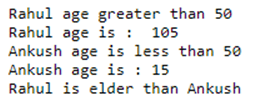
- Another condition is used here, where the values under the variables ‘Rahul’ and ‘Ankush ’ are used. If the condition is fulfilled, then print the output statement; otherwise, print the else statement.
IF rahul>ankush THEN
OUTPUT ‘Rahul is elder than Ankush’
ELSE
OUTPUT ‘Ankush is elder than Rahul’
Actual Code:
Rahul = 105;

if( Rahul< 50 )

then

print("Rahul age is less than 50" )

else

print("Rahul age greater than 50" )

end

print("Rahul age is :", Rahul)

Ankush = 15;

if( Ankush< 50 )

then

print("Ankush age is less than 50" )

else

print("Ankush age greater than 50" )

end

print("Ankush age is :", Ankush)

if (Rahul > Ankush)

then

print("Rahul is elder than Ankush" )

else

print("Ankush is elder than Rahul" )

end
Output:
Example #4
Step 1
- Put the input value of age
- The input is stored in the respective variable ‘age’
INPUT user inputs their age
STORE the user’s input in the age variable
OUTPUT ‘Actually, I am:’ age
Step 2
- Insert the condition; here, the first condition is to check if the age variable value is equal to 60. If the value is equal to 60, then print the output comment.
IF age == 60 THEN
OUTPUT ‘Got to know that your age is 60’
Step 3
- Insert the condition; here, the second condition is to check if the age variable value is equal to 5. If the value is equal to 5, then print the output comment.
IF age==5 THEN
OUTPUT ‘Got to know that your age is 5’
Step 4
- Insert the condition; here, the first condition is to check if the age variable value is equal to 0. If the value is equal to 0, then print the output comment.
ELSEIF age==0 THEN
OUTPUT ‘Got to know that, you are not born :P’
ELSE
OUTPUT ‘Sorry! I guess we are unable to determine your age’
OUTPUT ‘Told you, man! my age is:’ age
Actual Code:
Age = 150

print("Actually I am: ", Age, "years old" )

if( Age == 60 )

then

print("Got to know that, your age is 60" )

elseif( Age == 5 )

then

print("Got to know that, your age is 5" )

elseif( Age == 0 )

then

print("Got to know that, you are not born :P" )

else

print("Sorry! I guess we are unable to determine your age" )

end

print("Told you man! my age is: ", Age )
Output:

Advantages
The following are the major advantages of pseudocode:
- Pseudocode helps the coder to focus on the logic that is to be used in the program rather than the syntax of the programming language.
- Pseudocode is independent of any programming language, which makes it easier to translate into various languages.
- The coders are given the liberty to express their logic in plain English without any restraints of major syntax.
- Writing actual code becomes easier for the coder if they use pseudocode for writing initially. As basic are not so concise, pseudocode makes them concise enough to make it more readable and easier to modify
- If we compare flow charts to pseudo-code, flow charts are lengthier to write and difficult to represent. On the other hand, pseudocode is easier to write, and programs can be easily translated. The coders just have to focus on the underlined meaning. The major line of focus is to solve the problem with logic rather than being stuck on using the language perfectly.
- Using pseudocode words and phrases when writing eases the process of translating it into actual code.
Conclusion
Based on the above article, we understood the concept of pseudocode. This article explains the pseudocode and how it works. The article covers the major advantages of using pseudocode. Several examples are provided above to help coders understand the pseudocode and ease their programming process.
Recommended Articles
This is a guide to pseudocode. Here, we also discuss the definition, how the pseudocode works, along with different examples and its code implementation. You may also have a look at the following articles to learn more –

