

Updated February 28, 2023
Introduction to PowerShell Switch Statement
A switch statement in PowerShell is the same as that of the switch in other programming languages. The switch statement is used to evaluate a predefined list of conditions, in other words, it is equivalent to multiple if statements. The switch statement has a sequence of the condition and each condition has its own action to be performed. Whenever a condition is matched, its corresponding action is performed. Each condition inside a switch statement is considered as a case and the value for which switch statement is performed is checked for each case. This article will cover in detail the switch case statement. There is a default block to handle values that don’t match any cases.
Syntax
The basic syntax/structure of the switch statement is follows
switch(<valueToBeChecked>) {

<condition> {<actionToBePerformed>}

break;

<condition> {< actionToBePerformed >}

break;

<condition> {< actionToBePerformed >}

break;

Default {< actionToBePerformed >}

}
Code:
switch (Jan)

{

Jan  {"It is Jan."}

Feb  {"It is Feb."}

Mar  {"It is Mar."}

Apr  {"It is Apr."}

}
The above will produce an output of “It is Jan”.
Syntax #1
The other detailed syntax of the switch statement is as follows
switch [-regex|-wildcard|-exact][-casesensitive] (<value>)

{

"string"|number|variable|{ expression } { statementlist }

default { statementlist }

}
Syntax #2
switch [-regex|-wildcard|-exact][-casesensitive] -file filename

{

"string"|number|variable|{ expression } { statementlist }

default { statementlist }

}
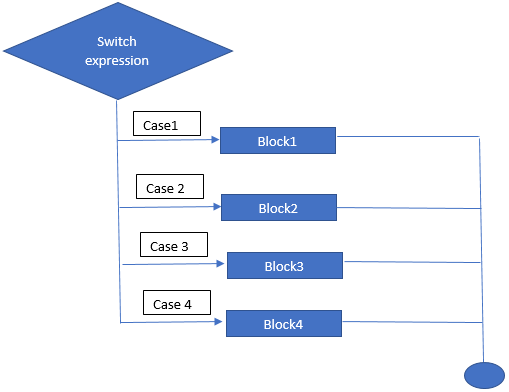
Flow Diagram of PowerShell Switch Statement
Below is the flow diagram:
Key things about Switch Statement:
- Either an object or an array of objects can be used as the switch variable.
- There can be any number of case statements within a switch. Default and action blocks are optional.
- The switch variable and the case variable must be of the same data type. It should either be a constant or a literal.
- Whenever a case is matched, the statements following that are executed until a break statement is encountered.
- When a break statement is encountered, the switch statement terminates. The control is shifted to the next statement following the break.
- It is not necessary for each case to have a break if there is no break the subsequent statement is executed until a break is encountered.
Parameters
The following are the parameters of the switch.
- Wildcard: This denotes that the condition being checked is a wildcard string. If the matching clause is not of string type, then the corresponding parameter is not considered. It is case insensitive comparison.
- Exact: It denotes that an exact match must be there. If the matching clause is not of string type, then the corresponding parameter is not considered. It is case insensitive.
- Case Sensitive: It denotes a case sensitive match. If the matching clause is not of string type, then the corresponding parameter is not considered.
- File: Input is taken from a file. In the case of multiple files specified, only the last file is used for comparison. Each line is evaluated by the switch statement. It is case insensitive.
- Regex: It denotes regular expression must be considered for matching. If the matching clause is not of string type, then the corresponding parameter is not considered.
Examples to Implement PowerShell Switch Statement
Below are the examples are mentioned:
Examples #1
Code:
Write-Host "Demo of switch statement in PowerShell"

$name="vignesh"

switch($name)

{

"ram" {"my name is ram";break}

"raman" {"my name is raman";break}

"ramu" {"my name is ramu";break}

"Vignesh" {"my name is Vignesh";break}

"ram123" {"my name is ram123";break}

"ram45" {"my name is ram454";break}

"ramfdgdf" {"my name is ramdfgfdg";break}

"ramfgdf" {"my name is ramdgfdg";break}

"ramfgdfg" {"my name is ramdgg";break}

}

Write-Host "Demo with default block"

$city="NewYork"

switch($city)

{

"Tn" {"city name is TN";break}

"as" {"city name is as";break}

"sd" {"city name is sd";break}

"gf" {"city name is gf";break}

"gujarat" {"city name is gujarat";break}

"wqe" {"city name is wqe";break}

"ewrewr" {"city name is ewrewr";break}

"wer" {"city name is wer";break}

"ewr" {"city name is ewr";break}

default {"city is not present in the list";break}

}
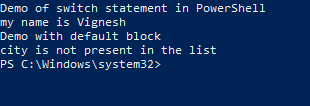
Output:
Examples #2
Code:
Write-Host "Demo of switch statement with array as input in PowerShell"

$name="vignesh"

$name1="Krishnakumar"

$name2="Nandhini"

$name3="Vyapini"

switch($name,$name1,$name2,$name3)

{

"Krishnakumar" {"my name is Krishnakumar";break}

"Nandhini" {"my name is Nandhini";break}

"ramu" {"my name is ramu";break}

"Vignesh" {"my name is Vignesh";break}

"ram123" {"my name is ram123";break}

"ram45" {"my name is ram454";break}

"ramfdgdf" {"my name is ramdfgfdg";break}

"ramfgdf" {"my name is ramdgfdg";break}

"Vyapini" {"my name is Vyapini";break}

}

Write-Host "Demo with default block"

$city="NewYork"

$city1="Tn"

$city2="gujarat"

$city3="Texas"

$city4="albama"

switch($city,$city1,$city2,$city3,$city4)

{

"Tn" {"city name is TN"}

"as" {"city name is as"}

"sd" {"city name is sd"}

"gf" {"city name is gf"}

"gujarat" {"city name is gujarat"}

"Texas" {"city name is texas"}

"ewrewr" {"city name is ewrewr";}

"wer" {"city name is wer"}

"NewYork" {"city name is NewYork"}

default {"city is not present in the list";break}

}
Output:
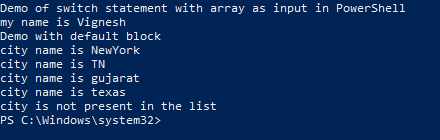
Explanation: In the above example, if you look closely, in the first switch statement only the first match is printed. This is because as soon as a match is found, the corresponding break statement is executed, and the switch case is exited. In the second switch case, all the matching values are found because there is no break statement written for each case.
Examples #3
Code:
write-host "Demo of execution with and without break statement"

Write-Host "Demo of execution without break statement" -ForegroundColor Yellow

$Pm="Modi"

switch($pm)

{

"Modi" {"PM is Modi"}

"Indira gandhi" {"PM was Indira gandhi"}

"vallu" {"PM was Indira gandhi"}

"test" {"PM was Indira test"}

default {"none"}

"Modi" {"execution is done even after first match"}

}

Write-Host "Execution of switch with break statement" -ForegroundColor Yellow

switch($pm)

{

"Modi" {"PM is Modi";break}

"Indira gandhi" {"PM was Indira gandhi;break"}

"vallu" {"PM was Indira gandhi;break"}

"test" {"PM was Indira test;break"}

default {"none;break"}

"Modi" {"execution is done even after first match;break"}

}
Output:
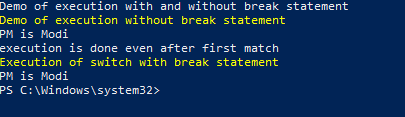
Explanation: In the above output, the same switch case is used with the same input parameter except that the first switch case doesn’t have a break statement. As you can see from above, if the break is not used execution is continued even after a successful match which doesn’t happen when a break is used.
Conclusion
Thus, the article covered in detail the switch case statement in PowerShell. It also explained with appropriate examples on the execution of a switch case statement and its syntax. The best way to learn more about this would be to try other various methods and practice them in sample scripts.
Recommended Articles
This is a guide to PowerShell Switch Statement. Here we discuss syntax, flow diagram to switch Statement and example to implement with proper codes and outputs. You can also go through our other related articles to learn more –

