

Introduction to PowerShell Escape Character
In PowerShell, escape characters are a sequence of special characters that are not a part of the standard character set. These are used to denote the PowerShell compiler on how to treat the next characters in the sequence. The escape character is PowerShell that usually prefixed by a backquote (`), which means the character must be treated in a literal manner and not in another way around. The backtick character is otherwise known as a grave accent and its ASCII value is 96. Escape sequence must be used within “” to be considered as an escape sequence.
Syntax:
The following is an example of an escape sequence
`t-
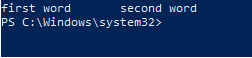
This is used for horizontal tab spacing.
Code:
Write-Host "first word" `t "second word"
Output:
List of available Escape Sequence in PowerShell
The following are some of the escape sequences available in PowerShell.
| Escape Sequence | Use |
| `0 | This denotes null character |
| `a | This is for alert |
| `b | This denotes backspace |
| `e | This is for escape sequence |
| `f | This is for form feed |
| `n | This denotes new line |
| `r | This is for carriage return |
| `t | This is for horizontal tab |
| `u{x} | This is for escape sequence of Unicode |
| `v | This denotes vertical tab space |
1. `0
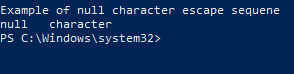
This is used to insert an empty space in the PowerShell output. This is not the same as $null, which stores a null value. This is used for processing text files which has termination characters.
Code:
Write-Host "Example of null character escape sequene"

Write-Host "null" `0 "character"
Output:
2. `a
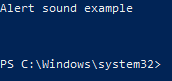
This is used to produce a beep sound. This is used for warning purpose or to send a reminder to the user. The following script is used to produce three beep sounds.
Code:
Write-host “Alert sound example”

for ($i = 0; $i -le 2; $i++)

{

"`a"

}
Output:
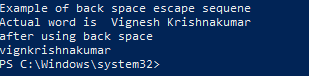
3. Backspace (`b)
This escape sequence is used to move the position of cursor one position back but characters are not deleted.
Code:
Write-Host "Example of back space escape sequene"

$input= "Vignesh Krishnakumar"

Write-Host "Actual word is "$input

Write-Host "after using back space"

Write-Host "vignesh`b`b`bkrishnakumar"
Output:
4. Escape (`e)
This is used for formatting the text purpose like modifying the color or underlining the text. These can also be used for positioning the cursor.
5. Form Feed (`f)
This is used during printing of documents. This ejects the current page and enables continuous printing.
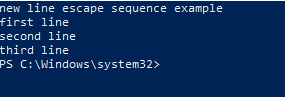
6. New line(`n)
This is used for inserting a new line immediately after the preceding character.
Code:
Write-Host "new line escape sequence example"

Write-Host "first line `nsecond line `nthird line"
Output:
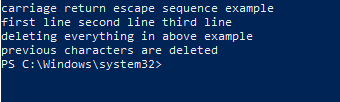
7. Carriage return(`r)
This is used to erase the line before the insertion point.
Code:
Write-Host "carriage return escape sequence example"

Write-Host "first line second line third line "

write-host "deleting everything in above example"

Write-Host "`rprevious characters are deleted"
Output:
8. Horizontal tab (`t)
This is used for inserting a tab space in the output. By default, PowerShell introduces a tab every eight space.
Code:
Write-Host "horizontal escape sequence example"

Write-Host "first word `t second word `t vignesh `t krishnakumar"
Output:

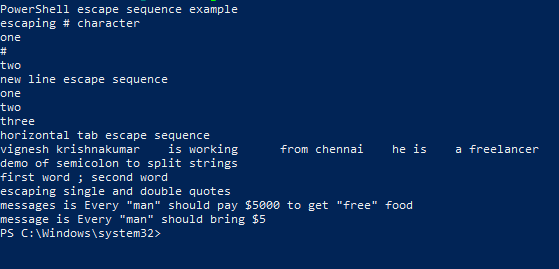
9. Stop-Parsing token (- -%)
This sequence is used when there is a need to pass input to other cmdlets. This prevents the PowerShell from interpreting strings as cmdlets or expressions.
Code:
Write-Host "PowerShell escape sequence example"

Write-Host "escaping # character"

echo one `# two

Write-Host "new line escape sequence"

Write-Host "one `ntwo `nthree"

Write-Host "horizontal tab escape sequence"

write-Host "vignesh`tkrishnakumar`tis working`tfrom chennai `the is `t a freelancer"

Write-Host "demo of semicolon to split strings"

Write-Host "first word ; second word"

Write-Host "escaping single and double quotes"

$msg1 = 'Every "man" should pay $5000 to get "free" food'

write-Host "messages is" $msg1

$msg2="Every ""man"" should bring `$5"

write-Host "message is" $msg2
Output:
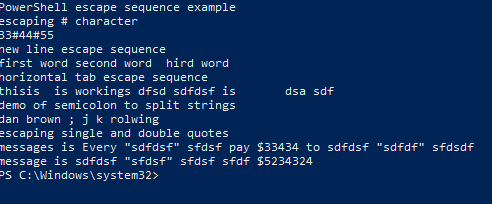
Code:
Write-Host "PowerShell escape sequence example"

Write-Host "escaping # character"

echo 33#44#55

Write-Host "new line escape sequence"

Write-Host "first word `second word `third word"

Write-Host "horizontal tab escape sequence"

write-Host "this`is`tis working`as dfsd `sdfdsf is `t dsa sdf"

Write-Host "demo of semicolon to split strings"

Write-Host "dan brown ; j k rolwing"

Write-Host "escaping single and double quotes"

$msg1 = 'Every "sdfdsf" sfdsf pay $33434 to sdfdsf "sdfdf" sfdsdf'

write-Host "messages is" $msg1

$msg2="sdfdsf ""sfdsf"" sfdsf sfdf `$5234324"

write-Host "message is" $msg2
Output:
How to Handle Common Error?
Code:
write-host "Demo of single and double quotes"

write-output -inputobject 'My favorite `tteacher is 'raji''

Write-Host "The above will throw an error"

Write-Host "Correct usage is as below"

write-output -inputobject "My favorite `tteacher is 'raji'"
Output:
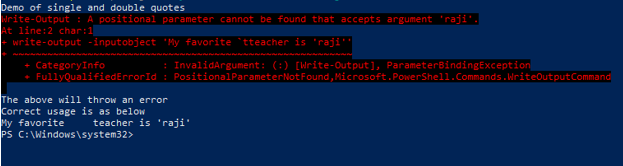
The error is thrown because a single quote is enclosed within a single quote. That can be avoided by using single quotes within double quotes.
Code:
Write-Host "Error with space example"

write-output -inputobject vignesh krishnakumar

Write-Host "Error is thrown"

Write-Host "Correct usage is as follows"

Write-Output -inputobject vignesh` Krishnakumar
Output:
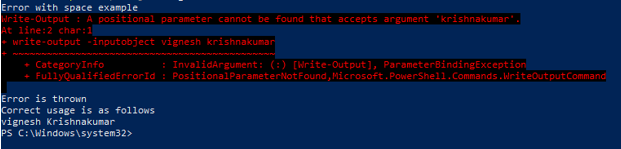
The error has occurred the space has not been instructed properly to the PowerShell.
Escaping Special Characters using Regex
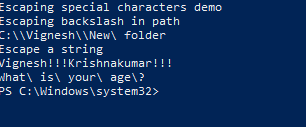
Code:
Write-Host "Escaping special characters demo"

Write-Host "Escaping backslash in path"

[regex]::Escape('C:\Vignesh\New folder')

Write-Host "Escape a string"

[regex]::Escape('Vignesh!!!Krishnakumar!!!')

[regex]::Escape('What is your age?')
Output:
Conclusion
Thus, the article covered in detail about the escape characters in PowerShell. It also covered in detail the various PowerShell escape sequences that are available and illustrated each with a detailed example. It also explained in detail the various errors that may occur during single quotes and double quotes usage and how to handle them. The article also covered in-depth about how special characters can be escaped and demonstrated it with proper examples. It showed an example of how regex can be used to avoid special characters. To learn in detail, it is advisable to write sample scripts and have a workaround with them.
Recommended Articles
This is a guide to PowerShell Escape Character. Here we discuss the escape sequence available in PowerShell with knowing how to handle it. You can also go through our other related articles to learn more –

