
Updated May 24, 2023

Introduction to PostgreSQL Table Schema
PostgreSQL provides the functionality to see the detail structure of table or database we called as schema. Table schema is helpful to see important information about the table. We can refer to the schema as a collection of tables schema also consists of view, indexes, sequence, data type, function, and operators. Schema is useful to organize databases which means we create tables into logical groups to access or manage easily. Schemas are allowed to multiple users to access the database without the interference of each other. In PostgreSQL, it creates schema automatically for every new database. When we create an object without schema then it is automatically placed into the public schema.
Syntax:
create schema scheam_name;Explanation:
In the above syntax, we create a schema for a table in which that schema name means the specified schema name we need to create.
Syntax for the schema in the table
create table schema name .table name;Explanation
In the above syntax, we use created schema name at the time of table creation in which that we use create table statement, where schema name means specified schema name that we already created and table name means specified table name that we need to create with different attribute and different data types.
How to Create Table Schema in PostgreSQL?
We must install PostgreSQL in your system. We required basic knowledge of PostgreSQL. Require database knowledge as well as we must know how schema works in PostgreSQL. We must need basic knowledge about schema syntax, which means how it is used. We can perform different operations on the database table and a schema with the help of psql and pgAdmin.
First, let see how we can use the first syntax which means creating a schema and how we can use created schema as follows.
create schema demo;In the above example, we use create schema statement to create demo schema. Illustrate the end result of the above declaration by using the following snapshot.

Let’s see how to use created schema for a specific table.
Code:
CREATE TABLE demo.Test (
cust_id INT GENERATED ALWAYS AS IDENTITY,
cust_name VARCHAR(255) NOT NULL,
cust_phone VARCHAR(15),
cust_email VARCHAR(100),
PRIMARY KEY(cust_id)
);
In the above example, we use create table statement to create a Test table as shown in the above statement. We added different attributes such as cust_id, cust_name, cust_phone, and cust_email with different data types. In this example, cust_id is a primary key, see in this example, we use an already created schema name as a demo for the Test database table, and we successfully created a Test table with demo schema. Illustrate the end result of the above declaration by using the following snapshot.

Now let’s see how we can access the schema that means we can show the table by using the schema name as follows.
select * from demo.Test;In the above statement, we display the demo schema for a Test database table. Illustrate the end result of the above declaration by using the following snapshot.

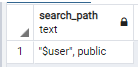
If we want to find the current search path of schema so we can use the following statement as follows.
show search_path;In the above example, we use the show keywords to display the schema search path. It shows the user and, by default, the schema name as public. Illustrate the end result of the above declaration by using the following snapshot.
SQL Commands for Schema
Let’s see some Psql Commands for schema as follows.
- \d: The \d command is used to show all tables from the database with the definition of tables.
- \d+: The \d+ command shows all relations in the PostgreSQL database.
- \dn: The \dn command shows all schemas from the PostgreSQL database.
- \I: The \I command is used to list all databases from PostgreSQL.
- \z: The \z command shows all tables from the PostgreSQL database with its access privileges.
So these are some useful commands to show the definition and schema of a table by using a command-line interface.
Drop Schema
Drop schema is used to delete schema from the database. Let’s see syntax and examples for drop schema statements.
Syntax:
drop schema schema_name;In the above syntax, we use drop schema statement to delete schema, where schema name means specified schema we need to delete.
drop schema demo;With the help of the above statement, we can delete the demo schema. Still, it shows an error message because another object depends on the demo schema, so we can’t delete the demo schema without a cascade statement. Illustrate the end result of the above declaration by using the following snapshot.

In the above example, we see we cannot drop schema without cascade. So we can use cascade in drop statement to delete the schema as follows.
drop schema demo cascade;In this example, we use cascade in the drop statement, which means it deletes all dependent objects on the demo schema cascade keyword automatically removes the object. Table and functions from the database. Illustrate the end result of the above declaration by using the following snapshot.

Let’s see how we can delete multiple schemas in PostgreSQL.
Syntax:
drop schema schema_name1, schema name2;In the above statement, we use a drop statement with multiple schemas names such schema_name1 and schema name2.
drop schema test,test1;The above example uses a drop statement to delete two schemas. In this example, we have two schemas such as test and test1, and we want to delete them at a time, so we use the above statement. Illustrate the end result of the above declaration by using the following snapshot.

Conclusion – PostgreSQL Table Schema
We hope you understand the PostgreSQL Table Schema from this article. The above article taught us the basic syntax of Table Schema. We have also learned how to implement them in PostgreSQL with different examples of each operation. From this article, we have learned how we can handle Table Schema in PostgreSQL.
Recommended Articles
We hope that this EDUCBA information on “PostgreSQL Table Schema” was beneficial to you. You can view EDUCBA’s recommended articles for more information.

