

Updated May 22, 2023

Introduction to PostgreSQL RAISE EXCEPTION
PostgreSQL uses the raise exception statement to raise exceptions and report warnings, errors, and other types of messages within a function or stored procedure. We are raising the exception in function and stored procedures in PostgreSQL; there are different level available of raise exception, i.e., info, notice, warning, debug, log, and notice. We can basically use the raise exception statement to raise errors and report the messages; by default, the exception level is used in the raise exception. We can also add the parameter and variable in the raise exception statement; also, we can print our variable’s value.
Syntax:
Given below is the syntax:
RAISE [LEVEL] (Level which we have used with raise exception statement.) [FORMAT]OR
RAISE [ LEVEL] USING option (Raise statement using option) = expressionOR
RAISE;Parameters Description:
- RAISE: This statement defines an exception statement that raises an exception in PostgreSQL. We have basically pass two parameters with raise exception, i.e., level and format. There is various parameter available to raise an error.
- LEVEL: The level in the raise exception statement defines the severity of the error. We can use level in raise exception, i.e., log, notice, warning, info, debug, and exception. Every level generates detailed information about the error or warning message based on the priority of levels. In PostgreSQL, the raise statement uses the exception level by default. The log_min_messages and client_min_messages parameters control the logging of the database server.
- FORMAT: This is defined as an error message which we want to display. If our message needs some variable value, then we need to use the % sign. This sign acts as a placeholder that replaces the variable value with a given command.
- expression: We can use multiple expression with raise expression statement in it. The expression is an optional parameter that was used with the raise expression statement.
- option: We can use options with raise exception statement in PostgreSQL.
How RAISE EXCEPTION work in PostgreSQL?
We can raise the exception by violating the data integrity constraints in PostgreSQL. We use the raise exception statement to raise errors and report messages.
Given below shows the raise statement-level options, which was specifying the error severity in PostgreSQL:
- Notice
- Log
- Debug
- Warning
- Info
- Exception
If we need to raise an error, we need to use the exception level after using the raise statement in it.
We can also add more detailed information about the error by using the following clause with the raise exception statement in it.
USING option = expression
We can also provide an error message that helps in easier identification of the root cause of the error, allowing us to discover the error. The exception gives an error in the error code; we will identify the error using the error code; it will define either a SQL State code condition. When the raise statement does not specify the level, it will specify the printed message as an error. After printing the error message, the currently running transaction is aborted, and the next raise statement does not execute.
It is utilized in various parameters or options to generate error messages that are more informative and readable. When no level is specified, the raise statement defaults to using the exception level. The exception level aborts the current transaction with a raise statement. The exception level is very useful and important to raise the statement to abort the current transaction in it.
Examples of PostgreSQL RAISE EXCEPTION
Given below are the examples mentioned:
Example #1
Raise an exception statement, which reports different messages.
- The below example shows the raise exception statement, which reports different messages.
- The below example demonstrates the usage of the raise statement to report various messages at the current timestamp.
Code:
DO $$
BEGIN
RAISE INFO 'Print the message of information %', now() ;
RAISE LOG 'Print the message of log %', now();
RAISE DEBUG 'Print the message of debug %', now();
RAISE WARNING 'Print the message of warning %', now();
RAISE NOTICE 'Print the message of notice %', now();
RAISE EXCEPTION 'Print the message of exception %', now();
END $$;
Output:
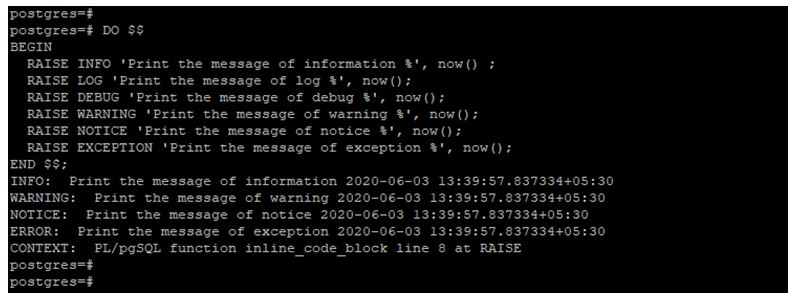
In the above example, only info, warning, notice, and exception will display the information. But debug and log will not display the output information.
Example #2
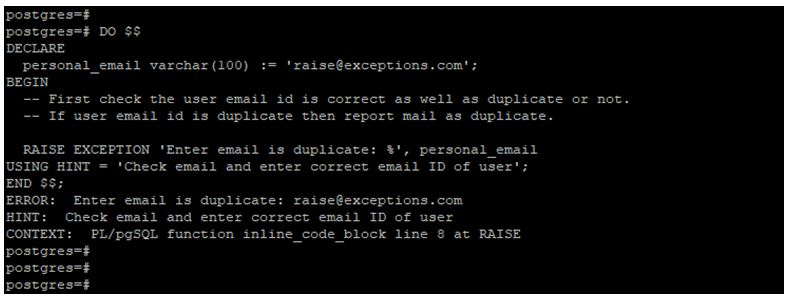
Raise error using raise exception.
- The below example shows that raise the error using the raise exception in PostgreSQL.
- We have added more detailed information by adding an exception.
Code:
DO $$
DECLARE
personal_email varchar(100) := '[email protected]';
BEGIN
-- First check the user email id is correct as well as duplicate or not.
-- If user email id is duplicate then report mail as duplicate.
RAISE EXCEPTION 'Enter email is duplicate: %', personal_email
USING HINT = 'Check email and enter correct email ID of user';
END $$;
Output:
Example #3
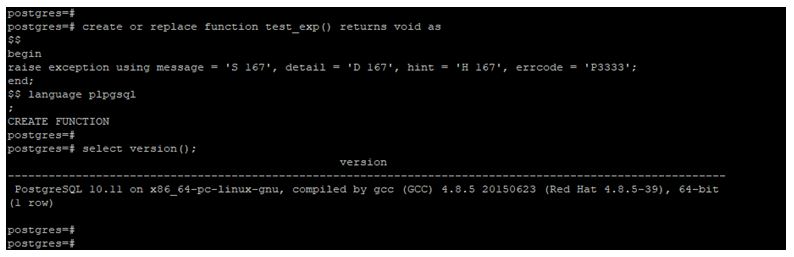
Raise an exception by creating a function.
- The below example shows that raise exception in PostgreSQL by creating the function.
Code:
create or replace function test_exp() returns void as
$$
begin
raise exception using message = 'S 167', detail = 'D 167', hint = 'H 167', errcode = 'P3333';
end;
$$ language plpgsql
;
Output:
Advantages of PostgreSQL RAISE EXCEPTION
Below are the advantages:
- The main advantage of raising exceptions is raising the statement for reporting the warnings.
- We have used raise exceptions in various parameters.
- Raise exceptions to have multiple levels to raise the error and warning.
- The raise statement displays warnings and errors at the exception level.
Conclusion
RAISE EXCEPTION in PostgreSQL is basically used to raise the warning and error message. It is very useful and important. There are six levels of raise exception is available in PostgreSQL, i.e., notice, log, debug, warning info, and exception. It is used in various parameters.
Recommended Articles
We hope that this EDUCBA information on “PostgreSQL RAISE EXCEPTION” was beneficial to you. You can view EDUCBA’s recommended articles for more information.

