

Updated May 22, 2023
Introduction to PostgreSQL LENGTH()
PostgreSQL length() function is used to find the length of the string, which we have used in the length function. Length function is used to find the number of character from a string, length function is also used with the column name to find the length of the column row. Length function is used in PostgreSQL 8.4 to PostgreSQL 12 versions. We have used cast with length functions to find the length of integer numbers, cast is very useful to find the length of integer string in PostgreSQL. PostgreSQL length function is very important and useful to find the length of a string.
Syntax
Below is the syntax as follows.
- Length (String (String name which we have used to find the length.));
- Select length (“); (We have used empty string using the length function in PostgreSQL.)
- Select length (NULL);(We have used a null string using the length function in PostgreSQL.)
- Select length (”); (We have used space string using length function in PostgreSQL.)
- Select column_name1, Column_name2, LENGTH (Column_name)from table_name order by column_name;
Parameters
Below is the parameter description of the above syntax as follows.
- Length: Length function is used to find the length of the string. We have used this function to find column rows length in PostgreSQL. Length function is very important and useful in PostgreSQL.
- Null: We have also used the null string in length function. The result of the null string is null.
- Length (”): We have also used space string in the length function. The result of the space string is how many space we have used in the string.
- Length (“): We have also used an empty string in the length function. The result of an empty string is zero.
- String: String is defines as which string or word we have used to find the length using the length function in PostgreSQL.
- Select: We have used select to select the length of the string in PostgreSQL. We have also used select to select column name from the table and find the length of the column.
- Column 1 to column N: Column name used to find character length of column by using length function.
- Order by: Order by clause is used in the length function to arrange the length of a column in ascending or descending order.
- Table name: Table name is used to select the column name and find the length of the column by using the column name.
How LENGTH() function works in PostgreSQL?
Below is the working of the length() function.
- Length function is used to find the length of the string, which we have used in the length function. Length function is very important and useful in PostgreSQL to calculate the length of the string.
- The length function finds the number of characters in a string.
- Length function is also used with the column name to find the length of the column row. We have also used the order by in length function to display the character count of string in ascending or descending order.
- We have used cast with length functions to find the length of integer numbers.
- Cast in length function is very useful to find the length of an integer string in PostgreSQL.
- If we have used a null value as a string in length function, the result of a null value string is always null.
- If we have used space value as a string in length function, the result of the space value string is how many space we have used in the string, it will shows in the result length of the string that how many space we have used in the space string.
- The length of capital and small letter is the same in length function. In the below example, we have use the “ABCDEFGH” and “abcdefgh” string with the length function result of both string are same.
Example:
select length ('ABCDEFGH');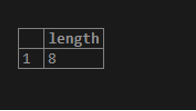
- If we have used an empty value as a string in length function, the result of an empty value string is always zero.
- PostgreSQL length function is accept the string as a parameter value. Length function will display the length of the following data types are as follows.
- Char
- Varchar
- Text
- The length function in PostgreSQL will return the number of characters we have used in the string.
Examples
Below is an example of a length function.
Example #1
In the example below, we find the length of the null string. The result of the null string is null.
select length (NULL);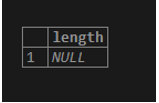
Example #2
In the example below, we find the length of an empty string. The result of an empty string is zero.
select length ('');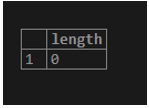
Example #3
In the example below, we find the length of an empty string. The result of an empty string is 3 because we give three spaces.
select length (' ');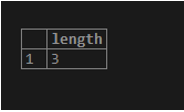
Example #4
In the example below, we find the length of the number string. We need to use the cast function to find the length of the integer string.
SELECT LENGTH (CAST('12345' as TEXT));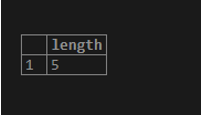
We use a product table to describe an example of a length function in PostgreSQL. Below is the table description of the product table.
Select * from product;
Example #5
Below example shows find the length of column data from the product table.
select prod_id, prod_name, length(prod_name)AS prod_name_length, length(delivery_address) from product order by prod_name_length ASC;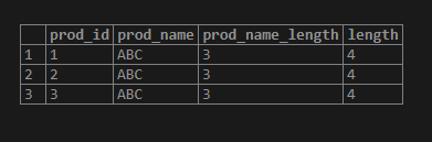
Conclusion
The PostgreSQL length function finds the string length that we specify within the function. It accepts the string as a parameter value or a string. A string value using the length function accepts the string of char, varchar, and text data types.
Recommended Articles
We hope that this EDUCBA information on “PostgreSQL LENGTH()” was beneficial to you. You can view EDUCBA’s recommended articles for more information.

