


Updated May 12, 2023

Introduction to PostgreSQL Inner Join
PostgreSQL Inner Join is one of the database’s most important concepts, allowing users to relate the data in multiple tables. Suppose you want to retrieve data from tables named table1 and table2. The table2 table has the foreign_key_table1 field that relates to the primary key of the table1 table. To retrieve the data from both tables considered as table1 and table2, we need to use the SELECT statement with an INNER JOIN clause as follows:
Code:
SELECT
table1.primary_key_table1,
table1.column1,
table2.primary_key_table2,
table2.column2
FROM
table1
INNER JOIN table2 ON table1.primary_key_table1 = table2.foreign_key_table1;
Explanation: To join table1 to table2, we need to specify the column names in the SELECT clause from both tables and the name of the main table (table1) in the FROM clause. The INNER JOIN clause must specify the name of the table to which the main table will be connected (table2), and a join condition can be added after the ON keyword, such as table1.primary_key_table1 = table2.foreign_key_table1. PostgreSQL scans table2 for every row in table1 to check if any row satisfies the condition, combining the resulting rows into a single row. To improve performance, the primary and foreign key columns in table1 (primary_key_table1 and foreign_key_table1, respectively) are usually indexed. To avoid ambiguity when table1 and table2 have columns with the same name, we must refer to the column as table_name.column_name.
Syntax
SELECT [* | column_name_list]
FROM table_name1
INNER JOIN table_name2
ON table_name1.column_name=table_name2.column_name;
OR
SELECT [* | column_name_list]
FROM table_name1
INNER JOIN table_name2
USING (column_name);
OR
SELECT [* | column_name_list]
FROM table_name1,table_name2
WHERE table_name1.column_name=table_name2.column_name;
Types of Inner Joins
Below are the types:
Theta join
A theta join allows us to join two tables based on the condition that theta represents. Theta joins supports all comparison operators. It returns all rows from the tables that participated in joining after the JOIN condition is satisfied.
Code:
SELECT column_name_list
FROM table_name_1
INNER JOIN table_name_2
ON table_name_1.column_name = table_name_2.column_name;
EQUI join
With the help of primary key or foreign key relationships, we can join multiple tables using EQUI join:
Code:
SELECT *
FROM table_name_1
JOIN table_name_2 ON table_name_1.<column_id> = table_name_2.<column_id>;
Natural join
We can improve EQUI join with the help NATURAL keyword. This is the same as EQUI join.
Code:
SELECT *
FROM table_name_1
NATURAL JOIN table_name_2;
How does PostgreSQL Inner Join work?
The Inner Join is used to determine which rows of the tables that participated in JOIN needs to be considered to return after verifying the condition. Also, we can use the ON or USING clause to join the condition.
ON clause
It matches the common columns of the tables participating in JOIN from the boolean expression and evaluates which rows need to be added in joining.
USING clause
It takes a comma-separated list of column names, which is common in both the tables and performs a join on matching each of these pairs of columns.
Examples to Implement PostgreSQL Inner Join
Below are the examples mentioned:
Example #1
To understand the examples of considering the following ‘student’ and ‘Branch’ table structures.
Code:
CREATE TABLE student(
rollno int PRIMARY KEY,
firstname VARCHAR (50) NOT NULL,
lastname VARCHAR (50) NOT NULL,
branch_id int NOT NULL,
result boolean,
joining_date DATE NOT NULL
);
CREATE TABLE Branch(
branch_id int primary key,
branch VARCHAR (50) NOT NULL
);
Example #2
Insert some data in the ‘student’ and ‘Branch’ tables after creating the above SQL queries. Let’s consider the following SQL queries to insert data:
Code:
INSERT INTO Branch (branch_id, branch)
values
('1',  'Civil'),
('2', 'Computer'),
('3', 'IT'),
('4',  'Mechanical'),
('5',  'Eletrical');
INSERT INTO student (rollno, firstname, lastname, branch_id, result, joining_date)
values
('101', 'Oliver','Jake', '1', false, '06-01-2020'),
('102', 'Jack','Connor', '1', false, '06-01-2020'),
('103', 'Harry','Callum', '2', false, '06-01-2020'),
('104', 'Jacob','John', '2', false, '06-01-2020'),
('105', 'Thomas','David', '3', false, '06-01-2020');
Code:
select * from student;Output:
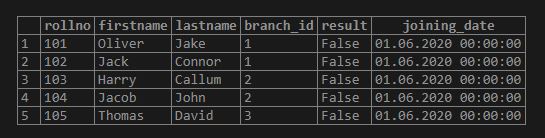
Code:
select * from Branch;Output:
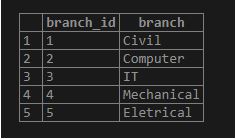
Examples to Implement PostgreSQL INNER JOIN with Two Tables
Below are the examples mentioned for two tables:
Example #1
Each student will have a branch assigned. The branch_id field establishes the link between two tables. You can use the INNER JOIN clause to join the student table to the Branch table as follows:
Code:
select * from student inner join Branch ON student.branch_id = Branch.branch_id;Output:
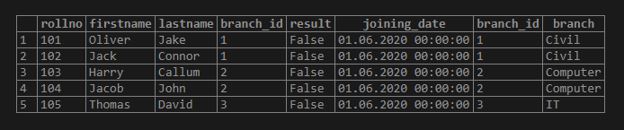
Example #2
You can add the ORDER BY clause [ASC | DESC ] to sort the result set by branch id as follows:
Code:
select * from student inner join Branch ON student.branch_id = Branch.branch_id order by branch.branch_id desc;Output:
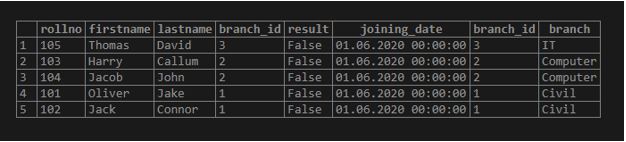
Example #3
You can also use a WHERE clause to filter students. The following query returns student data for the student whose branch_id is 1:
Code:
select * from student inner join Branch ON student.branch_id = Branch.branch_id where student.branch_id = '1';Output:

Examples to Implement PostgreSQL Inner Join to join Three Tables
The following section explains the relationship between the three tables:
Example #1
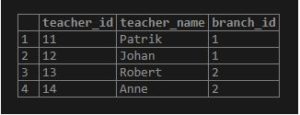
Student, Branch, and Teacher. Create a Teacher table with the following SQL queries to understand this example:
Code:
CREATE TABLE Teacher(
teacher_id int primary key,
teacher_name VARCHAR (50) NOT null,
branch_id int
);
INSERT INTO Teacher (teacher_id, teacher_name, branch_id)
values
('11', 'Patrik', '1'),
('12', 'Johan', '1'),
('13', 'Robert','2'),
('14', 'Anne', '2');
Code:
select * from Teacher;Output:
Example #2
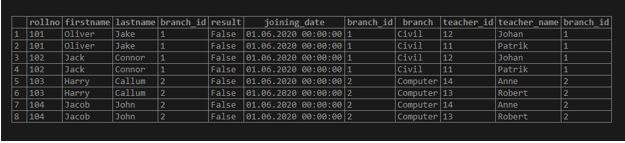
Code:
select * from student
inner join Branch ON student.branch_id = Branch.branch_id
inner join Teacher ON student.branch_id = Teacher.branch_id;
Output:
Example #3
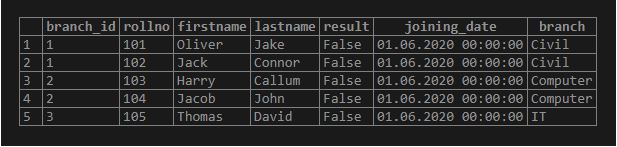
Example with Natural join Type
Code:
select * from student
natural join Branch;
Output:
Example #4
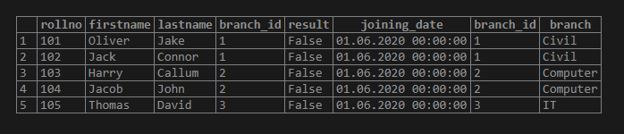
Example with EQUI join type:
Code:
select * from student
join Branch ON student.branch_id = Branch.branch_id;
Output:
Conclusion
We hope you have understood the INNER JOIN properly. This tutorial shows you how to select data from multiple tables by joining one table to other tables using the PostgreSQL INNER JOIN clause. We hope you have learned how to use an INNER JOIN of PostgreSQL joins to query data from multiple tables.
Recommended Articles
We hope that this EDUCBA information on “PostgreSQL Inner Join” was beneficial to you. You can view EDUCBA’s recommended articles for more information.

