
Updated May 31, 2023
Introduction to PostgreSQL Case Insensitive
PostgreSQL case insensitive is defined as searching with considering as the SQL select queries and the regular expression in PostgreSQL. While using regular expressions, we need to use the PostgreSQL ~* operator instead of the like operator; we can also use the ilike operator in PostgreSQL. It can also create an extension name as citext to use the case-insensitive query in PostgreSQL; need to create it first to use the extension of citext. We have also used the lower function in PostgreSQL to use the case-insensitive query; we also have to add an index of the lower function on the column.
Syntax
Different syntax are mentioned below:
1. PostgreSQL case insensitive by using the citext extension
Create extension citext (Create new extension of citext in PostgreSQL);
Select name_of_column1, name_of_column2, name_of_column3, …, name_of_columnN from name_of_table where name_of_column::citext IN (value_of_column1, value_of_column2, value_of_column3, …, value_of_columnN);
2. PostgreSQL case insensitive using the lower function
SELECT name_of_column1, name_of_column2, name_of_column3, …, name_of_columnN from name_of_table WHERE lower('name_of_column') = LOWER('name_of_column');3. PostgreSQL case insensitive using add the index of lower function
Create index name_of_index on name_of_table (lower (name_of_column));Below is the parameter description syntax of PostgreSQL case insensitive.
- Select – The “SELECT” operation defines the retrieval of rows from a column without considering any casting requirements. We have to use the citext extension to retrieve records from the table.
- Create extension – This is defined as creating an extension name as citext in PostgreSQL. So, for example, we can create this extension to define the case insensitive.
- Citext – This is the extension used in PostgreSQL case insensitive. If we have to fetch records from the string table without casting, we must use the citext extension in PostgreSQL.
- Name of column 1 to the name of column N – To perform a case-insensitive query in PostgreSQL and apply the lower function and citext extension to a selection of columns, you can specify the column names as “Name of column 1” to “Name of column N”.
- Name of the table – The “Name of the table” refers to the specific table name used to select columns and apply the lower function and citext extension for a case-insensitive query in PostgreSQL.
- Where condition – We use the where condition in PostgreSQL to retrieve the specified records from the table. We have used the where condition to use the citext extension in PostgreSQL.
- Lower – The lower function is employed in case-insensitive queries. While using the lower function, it will not issue the error of typecasting.
- Create index – We create an index on the column using the lower function. To create an index in PostgreSQL using the lower function, you can follow these steps.
- Name of the index – The “Name of the index” refers to the designation of creating a new index in PostgreSQL using the lower function.
How Case Insensitive Query Work in PostgreSQL
- Below is the working of case insensitive query in PostgreSQL.
- Now, we are using citext extension to work on case-insensitive query in PostgreSQL. By default, PostgreSQL has not installed the citext extension; we need first to install the same on our server to use this extension.
- The below example shows that by default citext extension is not installed; we need to install it first to use the same in PostgreSQL.
select * from stud2 where name::citext in ('ABC', 'PQR');
create extension citext;
select * from stud2 where name::citext in ('ABC', 'PQR');
Output:
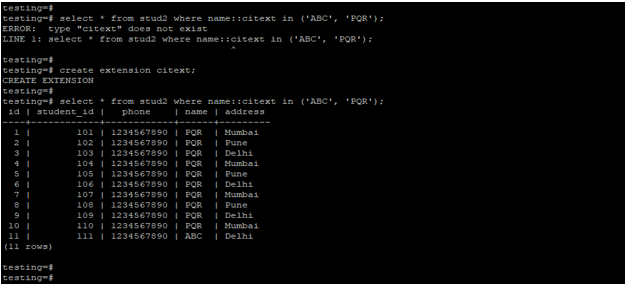
- In this example, we have created an extension of citext by using the command of creating an extension, and the extension name is citext.
- After creating an extension, the select operation successfully uses the citext extension.
- Citext extension will call lower functions internally into the system. The citext extension automatically applies the lower function. Therefore, we do not need to use the lower function in our query while using the citext extension in PostgreSQL.
- To check citext extension is enabled or not, we are using the following command as follows.
\dx citext;Output:
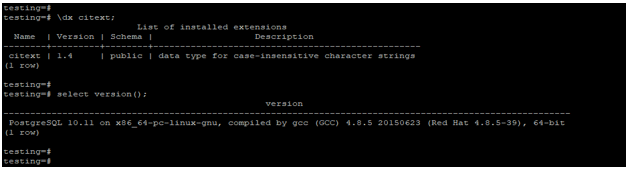
- Using the above command, we can check whether the citext extension is installed on our PostgreSQL database server. Also, we can check the version name and schema name on which we have enabled the extension.
- It will also show the description of the citext extension.
Examples
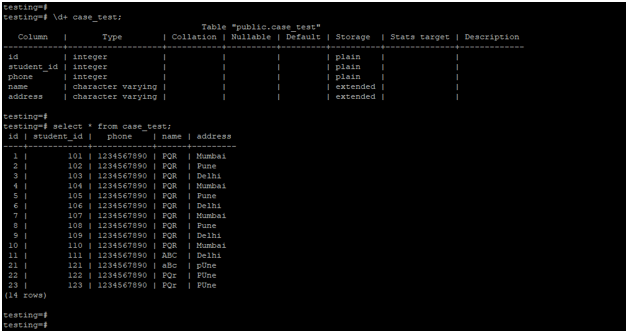
Below is an example of case insensitive in PostgreSQL as follows. We are using the case_test table to describe the example of case insensitive.
Below is the structure and data for the table of the case_test.
\d+ case_test;
select * from case_test;
Output:
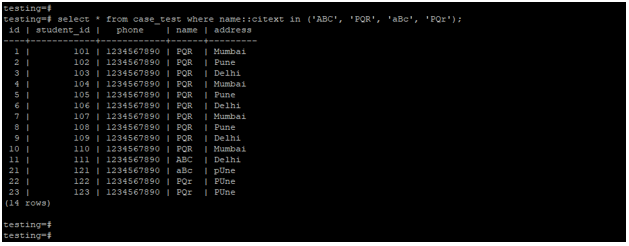
1. Case insensitive query by using citext extension –
- The example below shows that the case is insensitive using the citext extension.
- We have used the ‘ABC,’ ‘PQR,’ ‘aBc,’ and ‘PQr’ strings to search the data from the case_test table.
select * from case_test where name::citext in ('ABC', 'PQR', 'aBc', 'PQr');Output:
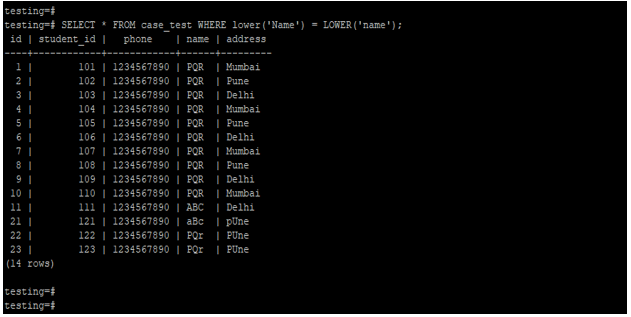
2. Case insensitive query by using lower function –
- The example below shows that the case is insensitive using the lower function.
- We have used a lower function on the name column to fetch the data from the case_test table.
SELECT * FROM case_test WHERE lower('Name') = LOWER('name');Output:
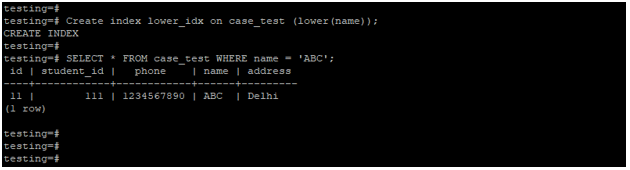
3. Case-insensitive query by creating a lower function index on the column
The below example shows that case-insensitive query by creating a lower function index on the column.
Create index lower_idx on case_test (lower(name));
SELECT * FROM case_test WHERE name = 'ABC';
Output:
Recommended Articles
We hope that this EDUCBA information on “PostgreSQL Case Insensitive” was beneficial to you. You can view EDUCBA’s recommended articles for more information.

